



墨天轮本次有个openGauss在线实训的课程,正好这段时间在看国产数据库,趁此机会,也好好熟悉下国产数据库,也非常感谢墨天轮的这次活动。
一、学习目标
学习从操作系统层面和使用openGauss工具查看数据库的状态、版本和数据文件目录。
本节课重点是学习gs_ctl的使用,如何查看数据库状态、查看数据库进程和线程,使用gsql来查看数据库目录和版本等。
二、课程作业
2.1 查看数据库状态
-- 通过查看数据库状态可查看数据库是否启动
omm@modb:~$ gs_ctl status
[2022-11-24 11:44:24.035][679][][gs_ctl]: gs_ctl status,datadir is /var/lib/opengauss/data
gs_ctl: server is running (PID: 1)
/usr/local/opengauss/bin/gaussdb

-- 通过查看数据库进程状态也可以查看数据库是否启动
omm@modb:~$  ps -ef|grep gauss
omm          1     0  0 10:37 ?        00:00:19 gaussdb
omm        696   494  0 11:47 pts/0    00:00:00 grep gauss

# gs_ctl是openGauss提供的数据库服务控制工具,可以用来启停数据库服务和查询数据库状态。主要供openGauss管理模块调用。
# 可以通过gs_ctl --help 来查看gs_ctl的详细用法
# 如果是集群状态,gs_ctl status可以查看该数据库是否启动,但无法判断该数据库是主备,可以通过如下方法来查看数据库状态及主备情况

[omm@opengauss-node1 ~]$ gs_ctl status -D /opt/gaussdb/install/data/db1
[2022-11-24 11:46:10.278][2937420][][gs_ctl]: gs_ctl status,datadir is /opt/gaussdb/install/data/db1
gs_ctl: server is running (PID: 30578)
/opt/gaussdb/install/app/bin/gaussdb "-D" "/opt/gaussdb/install/data/db1" "-M" "primary"

-- 如果使用gs_ctl status查询数据库状态报如下错误,原因是未设置PGDATA环境变量
[omm@opengauss-node1 ~]$ gs_ctl status
[2022-11-24 11:50:51.105][2939002][][gs_ctl]:  no database directory specified and environment variable PGDATA unset
Try "gs_ctl --help" for more information.

-- 当在omm用户.bashrc设置环境变量PGDATA后,再次查看会是如下信息:
[omm@opengauss-node1 ~]$ gs_ctl status
[2022-11-24 13:09:43.686][2967181][][gs_ctl]: gs_ctl status,datadir is /opt/gaussdb/install/data/db1
gs_ctl: server is running (PID: 30578)
/opt/gaussdb/install/app/bin/gaussdb "-D" "/opt/gaussdb/install/data/db1" "-M" "primary"

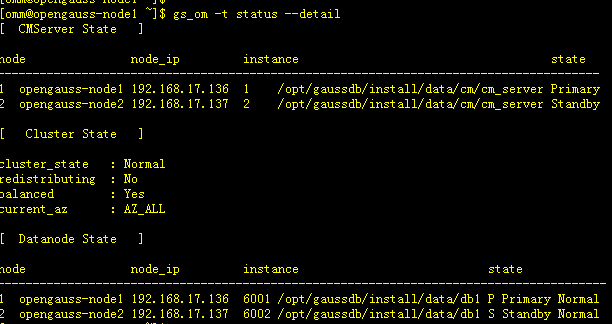
-- 如果是集群,还可以通过使用 gs_om来查看数据库和整个集群状态,以及主备情况,在3.0 还推出cm_ctl查看集群状态,如下所示:
[omm@opengauss-node1 ~]$ gs_om -t status --detail
[  CMServer State   ]

node               node_ip         instance                                    state
--------------------------------------------------------------------------------------
1  opengauss-node1 192.168.17.136  1    /opt/gaussdb/install/data/cm/cm_server Primary
2  opengauss-node2 192.168.17.137  2    /opt/gaussdb/install/data/cm/cm_server Standby

[   Cluster State   ]

cluster_state   : Normal
redistributing  : No
balanced        : Yes
current_az      : AZ_ALL

[  Datanode State   ]

node               node_ip         instance                           state
---------------------------------------------------------------------------------------
1  opengauss-node1 192.168.17.136  6001 /opt/gaussdb/install/data/db1 P Primary Normal
2  opengauss-node2 192.168.17.137  6002 /opt/gaussdb/install/data/db1 S Standby Normal

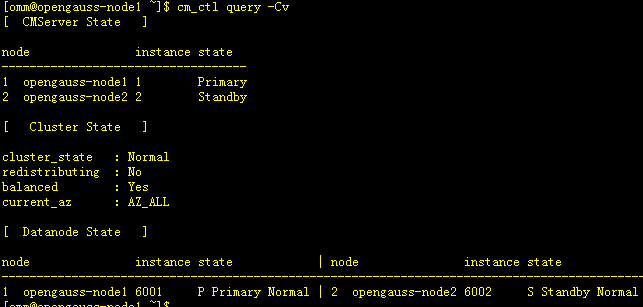
-- 3.0 推出 cm_ctl
[omm@opengauss-node1 ~]$ cm_ctl query -Cv
[  CMServer State   ]

node               instance state
-----------------------------------
1  opengauss-node1 1        Primary
2  opengauss-node2 2        Standby

[   Cluster State   ]

cluster_state   : Normal
redistributing  : No
balanced        : Yes
current_az      : AZ_ALL

[  Datanode State   ]

node               instance state            | node               instance state
----------------------------------------------------------------------------------------------
1  opengauss-node1 6001     P Primary Normal | 2  opengauss-node2 6002     S Standby Normal


2.2 查看数据库进行和线程
-- 可以通过ps 命令来查看数据库进程和线程
omm@modb:~$ ps -ef|grep -i gauss
omm          1     0  0 10:37 ?        00:00:40 gaussdb
omm       1025   494  0 13:03 pts/0    00:00:00 grep -i gauss

-- 通过 ps -Tp 进程ID 来查看线程信息
 ps -Tp 1
omm@modb:~$ ps -Tp 1
  PID  SPID TTY          TIME CMD
    1     1 ?        00:00:00 gaussdb
    1   293 ?        00:00:00 jemalloc_bg_thd
    1   299 ?        00:00:00 gaussdb
    1   300 ?        00:00:00 syslogger
    1   303 ?        00:00:00 reaper
    1   301 ?        00:00:00 jemalloc_bg_thd
    1   302 ?        00:00:00 alarm
    1   304 ?        00:00:00 jemalloc_bg_thd
    1   305 ?        00:00:00 jemalloc_bg_thd
    1   349 ?        00:00:00 checkpointer
    1   350 ?        00:00:00 Spbgwriter
    1   351 ?        00:00:06 pagewriter
    1   352 ?        00:00:00 pagewriter
    1   353 ?        00:00:00 pagewriter
    1   354 ?        00:00:00 pagewriter
    1   357 ?        00:00:00 WALwriteraux
    1   355 ?        00:00:00 pagewriter
    1   356 ?        00:00:00 WALwriter
    1   358 ?        00:00:00 AVClauncher
    1   359 ?        00:00:00 Jobscheduler
    1   360 ?        00:00:00 asyncundolaunch
    1   363 ?        00:00:00 statscollector
    1   361 ?        00:00:00 globalstats
    1   362 ?        00:00:00 applylauncher
    1   364 ?        00:00:04 percentworker
    1   365 ?        00:00:17 ashworker
    1   367 ?        00:00:00 auditor
    1   366 ?        00:00:04 TrackStmtWorker
    1   368 ?        00:00:00 2pccleaner
    1   369 ?        00:00:00 faultmonitor
    1   370 ?        00:00:00 WLMworker
    1   371 ?        00:00:01 WLMmonitor
    1   372 ?        00:00:00 WLMarbiter
    1   373 ?        00:00:00 undorecycler
2.3 查看数据库目录
-- 可以使用gs_ctl 来查看数据库目录
[omm@opengauss-node1 ~]$ gs_ctl notify
[2022-11-24 13:12:56.962][2968304][][gs_ctl]: gs_ctl notify ,datadir is /opt/gaussdb/install/data/db1
[2022-11-24 13:12:56.962][2968304][][gs_ctl]: the parameter of notify must be specified

2.4 通过环境变量查看数据库目录
[omm@opengauss-node1 ~]$ grep -i PGDATA ~/.bashrc
export PGDATA=/opt/gaussdb/install/data/db1

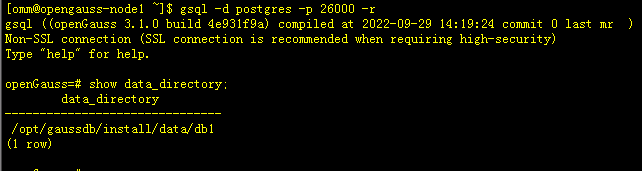
2.5 查看数据文件目录
[omm@opengauss-node1 ~]$ gsql -d postgres -p 26000 -r
gsql ((openGauss 3.1.0 build 4e931f9a) compiled at 2022-09-29 14:19:24 commit 0 last mr  )
Non-SSL connection (SSL connection is recommended when requiring high-security)
Type "help" for help.

openGauss=# show data_directory;
        data_directory
-------------------------------
 /opt/gaussdb/install/data/db1
(1 row)
[omm@opengauss-node1 ~]$ gsql -d postgres -p 26000 -r
gsql ((openGauss 3.1.0 build 4e931f9a) compiled at 2022-09-29 14:19:24 commit 0 last mr  )
Non-SSL connection (SSL connection is recommended when requiring high-security)
Type "help" for help.

openGauss=# select version();
                                                                       version
------------------------------------------------------------------------------------------------------------------------------------------------------
 (openGauss 3.1.0 build 4e931f9a) compiled at 2022-09-29 14:19:24 commit 0 last mr   on x86_64-unknown-linux-gnu, compiled by g++ (GCC) 7.3.0, 64-bit
(1 row)

三、课程总结
通过本课程的学习,要熟练掌握通过gs_ctl的相关用法,可以通过gs_ctl --help来了解每个命令的详细使用。
另外还要熟练账号gsql命令,并通过gsql命令来查询数据库的相关信息。
「喜欢这篇文章,您的关注和赞赏是给作者最好的鼓励」
关注作者
【版权声明】本文为墨天轮用户原创内容,转载时必须标注文章的来源(墨天轮),文章链接,文章作者等基本信息,否则作者和墨天轮有权追究责任。如果您发现墨天轮中有涉嫌抄袭或者侵权的内容,欢迎发送邮件至:contact@modb.pro进行举报,并提供相关证据,一经查实,墨天轮将立刻删除相关内容。
