



一、表空间概念
对于openGauss数据库,表空间是一个目录,可以存在多个表空间,每个表空间所对应的目录存储的是其所包含的数据库的各种物理文件。
openGauss的表空间这一特性和Oracle不一样,Oracle的表空间是一逻辑概念,Oracle表空间不是一个目录,其数据是存放于数据文件之上的,一个表空间可以对应着一个或多个物理的数据文件。
openGauss的表空间是一个目录,其仅起到物理隔离的作用,对于其管理功能更依赖于表空间所在的文件系统。
1.1 openGauss默认表空间
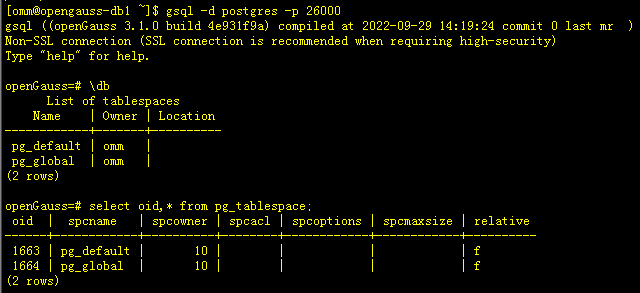
在安装部署openGauss后,会创建两个默认的表空间,分别是pg_default和pg_global。
以下是新安装部署openGuass后,显示的两个默认表空间。
[omm@opengauss-db1 ~]$ gsql -d postgres -p 26000
gsql ((openGauss 3.1.0 build 4e931f9a) compiled at 2022-09-29 14:19:24 commit 0 last mr  )
Non-SSL connection (SSL connection is recommended when requiring high-security)
Type "help" for help.

openGauss=# \db
      List of tablespaces
    Name    | Owner | Location
------------+-------+----------
 pg_default | omm   |
 pg_global  | omm   |
(2 rows)

openGauss=# select oid,* from pg_tablespace;
 oid  |  spcname   | spcowner | spcacl | spcoptions | spcmaxsize | relative
------+------------+----------+--------+------------+------------+----------
 1663 | pg_default |       10 |        |            |            | f
 1664 | pg_global  |       10 |        |            |            | f
(2 rows)
1.1.1 默认表空间作用
根据官网资料,openGauss两个默认的表空间,其具体作用分别如下:
- pg_default 用来存储系统目录对象、用户表、用户表index、临时表、临时表index、内部临时表的默认条空间。
- pg_global 用来存放系统字典表。
1.1.2 默认表空间存放位置
-
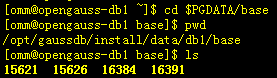
pg_default pg_default对应存储目录为实例数据目录$PGDATA/base下,该目录下存放的文件信息如下:
[omm@opengauss-db1 ~]$ cd $PGDATA/base
[omm@opengauss-db1 base]$ pwd
/opt/gaussdb/install/data/db1/base
[omm@opengauss-db1 base]$ ls
15621  15626  16384  16391
-
pg_global pg_global对应存储目录为实例数据库目录下的$PGDATA/global下,该目录下存放的文件信息如下:
[omm@opengauss-db1 global]$ pwd
/opt/gaussdb/install/data/db1/global
[omm@opengauss-db1 global]$ ls
15036      15116  15274      15278      15282  15287_fsm  15291_fsm  15336  15343  15348_fsm  15352_fsm  15356_fsm  15382  15418      15446_vm  15536      15540  15622      config_exec_params  pg_dw_meta              pg_remain_segs
15036_fsm  15118  15275      15279      15283  15287_vm   15291_vm   15338  15345  15348_vm   15352_vm   15356_vm   15409  15419      15515     15537      15541  15622_fsm  pg_control          pg_dw_single
15036_vm   15119  15276      15280      15285  15289      15293      15339  15346  15350      15354      15358      15411  15427      15517     15538      15542  15622_vm   pg_control.backup   pg_filenode.map
15038      15270  15276_fsm  15280_fsm  15286  15290      15295      15340  15347  15351      15355      15359      15412  15446      15518     15538_fsm  15544  15624      pg_dw_0             pg_filenode.map.backup
15039      15272  15276_vm   15280_vm   15287  15291      15296      15341  15348  15352      15356      15380      15416  15446_fsm  15534     15538_vm   15545  15625      pg_dw_ext_chunk     pg_internal.init.92780

二、表空间特性
相对于其它数据库,openGauss数据库的表空间存在很多相同的特点,但又有很多自己的特性,根据openGauss官网介绍,部分特性如下:
- 如初始化数据库所在分区或卷空间已满,又无法逻辑上扩展更多空间,可在不同分区创建和使用表空间,知道系统重新配置空间。
- 表空间允许数据库管理员根据数据库对象使用模式安排数据位置,比如将频繁使用的索引放在性能较好的SSD盘,将归档文件或对性能要求不高的表放在非SSD盘,从而提高性能降低费用。
- 数据库管理员还可以通过表空间设置占用的磁盘空间,当和其它数据共用分区时,可防止表空间占用相同分区上的其它空间。
- 表空间还可以控制数据库数据占用的磁盘空间,当表空间所在磁盘使用率达到90%时,数据库将被设置为只读模式,当磁盘使用率降到90%以下时,数据库将恢复到读写模式。
三、表空间管理
常用表空间管理的语句及命令如下。
3.1 创建表空间
创建表空间语法如下:
openGauss=# \h create tablespace
Command:     CREATE TABLESPACE
Description: define a new tablespace
Syntax:
CREATE TABLESPACE tablespace_name
    [ OWNER user_name ]  [ RELATIVE ]  LOCATION 'directory' [ MAXSIZE 'space_size' ]
    [with_option_clause];

where option_clause can be:
WITH ( filesystem= { 'systemtype '| " systemtype " | systemtype }
 [ { , address = { ' ip:port [ , ... ] ' | " ip:port [ , ... ] "} } ]
, cfgpath = { 'path '| " path " } ,storepath = { 'rootpath '| " rootpath "}
[{, random_page_cost = { 'value '| " value " | value }}]
[{,seq_page_cost = { 'value '| " value " | value }}])
注意事项:
- 命令行创建表空间LOCATION后不能跟全路径
-- 如创建通用表空间
CREATE TABLESPACE tablespace RELATIVE LOCATION 'my_tablespace/tablespace1';
# 注意 使用命令直接创建表空间时 LOCATION 后不能跟全路径,否则会报如下错误:
presdb=# CREATE TABLESPACE optb01 RELATIVE LOCATION '/opt/gaussdb/install/data/tbs_optb01';
ERROR:  relative location can only be formed of 'a~z', 'A~Z', '0~9', '-', '_' and two level directory at most

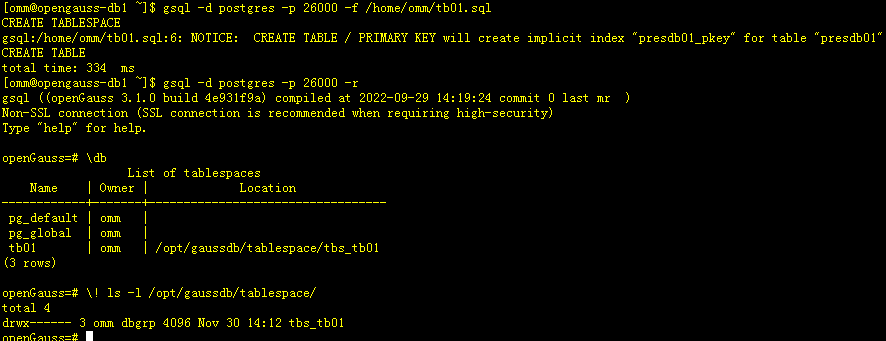
- 使用 -f 跟脚本文件创建可跟全路径
-- 如编辑以下脚本
[omm@opengauss-db1 ~]$ cat tb01.sql
CREATE TABLESPACE tb01 location '/opt/gaussdb/tablespace/tbs_tb01';

create table presdb01 (
  cfg_name    varchar(30) primary key,
  cfg_value   varchar(50)
) tablespace tb01;

-- 通过 -f 后跟脚本名称创建表空间
[omm@opengauss-db1 ~]$ gsql -d postgres -p 26000 -f /home/omm/tb01.sql
CREATE TABLESPACE
gsql:/home/omm/tb01.sql:6: NOTICE:  CREATE TABLE / PRIMARY KEY will create implicit index "presdb01_pkey" for table "presdb01"
CREATE TABLE
total time: 334  ms
[omm@opengauss-db1 ~]$ gsql -d postgres -p 26000 -r
gsql ((openGauss 3.1.0 build 4e931f9a) compiled at 2022-09-29 14:19:24 commit 0 last mr  )
Non-SSL connection (SSL connection is recommended when requiring high-security)
Type "help" for help.

openGauss=# \db
                  List of tablespaces
    Name    | Owner |             Location
------------+-------+----------------------------------
 pg_default | omm   |
 pg_global  | omm   |
 tb01       | omm   | /opt/gaussdb/tablespace/tbs_tb01
(3 rows)

openGauss=# \! ls -l /opt/gaussdb/tablespace/
total 4
drwx------ 3 omm dbgrp 4096 Nov 30 14:12 tbs_tb01
openGauss=#
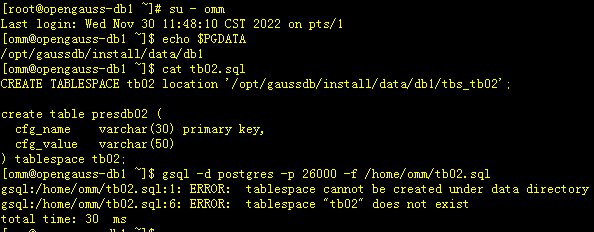
- 通过脚本创建表空间不加relative参数不能使用$PGDATA目录
[root@opengauss-db1 ~]# su - omm
Last login: Wed Nov 30 11:48:10 CST 2022 on pts/1
[omm@opengauss-db1 ~]$ echo $PGDATA
/opt/gaussdb/install/data/db1
[omm@opengauss-db1 ~]$ cat tb02.sql
CREATE TABLESPACE tb02 location '/opt/gaussdb/install/data/db1/tbs_tb02';

create table presdb02 (
  cfg_name    varchar(30) primary key,
  cfg_value   varchar(50)
) tablespace tb02;
[omm@opengauss-db1 ~]$ gsql -d postgres -p 26000 -f /home/omm/tb02.sql
gsql:/home/omm/tb02.sql:1: ERROR:  tablespace cannot be created under data directory
gsql:/home/omm/tb02.sql:6: ERROR:  tablespace "tb02" does not exist
total time: 30  ms
-
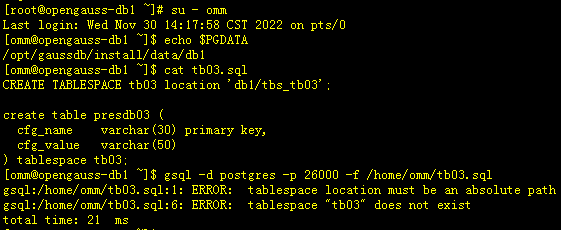
通过脚本创建表空间不可以使用相对路径
[root@opengauss-db1 ~]# su - omm
Last login: Wed Nov 30 14:17:58 CST 2022 on pts/0
[omm@opengauss-db1 ~]$ echo $PGDATA
/opt/gaussdb/install/data/db1
[omm@opengauss-db1 ~]$ cat tb03.sql
CREATE TABLESPACE tb03 location 'db1/tbs_tb03';

create table presdb03 (
  cfg_name    varchar(30) primary key,
  cfg_value   varchar(50)
) tablespace tb03;
[omm@opengauss-db1 ~]$ gsql -d postgres -p 26000 -f /home/omm/tb03.sql
gsql:/home/omm/tb03.sql:1: ERROR:  tablespace location must be an absolute path
gsql:/home/omm/tb03.sql:6: ERROR:  tablespace "tb03" does not exist
total time: 21  ms
-
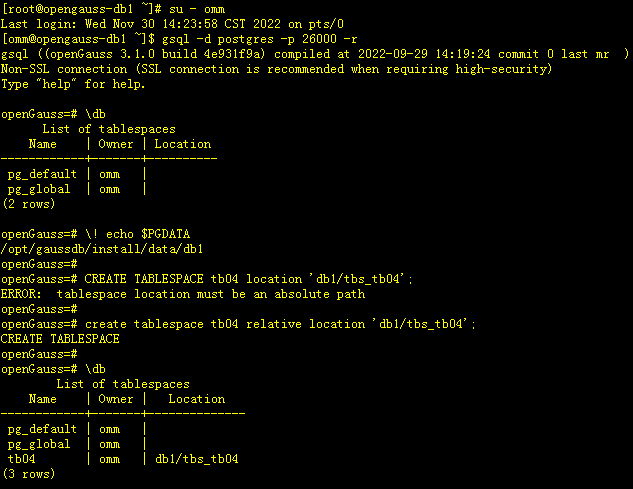
通过命令创建表空间可使用$PGDATA的相对路径,但要加relative参数
[root@opengauss-db1 ~]# su - omm
Last login: Wed Nov 30 14:23:58 CST 2022 on pts/0
[omm@opengauss-db1 ~]$ gsql -d postgres -p 26000 -r
gsql ((openGauss 3.1.0 build 4e931f9a) compiled at 2022-09-29 14:19:24 commit 0 last mr  )
Non-SSL connection (SSL connection is recommended when requiring high-security)
Type "help" for help.

openGauss=# \db
      List of tablespaces
    Name    | Owner | Location
------------+-------+----------
 pg_default | omm   |
 pg_global  | omm   |
(2 rows)

openGauss=# \! echo $PGDATA
/opt/gaussdb/install/data/db1
openGauss=#
openGauss=# CREATE TABLESPACE tb04 location 'db1/tbs_tb04';
ERROR:  tablespace location must be an absolute path
openGauss=#
openGauss=# create tablespace tb04 relative location 'db1/tbs_tb04';
CREATE TABLESPACE
openGauss=#
openGauss=# \db
        List of tablespaces
    Name    | Owner |   Location
------------+-------+--------------
 pg_default | omm   |
 pg_global  | omm   |
 tb04       | omm   | db1/tbs_tb04
(3 rows)
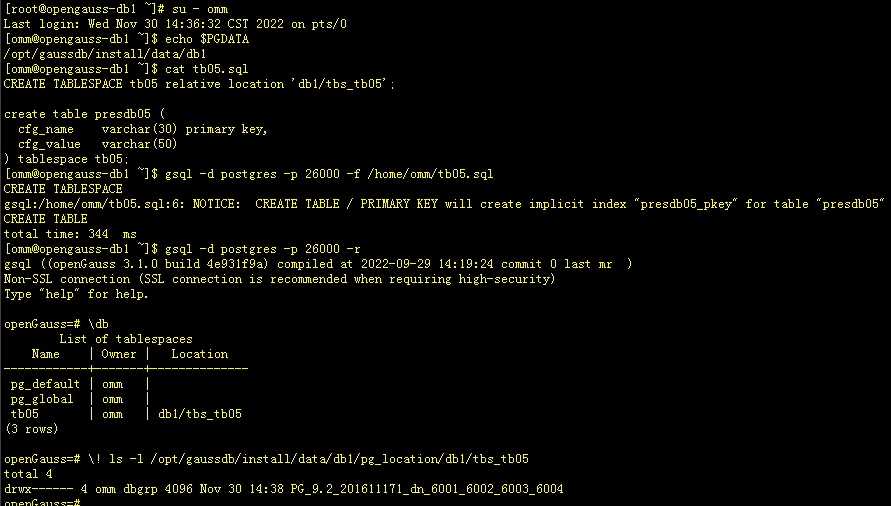
- 通过脚本使用$PGDATA目录下添加relative参数使用相对路径创建表空间
[root@opengauss-db1 ~]# su - omm
Last login: Wed Nov 30 14:36:32 CST 2022 on pts/0
[omm@opengauss-db1 ~]$ echo $PGDATA
/opt/gaussdb/install/data/db1
[omm@opengauss-db1 ~]$ cat tb05.sql
CREATE TABLESPACE tb05 relative location 'db1/tbs_tb05';

create table presdb05 (
  cfg_name    varchar(30) primary key,
  cfg_value   varchar(50)
) tablespace tb05;
[omm@opengauss-db1 ~]$ gsql -d postgres -p 26000 -f /home/omm/tb05.sql
CREATE TABLESPACE
gsql:/home/omm/tb05.sql:6: NOTICE:  CREATE TABLE / PRIMARY KEY will create implicit index "presdb05_pkey" for table "presdb05"
CREATE TABLE
total time: 344  ms
[omm@opengauss-db1 ~]$ gsql -d postgres -p 26000 -r
gsql ((openGauss 3.1.0 build 4e931f9a) compiled at 2022-09-29 14:19:24 commit 0 last mr  )
Non-SSL connection (SSL connection is recommended when requiring high-security)
Type "help" for help.

openGauss=# \db
        List of tablespaces
    Name    | Owner |   Location
------------+-------+--------------
 pg_default | omm   |
 pg_global  | omm   |
 tb05       | omm   | db1/tbs_tb05
(3 rows)

openGauss=# \! ls -l /opt/gaussdb/install/data/db1/pg_location/db1/tbs_tb05
total 4
drwx------ 4 omm dbgrp 4096 Nov 30 14:38 PG_9.2_201611171_dn_6001_6002_6003_6004
# 可以看到虽然该方式可以创建表空间,但目标空间的存放路径是在$PGDATA/pg_location目录下创建的
3.2 删除表空间
[root@opengauss-db1 ~]# su - omm
Last login: Wed Nov 30 14:47:35 CST 2022 on pts/0
[omm@opengauss-db1 ~]$ cat tb01.sql
CREATE TABLESPACE tb01 location '/opt/gaussdb/tablespace/tbs_tb01';

create table presdb01 (
  cfg_name    varchar(30) primary key,
  cfg_value   varchar(50)
) tablespace tb01;
[omm@opengauss-db1 ~]$ gsql -d postgres -p 26000 -f /home/omm/tb01.sql
CREATE TABLESPACE
gsql:/home/omm/tb01.sql:6: NOTICE:  CREATE TABLE / PRIMARY KEY will create implicit index "presdb01_pkey" for table "presdb01"
CREATE TABLE
total time: 493  ms
[omm@opengauss-db1 ~]$ gsql -d postgres -p 26000 -r
gsql ((openGauss 3.1.0 build 4e931f9a) compiled at 2022-09-29 14:19:24 commit 0 last mr  )
Non-SSL connection (SSL connection is recommended when requiring high-security)
Type "help" for help.

openGauss=# \db
                  List of tablespaces
    Name    | Owner |             Location
------------+-------+----------------------------------
 pg_default | omm   |
 pg_global  | omm   |
 tb01       | omm   | /opt/gaussdb/tablespace/tbs_tb01
(3 rows)

openGauss=# \dt
                          List of relations
 Schema |   Name   | Type  | Owner |             Storage
--------+----------+-------+-------+----------------------------------
 public | presdb01 | table | omm   | {orientation=row,compression=no}
(1 row)

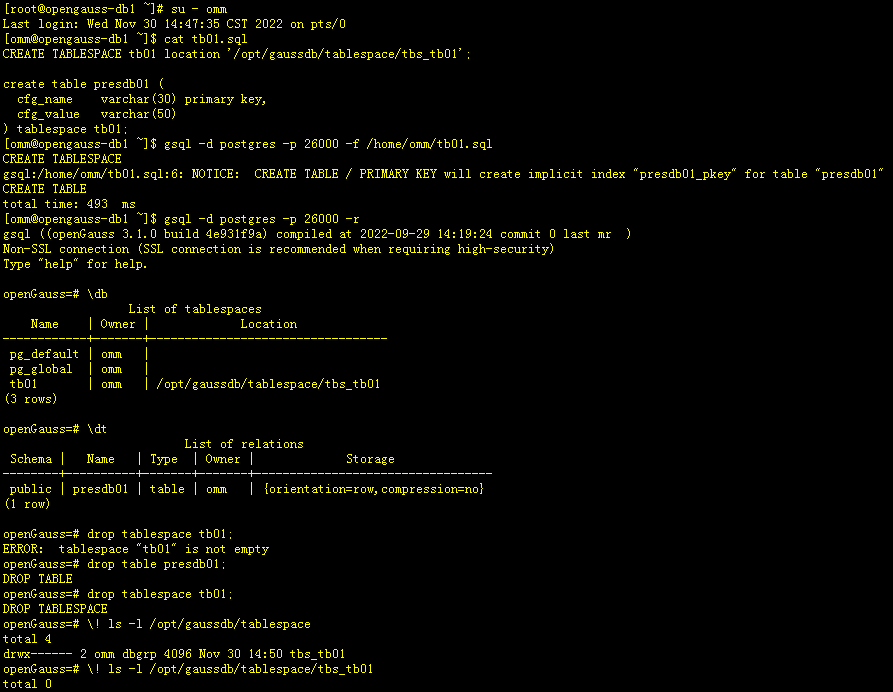
openGauss=# drop tablespace tb01;
ERROR:  tablespace "tb01" is not empty
openGauss=# drop table presdb01;
DROP TABLE
openGauss=# drop tablespace tb01;
DROP TABLESPACE
openGauss=# \! ls -l /opt/gaussdb/tablespace
total 4
drwx------ 2 omm dbgrp 4096 Nov 30 14:50 tbs_tb01
openGauss=# \! ls -l /opt/gaussdb/tablespace/tbs_tb01
total 0
openGauss=#

# 从以上实验可看到删除表空间,需要先删除表空间的对应的表等数据信息,否则无法删除表空间
# 执行drop tablespace tablespace_name后,仅仅是将表空间下的文件给清空了,但表空间目录还存在
# 表空间所对应的目录名称并不一定是create tablespace tablespace_name中tablespace_name中的名称,而是创建表空间语句location之后最后面的文件名称,比如
# CREATE TABLESPACE tb01 location '/opt/gaussdb/tablespace/tbs_tb01'; 该表空间对应的目录名称是tbs_tb01而非tb01
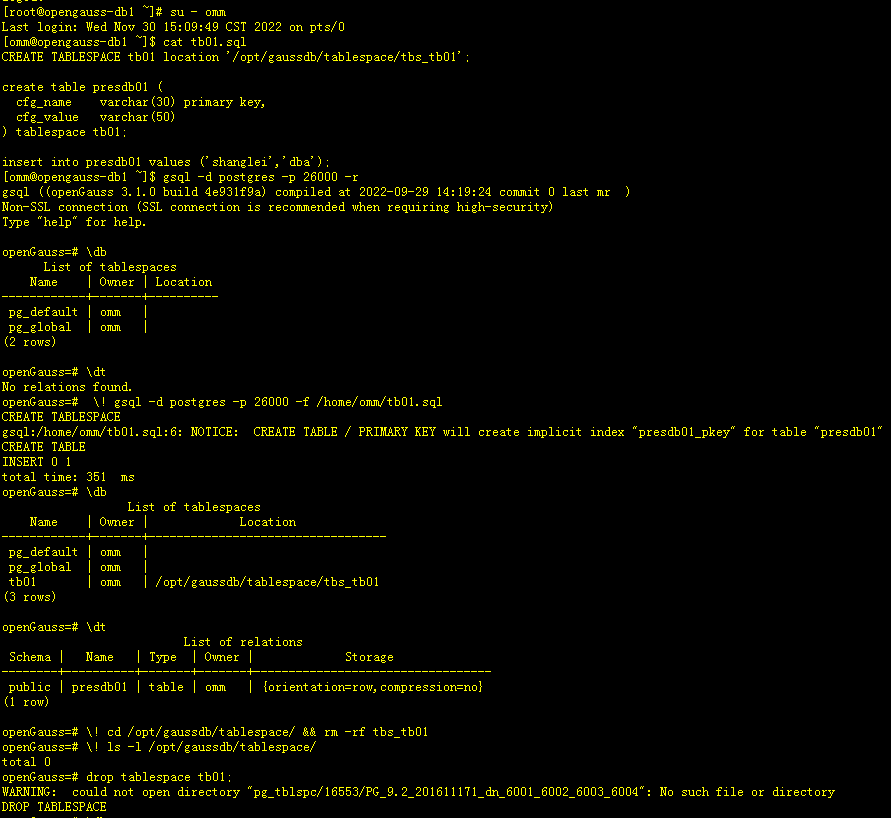
如果为删除表空间上的表等数据信息,直接将表空间对应的目录给删除,会怎样呢,我来做下实验。
[root@opengauss-db1 ~]# su - omm
Last login: Wed Nov 30 15:09:49 CST 2022 on pts/0
[omm@opengauss-db1 ~]$ cat tb01.sql
CREATE TABLESPACE tb01 location '/opt/gaussdb/tablespace/tbs_tb01';

create table presdb01 (
  cfg_name    varchar(30) primary key,
  cfg_value   varchar(50)
) tablespace tb01;

insert into presdb01 values ('shanglei','dba');
[omm@opengauss-db1 ~]$ gsql -d postgres -p 26000 -r
gsql ((openGauss 3.1.0 build 4e931f9a) compiled at 2022-09-29 14:19:24 commit 0 last mr  )
Non-SSL connection (SSL connection is recommended when requiring high-security)
Type "help" for help.

openGauss=# \db
      List of tablespaces
    Name    | Owner | Location
------------+-------+----------
 pg_default | omm   |
 pg_global  | omm   |
(2 rows)

openGauss=# \dt
No relations found.
openGauss=#  \! gsql -d postgres -p 26000 -f /home/omm/tb01.sql
CREATE TABLESPACE
gsql:/home/omm/tb01.sql:6: NOTICE:  CREATE TABLE / PRIMARY KEY will create implicit index "presdb01_pkey" for table "presdb01"
CREATE TABLE
INSERT 0 1
total time: 351  ms
openGauss=# \db
                  List of tablespaces
    Name    | Owner |             Location
------------+-------+----------------------------------
 pg_default | omm   |
 pg_global  | omm   |
 tb01       | omm   | /opt/gaussdb/tablespace/tbs_tb01
(3 rows)

openGauss=# \dt
                          List of relations
 Schema |   Name   | Type  | Owner |             Storage
--------+----------+-------+-------+----------------------------------
 public | presdb01 | table | omm   | {orientation=row,compression=no}
(1 row)

openGauss=# \! cd /opt/gaussdb/tablespace/ && rm -rf tbs_tb01
openGauss=# \! ls -l /opt/gaussdb/tablespace/
total 0
openGauss=# drop tablespace tb01;
WARNING:  could not open directory "pg_tblspc/16553/PG_9.2_201611171_dn_6001_6002_6003_6004": No such file or directory
DROP TABLESPACE
openGauss=# \db
      List of tablespaces
    Name    | Owner | Location
------------+-------+----------
 pg_default | omm   |
 pg_global  | omm   |
(2 rows)

openGauss=# \dt
                          List of relations
 Schema |   Name   | Type  | Owner |             Storage
--------+----------+-------+-------+----------------------------------
 public | presdb01 | table | omm   | {orientation=row,compression=no}
(1 row)

openGauss=# select * from presdb01;
ERROR:  could not open file "pg_tblspc/16553/PG_9.2_201611171_dn_6001_6002_6003_6004/15626/16554": No such file or directory
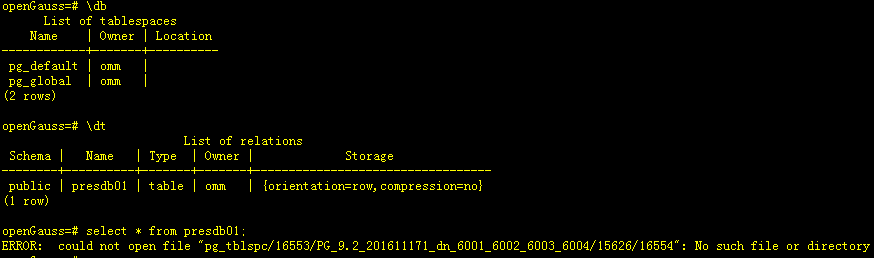
# 通过实验可以看到未将表空间上的表删除,直接将表空间对应目录删了,会提示该目录找不到,表空间上的表未被删除,查询表数据时报该文件不存在
3.3 修改表空间名称
[omm@opengauss-db1 ~]$ gsql -d postgres -p 26000 -r
gsql ((openGauss 3.1.0 build 4e931f9a) compiled at 2022-09-29 14:19:24 commit 0 last mr  )
Non-SSL connection (SSL connection is recommended when requiring high-security)
Type "help" for help.

openGauss=# \db
      List of tablespaces
    Name    | Owner | Location
------------+-------+----------
 pg_default | omm   |
 pg_global  | omm   |
(2 rows)

openGauss=# \dt
No relations found.
openGauss=# \! gsql -d postgres -p 26000 -f /home/omm/tb01.sql
CREATE TABLESPACE
gsql:/home/omm/tb01.sql:6: NOTICE:  CREATE TABLE / PRIMARY KEY will create implicit index "presdb01_pkey" for table "presdb01"
CREATE TABLE
INSERT 0 1
total time: 350  ms
openGauss=# \db
                  List of tablespaces
    Name    | Owner |             Location
------------+-------+----------------------------------
 pg_default | omm   |
 pg_global  | omm   |
 tb01       | omm   | /opt/gaussdb/tablespace/tbs_tb01
(3 rows)

openGauss=# \dt
                          List of relations
 Schema |   Name   | Type  | Owner |             Storage
--------+----------+-------+-------+----------------------------------
 public | presdb01 | table | omm   | {orientation=row,compression=no}
(1 row)

openGauss=# alter tablespace tb01 rename to tb02;
ALTER TABLESPACE
openGauss=# \db
                  List of tablespaces
    Name    | Owner |             Location
------------+-------+----------------------------------
 pg_default | omm   |
 pg_global  | omm   |
 tb02       | omm   | /opt/gaussdb/tablespace/tbs_tb01
(3 rows)

openGauss=# select * from presdb01;
 cfg_name | cfg_value
----------+-----------
 shanglei | dba
(1 row)

openGauss=# \! ls -l /opt/gaussdb/tablespace/
total 4
drwx------ 3 omm dbgrp 4096 Nov 30 15:20 tbs_tb01

# 通过上述实验可看到修改表空间名称后,仍可正常查询原表空间上的表数据信息,修改表空间名称,其对对应的目录名称并未随之改变
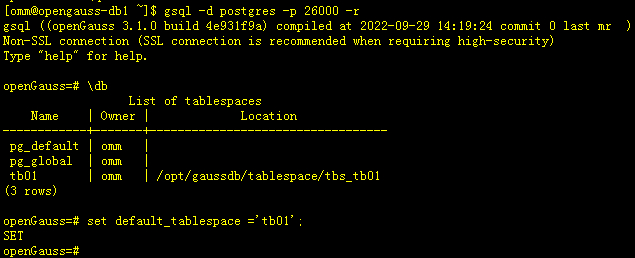
3.4 设置默认表空间
[omm@opengauss-db1 ~]$ gsql -d postgres -p 26000 -r
gsql ((openGauss 3.1.0 build 4e931f9a) compiled at 2022-09-29 14:19:24 commit 0 last mr  )
Non-SSL connection (SSL connection is recommended when requiring high-security)
Type "help" for help.

openGauss=# \db
                  List of tablespaces
    Name    | Owner |             Location
------------+-------+----------------------------------
 pg_default | omm   |
 pg_global  | omm   |
 tb01       | omm   | /opt/gaussdb/tablespace/tbs_tb01
(3 rows)

openGauss=# set default_tablespace ='tb01';
SET
3.5 监控表空间
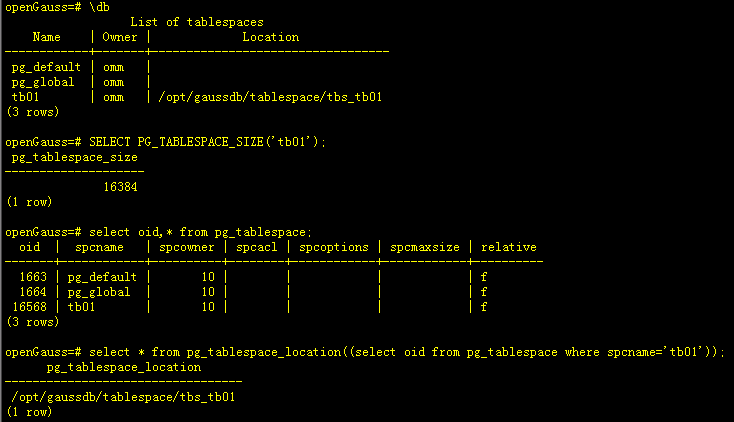
监控表空间的一些常用语句及命令如下。
-- 通过\db 元命令查询表空间
openGauss=# \db
                  List of tablespaces
    Name    | Owner |             Location
------------+-------+----------------------------------
 pg_default | omm   |
 pg_global  | omm   |
 tb01       | omm   | /opt/gaussdb/tablespace/tbs_tb01
(3 rows)

-- 查询表空间使用率
openGauss=# SELECT PG_TABLESPACE_SIZE('tb01');
 pg_tablespace_size
--------------------
              16384
(1 row)
# 单位为字节

-- 询表空间oid信息
openGauss=# select oid,* from pg_tablespace;
  oid  |  spcname   | spcowner | spcacl | spcoptions | spcmaxsize | relative
-------+------------+----------+--------+------------+------------+----------
  1663 | pg_default |       10 |        |            |            | f
  1664 | pg_global  |       10 |        |            |            | f
 16568 | tb01       |       10 |        |            |            | f
(3 rows)

-- 查询表空间物理位置信息
openGauss=# select * from pg_tablespace_location((select oid from pg_tablespace where spcname='tb01'));
      pg_tablespace_location
----------------------------------
 /opt/gaussdb/tablespace/tbs_tb01
(1 row)
最后修改时间:2022-12-01 09:43:17
「喜欢这篇文章,您的关注和赞赏是给作者最好的鼓励」
关注作者
【版权声明】本文为墨天轮用户原创内容,转载时必须标注文章的来源(墨天轮),文章链接,文章作者等基本信息,否则作者和墨天轮有权追究责任。如果您发现墨天轮中有涉嫌抄袭或者侵权的内容,欢迎发送邮件至:contact@modb.pro进行举报,并提供相关证据,一经查实,墨天轮将立刻删除相关内容。
