



openGauss每日一练第3天 | 逻辑结构-库和表空间
openGauss中一个数据库集簇对应多个数据库。本章主要学习openGauss体系结构,了解实例(集簇或服务)和数据库的关系。在一个openGauss DBMS上,一个数据库集簇(Database Cluster)中,可以创建、管理多个数据库。
通过使用表空间,管理员可以控制一个数据库安装的磁盘布局。这样有以下优点:
如果初始化数据库所在的分区或者卷空间已满,又不能逻辑上扩展更多空间,可以在不同的分区上创建和使用表空间,直到系统重新配置空间。
表空间允许管理员根据数据库对象的使用模式安排数据位置,从而提高性能。
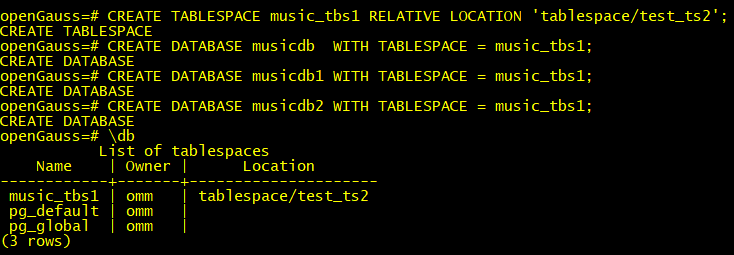
1.创建表空间music_tbs1和多个数据库music_db、music_db1、music_db2
查看当前表空间信息;
openGauss=# \db
List of tablespaces
Name | Owner | Location
------------+-------+---------------------
music_tbs | omm | tablespace/test_ts1
pg_default | omm |
pg_global | omm |
(3 rows)
先清理掉之前测试的
openGauss=# drop tablespace music_tbs1;
DROP TABLESPACE
openGauss=# drop database musicdb;
DROP DATABASE
openGauss=# drop database musicdb1;
DROP DATABASE
openGauss=# drop database musicdb2;
DROP DATABASE
openGauss=# drop database musicdb3;
DROP DATABASE
CREATE TABLESPACE music_tbs1 RELATIVE LOCATION 'tablespace/test_ts2';
CREATE DATABASE musicdb WITH TABLESPACE = music_tbs1;
CREATE DATABASE musicdb1 WITH TABLESPACE = music_tbs1;
CREATE DATABASE musicdb2 WITH TABLESPACE = music_tbs1;
表空间对应于一个文件系统目录,假定数据库节点数据目录/pg_location/mount1/path1是用户拥有读写权限的空目录。
Tablespace,即表空间,是一个目录,可以存在多个,里面存储的是它所包含的数据库的各种物理文件。每个表空间可以对应多个Database。
Database,即数据库,用于管理各类数据对象,各数据库间相互隔离。数据库管理的对象可分布在多个Tablespace上。
Datafile Segment,即数据文件,通常每张表只对应一个数据文件。如果某张表的数据大于1GB,则会分为多个数据文件存储。
Table,即表,每张表只能属于一个数据库,也只能对应到一个Tablespace。每张表对应的数据文件必须在同一个Tablespace中。
Block,即数据块,是数据库管理的基本单位,默认大小为8KB。
查看数据库
2.查看数据库上的表空间
openGauss自带了两个表空间:pg_default和pg_global。
openGauss=# \db
List of tablespaces
Name | Owner | Location
------------+-------+---------------------
music_tbs1 | omm | tablespace/test_ts2
pg_default | omm |
pg_global | omm |
(3 rows)
默认表空间pg_default:用来存储非共享系统表、用户表、用户表index、临时表、临时表index、内部临时表的默认表空间。对应存储目录为实例数据目录下的base目录。
共享表空间pg_global:用来存放共享系统表的表空间。对应存储目录为实例数据目录下的global目录。
music_tbs1是新建的。
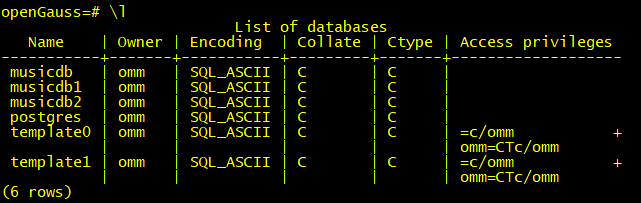
3.查看openGauss实例上有哪些数据库
--\l命令,元命令\l的作用是显示openGauss数据库集簇中,目前有哪些数据库。
openGauss=# \l
List of databases
Name | Owner | Encoding | Collate | Ctype | Access privileges
-----------+-------+-----------+---------+-------+-------------------
musicdb | omm | SQL_ASCII | C | C |
musicdb1 | omm | SQL_ASCII | C | C |
musicdb2 | omm | SQL_ASCII | C | C |
postgres | omm | SQL_ASCII | C | C |
template0 | omm | SQL_ASCII | C | C | =c/omm +
| | | | | omm=CTc/omm
template1 | omm | SQL_ASCII | C | C | =c/omm +
| | | | | omm=CTc/omm
(6 rows)
openGauss=#
新增+号,可以看到详细信息
openGauss=# \l+
List of databases
Name | Owner | Encoding | Collate | Ctype | Access privileges | Size | Tablespace | Description
-----------+-------+-----------+---------+-------+-------------------+-------+------------+--------------------------------------------
musicdb | omm | SQL_ASCII | C | C | | 13 MB | music_tbs1 |
musicdb1 | omm | SQL_ASCII | C | C | | 13 MB | music_tbs1 |
musicdb2 | omm | SQL_ASCII | C | C | | 13 MB | music_tbs1 |
postgres | omm | SQL_ASCII | C | C | | 13 MB | pg_default | default administrative connection database
template0 | omm | SQL_ASCII | C | C | =c/omm +| 13 MB | pg_default | default template for new databases
| | | | | omm=CTc/omm | | |
template1 | omm | SQL_ASCII | C | C | =c/omm +| 13 MB | pg_default | unmodifiable empty database
| | | | | omm=CTc/omm | | |
(6 rows)
4.使用操作系统命令,查看openGauss实例的进程、线程
[omm@fdb62pd2 ~]$ ps -ef | grep open
omm 13880 1 5 14:52 ? 00:08:24 /apps2/opengauss/install/app/bin/gaussdb
omm 24259 10146 0 17:22 pts/3 00:00:00 grep --color=auto open
[omm@fdb62pd2 ~]$
[omm@fdb62pd2 ~]$ ps -Tp 13880
PID SPID TTY TIME CMD
13880 13880 ? 00:00:01 gaussdb
13880 13881 ? 00:00:00 jemalloc_bg_thd
13880 13886 ? 00:00:00 gaussdb
13880 13887 ? 00:00:00 syslogger
13880 13888 ? 00:00:01 alarm
13880 13889 ? 00:00:00 reaper
13880 13890 ? 00:00:00 jemalloc_bg_thd
13880 13892 ? 00:00:00 jemalloc_bg_thd
13880 13893 ? 00:00:00 jemalloc_bg_thd
13880 13917 ? 00:00:02 checkpointer
13880 13918 ? 00:00:00 Spbgwriter
13880 13919 ? 00:00:24 pagewriter
13880 13920 ? 00:00:00 pagewriter
13880 13921 ? 00:00:00 pagewriter
13880 13922 ? 00:00:00 pagewriter
13880 13923 ? 00:00:00 pagewriter
13880 13924 ? 00:00:01 WALwriter
13880 13925 ? 00:00:00 WALwriteraux
13880 13926 ? 00:00:00 AVClauncher
13880 13927 ? 00:00:01 Jobscheduler
13880 13928 ? 00:00:00 asyncundolaunch
13880 13929 ? 00:00:00 globalstats
13880 13930 ? 00:00:00 applylauncher
13880 13931 ? 00:00:00 statscollector
13880 13932 ? 00:00:00 txnsnapcapturer
13880 13933 ? 00:00:00 CfsShrinker
13880 13934 ? 00:00:19 percentworker
13880 13935 ? 00:05:05 ashworker
13880 13936 ? 00:00:44 TrackStmtWorker
13880 13937 ? 00:00:00 auditor
13880 13938 ? 00:00:00 2pccleaner
13880 13939 ? 00:00:00 faultmonitor
13880 13941 ? 00:00:01 heartbeat
13880 13942 ? 00:00:42 undorecycler
13880 13943 ? 00:00:00 WalSender
可以看到openGauss是一个单进程多线程架构。典型的如后端写(background writer)进程。功能就是把共享缓冲区中的脏数据(指共享缓冲区中新增或者修改的内容)写入到磁盘。目的是让数据库进程在进行用户查询时可以很少或者几乎不等待写动作的发生(写动作由后端写进程完成。
