



【免责声明】本公众号文章仅代表个人观点,与任何公司无关。

从数据库设计构想理念和本身技术,以及生态和周边运维、内部管理而言,Oracle都是领先的。有很多值得大家学习的地方。
Oracle不仅仅要让数据库自治运行、运维管理和优化自动化,甚至连技术支持、问题诊断也要自动化,打照成一个闭环。
这一切的基础是几十年功能的演进的迭代。对于数据库功能来说,包括大家知道的自动化内存管理、自动化统计收集、SQL调优等等;对于问题诊断方面,Oracle不仅提供了自动诊断目录(ADR:Automatic Diagnostic Repository)功能,为了方便用户更及时和方便的收集问题相关的日志和诊断数据,还提供了TFA (Trace File Analyzer )功能。
TFA最初主要应用于RAC环境,但是应为其强大和便利性,Oracle逐渐将其变成问题诊断框架的主流。现在已经集成在自主健康框架(AHF:Autonomous Health Framework)中。
TFA是用于目标诊断收集的实用程序,除了单实例,非群集数据库之外,它还简化了Oracle集群件,Oracle Grid Infrastructure和Oracle Real Application Clusters(Oracle RAC)系统的诊断数据收集。
TFA可以一键收集所有需要的日志,并且可以过滤掉不需要的日志。而且用户将相关文件上传到MOS上后,Oracle内部自动化诊断的框架会自动分析日志内容,无需人工干预以最快的速度提供潜在的解决方案。例如,对大家很头疼的ORA-600/7445等有规律可循的问题,通过收集TFA上传MOS网站,可能在几分钟之内就找到相应的bug或解决方案。这也是Oracle技术支持近年来主推这个工具的原因吧。
闲话少说,通过用户的角度介绍一下这个TFA工具。
TFA的功能
以下这2张图,可以很好的理解TFA工具的功能。
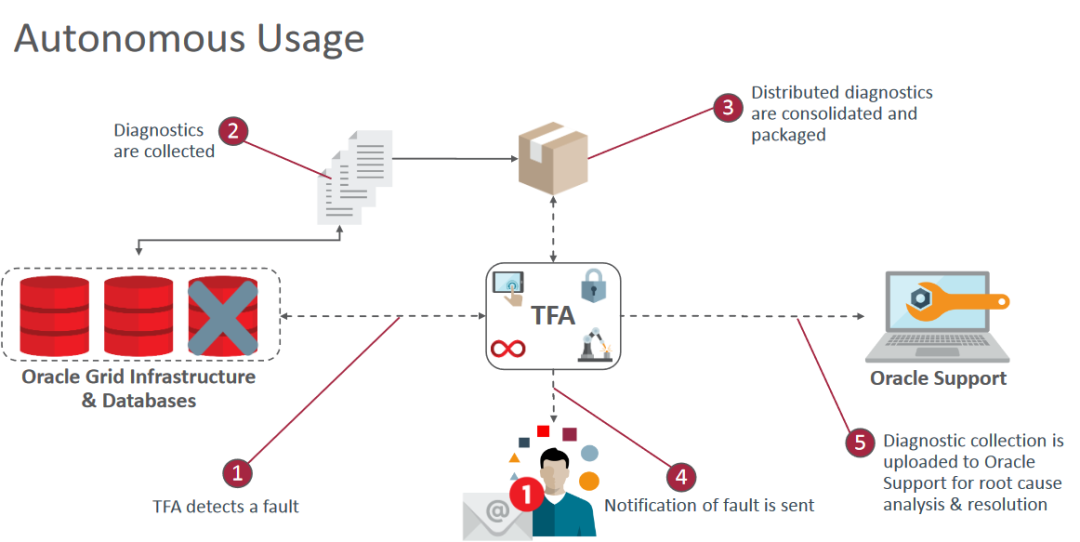
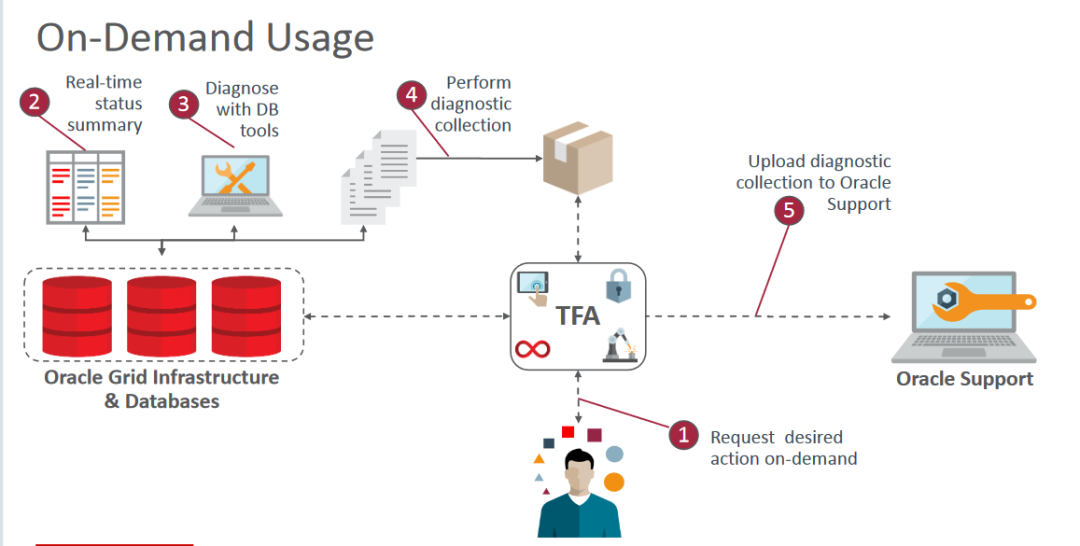
通过上图可以看到TFA应用的两个方向,一个是自动化使用,一个是按需使用。
※点击阅读原文或下面链接可以查看和下载官方介绍的PPT资料。
参考:
https://www.oracle.com/technetwork/database/options/clustering/overview/tfa-customer-slides-3752135.pdf
本文主要介绍按需使用的方法。
TFA的安装和使用
包含TFA的AHF工具包会包含在DB和GI RU中,也可以通过MOS文档 (Doc ID 2550798.1)或者补丁30166242下载,然后手工安装。
关于AHF工具包,有兴趣的通过可以参考在线文档的介绍。
https://docs.oracle.com/en/database/oracle/oracle-database/19/atnms/
TFA快速安装
TFA可以作为AHF工具的一部分手工安装,而且安装极其简单。
解压一键执行ahf_setup命令即可。
手工安装例:
-- 安装包解压[root@node1 oracle]# unzip AHF-LINUX_v20.4.4.zip-- 一键安装[root@node1 oracle]# ./ahf_setup
注意:推荐使用root用户进行安装,不用root用户安装的话会有些限制,比如说不能远程收集,不能收集需要root权限的某些文件等。
参考:
https://docs.oracle.com/en/database/oracle/oracle-database/19/atnms/quick-start-guide.html#GUID-41689DF9-F81D-4C8C-992F-78CF48F9B6DF
手工运行TFA
TFA的使用也非常简单,能够大大减少DBA或者用户收集信息的流程和时间。具体使用方法主要如下:
$ tfactl <+运行选项>
几个收集的例子
1.默认收集前一小时的信息
$ tfactl diagcollect
2.收集某段时间的所有诊断信息
可以通过指定如下参数,收集某段时间的所有信息。
tfactl diagcollect -database all -from '[YYYY-MM-DD HH24:MI:SS]' -to '[YYYY-MM-DD HH24:MI:SS]'
其中时间格式可以指定如下的格式:
-from "Mon/dd/yyyy hh:mm:ss" From <time>or "yyyy-mm-dd hh:mm:ss"or "yyyy-mm-ddThh:mm:ss"or "yyyy-mm-dd"-to "Mon/dd/yyyy hh:mm:ss" To <time>or "yyyy-mm-dd hh:mm:ss"or "yyyy-mm-ddThh:mm:ss"or "yyyy-mm-dd"
3.根据问题类型收集诊断信息
可以通过指定如下参数,根据问题类型收集诊断信息。
$ tfactl diagcollect -srdc srdc_type
指定的问题类型(srdc_type)可以参考在线文档。
https://docs.oracle.com/en/database/oracle/oracle-database/19/atnms/ondemand-diagnostic-collection.html#GUID-F8381A7A-E2F7-442C-AED0-3FEEF4129125>15.6 Collecting Diagnostic Data and Using One Command Service Request Data Collections>>Table 15-3 One Command Service Request Data Collections
例如常用的SRDC命令如下:
数据库性能相关的诊断信息:$ tfactl diagcollect -srdc dbperf各种错误的诊断信息:$ tfactl diagcollect -srdc ORA-04031ASM/ACFS相关问题的诊断信息:$ tfactl diagcollect -srdc DBASMDBCA运行相关的诊断信息:tfactl diagcollect -srdc dbstandalonedbca
例如通过如下的命令,可以简单地完成数据库性能相关信息的收集,包括AWR,ASH,ADDM,OSWatcher,Tracefile等。
$ tfactl diagcollect -srdc dbperf
执行过程中会交互式地提示输入相关信息。
4. 常用的例子:tfactl diagcollect -examples
可以通过tfactl diagcollect -examples命令会罗列一些常用的例子。
例:
$ tfactl diagcollect -examplesExamples:opt/oracle.ahf/tfa/bin/tfactl diagcollectTrim and Zip all files updated in the last 1 hours as well as chmos/osw datafrom across the cluster and collect at the initiating nodeNote: This collection could be larger than required but is there as thesimplest way to capture diagnostics if an issue has recently occurred.opt/oracle.ahf/tfa/bin/tfactl diagcollect -last 8hTrim and Zip all files updated in the last 8 hours as well as chmos/osw datafrom across the cluster and collect at the initiating nodeopt/oracle.ahf/tfa/bin/tfactl diagcollect -database hrdb,fdb -last 1d -z fooTrim and Zip all files from databases hrdb & fdb in the last 1 day andcollect at the initiating nodeopt/oracle.ahf/tfa/bin/tfactl diagcollect -crs -os -node node1,node2 -last 6hTrim and Zip all crs files, o/s logs and chmos/osw data from node1 & node2updated in the last 6 hours and collect at the initiating nodeopt/oracle.ahf/tfa/bin/tfactl diagcollect -asm -node node1 -from "Apr/14/2021" -to "Apr/14/2021 21:00:00"Trim and Zip all ASM logs from node1 updated between from and to time andcollect at the initiating nodeopt/oracle.ahf/tfa/bin/tfactl diagcollect -for "Apr/14/2021"Trim and Zip all log files updated on "Apr/14/2021" and collect at thecollect at the initiating nodeopt/oracle.ahf/tfa/bin/tfactl diagcollect -for "Apr/14/2021 21:00:00"Trim and Zip all log files updated from 09:00 on "Apr/14/2021" to 09:00 on "Apr/15/2021"(i.e. 12 hours before and after the time given) and collect at the initiating nodeopt/oracle.ahf/tfa/bin/tfactl diagcollect -crs -collectdir tmp_dir1,/tmp_dir2Trim and Zip all crs files updated in the last 1 hoursAlso collect all files from /tmp_dir1 and /tmp_dir2 at the initiating node
查看TFA相关的设置
可以通过如下命令查看TFA的相关设置:
$ tfactl print config$ tfactl status$ tfactl toolstatus
有了TFA,我们再也不用为了收集各种信息而忙得焦头烂额了。
后续文章更加精彩,欢迎关注本公众号。
——End——
专注于技术不限于技术!
用碎片化的时间,一点一滴地提高数据库技术和个人能力。
欢迎关注!
数据库基础系列(从基础了解数据库):
