



接触OG出现很多困惑,表空间是其中之一.
ORACLE里表空间是个逻辑概念,创建表空间同时创建数据文件,通过数据文件落盘来实现存储,而数据文件大小、是否扩展都是物理文件的属性。而OG这里,这个概念不一样了:
- 表空间本身就可以控制数据库的磁盘布局;
- 表空间对应于一个文件系统目录,如果使用revative location,路径指向数据库节点的数据目录/pg_location/相对路径(例如:/opt/huawei/install/data/dn/pg_location/tablespace/music_tbs);
- 在创建表空间也可以不用指定大小(使用表空间配额管理会使性能有30%左右的影响,在HCS等场景下一般不建议用户使用自定义的表空间);
- 如果初始化数据库所在的分区或者卷空间已满,又不能逻辑上扩展更多空间,可以在不同的分区上创建和使用表空间,直到系统重新配置空间。
文档链接:
学习目标
学习表空间与数据库对象的关系。
在musicdb数据库中创建的所有的表,没有指定表空间的名字,因此都创建在数据库默认的表空间music_tbs中,当我们在musicdb数据库中创建表warehouse_t1的时候,明确指定在表空间ds_location1中创建时,这个表会存储在这个指定的表空间。即一个数据库中的对象,可以位于不同的表空间.
课程学习
1.连接数据库,准备测试环境
1)登录数据库
[omm@hecs-30579 tablespace]$ gsql -d postgres -p 26000 -r
gsql ((openGauss 3.1.0 build 4e931f9a) compiled at 2022-09-29 14:19:24 commit 0 last mr  )
Non-SSL connection (SSL connection is recommended when requiring high-security)
Type "help" for help.
2)使用元命令\db、\l查看表空间、数据库
openGauss=# \db
      List of tablespaces
    Name    | Owner | Location
------------+-------+----------
 pg_default | omm   |
 pg_global  | omm   |
(2 rows)

openGauss=# \l
                          List of databases
   Name    | Owner | Encoding  | Collate | Ctype | Access privileges
-----------+-------+-----------+---------+-------+-------------------
 postgres  | omm   | SQL_ASCII | C       | C     |
 template0 | omm   | SQL_ASCII | C       | C     | =c/omm           +
           |       |           |         |       | omm=CTc/omm
 template1 | omm   | SQL_ASCII | C       | C     | =c/omm           +
           |       |           |         |       | omm=CTc/omm
(3 rows)
3)创建表空间music_tbs
openGauss=# create tablespace music_tbs relative location 'tablespace/music_tbs';
CREATE TABLESPACE
4)查看表空间music_tbs磁盘路径
openGauss=# \! ls /opt/huawei/install/data/dn/pg_location/tablespace/
music_tbs
openGauss=# \! ls /opt/huawei/install/data/dn/pg_location/tablespace/music_tbs
PG_9.2_201611171_dn_6001
openGauss=# \! ls /opt/huawei/install/data/dn/pg_location/tablespace/music_tbs/PG_9.2_201611171_dn_6001
pgsql_tmp
openGauss=# \! ls -lah /opt/huawei/install/data/dn/pg_location/tablespace/music_tbs/PG_9.2_201611171_dn_6001
total 12K
drwx------ 3 omm dbgrp 4.0K Dec  2 10:22 .
drwx------ 3 omm dbgrp 4.0K Dec  2 10:22 ..
drwx------ 2 omm dbgrp 4.0K Dec  2 10:22 pgsql_tmp
openGauss=# \! ls /opt/huawei/install/data/dn/pg_location/tablespace/music_tbs/PG_9.2_201611171_dn_6001/pgsql_tmp
openGauss=#
5)创建数据库musicdb
openGauss=# create database musicdb  with tablespace=music_tbs;
CREATE DATABASE
openGauss=#
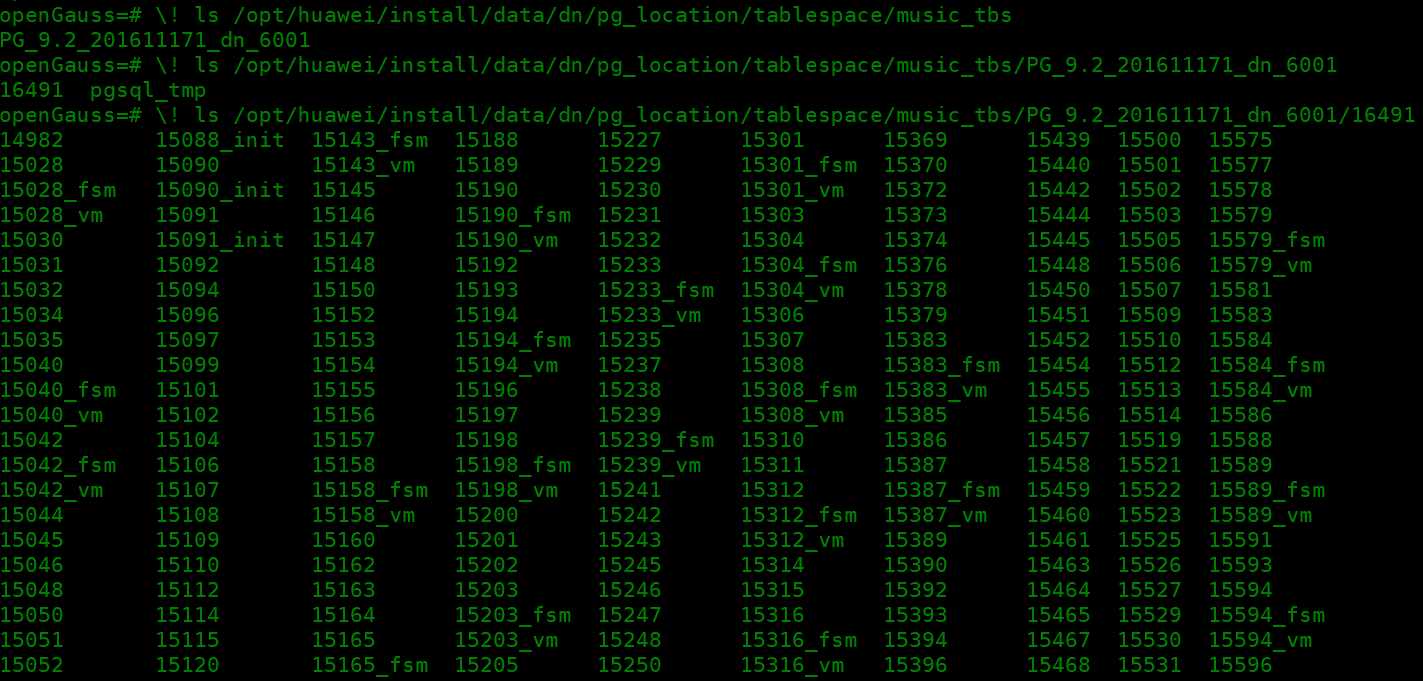
6)查看数据库musicdb磁盘路径
7)创建用户user1,授予sysadmin
openGauss=# create user user1 identified by 'kunpeng@1234';
CREATE ROLE
openGauss=# alter user user1 sysadmin;
ALTER ROLE
2.创建表空间、查看表空间ds_location1
1) 创建表空间ds_location1
openGauss=# create tablespace ds_location1 relative location 'tablespace/tablespace_1';
CREATE TABLESPACE
openGauss=#
2) 使用元命令\db查看表空间ds_location1
openGauss=# \db
              List of tablespaces
     Name     | Owner |        Location
--------------+-------+-------------------------
 ds_location1 | omm   | tablespace/tablespace_1
 music_tbs    | omm   | tablespace/music_tbs
 pg_default   | omm   |
 pg_global    | omm   |
(4 rows)
3) 查看表空间ds_location1磁盘路径
openGauss=# \! ls -lah /opt/huawei/install/data/dn/pg_location/tablespace/
total 16K
drwx------ 4 omm dbgrp 4.0K Dec  2 10:43 .
drwx------ 3 omm dbgrp 4.0K Nov 28 08:43 ..
drwx------ 3 omm dbgrp 4.0K Dec  2 10:22 music_tbs
drwx------ 3 omm dbgrp 4.0K Dec  2 10:43 tablespace_1
openGauss=#
openGauss=#
openGauss=# \! ls -lah /opt/huawei/install/data/dn/pg_location/tablespace/tablespace_1
total 12K
drwx------ 3 omm dbgrp 4.0K Dec  2 10:43 .
drwx------ 4 omm dbgrp 4.0K Dec  2 10:43 ..
drwx------ 3 omm dbgrp 4.0K Dec  2 10:43 PG_9.2_201611171_dn_6001
openGauss=# \! ls -lah /opt/huawei/install/data/dn/pg_location/tablespace/tablespace_1/PG_9.2_201611171_dn_6001
total 12K
drwx------ 3 omm dbgrp 4.0K Dec  2 10:43 .
drwx------ 3 omm dbgrp 4.0K Dec  2 10:43 ..
drwx------ 2 omm dbgrp 4.0K Dec  2 10:43 pgsql_tmp
openGauss=#
可以看到music_tbs和ds_location1两个表空间路径下都创建了PG_9.2_201611171_dn_6001目录,代表当前实例
[omm@hecs-30579 openGauss]$ gs_om -t status --detail
[   Cluster State   ]

cluster_state   : Normal
redistributing  : No
current_az      : AZ_ALL

[  Datanode State   ]

    node      node_ip         port      instance                            state
-------------------------------------------------------------------------------------------------
1  hecs-30579 192.168.0.98    26000      6001 /opt/huawei/install/data/dn   P Primary Normal
[omm@hecs-30579 openGauss]$
3.使用user1用户,访问musicdb数据库 ,在表空间ds_location1上创建表warehouse_t1:
openGauss=# \c musicdb user1
Password for user user1:
Non-SSL connection (SSL connection is recommended when requiring high-security)
You are now connected to database "musicdb" as user "user1".
musicdb=>
musicdb=> create table warehouse_t1(col1 char(10)) tablespace ds_location1;
CREATE TABLE
musicdb=>
4.查看musicdb数据库目前有哪些表:
musicdb=> select table_catalog,table_schema,table_name,table_type from information_schema.tables where table_schema not in('pg_catalog','information_schema','dbe_perf');
 table_catalog |  table_schema   |  table_name  | table_type
---------------+-----------------+--------------+------------
 musicdb       | db4ai           | snapshot     | BASE TABLE
 musicdb       | dbe_pldeveloper | gs_errors    | BASE TABLE
 musicdb       | dbe_pldeveloper | gs_source    | BASE TABLE
 musicdb       | public          | warehouse_t1 | BASE TABLE
(4 rows)

musicdb=>
5.查询表在那个表空间:
1) 查询表warehouse_t1在那个表空间:
musicdb=> select * from pg_tables where tablename = 'warehouse_t1';
 schemaname |  tablename   | tableowner |  tablespace  | hasindexes | hasrules | hastriggers | tablecreator |
created            |         last_ddl_time
------------+--------------+------------+--------------+------------+----------+-------------+--------------+------------
-------------------+-------------------------------
 public     | warehouse_t1 | user1      | ds_location1 | f          | f        | f           | user1        | 2022-12-02
11:07:20.744739+08 | 2022-12-02 11:07:20.744739+08
(1 row)

musicdb=>
2) 查询磁盘路径/opt/huawei/install/data/dn/pg_location/tablespace/tablespace_1/PG_9.2_201611171_dn_6001/16491下有哪些文件:

3) 创建表warehouse_t12未指定表空间,则在默认表空间(不显示默认表空间名)
musicdb=> create table warehouse_t12 (col1 char(10));
CREATE TABLE
musicdb=> select * from pg_tables where tablename = 'warehouse_t12';
 schemaname |   tablename   | tableowner | tablespace | hasindexes | hasrules | hastriggers | tablecreator |            c
reated            |         last_ddl_time
------------+---------------+------------+------------+------------+----------+-------------+--------------+-------------
------------------+-------------------------------
 public     | warehouse_t12 | user1      |            | f          | f        | f           | user1        | 2022-12-02 1
1:24:54.338564+08 | 2022-12-02 11:24:54.338564+08
(1 row)

musicdb=>
6.查看openGuass数据库的默认表空间
musicdb=> select datname,dattablespace,spcname from pg_database d, pg_tablespace t where d.dattablespace=t.oid;
  datname  | dattablespace |  spcname
-----------+---------------+------------
 template1 |          1663 | pg_default
 template0 |          1663 | pg_default
 musicdb   |         16490 | music_tbs
 postgres  |          1663 | pg_default
(4 rows)
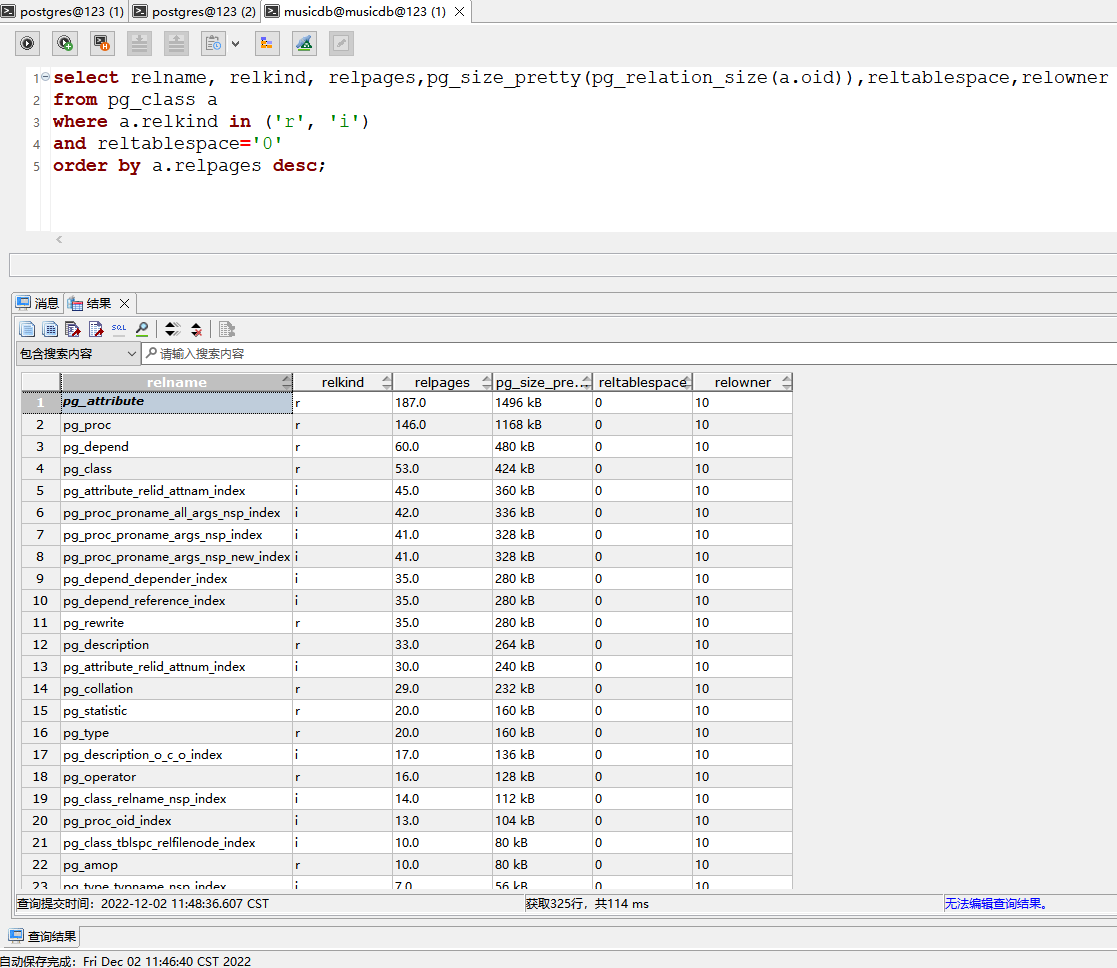
7.查询数据库的默认表空间上的对象
musicdb=> select relname, relkind, relpages,pg_size_pretty(pg_relation_size(a.oid)),reltablespace,relowner
musicdb-> from pg_class a
musicdb-> where a.relkind in ('r', 'i')
musicdb-> and reltablespace='0'
musicdb-> order by a.relpages desc;
                    relname                     | relkind | relpages | pg_size_pretty | reltablespace | relowner
------------------------------------------------+---------+----------+----------------+---------------+----------
 pg_attribute                                   | r       |      187 | 1496 kB        |             0 |       10
 pg_proc                                        | r       |      146 | 1168 kB        |             0 |       10
 pg_depend                                      | r       |       60 | 480 kB         |             0 |       10
 pg_class                                       | r       |       53 | 424 kB         |             0 |       10
 pg_attribute_relid_attnam_index                | i       |       45 | 360 kB         |             0 |       10
 pg_proc_proname_all_args_nsp_index             | i       |       42 | 336 kB         |             0 |       10
 pg_proc_proname_args_nsp_index                 | i       |       41 | 328 kB         |             0 |       10
 pg_proc_proname_args_nsp_new_index             | i       |       41 | 328 kB         |             0 |       10
 pg_depend_depender_index                       | i       |       35 | 280 kB         |             0 |       10
 pg_depend_reference_index                      | i       |       35 | 280 kB         |             0 |       10
 pg_rewrite                                     | r       |       35 | 280 kB         |             0 |       10
 pg_description                                 | r       |       33 | 264 kB         |             0 |       10
 pg_attribute_relid_attnum_index                | i       |       30 | 240 kB         |             0 |       10
 pg_collation                                   | r       |       29 | 232 kB         |             0 |       10
 pg_statistic                                   | r       |       20 | 160 kB         |             0 |       10
 pg_type                                        | r       |       20 | 160 kB         |             0 |       10
 pg_description_o_c_o_index                     | i       |       17 | 136 kB         |             0 |       10
 pg_operator                                    | r       |       16 | 128 kB         |             0 |       10
 pg_class_relname_nsp_index                     | i       |       14 | 112 kB         |             0 |       10
 pg_proc_oid_index                              | i       |       13 | 104 kB         |             0 |       10
 pg_class_tblspc_relfilenode_index              | i       |       10 | 80 kB          |             0 |       10
 pg_amop                                        | r       |       10 | 80 kB          |             0 |       10
--More--
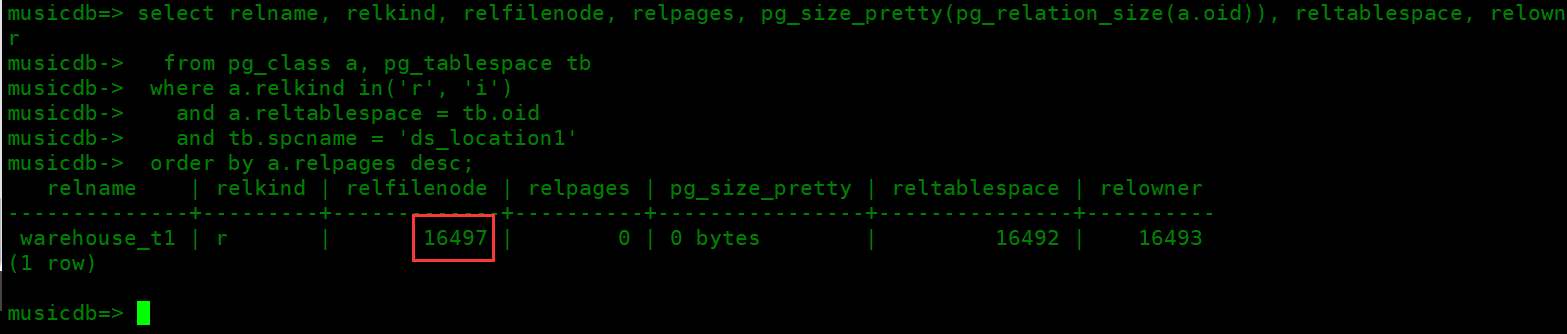
8.查询表空间ds_location1上的对像
musicdb->  order by a.relpages desc;
   relname    | relkind | relfilenode | relpages | pg_size_pretty | reltablespace | relowner
--------------+---------+-------------+----------+----------------+---------------+----------
 warehouse_t1 | r       |       16497 |        0 | 0 bytes        |         16492 |    16493
(1 row)

musicdb=>
学习心得
OG的表空间初步理解是物理概念
最后修改时间:2022-12-02 11:50:10
「喜欢这篇文章,您的关注和赞赏是给作者最好的鼓励」
关注作者
【版权声明】本文为墨天轮用户原创内容,转载时必须标注文章的来源(墨天轮),文章链接,文章作者等基本信息,否则作者和墨天轮有权追究责任。如果您发现墨天轮中有涉嫌抄袭或者侵权的内容,欢迎发送邮件至:contact@modb.pro进行举报,并提供相关证据,一经查实,墨天轮将立刻删除相关内容。
