



一、学习目标
本节课是本次实训的第九节课,本节课的重点依然是熟悉表空间和数据库间的关系,以及对openGauss中oid的理解。
1.1 表空间和数据库关系
openGauss一个实例下可以创建多个库,每个库可以有多个表空间,但只有一个默认表空间,多个库可以共用一个表空间。
如果建库时指定了默认表空间,用户创建的表会建在默认表空间上。
同时,用户也可以在建表时指定表空间。
1.2 oid的认识和理解
对于oid,在之前的课程里,已经使用过,但未知其含义,所以这次我从openGauss官网专门查询了oid的含义。
openGauss官网对oid的描述是,oid是openGauss在内部使用的一个对象标识符,其用来作为各种系统表的主键。系统不会为用户创建的表增加oid系统字段。
openGauss数据库oid类型是采用一个四字节的无符号整数实现的,不建议在用户自定义的表中使用oid字段作为主键。
oid 是一数字化的对象表示符,比如564182。
-- 实例,可以查询一个系统表的oid值。
[omm@opengauss-node1 ~]$ gsql -d presdb -p 26000
gsql ((openGauss 3.1.0 build 4e931f9a) compiled at 2022-09-29 14:19:24 commit 0 last mr  )
Non-SSL connection (SSL connection is recommended when requiring high-security)
Type "help" for help.

presdb=# select oid from pg_class where relname = 'pg_type';
 oid
------
 1247
(1 row)
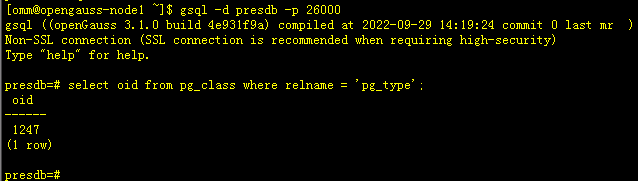
oid别名类型REGCLASS,主要用于对象oid值的简化查找。
[omm@opengauss-node1 ~]$ gsql -d postgres -p 26000
gsql ((openGauss 3.1.0 build 4e931f9a) compiled at 2022-09-29 14:19:24 commit 0 last mr  )
Non-SSL connection (SSL connection is recommended when requiring high-security)
Type "help" for help.

openGauss=# select attrelid,attname,atttypid,attstattarget from pg_attribute where attrelid = 'pg_type'::regclass;
 attrelid |    attname     | atttypid | attstattarget
----------+----------------+----------+---------------
     1247 | xc_node_id     |       23 |             0
     1247 | tableoid       |       26 |             0
     1247 | cmax           |       29 |             0
     1247 | xmax           |       28 |             0
     1247 | cmin           |       29 |             0
     1247 | xmin           |       28 |             0
     1247 | oid            |       26 |             0
     1247 | ctid           |       27 |             0
     1247 | typname        |       19 |            -1
     1247 | typnamespace   |       26 |            -1
     1247 | typowner       |       26 |            -1
     1247 | typlen         |       21 |            -1
     1247 | typbyval       |       16 |            -1
     1247 | typtype        |       18 |            -1
     1247 | typcategory    |       18 |            -1
     1247 | typispreferred |       16 |            -1
     1247 | typisdefined   |       16 |            -1
     1247 | typdelim       |       18 |            -1
     1247 | typrelid       |       26 |            -1
     1247 | typelem        |       26 |            -1
     1247 | typarray       |       26 |            -1
     1247 | typinput       |       24 |            -1
     1247 | typoutput      |       24 |            -1
     1247 | typreceive     |       24 |            -1
     1247 | typsend        |       24 |            -1
     1247 | typmodin       |       24 |            -1
     1247 | typmodout      |       24 |            -1
     1247 | typanalyze     |       24 |            -1
     1247 | typalign       |       18 |            -1
     1247 | typstorage     |       18 |            -1
     1247 | typnotnull     |       16 |            -1
     1247 | typbasetype    |       26 |            -1
     1247 | typtypmod      |       23 |            -1
     1247 | typndims       |       23 |            -1
     1247 | typcollation   |       26 |            -1
     1247 | typdefaultbin  |      194 |            -1
     1247 | typdefault     |       25 |            -1
     1247 | typacl         |     1034 |            -1
(38 rows)
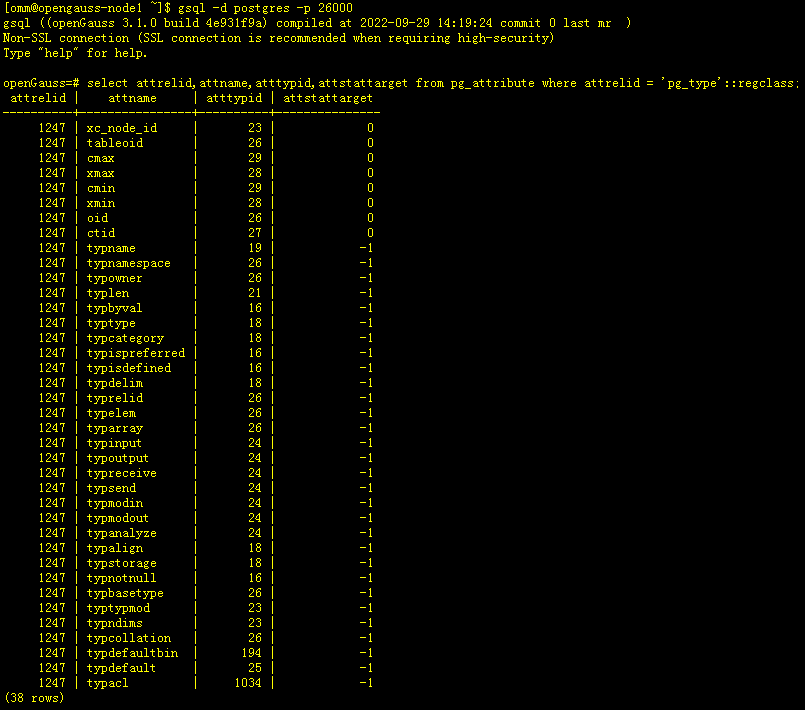
我们还可以采用如下一些SQL来查询数据库及表空间的oid信息,如下所示:
-- 查询数据库及其对应oid信息
openGauss=# select oid,datname from pg_database;
  oid  |  datname
-------+-----------
     1 | template1
 16404 | presdb
 16657 | musicdb10
 15621 | template0
 16668 | musicdb2
 15626 | postgres
(6 rows)

-- 查询表空间及其对应oid信息
openGauss=# select oid,* from pg_tablespace ;
  oid  |  spcname   | spcowner |    spcacl     | spcoptions | spcmaxsize | relative
-------+------------+----------+---------------+------------+------------+----------
  1663 | pg_default |       10 |               |            |            | f
  1664 | pg_global  |       10 |               |            |            | f
 16423 | tbs1       |    16390 |               |            |            | f
 16424 | tbs2       |    16390 |               |            |            | f
 16656 | musicdbtbs |       10 |               |            |            | t
 16665 | music_tbs  |       10 |               |            |            | t
 16683 | fastspace  |    16679 | {jack=C/jack} |            |            | t
 16691 | slowspace  |    16679 |               |            |            | t
 16692 | optb01     |       10 |               |            |            | t
 16693 | optb02     |       10 |               |            |            | f
(10 rows)

-- 查询数据库及表空间oid信息
openGauss=# select datname,dattablespace,spcname from pg_database d, pg_tablespace t where d.dattablespace=t.oid;
  datname  | dattablespace |  spcname
-----------+---------------+------------
 template1 |          1663 | pg_default
 presdb    |          1663 | pg_default
 musicdb10 |         16656 | musicdbtbs
 template0 |          1663 | pg_default
 musicdb2  |         16665 | music_tbs
 postgres  |          1663 | pg_default
(6 rows)
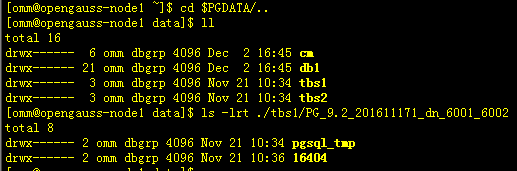
另外还可以登陆数据库服务器,从操作系统层面查询oid信息,查询该表空间及其所对应的数据库oid信息。
[omm@opengauss-node1 ~]$ cd $PGDATA/..
[omm@opengauss-node1 data]$ ll
total 16
drwx------  6 omm dbgrp 4096 Dec  2 16:45 cm
drwx------ 21 omm dbgrp 4096 Dec  2 16:45 db1
drwx------  3 omm dbgrp 4096 Nov 21 10:34 tbs1
drwx------  3 omm dbgrp 4096 Nov 21 10:34 tbs2
[omm@opengauss-node1 data]$ ls -lrt ./tbs1/PG_9.2_201611171_dn_6001_6002
total 8
drwx------ 2 omm dbgrp 4096 Nov 21 10:34 pgsql_tmp
drwx------ 2 omm dbgrp 4096 Nov 21 10:36 16404
# 此处16404及上面pg_database信息里所查询到的presdb数据库oid信息。
二、测试练习
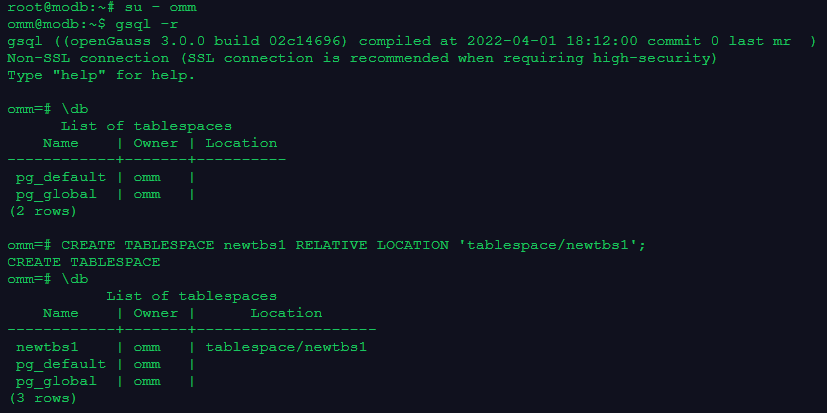
2.1 创建表空间
root@modb:~# su - omm
omm@modb:~$ gsql -r
gsql ((openGauss 3.0.0 build 02c14696) compiled at 2022-04-01 18:12:00 commit 0 last mr  )
Non-SSL connection (SSL connection is recommended when requiring high-security)
Type "help" for help.

omm=# \db
      List of tablespaces
    Name    | Owner | Location
------------+-------+----------
 pg_default | omm   |
 pg_global  | omm   |
(2 rows)

omm=# CREATE TABLESPACE newtbs1 RELATIVE LOCATION 'tablespace/newtbs1';
CREATE TABLESPACE
omm=# \db
           List of tablespaces
    Name    | Owner |      Location
------------+-------+--------------------
 newtbs1    | omm   | tablespace/newtbs1
 pg_default | omm   |
 pg_global  | omm   |
(3 rows)
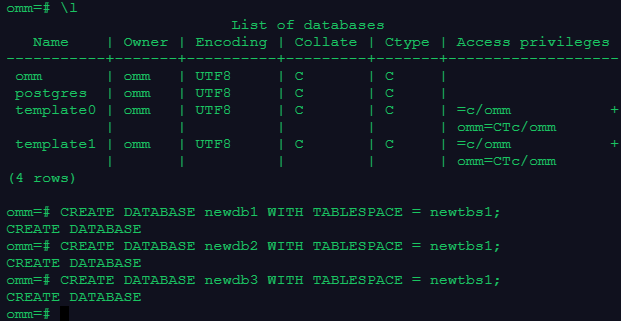
2.2 创建多个库并使用同一表空间
omm=# \l
                         List of databases
   Name    | Owner | Encoding | Collate | Ctype | Access privileges
-----------+-------+----------+---------+-------+-------------------
 omm       | omm   | UTF8     | C       | C     |
 postgres  | omm   | UTF8     | C       | C     |
 template0 | omm   | UTF8     | C       | C     | =c/omm           +
           |       |          |         |       | omm=CTc/omm
 template1 | omm   | UTF8     | C       | C     | =c/omm           +
           |       |          |         |       | omm=CTc/omm
(4 rows)

omm=# CREATE DATABASE newdb1 WITH TABLESPACE = newtbs1;
CREATE DATABASE
omm=# CREATE DATABASE newdb2 WITH TABLESPACE = newtbs1;
CREATE DATABASE
omm=# CREATE DATABASE newdb3 WITH TABLESPACE = newtbs1;
CREATE DATABASE
2.3 查询默认表空间及其对应库信息
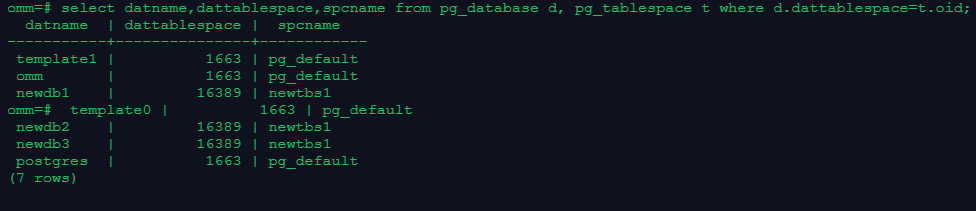
-- 从以下SQL可以查询默认表空间newtbs1及其对应的多个数据库,以及库表oid相关信息。
omm=# select datname,dattablespace,spcname from pg_database d, pg_tablespace t where d.dattablespace=t.oid;
  datname  | dattablespace |  spcname
-----------+---------------+------------
 template1 |          1663 | pg_default
 omm       |          1663 | pg_default
 newdb1    |         16389 | newtbs1
 omm=#           template0 |          1663 | pg_default
 newdb2    |         16389 | newtbs1
 newdb3    |         16389 | newtbs1
 postgres  |          1663 | pg_default
(7 rows)
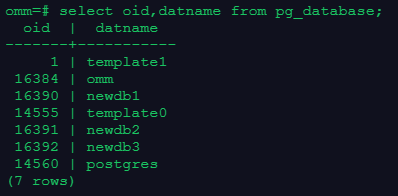
可以通过如下SQL查询数据库及其对应的oid信息:
omm=# select oid,datname from pg_database;
  oid  |  datname
-------+-----------
     1 | template1
 16384 | omm
 16390 | newdb1
 14555 | template0
 16391 | newdb2
 16392 | newdb3
 14560 | postgres
(7 rows)
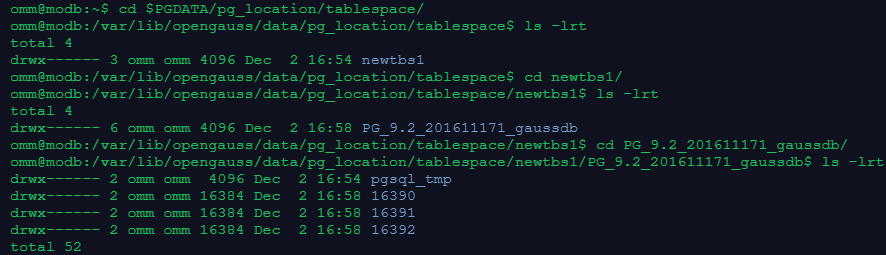
2.4 文件系统查看默认表空间对应库信息
omm@modb:~$ cd $PGDATA/pg_location/tablespace/
omm@modb:/var/lib/opengauss/data/pg_location/tablespace$ ls -lrt
total 4
drwx------ 3 omm omm 4096 Dec  2 16:54 newtbs1
omm@modb:/var/lib/opengauss/data/pg_location/tablespace$ cd newtbs1/
omm@modb:/var/lib/opengauss/data/pg_location/tablespace/newtbs1$ ls -lrt
total 4
drwx------ 6 omm omm 4096 Dec  2 16:58 PG_9.2_201611171_gaussdb
omm@modb:/var/lib/opengauss/data/pg_location/tablespace/newtbs1$ cd PG_9.2_201611171_gaussdb/
omm@modb:/var/lib/opengauss/data/pg_location/tablespace/newtbs1/PG_9.2_201611171_gaussdb$ ls -lrt
drwx------ 2 omm omm  4096 Dec  2 16:54 pgsql_tmp
drwx------ 2 omm omm 16384 Dec  2 16:58 16390
drwx------ 2 omm omm 16384 Dec  2 16:58 16391
drwx------ 2 omm omm 16384 Dec  2 16:58 16392
total 52
# 此处13390、16391、16392及对应之前通过pg_database表所查询到的数据库oid信息,从操作系统层面也可以看到当前默认表空间被三个数据库所使用。
三、学习心得
通过本课程的学习,还是要重点理解openGauss的表空间与数据库的对应关系,特别是从openGauss的逻辑结构来理解表、表空间、数据库以及用户之间的关系。
另外本课程的一个重点就是oid的理解,要清楚oid是一个数字化的对象表示符,在系统表中充当主键作用,不要将oid用于个人创建的自定义表中做主键。
另外就是如何通过使用SQL语句以及在操作系统层面来查询表空间、数据库的相应oid信息。
「喜欢这篇文章,您的关注和赞赏是给作者最好的鼓励」
关注作者
【版权声明】本文为墨天轮用户原创内容,转载时必须标注文章的来源(墨天轮),文章链接,文章作者等基本信息,否则作者和墨天轮有权追究责任。如果您发现墨天轮中有涉嫌抄袭或者侵权的内容,欢迎发送邮件至:contact@modb.pro进行举报,并提供相关证据,一经查实,墨天轮将立刻删除相关内容。
