



openGauss每日一练第9天 |PG_DATABASE
今日目标:学习表空间与数据库对象的关系,了解oid的含义。
openGauss在内部使用对象标识符(OID)作为各种系统表的主键。系统不会给用户创建的表增加一个OID系统字段,OID类型代表一个对象标识符。
OID类型:主要作为数据库系统表中字段使用。
系统表
-
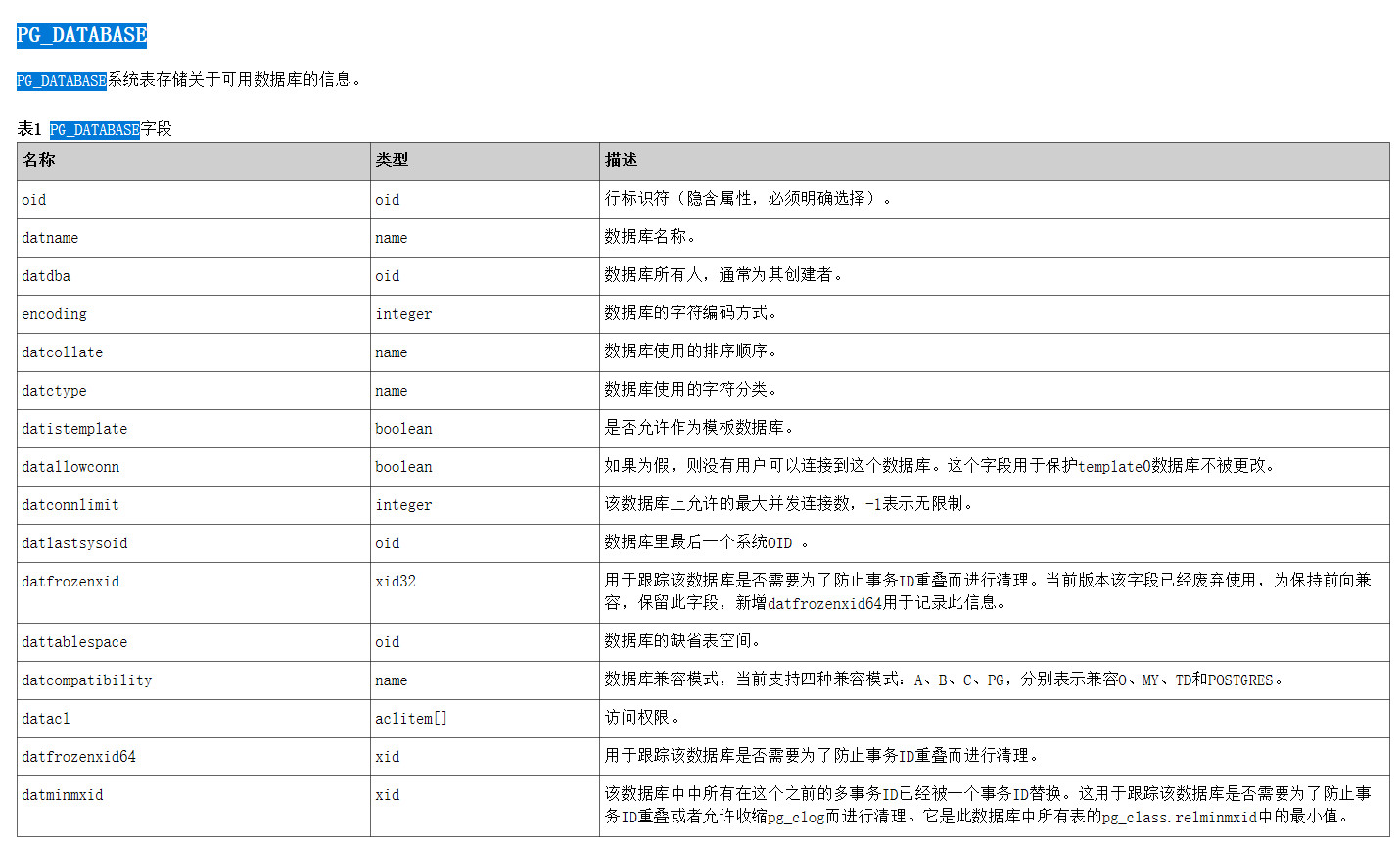
系统表存储关于可用数据库的信息。
-
PG_TABLESPACE
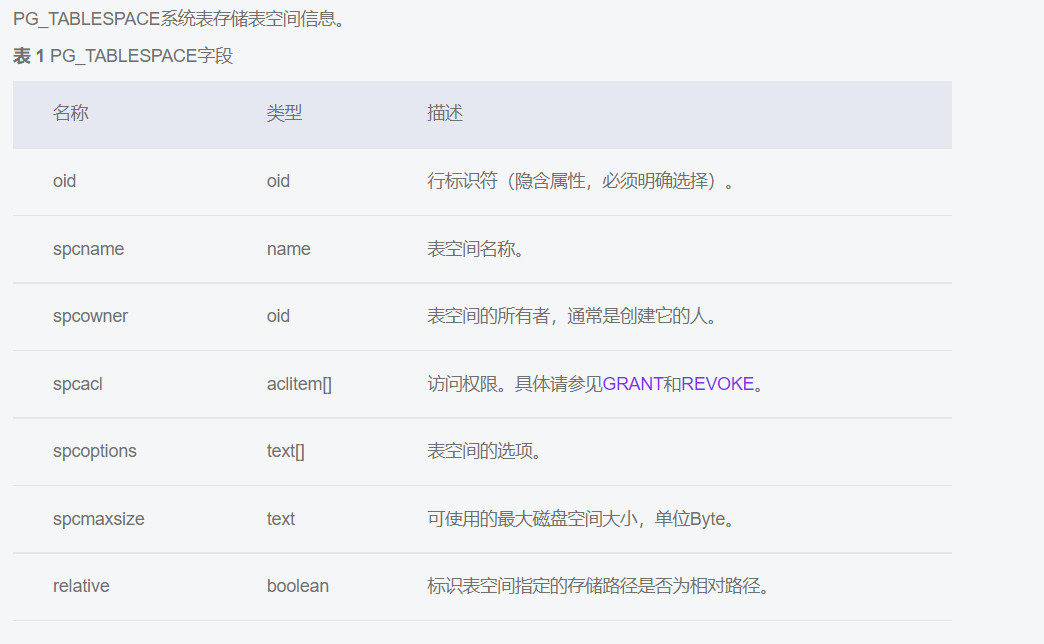
PG_TABLESPACE系统表存储表空间信息。
1.实验准备
- 创建表空间music_tbs ,并在该表空间下创建数据库musicdb
创建user1,并授予sysadmin权限
omm=# create tablespace music_tbs relative location 'tablespace/test_ts1';
CREATE TABLESPACE
omm=# create database musicdb with tablespace music_tbs ;
CREATE DATABASE
omm=# create user user1 sysadmin  identified by 'gauss@1234';
NOTICE:  The encrypted password contains MD5 ciphertext, which is not secure.
CREATE ROLE
omm=# \db
           List of tablespaces
    Name    | Owner |      Location
------------+-------+---------------------
 music_tbs  | omm   | tablespace/test_ts1
 pg_default | omm   |
 pg_global  | omm   |
(3 rows)

omm=# \l
                         List of databases
   Name    | Owner | Encoding | Collate | Ctype | Access privileges
-----------+-------+----------+---------+-------+-------------------
 musicdb   | omm   | UTF8     | C       | C     |
 omm       | omm   | UTF8     | C       | C     |
 postgres  | omm   | UTF8     | C       | C     |
 template0 | omm   | UTF8     | C       | C     | =c/omm           +
           |       |          |         |       | omm=CTc/omm
 template1 | omm   | UTF8     | C       | C     | =c/omm           +
           |       |          |         |       | omm=CTc/omm
(5 rows)

omm=# \du
                                                              List of roles
 Role name |                                                    Attributes                                                    | Member of
-----------+------------------------------------------------------------------------------------------------------------------+-----------
 gaussdb   | Sysadmin                                                                                                         | {}
 omm       | Sysadmin, Create role, Create DB, Replication, Administer audit, Monitoradmin, Operatoradmin, Policyadmin, UseFT | {}
 user1     | Sysadmin                                                                                                         | {}

omm=#
- openGauss的默认表空间查看
musicdb=> select datname,dattablespace,spcname from pg_database d, pg_tablespace t where d.dattablespace=t.oid;
  datname  | dattablespace |  spcname
-----------+---------------+------------
 template1 |          1663 | pg_default
 omm       |          1663 | pg_default
 musicdb   |         16389 | music_tbs
 template0 |          1663 | pg_default
 newdb1    |         16396 | newtbs1
 postgres  |          1663 | pg_default
(6 rows)
-
查询数据库的默认表空间上的对象
select relname, relkind, relpages,pg_size_pretty(pg_relation_size(a.oid)),reltablespace,relowner
from pg_class a
where a.relkind in ('r', 'i')
and reltablespace='0'
order by a.relpages desc;
2.课后作业
2.1.创建表空间newtbs1
\db // 查看表表空间
omm=# create tablespace newtbs1 relative location 'tablespace/tablespace_test';
CREATE TABLESPACE
omm=# \db
               List of tablespaces
    Name    | Owner |          Location
------------+-------+----------------------------
 music_tbs  | omm   | tablespace/test_ts1
 newtbs1    | omm   | tablespace/tablespace_test
 pg_default | omm   |
 pg_global  | omm   |
(4 rows)

omm=# select oid ,* from pg_tablespace;
  oid  |  spcname   | spcowner | spcacl | spcoptions | spcmaxsize | relative
-------+------------+----------+--------+------------+------------+----------
  1663 | pg_default |       10 |        |            |            | f
  1664 | pg_global  |       10 |        |            |            | f
 16389 | music_tbs  |       10 |        |            |            | t
 16398 | newtbs1    |       10 |        |            |            | t
(4 rows)
2.2 创建3个数据库newdb1、newdb2、newdb3,默认表空间为newtbs1
omm=# create database newdb1 with tablespace = newtbs1 ;
CREATE DATABASE
omm=# create database newdb2 with tablespace newtbs1 ;
CREATE DATABASE
omm=# create database newdb3 with tablespace = newtbs1 ;
CREATE DATABASE
omm=#
2.3 使用sql查看表空间newtbs1上有几个数据库
omm=# select * from pg_tablespace ;
  spcname   | spcowner | spcacl | spcoptions | spcmaxsize | relative
------------+----------+--------+------------+------------+----------
 pg_default |       10 |        |            |            | f
 pg_global  |       10 |        |            |            | f
 music_tbs  |       10 |        |            |            | t
 newtbs1    |       10 |        |            |            | t
(4 rows)
omm=# select datname,dattablespace,spcname from pg_database d ,pg_tablespace t where d.dattablespace = t.oid;
  datname  | dattablespace |  spcname
-----------+---------------+------------
 template1 |          1663 | pg_default
 omm       |          1663 | pg_default
 musicdb   |         16389 | music_tbs
 template0 |          1663 | pg_default
 musicdb2  |         16389 | music_tbs
 musicdb3  |         16389 | music_tbs
 musicdb1  |         16389 | music_tbs
 postgres  |          1663 | pg_default
 newdb1    |         16398 | newtbs1
 newdb2    |         16398 | newtbs1
 newdb3    |         16398 | newtbs1
(11 rows)
omm=# select datname,dattablespace,spcname from pg_database d, pg_tablespace t where d.dattablespace = t.oid and spcname = 'newtbs1';
 datname | dattablespace | spcname
---------+---------------+---------
 newdb1  |         16398 | newtbs1
 newdb2  |         16398 | newtbs1
 newdb3  |         16398 | newtbs1
(3 rows)

omm=#
2.4. 在文件系统中查看表空间newtbs1中的多个数据库
omm=# select oid,* from pg_tablespace where spcname = 'newtbs1';
  oid  | spcname | spcowner | spcacl | spcoptions | spcmaxsize | relative
-------+---------+----------+--------+------------+------------+----------
 16398 | newtbs1 |       10 |        |            |            | t
(1 row)

omm=# select oid,datname,dattablespace from pg_database where dattablespace = '16398';
oid  | datname | dattablespace
-------+---------+---------------
 16399 | newdb1  |         16398
 16400 | newdb2  |         16398
 16401 | newdb3  |         16398
 (3 rows)
 omm=# select datname ,dattablespace,spcname from pg_database d,pg_tablespace t where d.dattablespace = t.oid and t.spcname = 'newtbs1';
 datname | dattablespace | spcname
---------+---------------+---------
 newdb1  |         16398 | newtbs1
 newdb2  |         16398 | newtbs1
 newdb3  |         16398 | newtbs1
(3 rows)

omm=#
退出数据库,进入文件系统查看表空间
omm=# \q
omm@modb:/var/lib/opengauss/data/pg_tblspc$ pwd
/var/lib/opengauss/data/pg_tblspc
omm@modb:/var/lib/opengauss/data/pg_tblspc$ ls
16389  16398
omm@modb:/var/lib/opengauss/data/pg_tblspc$ cd 16398
omm@modb:/var/lib/opengauss/data/pg_tblspc/16398$ ls -lrht
total 4.0K
drwx------ 6 omm omm 4.0K Dec  2 22:01 PG_9.2_201611171_gaussdb
omm@modb:/var/lib/opengauss/data/pg_tblspc/16398$ cd PG_9.2_201611171_gaussdb/
omm@modb:/var/lib/opengauss/data/pg_tblspc/16398/PG_9.2_201611171_gaussdb$ ls
16399  16400  16401  pgsql_tmp
omm@modb:/var/lib/opengauss/data/pg_tblspc/16398/PG_9.2_201611171_gaussdb$
最后修改时间:2023-03-29 14:42:42
「喜欢这篇文章,您的关注和赞赏是给作者最好的鼓励」
关注作者
【版权声明】本文为墨天轮用户原创内容,转载时必须标注文章的来源(墨天轮),文章链接,文章作者等基本信息,否则作者和墨天轮有权追究责任。如果您发现墨天轮中有涉嫌抄袭或者侵权的内容,欢迎发送邮件至:contact@modb.pro进行举报,并提供相关证据,一经查实,墨天轮将立刻删除相关内容。
