



一、学习目标
本节课是本次实训的第十节课,本节课的重点是熟悉openGauss逻辑结构,特别是表空间管理相关知识,包括如何创建表空间、删除表空间、重命名表空间、查看表空间的情况
下面这幅图详细的描述了openGauss的逻辑结构。
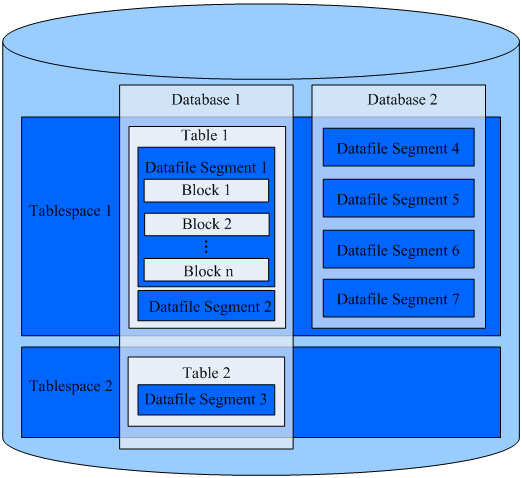
- Tablespace,即表空间,是一个目录,可以存在多个,里面存储的是它所包含的数据库的各种物理文件。每个表空间可以对应多个Database。
- Database,即数据库,用于管理各类数据对象,各数据库间相互隔离。数据库管理的对象可分布在多个Tablespace上。
- Datafile Segment,即数据文件,通常每张表只对应一个数据文件。如果某张表的数据大于1GB,则会分为多个数据文件存储。
- Table,即表,每张表只能属于一个数据库,也只能对应到一个Tablespace。每张表对应的数据文件必须在同一个Tablespace中。
- Block,即数据块,是数据库管理的基本单位,默认大小为8KB。
通过使用表空间,管理员可以控制一个数据库安装的磁盘布局。这样有以下优点:
如果初始化数据库所在的分区或者卷空间已满,又不能逻辑上扩展更多空间,可以在不同的分区上创建和使用表空间,直到系统重新配置空间。
表空间允许管理员根据数据库对象的使用模式安排数据位置,从而提高性能。
一个频繁使用的索引可以放在性能稳定且运算速度较快的磁盘上,比如一种固态设备。
一个存储归档的数据,很少使用的或者对性能要求不高的表可以存储在一个运算速度较慢的磁盘上。
管理员通过表空间可以设置占用的磁盘空间。用以在和其他数据共用分区的时候,防止表空间占用相同分区上的其他空间。
表空间可以控制数据库数据占用的磁盘空间,当表空间所在磁盘的使用率达到90%时,数据库将被设置为只读模式,当磁盘使用率降到90%以下时,数据库将恢复到读写模式。
表空间对应于一个文件系统目录,采用如下命令创建一个对应/pg_location/mount1/path1的表空间,并指定最大可使用空间为500GB。
–创建表空间。
CREATE TABLESPACE ds_location1 RELATIVE LOCATION ‘/pg_location/mount1/path1’ MAXSIZE ‘500G’;
通过MAXSIZE进行表空间配额管理对并发插入性能可能会有30%左右的影响,MAXSIZE指定每个DN的配额大小,每个DN实际的表空间容量和配额误差在500MB以内。请根据实际的情况确认是否需要设置表空间的最大值。
openGauss 自带了两个表空间:pg_default和pg_global。
表空间pg_default:用来存储系统目录对象、用户表、用户表index、和临时表、临时表index、内部临时表的默认空间。对应存储目录为实例数据目录下的base目录。
表空间pg_global:用来存放系统字典表。对应存储目录为实例数据目录下的global目录。
二、测试练习
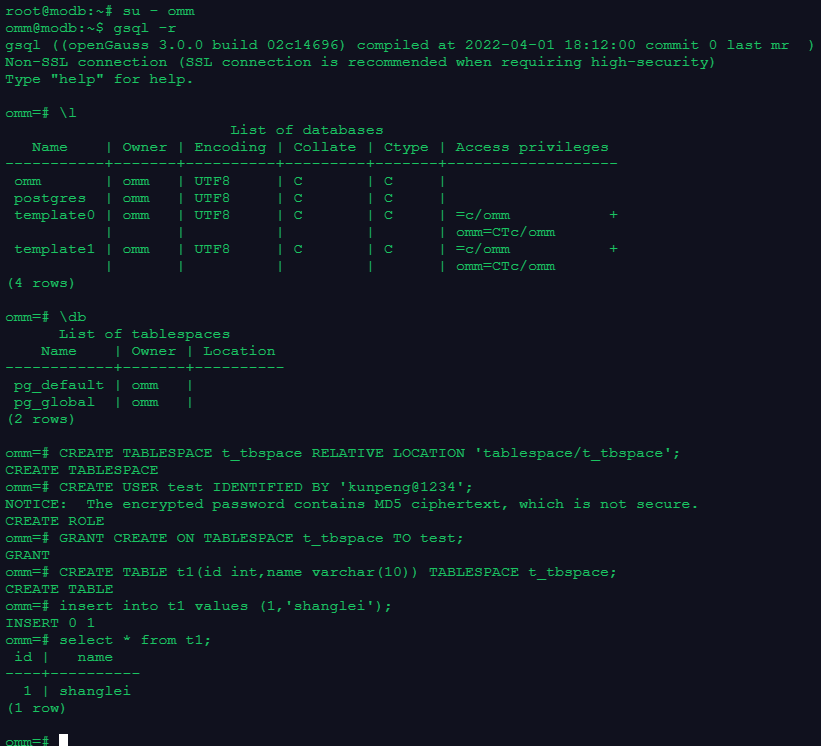
2.1 创建并使用表空间
root@modb:~# su - omm
omm@modb:~$ gsql -r
gsql ((openGauss 3.0.0 build 02c14696) compiled at 2022-04-01 18:12:00 commit 0 last mr  )
Non-SSL connection (SSL connection is recommended when requiring high-security)
Type "help" for help.

-- 查看当前存在的数据库
omm=# \l
                         List of databases
   Name    | Owner | Encoding | Collate | Ctype | Access privileges
-----------+-------+----------+---------+-------+-------------------
 omm       | omm   | UTF8     | C       | C     |
 postgres  | omm   | UTF8     | C       | C     |
 template0 | omm   | UTF8     | C       | C     | =c/omm           +
           |       |          |         |       | omm=CTc/omm
 template1 | omm   | UTF8     | C       | C     | =c/omm           +
           |       |          |         |       | omm=CTc/omm
(4 rows)

-- 查看当前存在哪些表空间
omm=# \db
      List of tablespaces
    Name    | Owner | Location
------------+-------+----------
 pg_default | omm   |
 pg_global  | omm   |
(2 rows)

-- 创建表空间t_tbspace
omm=# CREATE TABLESPACE t_tbspace RELATIVE LOCATION 'tablespace/t_tbspace';
CREATE TABLESPACE

omm=# CREATE USER test IDENTIFIED BY 'kunpeng@1234';
NOTICE:  The encrypted password contains MD5 ciphertext, which is not secure.
CREATE ROLE
-- 为用户授权使用t_tbspace表空间
omm=# GRANT CREATE ON TABLESPACE t_tbspace TO test;
GRANT
omm=# CREATE TABLE t1(id int,name varchar(10)) TABLESPACE t_tbspace;
CREATE TABLE
omm=# insert into t1 values (1,'shanglei');
INSERT 0 1
omm=# select * from t1;
 id |   name
----+----------
  1 | shanglei
(1 row)
2.2 查看表空间oid和大小
omm=# select oid,* from pg_tablespace ;
  oid  |  spcname   | spcowner |         spcacl         | spcoptions | spcmaxsize | relative
-------+------------+----------+------------------------+------------+------------+----------
  1663 | pg_default |       10 |                        |            |            | f
  1664 | pg_global  |       10 |                        |            |            | f
 16389 | t_tbspace  |       10 | {omm=C/omm,test=C/omm} |            |            | t
(3 rows)

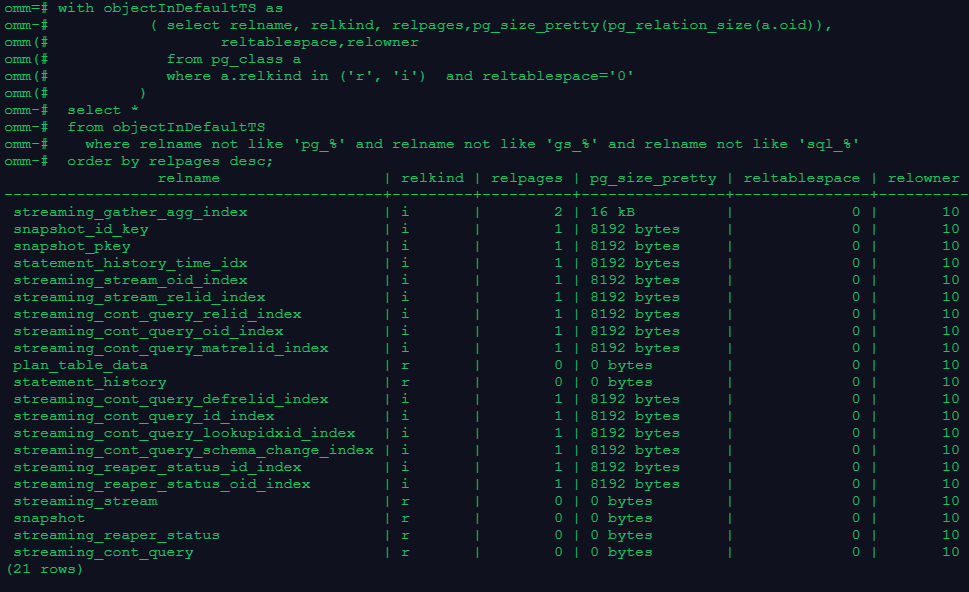
2.3 查看数据库默认表空间对象
omm=# with objectInDefaultTS as
omm-#           ( select relname, relkind, relpages,pg_size_pretty(pg_relation_size(a.oid)),
omm(#                   reltablespace,relowner
omm(#             from pg_class a
omm(#             where a.relkind in ('r', 'i')  and reltablespace='0'
omm(#          )
omm-#  select *
omm-#  from objectInDefaultTS
omm-#    where relname not like 'pg_%' and relname not like 'gs_%' and relname not like 'sql_%'
omm-#  order by relpages desc;
                 relname                  | relkind | relpages | pg_size_pretty | reltablespace | relowner
------------------------------------------+---------+----------+----------------+---------------+----------
 streaming_gather_agg_index               | i       |        2 | 16 kB          |             0 |       10
 snapshot_id_key                          | i       |        1 | 8192 bytes     |             0 |       10
 snapshot_pkey                            | i       |        1 | 8192 bytes     |             0 |       10
 statement_history_time_idx               | i       |        1 | 8192 bytes     |             0 |       10
 streaming_stream_oid_index               | i       |        1 | 8192 bytes     |             0 |       10
 streaming_stream_relid_index             | i       |        1 | 8192 bytes     |             0 |       10
 streaming_cont_query_relid_index         | i       |        1 | 8192 bytes     |             0 |       10
 streaming_cont_query_oid_index           | i       |        1 | 8192 bytes     |             0 |       10
 streaming_cont_query_matrelid_index      | i       |        1 | 8192 bytes     |             0 |       10
 plan_table_data                          | r       |        0 | 0 bytes        |             0 |       10
 statement_history                        | r       |        0 | 0 bytes        |             0 |       10
 streaming_cont_query_defrelid_index      | i       |        1 | 8192 bytes     |             0 |       10
 streaming_cont_query_id_index            | i       |        1 | 8192 bytes     |             0 |       10
 streaming_cont_query_lookupidxid_index   | i       |        1 | 8192 bytes     |             0 |       10
 streaming_cont_query_schema_change_index | i       |        1 | 8192 bytes     |             0 |       10
 streaming_reaper_status_id_index         | i       |        1 | 8192 bytes     |             0 |       10
 streaming_reaper_status_oid_index        | i       |        1 | 8192 bytes     |             0 |       10
 streaming_stream                         | r       |        0 | 0 bytes        |             0 |       10
 snapshot                                 | r       |        0 | 0 bytes        |             0 |       10
 streaming_reaper_status                  | r       |        0 | 0 bytes        |             0 |       10
 streaming_cont_query                     | r       |        0 | 0 bytes        |             0 |       10
(21 rows)
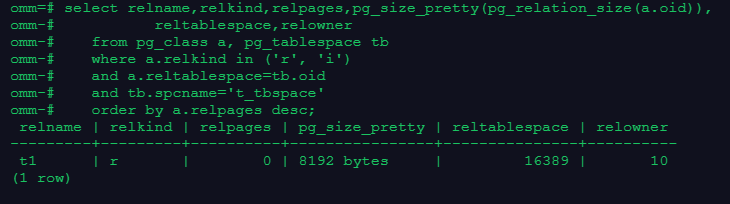
2.4 查看非默认表空间对象
omm=# select relname,relkind,relpages,pg_size_pretty(pg_relation_size(a.oid)),
omm-#           reltablespace,relowner
omm-#    from pg_class a, pg_tablespace tb
omm-#    where a.relkind in ('r', 'i')
omm-#    and a.reltablespace=tb.oid
omm-#    and tb.spcname='t_tbspace'
omm-#    order by a.relpages desc;
 relname | relkind | relpages | pg_size_pretty | reltablespace | relowner
---------+---------+----------+----------------+---------------+----------
 t1      | r       |        0 | 8192 bytes     |         16389 |       10
(1 row)
--可以看到在非默认表空间t_tbspace上有之前创建的t1表对象
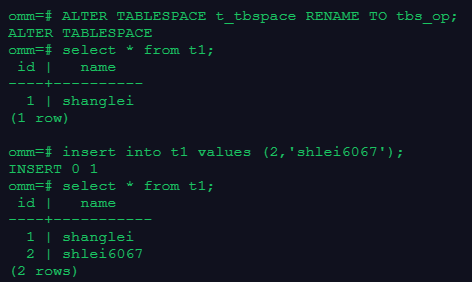
2.5 重命名自定义表空间
omm=# ALTER TABLESPACE t_tbspace RENAME TO tbs_op;
ALTER TABLESPACE
omm=# select * from t1;
 id |   name
----+----------
  1 | shanglei
(1 row)

omm=# insert into t1 values (2,'shlei6067');
INSERT 0 1
omm=# select * from t1;
 id |   name
----+-----------
  1 | shanglei
  2 | shlei6067
(2 rows)
-- 可以看到重命名表空间后,表空间上的对象依然可以查到
-- 重命名表空间,原表空间所对应的目录并未被改变,仍然是 t_tbspace
2.6 删除表空间
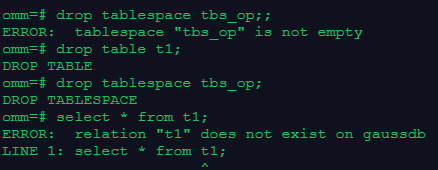
omm=# drop tablespace tbs_op;;
ERROR:  tablespace "tbs_op" is not empty
omm=# drop table t1;
DROP TABLE
omm=# drop tablespace tbs_op;
DROP TABLESPACE
omm=# select * from t1;
ERROR:  relation "t1" does not exist on gaussdb
LINE 1: select * from t1;
                      ^
-- 删除表空间时,当表空间上有对象,是无法直接删除表空间
-- 当删除了表空间上对象后,可删除表空间
三、学习心得
表空间是数据库中一个很重要的对象,表空间上承载着表和索引等对象。当表空间损坏,会造成表空间上的对象不可用,数据库无法正常访问。
要保证数据库可靠性,生产环境中要对表和表空间及时醉倒备份,防止出现问题时可以进行恢复。
对于openGauss表空间的管理和使用,我前面有个专门的博客,通过实验整理了下openGauss表空间在管理方面的一些需注意的地方,链接地址是:https://www.modb.pro/db/570009 openGauss体系结构之表空间知识点总结(含常用语句亲测验证)
