



初始化TIDB集群
echo -n ‘oracle’ |base64
apiVersion: v1
kind: Secret
metadata:
  namespace: tidb-cluster
  name: tidb-secret
type: Opaque
data:
  root:4oCYb3JhY2xl4oCZ
kubectl apply -f tidb-secret.yaml -n tidb-cluster
kubectlget secret -n tidb-cluster可以看到tidb-secret已创建。
1.2 初始化TIDB数据库
1)创建初始化tidb-init.yaml
---
apiVersion: pingcap.com/v1alpha1
kind: TidbInitializer
metadata:
  name: tidb-init
  namespace:tidb-cluster
spec:
  image:tnir/mysqlclient
  #imagePullPolicy:IfNotPresent
  cluster:
    namespace:tidb-cluster
    name:detailed-tidb
  initSql: |-
    create database app;
  passwordSecret: tidb-secret
docker pull tnir/mysqlclient:latest
docker save -o mysqlclient-latest.tar tnir/mysqlclient:latest
docker load -i mysqlclient-latest.tar
kubectl apply -f tidb-init.yaml

kubectl get pods -n tidb-cluster

初始完后,pod状态会变成Completed。
访问TIDB数据库
1) 查看对外暴露端口
kubectl get svc -n tidb-cluster

mysql -uroot -p -h10.96.200.242 -P4000
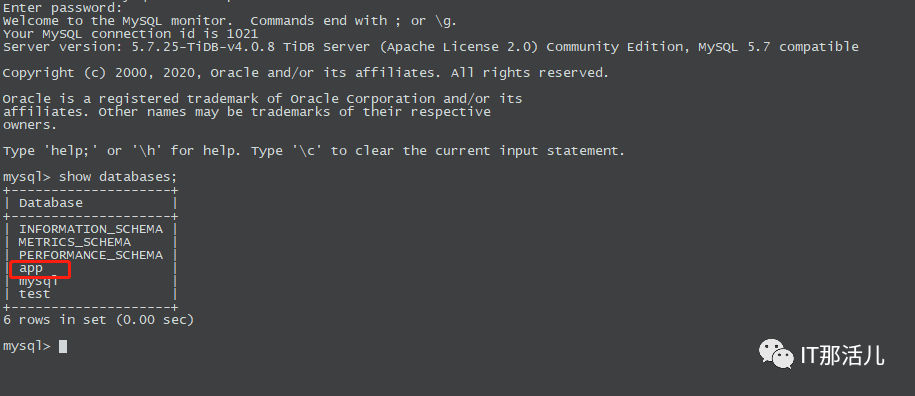
至此K8S+TIDB搭建完成。
踩坑点
1)现象
info: failedto connectto detailed-tidb:4000,sleep 1 second then retry
info: failedto connectto detailed-tidb:4000,sleep 1 second then retry
info: failedto connectto detailed-tidb:4000,sleep 1 second then retry
Errorfrom server (BadRequest): container “mysql-client” in
pod “k8s-staging-local-pv-tidb-initializer-6p8gg”is
waitingto start: PodInitializing
Events:
Type Reason Age From Message
Normal Scheduled48s default-scheduler Successfully assigned k8s-staging-local-pv/k8s-staging-local-pv-tidb-initializer-6p8gg to node-101359-dskbper6.kscn
Normal Pulled47s kubelet Container image “tnir/mysqlclient” already present on machine
Normal Created47s kubelet Created container wait
Normal Started47s kubelet Started container wait
2)解决

本文作者:阮飞鹏(上海新炬中北团队)
本文来源:“IT那活儿”公众号

文章转载自IT那活儿,如果涉嫌侵权,请发送邮件至:contact@modb.pro进行举报,并提供相关证据,一经查实,墨天轮将立刻删除相关内容。
