



一、学习目标
本次是openGauss每日一练实训课程的第12课,今天早上看到有人在课程群里反馈本节课的内容有些难度,早上因为在忙别的,所以也没有仔细去看本节课的学习内容。
下午抽出时间看了下今天的课程,才明白早上一些人所说的难应该是对本节课里所描述的模式搜索路径的理解较难。在Oracle里对于搜索路径常常是描述SQL的执行计划,比如一个SQL的执行计划该走索引还是全表扫等。
数据库里的模式指的就是英文的schema,比如Oracle里可以按照业务逻辑的不同将不同的表存放在不同的schema下起到一定的隔离作用。对于模式搜索路径较简单的理解是当访问数据库里的对象(比如表),非限定名访问时数据库系统搜索表的路径及顺序,精确定位所访问的表位于哪个模式(schema)下,限定名方式访问表: 数据库.模式.表。
schema中文翻译为模式,通过管理schema,允许多个用户连接使用同一数据库而不相互干扰,可以将数据库对象组织成易于管理的逻辑组,同时便于将第三方应用添加到相应的schema下而不引起冲突。
openGuass官网对于模式搜索路径的注意事项有下面的描述:
- 通过未修饰的表名(名称中只含有表名,没有“schema名”)引用表时,系统会通过search_path(搜索路径)来判断该表是哪个schema下的表。pg_temp和pg_catalog始终会作为搜索路径顺序中的前两位,无论二者是否出现在search_path中,或者出现在search_path中的任何位置。search_path(搜索路径)是一个schema名列表,在其中找到的第一个表就是目标表,如果没有找到则报错。(某个表即使存在,如果它的schema不在search_path中,依然会查找失败)在搜索路径中的第一个schema叫做"当前schema"。它是搜索时查询的第一个schema,同时在没有声明schema名时,新创建的数据库对象会默认存放在该schema下。
- 每个数据库都包含一个pg_catalog schema,它包含系统表和所有内置数据类型、函数、操作符。pg_catalog是搜索路径中的一部分,始终在临时表所属的模式后面,并在search_path中所有模式的前面,即具有第二搜索优先级。这样确保可以搜索到数据库内置对象。如果用户需要使用和系统内置对象重名的自定义对象时,可以在操作自定义对象时带上自己的模式。
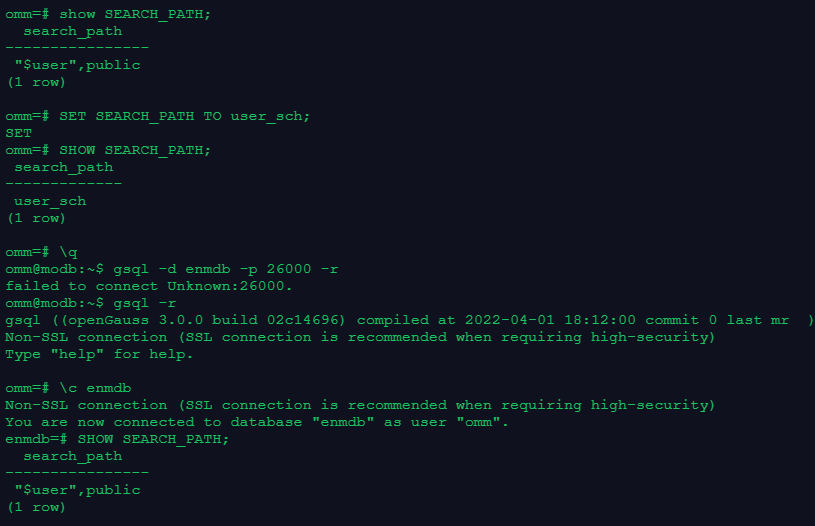
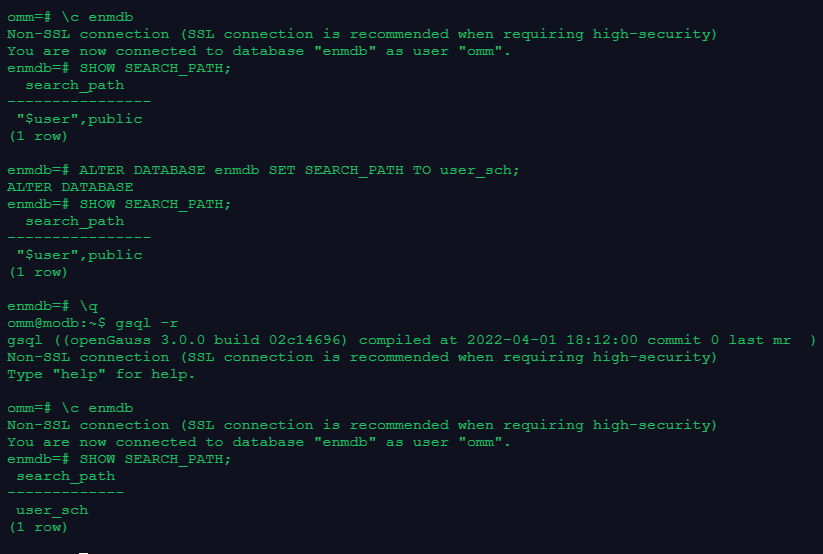
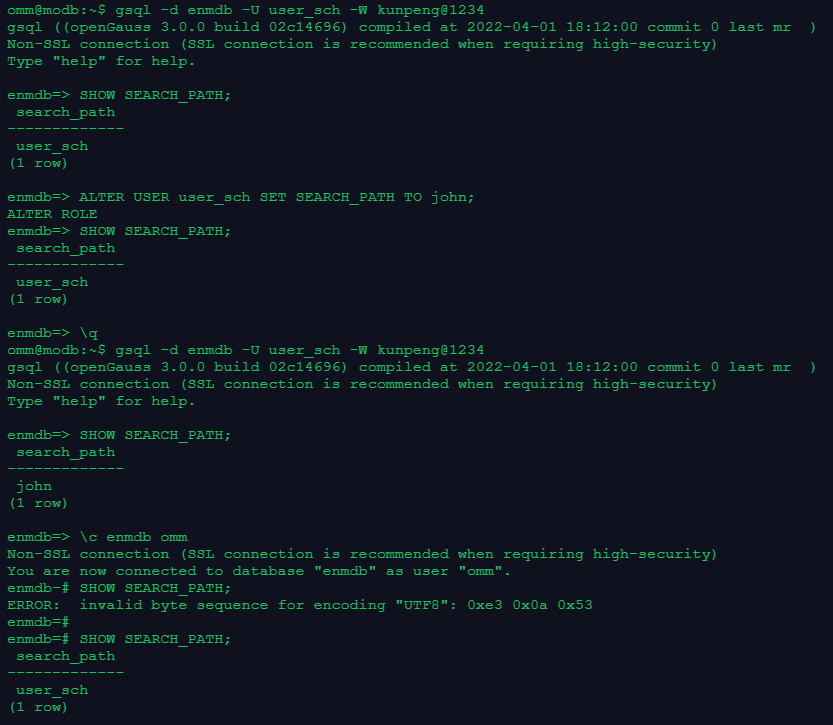
在设置模式搜路径时,会有会话级设置、数据库级别设置、用户级设置,会话级设置对于当前存在的活动会话有效,一旦退出该会话,设置的模式搜索路径失效,数据库级是对整个数据库级别进行设置,用户级设置是对当前用户生效,会话退出仍然生效,所有的会话都生效。会话级设置是通过SET SEARCH_PATH TO命令进行设置,数据库级设置是通过ALTER DATABASE xxx SET SEARCH_PATH TO进行设置,用户级设置是通过ALTER USER xxx SET SEARCH_PATH TO xxx。
会话级设置类似于Oracle的alter session set,数据库级设置类似于alter system set。
二、测试练习
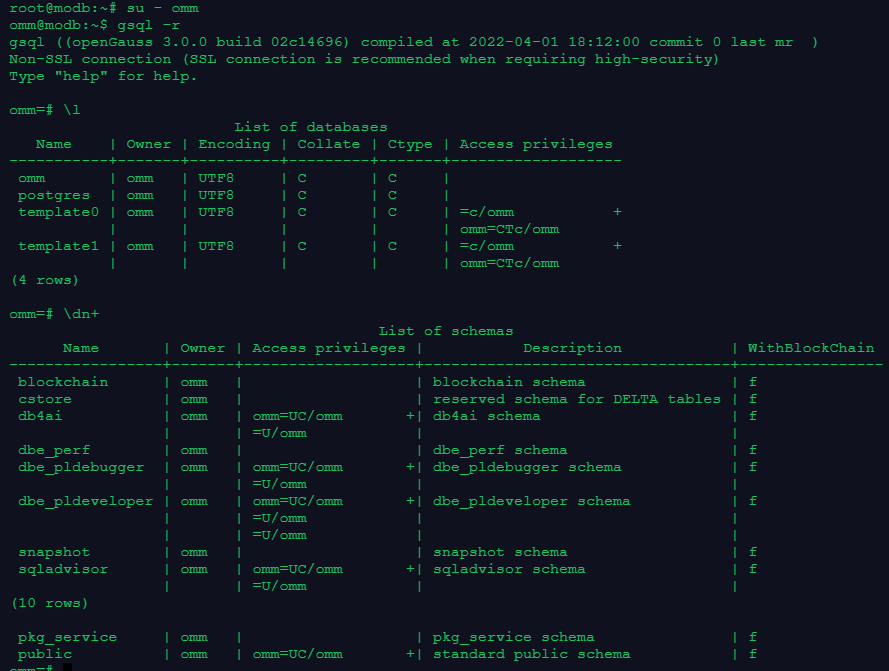
2.1 创建schema
root@modb:~# su - omm
omm@modb:~$ gsql -r
gsql ((openGauss 3.0.0 build 02c14696) compiled at 2022-04-01 18:12:00 commit 0 last mr  )
Non-SSL connection (SSL connection is recommended when requiring high-security)
Type "help" for help.

omm=# \l
                         List of databases
   Name    | Owner | Encoding | Collate | Ctype | Access privileges
-----------+-------+----------+---------+-------+-------------------
 omm       | omm   | UTF8     | C       | C     |
 postgres  | omm   | UTF8     | C       | C     |
 template0 | omm   | UTF8     | C       | C     | =c/omm           +
           |       |          |         |       | omm=CTc/omm
 template1 | omm   | UTF8     | C       | C     | =c/omm           +
           |       |          |         |       | omm=CTc/omm
(4 rows)

-- 查看当前数据库有哪些schema(模式)
omm=# \dn+
                                         List of schemas
      Name       | Owner | Access privileges |           Description            | WithBlockChain
-----------------+-------+-------------------+----------------------------------+----------------
 blockchain      | omm   |                   | blockchain schema                | f
 cstore          | omm   |                   | reserved schema for DELTA tables | f
 db4ai           | omm   | omm=UC/omm       +| db4ai schema                     | f
                 |       | =U/omm            |                                  |
 dbe_perf        | omm   |                   | dbe_perf schema                  | f
 dbe_pldebugger  | omm   | omm=UC/omm       +| dbe_pldebugger schema            | f
                 |       | =U/omm            |                                  |
 dbe_pldeveloper | omm   | omm=UC/omm       +| dbe_pldeveloper schema           | f
                 |       | =U/omm            |                                  |
                 |       | =U/omm            |                                  |
 snapshot        | omm   |                   | snapshot schema                  | f
 sqladvisor      | omm   | omm=UC/omm       +| sqladvisor schema                | f
                 |       | =U/omm            |                                  |
(10 rows)

 pkg_service     | omm   |                   | pkg_service schema               | f
 public          | omm   | omm=UC/omm       +| standard public schema           | f
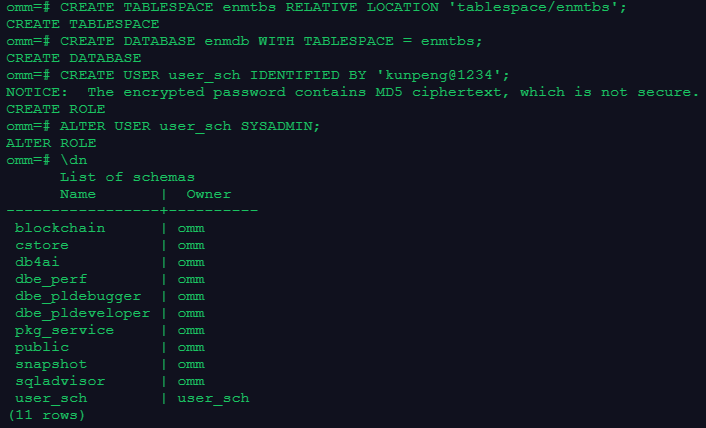
omm=# CREATE TABLESPACE enmtbs RELATIVE LOCATION 'tablespace/enmtbs';
CREATE TABLESPACE
omm=# CREATE DATABASE enmdb WITH TABLESPACE = enmtbs;
CREATE DATABASE
omm=# CREATE USER user_sch IDENTIFIED BY 'kunpeng@1234';
NOTICE:  The encrypted password contains MD5 ciphertext, which is not secure.
CREATE ROLE
omm=# ALTER USER user_sch SYSADMIN;
ALTER ROLE
omm=# \dn
      List of schemas
      Name       |  Owner
-----------------+----------
 blockchain      | omm
 cstore          | omm
 db4ai           | omm
 dbe_perf        | omm
 dbe_pldebugger  | omm
 dbe_pldeveloper | omm
 pkg_service     | omm
 public          | omm
 snapshot        | omm
 sqladvisor      | omm
 user_sch        | user_sch
(11 rows)
-- 可以看到当创建一个用户时,基默认创建了和该用户同名的schema(模式)。
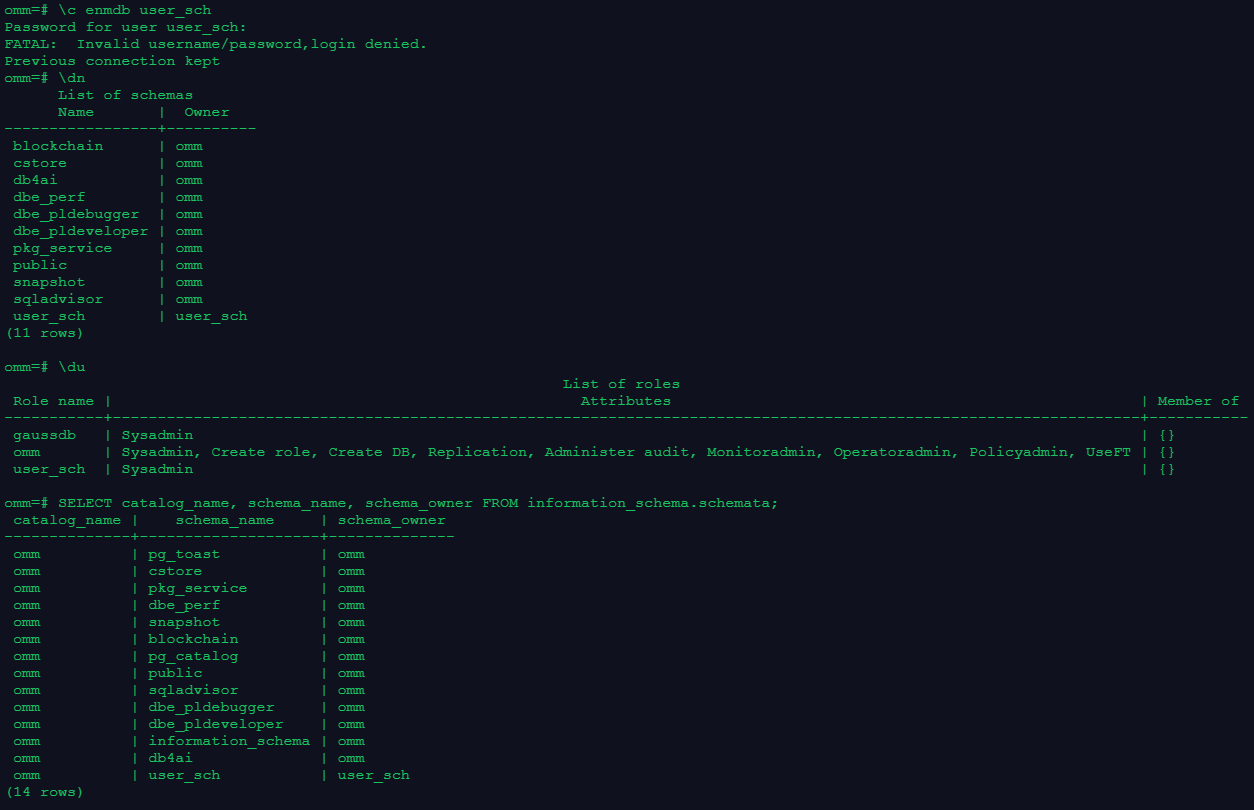
-- 使用 user_sch用户切换到enmdb 数据库
omm=# \c enmdb user_sch
Password for user user_sch:
FATAL:  Invalid username/password,login denied.
Previous connection kept
-- 查询当前数据库下有哪些schema(模式)
omm=# \dn
      List of schemas
      Name       |  Owner
-----------------+----------
 blockchain      | omm
 cstore          | omm
 db4ai           | omm
 dbe_perf        | omm
 dbe_pldebugger  | omm
 dbe_pldeveloper | omm
 pkg_service     | omm
 public          | omm
 snapshot        | omm
 sqladvisor      | omm
 user_sch        | user_sch
(11 rows)

-- 查看当前数据库下有哪些用户
omm=# \du
                                                              List of roles
 Role name |                                                    Attributes                                                    | Member of
-----------+------------------------------------------------------------------------------------------------------------------+-----------
 gaussdb   | Sysadmin                                                                                                         | {}
 omm       | Sysadmin, Create role, Create DB, Replication, Administer audit, Monitoradmin, Operatoradmin, Policyadmin, UseFT | {}
 user_sch  | Sysadmin                                                                                                         | {}

-- 使用SQL语句查询当前数据库下有哪些schema。
omm=# SELECT catalog_name, schema_name, schema_owner FROM information_schema.schemata;
 catalog_name |    schema_name     | schema_owner
--------------+--------------------+--------------
 omm          | pg_toast           | omm
 omm          | cstore             | omm
 omm          | pkg_service        | omm
 omm          | dbe_perf           | omm
 omm          | snapshot           | omm
 omm          | blockchain         | omm
 omm          | pg_catalog         | omm
 omm          | public             | omm
 omm          | sqladvisor         | omm
 omm          | dbe_pldebugger     | omm
 omm          | dbe_pldeveloper    | omm
 omm          | information_schema | omm
 omm          | db4ai              | omm
 omm          | user_sch           | user_sch
(14 rows)
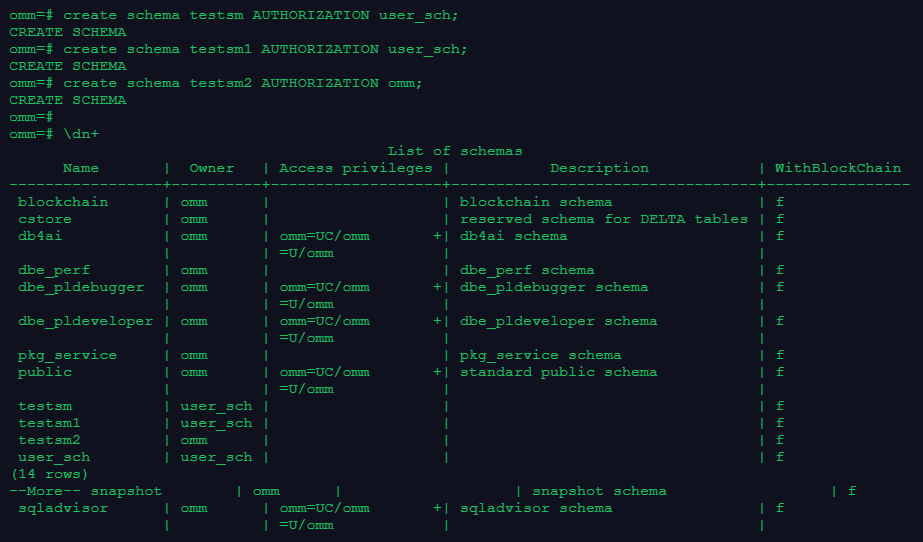
-- 因为user_sch被赋予了SYSADMIN权限,所以可以创建其它schema。
omm=# create schema testsm AUTHORIZATION user_sch;
CREATE SCHEMA
omm=# create schema testsm1 AUTHORIZATION user_sch;
CREATE SCHEMA
-- 创建schema testsm2 属于 omm系统用户
omm=# create schema testsm2 AUTHORIZATION omm;
CREATE SCHEMA
omm=#
-- 查看当前数据库下schema详细信息
omm=# \dn+
                                          List of schemas
      Name       |  Owner   | Access privileges |           Description            | WithBlockChain
-----------------+----------+-------------------+----------------------------------+----------------
 blockchain      | omm      |                   | blockchain schema                | f
 cstore          | omm      |                   | reserved schema for DELTA tables | f
 db4ai           | omm      | omm=UC/omm       +| db4ai schema                     | f
                 |          | =U/omm            |                                  |
 dbe_perf        | omm      |                   | dbe_perf schema                  | f
 dbe_pldebugger  | omm      | omm=UC/omm       +| dbe_pldebugger schema            | f
                 |          | =U/omm            |                                  |
 dbe_pldeveloper | omm      | omm=UC/omm       +| dbe_pldeveloper schema           | f
                 |          | =U/omm            |                                  |
 pkg_service     | omm      |                   | pkg_service schema               | f
 public          | omm      | omm=UC/omm       +| standard public schema           | f
                 |          | =U/omm            |                                  |
 testsm          | user_sch |                   |                                  | f
 testsm1         | user_sch |                   |                                  | f
 testsm2         | omm      |                   |                                  | f
 user_sch        | user_sch |                   |                                  | f
(14 rows)
--More-- snapshot        | omm      |                   | snapshot schema                  | f
 sqladvisor      | omm      | omm=UC/omm       +| sqladvisor schema                | f
                 |          | =U/omm            |                                  |
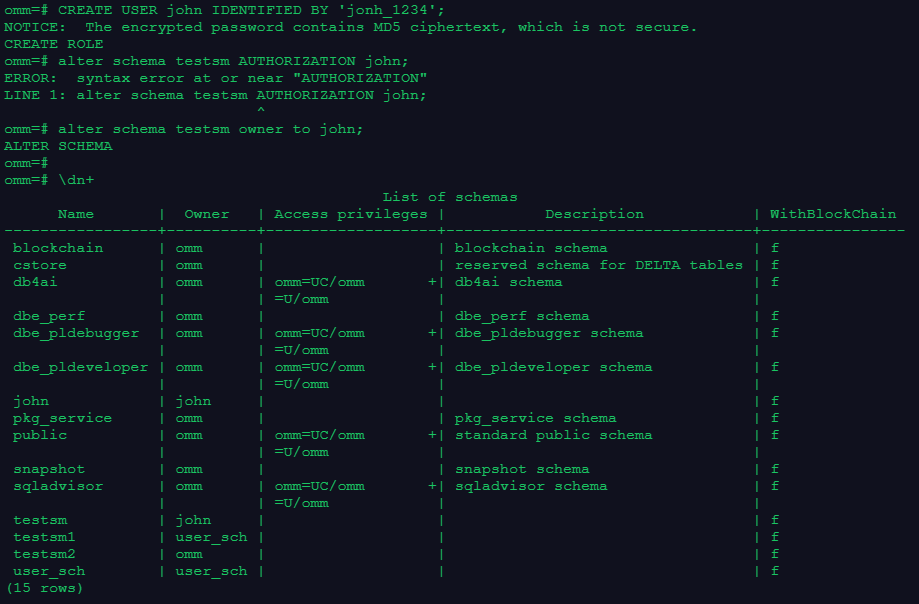
2.2 修改模式属主
-- 创建一个新用户john
omm=# CREATE USER john IDENTIFIED BY 'jonh_1234';
NOTICE:  The encrypted password contains MD5 ciphertext, which is not secure.
CREATE ROLE
omm=# alter schema testsm AUTHORIZATION john;
ERROR:  syntax error at or near "AUTHORIZATION"
LINE 1: alter schema testsm AUTHORIZATION john;
                            ^
-- 通过以下命令将模式testsm属主从user_sch修改为john。
omm=# alter schema testsm owner to john;
ALTER SCHEMA
omm=#
omm=# \dn+
                                          List of schemas
      Name       |  Owner   | Access privileges |           Description            | WithBlockChain
-----------------+----------+-------------------+----------------------------------+----------------
 blockchain      | omm      |                   | blockchain schema                | f
 cstore          | omm      |                   | reserved schema for DELTA tables | f
 db4ai           | omm      | omm=UC/omm       +| db4ai schema                     | f
                 |          | =U/omm            |                                  |
 dbe_perf        | omm      |                   | dbe_perf schema                  | f
 dbe_pldebugger  | omm      | omm=UC/omm       +| dbe_pldebugger schema            | f
                 |          | =U/omm            |                                  |
 dbe_pldeveloper | omm      | omm=UC/omm       +| dbe_pldeveloper schema           | f
                 |          | =U/omm            |                                  |
 john            | john     |                   |                                  | f
 pkg_service     | omm      |                   | pkg_service schema               | f
 public          | omm      | omm=UC/omm       +| standard public schema           | f
                 |          | =U/omm            |                                  |
 snapshot        | omm      |                   | snapshot schema                  | f
 sqladvisor      | omm      | omm=UC/omm       +| sqladvisor schema                | f
                 |          | =U/omm            |                                  |
 testsm          | john     |                   |                                  | f
 testsm1         | user_sch |                   |                                  | f
 testsm2         | omm      |                   |                                  | f
 user_sch        | user_sch |                   |                                  | f
(15 rows)
2.3 重命名模式
-- 查看当前模式
omm=# \dn
      List of schemas
      Name       |  Owner
-----------------+----------
 blockchain      | omm testsm2         | omm
 user_sch        | user_sch
 cstore          | omm
 db4ai           | omm
 dbe_perf        | omm
 dbe_pldebugger  | omm
 dbe_pldeveloper | omm
 john            | john
 pkg_service     | omm
 public          | omm
 snapshot        | omm
 sqladvisor      | omm
 testsm          | john
 testsm1         | user_sch

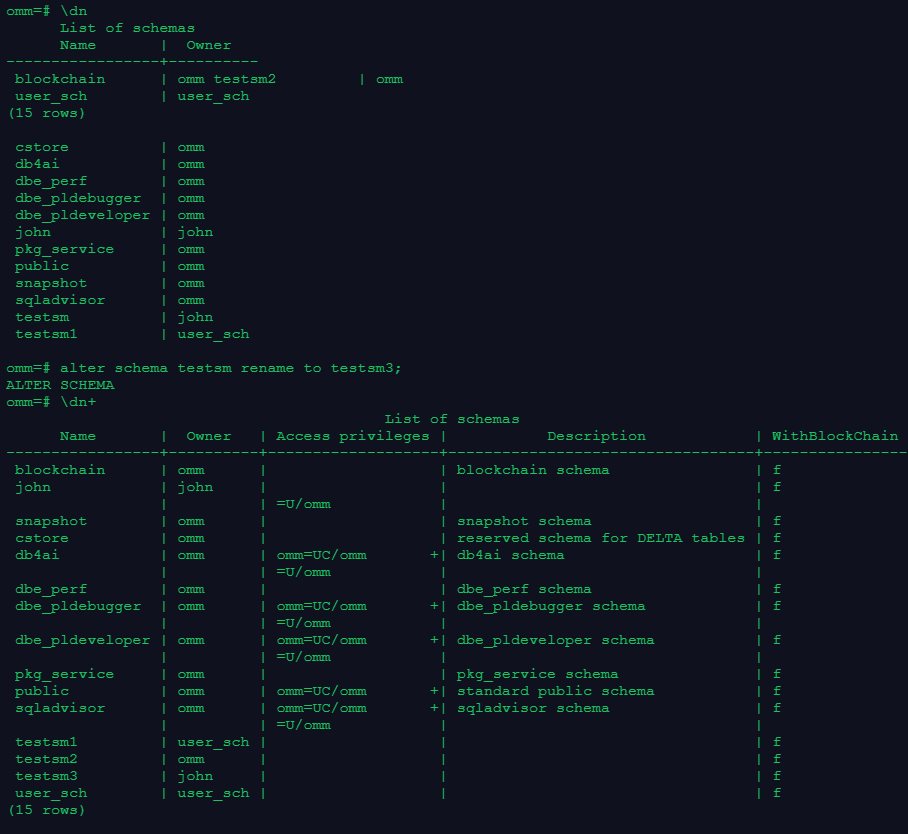
-- 重命名模式testsm为testsm3
omm=# alter schema testsm rename to testsm3;
ALTER SCHEMA
omm=# \dn+
                                          List of schemas
      Name       |  Owner   | Access privileges |           Description            | WithBlockChain
-----------------+----------+-------------------+----------------------------------+----------------
 blockchain      | omm      |                   | blockchain schema                | f
 john            | john     |                   |                                  | f
                 |          | =U/omm            |                                  |
 snapshot        | omm      |                   | snapshot schema                  | f
 cstore          | omm      |                   | reserved schema for DELTA tables | f
 db4ai           | omm      | omm=UC/omm       +| db4ai schema                     | f
                 |          | =U/omm            |                                  |
 dbe_perf        | omm      |                   | dbe_perf schema                  | f
 dbe_pldebugger  | omm      | omm=UC/omm       +| dbe_pldebugger schema            | f
                 |          | =U/omm            |                                  |
 dbe_pldeveloper | omm      | omm=UC/omm       +| dbe_pldeveloper schema           | f
                 |          | =U/omm            |                                  |
 pkg_service     | omm      |                   | pkg_service schema               | f
 public          | omm      | omm=UC/omm       +| standard public schema           | f
 sqladvisor      | omm      | omm=UC/omm       +| sqladvisor schema                | f
                 |          | =U/omm            |                                  |
 testsm1         | user_sch |                   |                                  | f
 testsm2         | omm      |                   |                                  | f
 testsm3         | john     |                   |                                  | f
 user_sch        | user_sch |                   |                                  | f
(15 rows)
2.4 会话级设置模式搜索路径
-- 查询当前模式搜索路径
omm=# show SEARCH_PATH;
  search_path
----------------
 "$user",public
(1 row)

-- 会话级设置默认搜索路径为user_sch
omm=# SET SEARCH_PATH TO user_sch;
SET
-- 查看修改后的模式搜索路径
omm=# SHOW SEARCH_PATH;
 search_path
-------------
 user_sch
(1 row)

omm=# \q
omm@modb:~$ gsql -d enmdb -p 26000 -r
failed to connect Unknown:26000.
omm@modb:~$ gsql -r
gsql ((openGauss 3.0.0 build 02c14696) compiled at 2022-04-01 18:12:00 commit 0 last mr  )
Non-SSL connection (SSL connection is recommended when requiring high-security)
Type "help" for help.

omm=# \c enmdb
Non-SSL connection (SSL connection is recommended when requiring high-security)
You are now connected to database "enmdb" as user "omm".
-- 会话退出后重新登陆查询搜索路径已修改为之前默认搜索路径
enmdb=# SHOW SEARCH_PATH;
  search_path
----------------
 "$user",public
(1 row)
2.5 数据库级修改模式搜索路径
omm=# \c enmdb
Non-SSL connection (SSL connection is recommended when requiring high-security)
You are now connected to database "enmdb" as user "omm".
enmdb=# SHOW SEARCH_PATH;
  search_path
----------------
 "$user",public
(1 row)

-- 数据库级修改模式搜索路径
enmdb=# ALTER DATABASE enmdb SET SEARCH_PATH TO user_sch;
ALTER DATABASE
enmdb=# SHOW SEARCH_PATH;
  search_path
----------------
 "$user",public
(1 row)

enmdb=# \q
omm@modb:~$ gsql -r
gsql ((openGauss 3.0.0 build 02c14696) compiled at 2022-04-01 18:12:00 commit 0 last mr  )
Non-SSL connection (SSL connection is recommended when requiring high-security)
Type "help" for help.

omm=# \c enmdb
Non-SSL connection (SSL connection is recommended when requiring high-security)
You are now connected to database "enmdb" as user "omm".
-- 会话退出后,原数据库级设置的模式搜索路径仍生效
enmdb=# SHOW SEARCH_PATH;
 search_path
-------------
 user_sch
(1 row)
2.6 用户级设置模式搜索路径
omm@modb:~$ gsql -d enmdb -U user_sch -W kunpeng@1234
gsql ((openGauss 3.0.0 build 02c14696) compiled at 2022-04-01 18:12:00 commit 0 last mr  )
Non-SSL connection (SSL connection is recommended when requiring high-security)
Type "help" for help.

enmdb=> SHOW SEARCH_PATH;
 search_path
-------------
 user_sch
(1 row)

-- 用户级修改模式搜索路径
enmdb=> ALTER USER user_sch SET SEARCH_PATH TO john;
ALTER ROLE
enmdb=> SHOW SEARCH_PATH;
 search_path
-------------
 user_sch
(1 row)

enmdb=> \q
omm@modb:~$ gsql -d enmdb -U user_sch -W kunpeng@1234
gsql ((openGauss 3.0.0 build 02c14696) compiled at 2022-04-01 18:12:00 commit 0 last mr  )
Non-SSL connection (SSL connection is recommended when requiring high-security)
Type "help" for help.

-- 会话退出重新登陆后之前设置的模式搜索路径仍然生效
enmdb=> SHOW SEARCH_PATH;
 search_path
-------------
 john
(1 row)
enmdb=> \c enmdb omm
Non-SSL connection (SSL connection is recommended when requiring high-security)
You are now connected to database "enmdb" as user "omm".
enmdb-# SHOW SEARCH_PATH;
ERROR:  invalid byte sequence for encoding "UTF8": 0xe3 0x0a 0x53
enmdb=#
-- 可以看到通过用户级设置的模式搜索路径仅对被设置用户有效,对整个数据库不生效
enmdb=# SHOW SEARCH_PATH;
 search_path
-------------
 user_sch
(1 row)
三、心得体会
对于openGauss的模式搜索路径,从Oracle等数据库转来的DBA对这块可能会有点难以适应,这块还是要加练习,并从项目中多加掌握。
