



openEuler2203发行版加入了openGauss2.1的rpm包,简化了安装过程,方便初学者入门。同时,系统的python 版本升级到了3.9.9,不兼容openGauss3.0以上要求的python3.7,要想体验openGauss3.1.0企业版,需要多次踩坑。下面记录一下过程,方便大家避坑。
1、操作系统安装
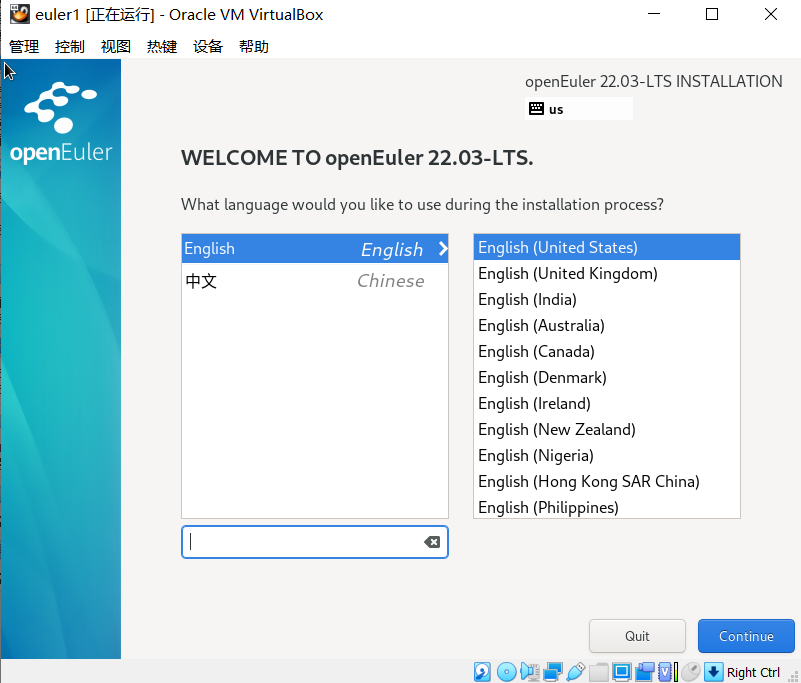
在VBOX6.1.40上新建虚拟机,安装选用英文
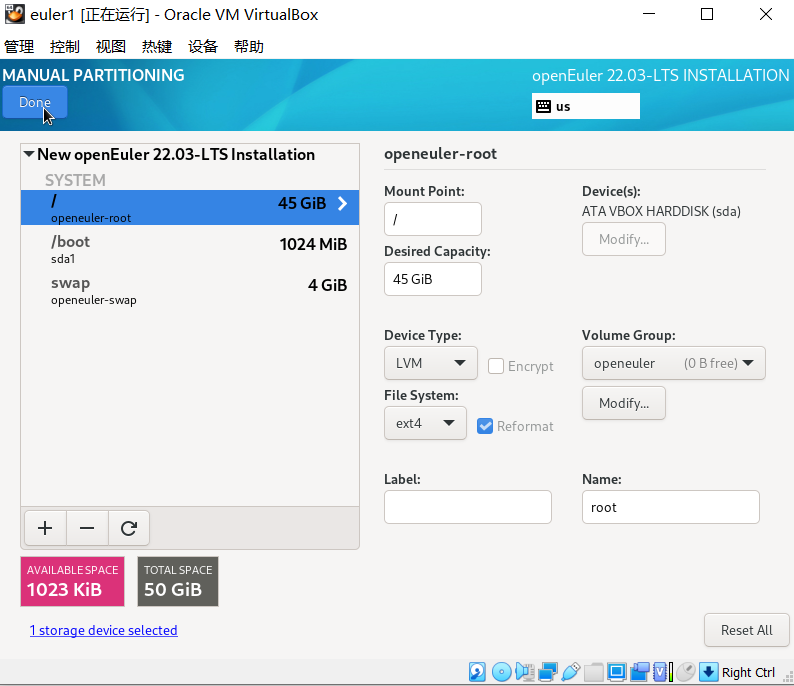
硬盘的分区情况
安装所需要的包,最小化安装加系统工具
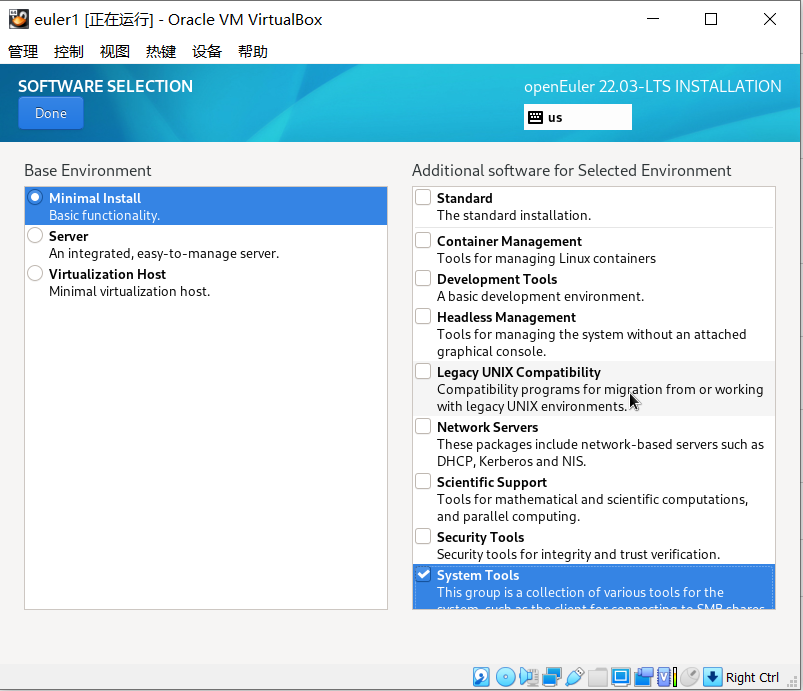
2.修改操作系统
查看操作系统版本
[root@eu1 srv]# cat /etc/os-release
NAME="openEuler"
VERSION="22.03 LTS"
ID="openEuler"
VERSION_ID="22.03"
PRETTY_NAME="openEuler 22.03 LTS"
ANSI_COLOR="0;31"
修改dnf,不受python版本降级影响
[root@eu1 ~]# head /usr/bin/dnf
#!/usr/bin/python3.9
关闭防火墙和交换内存
 systemctl stop firewalld
 systemctl disable firewalld
 swsapoff -a
修改selinux
sed -i 's/^SELINUX=.*/SELINUX=disabled/' /etc/selinux/config
修改资源限制
echo "* soft stack 3072" >> /etc/security/limits.conf
echo "* hard stack 3072" >> /etc/security/limits.conf
echo "* soft nofile 1000000" >> /etc/security/limits.conf
echo "* hard nofile 1000000" >> /etc/security/limits.conf
echo "* soft nproc unlimited" >> /etc/security/limits.d/90-nproc.conf
3.添加系统包
dnf -y install net-tools lsof bzip2 bison flex libaio-devel readline-devel vim ncurses-devel patch libnsl openeuler-lsb-core wget tar make automake autoconf libtool
dnf -y install gdbm-devel sqlite-devel uuid-devel libuuid libuuid-devel tk tk-devel expect texinfo gcc gcc-c++ glibc-devel
dnf -y install lksctp-tools  openssl-devel
4.安装libffi
操作系统中的libffi版本3.4.2,对应的动态库为libffi.so.8,与openGauss3.X不兼容,改为源码安装3.3
wget  https://github.com/libffi/libffi/archive/refs/tags/v3.3.tar.gz
tar xvf v3.3.tar.gz
cd libffi-3.3
./configure –prefix=/usr
make -j8
make install
安装后的库文件
[root@eu1 lib64]# ll libffi*
-rw-r--r--  1 root root 67K Sep 20 19:16 libffi.a
-rwxr-xr-x  1 root root 912 Sep 20 19:16 libffi.la
lrwxrwxrwx  1 root root  15 Sep 20 19:16 libffi.so -> libffi.so.7.1.0
lrwxrwxrwx  1 root root  15 Sep 20 19:16 libffi.so.7 -> libffi.so.7.1.0
-rwxr-xr-x  1 root root 54K Sep 20 19:16 libffi.so.7.1.0
lrwxrwxrwx. 1 root root  15 Mar 15  2022 libffi.so.8 -> libffi.so.8.1.0
-rwxr-xr-x. 1 root root 43K Mar 15  2022 libffi.so.8.1.0
5.安装python3.7
wget https://www.python.org/ftp/python/3.7.12/Python-3.7.12.tar.xz
tar xvf Python-3.7.12.tar.xz
cd Python-3.7.12.tar.xz
./configure --prefix=/opt/python3 --enable-shared --enable-optimizations CFLAGS=-fPIC
make -j8
make
整个过程大约一个小时左右
修改环境变量
echo "/opt/python3/bin">>/etc/profile
echo "/opt/python3/lib">>/etc/ld.so.conf.d/python3.conf
重启操作系统
6.安装openGauss 3.1
获取安装包
cd /srv
wget https://opengauss.obs.cn-south-1.myhuaweicloud.com/3.1.0/x86_openEuler/openGauss-3.1.0-openEuler-64bit-all.tar.gz
解压安装包
tar xvf  openGauss-3.1.0-openEuler-64bit-all.tar.gz
tar xvf  openGauss-3.1.0-openEuler-64bit.tar.bz2
tar xvf  openGauss-3.1.0-openEuler-64bit-om.tar.gz
用gs_chkeckos 设置必要的参数
script/gs_checkos -i B
确认已设置相关参数

编辑配置文件vim db.xml
<?xml version="1.0" encoding="UTF-8"?>
<ROOT>
    <!-- openGauss整体信息 -->
    <CLUSTER>
        <PARAM name="clusterName" value="Cluster" />
        <PARAM name="nodeNames" value="eu1" />

        <PARAM name="gaussdbAppPath" value="/opt/huawei/install/app" />
        <PARAM name="gaussdbLogPath" value="/var/log/omm" />
        <PARAM name="tmpMppdbPath" value="/opt/huawei/tmp"/>
        <PARAM name="gaussdbToolPath" value="/opt/huawei/install/om" />
        <PARAM name="corePath" value="/opt/huawei/corefile"/>
        <PARAM name="backIp1s" value="192.168.56.20"/>

    </CLUSTER>
    <!-- 每台服务器上的节点部署信息 -->
    <DEVICELIST>
        <!-- node1上的节点部署信息 -->
        <DEVICE sn="eu1">
            <PARAM name="name" value="eu1"/>
            <PARAM name="azName" value="AZ1"/>
            <PARAM name="azPriority" value="1"/>
            <!-- 如果服务器只有一个网卡可用,将backIP1和sshIP1配置成同一个IP -->
            <PARAM name="backIp1" value="192.168.56.20"/>
            <PARAM name="sshIp1" value="192.168.56.20"/>
       <!--dn-->
         <PARAM name="dataNum" value="1"/>
            <PARAM name="dataPortBase" value="26000"/>
            <PARAM name="dataNode1" value="/opt/huawei/install/data/dn"/>
        <PARAM name="dataNode1_syncNum" value="0"/>
        </DEVICE>
    </DEVICELIST>
</ROOT>
进行预安装
[root@eu1 srv]# script/gs_preinstall -X db.xml -U omm -G dbgrp
Warnging version of python doesnot meet the expection, maybe third-party libs need to be compiled by yourself
Warnging version of python doesnot meet the expection, maybe third-party libs need to be compiled by yourself
Parsing the configuration file.
Successfully parsed the configuration file.
Installing the tools on the local node.
Successfully installed the tools on the local node.
Setting host ip env
Successfully set host ip env.
Are you sure you want to create the user[omm] (yes/no)? yes
Please enter password for cluster user.
Password:
Please enter password for cluster user again.
Password:
[GAUSS-51103] : Failed to execute the PSSH command [encrypt ...].Error is:./encrypt: error while loading shared libraries: libreadline.so.7: cannot open shared object file: No such file or directory
没有找到这个库,建个软连接
ln -s /usr/lib64/libreadline.so.8 /usr/lib64/libreadline.so.7
预安装在/etc/profile写入相关变量,先清除这些变量
再进行预安装
[root@eu1 srv]# script/gs_preinstall -X db.xml -U omm -G dbgrp
Warnging version of python doesnot meet the expection, maybe third-party libs need to be compiled by yourself
Warnging version of python doesnot meet the expection, maybe third-party libs need to be compiled by yourself
Parsing the configuration file.
Successfully parsed the configuration file.
Installing the tools on the local node.
Successfully installed the tools on the local node.
Setting host ip env
Successfully set host ip env.
Are you sure you want to create the user[omm] (yes/no)? yes
Please enter password for cluster user.
Password:
Please enter password for cluster user again.
Password:
Generate cluster user password files successfully.

Successfully created [omm] user on all nodes.
Preparing SSH service.
Successfully prepared SSH service.
Checking OS software.
Successfully check os software.
Checking OS version.
Successfully checked OS version.
Creating cluster's path.
Successfully created cluster's path.
Set and check OS parameter.
Setting OS parameters.
Successfully set OS parameters.
Warning: Installation environment contains some warning messages.
Please get more details by "/srv/script/gs_checkos -i A -h euler --detail".
Set and check OS parameter completed.
Preparing CRON service.
Successfully prepared CRON service.
Setting user environmental variables.
Successfully set user environmental variables.
Setting the dynamic link library.
Successfully set the dynamic link library.
Setting Core file
Successfully set core path.
Setting pssh path
Successfully set pssh path.
Setting Cgroup.
Successfully set Cgroup.
Set ARM Optimization.
No need to set ARM Optimization.
Fixing server package owner.
Setting finish flag.
Successfully set finish flag.
Preinstallation succeeded.
顺利通过
修改文件权限
chown -R omm:dbgrp *
切换用户
su – omm
cd /srv
正式安装
[omm@eu1 srv]$ script/gs_install -X db.xml
Parsing the configuration file.
Check preinstall on every node.
Successfully checked preinstall on every node.
Creating the backup directory.
Successfully created the backup directory.
begin deploy..
Installing the cluster.
begin prepare Install Cluster..
Checking the installation environment on all nodes.
begin install Cluster..
Installing applications on all nodes.
Successfully installed APP.
begin init Instance..
encrypt cipher and rand files for database.
Please enter password for database:
Please repeat for database:
begin to create CA cert files
The sslcert will be generated in /opt/huawei/install/app/share/sslcert/om
NO cm_server instance, no need to create CA for CM.
Cluster installation is completed.
Configuring.
Deleting instances from all nodes.
Successfully deleted instances from all nodes.
Checking node configuration on all nodes.
Initializing instances on all nodes.
Updating instance configuration on all nodes.
Check consistence of memCheck and coresCheck on database nodes.
Configuring pg_hba on all nodes.
Configuration is completed.
Successfully started cluster.
Successfully installed application.
end deploy..
安装成功。
查询数据库状态
[omm@eu1 srv]$ gs_om -t status --detail
[   Cluster State   ]

cluster_state   : Normal
redistributing  : No
current_az      : AZ_ALL

[  Datanode State   ]

    node node_ip         port      instance                            state
--------------------------------------------------------------------------------------------
1  eu1 192.168.56.20   26000      6001 /opt/huawei/install/data/dn   P Primary Normal
登录测试
[omm@eu1 srv]$ gsql -d postgres -p26000
gsql ((openGauss 3.1.0 build 4e931f9a) compiled at 2022-09-29 14:19:46 commit 0 last mr  )
Non-SSL connection (SSL connection is recommended when requiring high-security)
Type "help" for help.

openGauss=# \l
                          List of databases
   Name    | Owner | Encoding  | Collate | Ctype | Access privileges
-----------+-------+-----------+---------+-------+-------------------
 postgres  | omm   | SQL_ASCII | C       | C     |
 template0 | omm   | SQL_ASCII | C       | C     | =c/omm           +
           |       |           |         |       | omm=CTc/omm
 template1 | omm   | SQL_ASCII | C       | C     | =c/omm           +
           |       |           |         |       | omm=CTc/omm
(3 rows)
最后修改时间:2022-12-06 15:34:26
「喜欢这篇文章,您的关注和赞赏是给作者最好的鼓励」
关注作者
【版权声明】本文为墨天轮用户原创内容,转载时必须标注文章的来源(墨天轮),文章链接,文章作者等基本信息,否则作者和墨天轮有权追究责任。如果您发现墨天轮中有涉嫌抄袭或者侵权的内容,欢迎发送邮件至:contact@modb.pro进行举报,并提供相关证据,一经查实,墨天轮将立刻删除相关内容。
