



1、登陆数据库【默认opengauss】
[root@enmoedu ~]# su - omm
Last login: Tue Dec  6 21:11:45 CST 2022 on pts/0
[omm@enmoedu ~]$
[omm@enmoedu ~]$ gs_om -t status --detail
[   Cluster State   ]

cluster_state   : Unavailable
redistributing  : No
current_az      : AZ_ALL

[  Datanode State   ]

    node   node_ip         port      instance                            state
----------------------------------------------------------------------------------------------
1  enmoedu 192.168.94.135  15400      6001 /opt/huawei/install/data/dn   P Primary Manually stopped
[omm@enmoedu ~]$
[omm@enmoedu ~]$ gs_om -t start
Starting cluster.
=========================================
[SUCCESS] enmoedu
2022-12-07 19:25:34.420 6390782c.1 [unknown] 140236102413376 [unknown] 0 dn_6001 01000  0 [BACKEND] WARNING:  could not create any HA TCP/IP sockets
2022-12-07 19:25:34.420 6390782c.1 [unknown] 140236102413376 [unknown] 0 dn_6001 01000  0 [BACKEND] WARNING:  could not create any HA TCP/IP sockets
2022-12-07 19:25:35.133 6390782c.1 [unknown] 140236102413376 [unknown] 0 dn_6001 01000  0 [BACKEND] WARNING:  Failed to initialize the memory protect for g_instance.attr.attr_storage.cstore_buffers (1024 Mbytes) or shared memory (1894 Mbytes) is larger.
=========================================
Successfully started.
[omm@enmoedu ~]$
2、查看
2.1)元命令\l,显示openGauss数据库集簇中,目前有哪些数据库
openGauss=# \l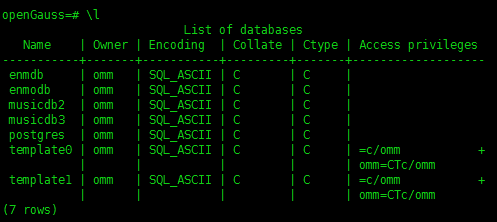
2.2)元命令\du,显示openGauss数据库集簇中,目前有哪些用户和角色
openGauss=# \du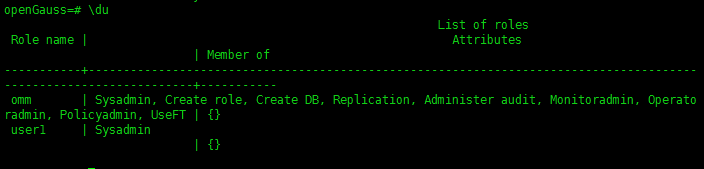
2.3)元命令\db,显示openGauss数据库集簇中,目前有哪些表空间
openGauss=# \db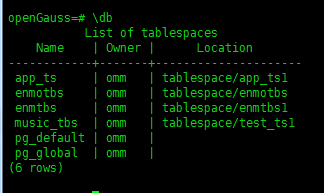
2.4)元命令\dn,显示当前数据库,有哪些数据库模式
enmodb=> \dn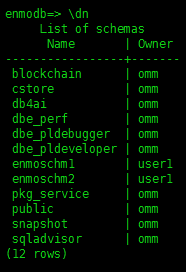
从以上信息,我们可以查看到数据库簇下面的数据库信息、表空间信息、用户信息等。
接下来,可以选择数据库enmodb,用户选择user1,即可登录
[omm@enmoedu ~]$ gsql -d enmodb -U user1 -W enmoedu@1234 -p 15400 -r
gsql ((openGauss 3.0.0 build 02c14696) compiled at 2022-04-01 18:12:34 commit 0 last mr  )
Non-SSL connection (SSL connection is recommended when requiring high-security)
Type "help" for help.

enmodb=>
3、创建表的时候定义列级约束
创建表的时候为表定义列级约束:在列级定义了primary key约束(id列)和not null约束(name列)。
drop table if exists test;
create table test(
   id bigint primary key,
 name varchar(50) not null,
  age  int);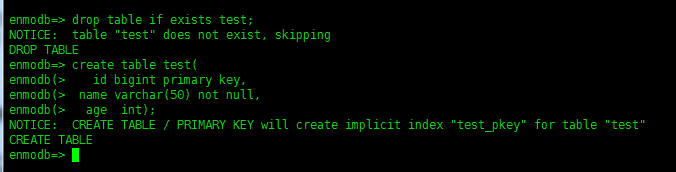
查看当前表test的信息【查看约束】
enmodb=> \d test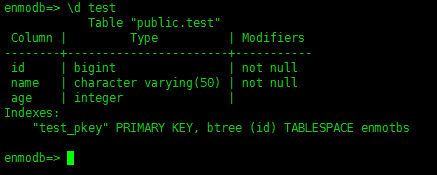
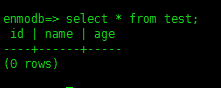
【查看数据】
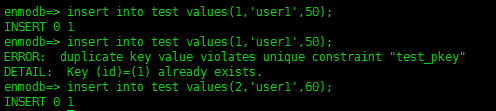
【插入数据】
insert into test values(1,'user1',50);
因为字段id、字段name均有约束not null,所以,存在约束的字段不能够插入重复的字段值。

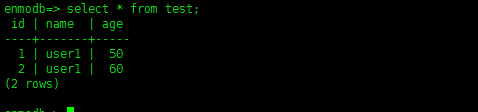
【查看数据】
4、创建表的时候定义表级约束
4.1)定义表级约束
#这里在表列级定义了primary key约束(id列),在列级定义了not null约束(name列)。
drop table if exists test001;
create table test001(
      id bigint,
      name varchar(50) not null,  -- 创建列级not null约束
      age  int,
      primary key(id) -- 创建表级约束);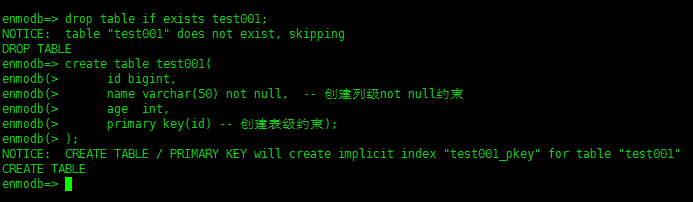
4.2)插入数据
insert into test001 values(1,'user1',50);
insert into test001 values(2,'user1',51);
insert into test001 values(3,'user1',52);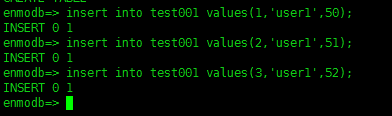
4.3)检索表
select * from test001;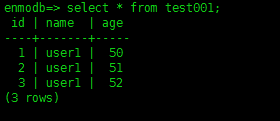
4.4)查看表test001的元数据信息
enmodb=> \d test001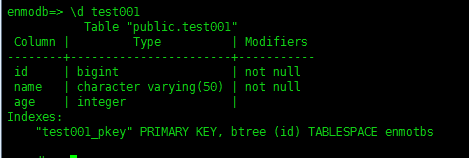
5、为表的属性定义默认值
执行SQL语句,在创建表的时候为表的某个列定义默认值
drop table if exists test002;
create table test002(
      id bigint,
      name varchar(28) not null,
      age  int default 20,  --  为该列定义默认值为20
      primary key(id)
);
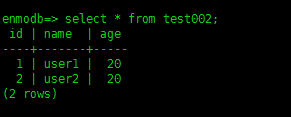
执行SQL insert语句,在向表test插入数据时,没有提供age列的值
insert into test002(id,name) values(1,'user1');
insert into test002(id,name) values(2,'user2');
insert into test002(id,name) values(3,'user3',23);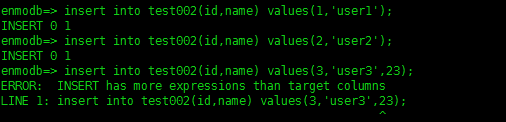
6、建表
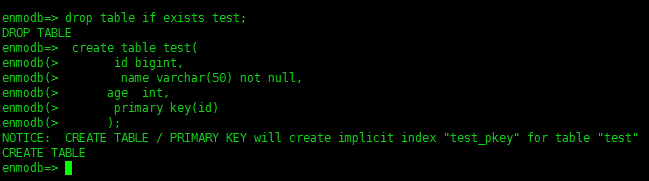
如果在创建表的时候,没有为某列定义默认值,缺省的默认值是空值null。
drop table if exists test;
 create table test(
        id bigint,
        name varchar(50) not null,
        age  int,
        primary key(id)
);
遵循主键唯一,主键不能重复,主键是id列。
插入数据
## enmodb=> insert into test(id,name) values(1,'user1');
INSERT 0 1
enmodb=> insert into test(id,name) values(1,'user1',102);##values的值比目标列的名称不对称,values值多,column列少
ERROR:  INSERT has more expressions than target columns
LINE 1: insert into test(id,name) values(1,'user1',102);

enmodb=> insert into test(id,name,age) values(1,'user1',102);##遵循主键唯一^
ERROR:  duplicate key value violates unique constraint "test_pkey"
DETAIL:  Key (id)=(1) already exists.
enmodb=> insert into test(id,name,age) values(2,'user1',102);
INSERT 0 1
enmodb=> select * from test;
 id | name  | age
----+-------+-----
  1 | user1 |
  2 | user1 | 102
(2 rows)

enmodb=> insert into test(id,name,age) values(3,'user1',103);
INSERT 0 1
enmodb=> insert into test(id,name,age) values(4,'user1');##column列多只,values值少
ERROR:  INSERT has more target columns than expressions
LINE 1: insert into test(id,name,age) values(4,'user1');
                                 ^
enmodb=> insert into test(id,name) values(4,'user1');
INSERT 0 1
##查看数据
enmodb=> select * from test;
 id | name  | age
----+-------+-----
  1 | user1 |
  2 | user1 | 102
  3 | user1 | 103
  4 | user1 |
(4 rows)

enmodb=>
创建表时使用自增数据类型
商品编号通常按顺序递增。这种情况可以使用serial数据类型。最简单方法直接使用serial数据类型。
##创建一个带有serial数据类型的测试表invoice:
drop table if exists invoice;
create table invoice(invoicenum serial NOT NULL,name varchar(20));
##为表invoice插入3条记录,并查看插入数据后的表的数据:
insert into invoice(name) values('user1');
insert into invoice(name) values('user2');
insert into invoice(name) values('user3');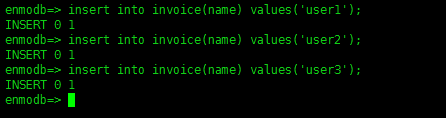
##可以看到每插入一条记录到表invoice后,列invoicenum的值会自增1。
select * from invoice;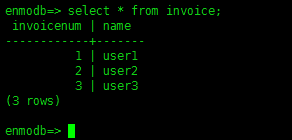
7、使用现有的表创建新表
创建视图
##执行下面的SQL语句,将创建新表,并且会将旧表的数据拷贝给新表:
DROP TABLE if exists newtestwithdata;
CREATE TABLE newtestwithdata AS SELECT * FROM invoice;
SELECT * FROM newtestwithdata;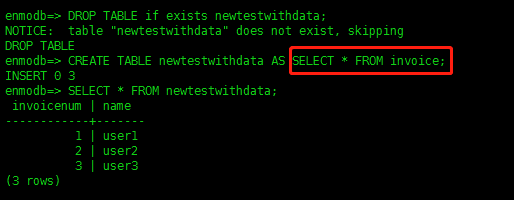
##执行下面的SQL语句,创建和旧表的表结构相同的新表,但是不会将旧表的数据拷贝给新表:
DROP TABLE if exists testnewwithoutdata;
CREATE TABLE testnewwithoutdata AS SELECT * FROM invoice WHERE 1=2;
SELECT * FROM testnewwithoutdata;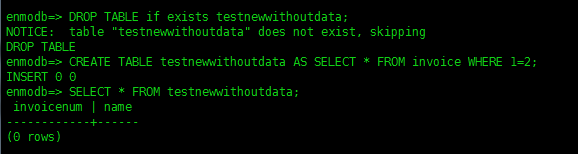
解说:where 1=2 ,含义:仅创建表结构。
最后修改时间:2022-12-07 20:37:54
「喜欢这篇文章,您的关注和赞赏是给作者最好的鼓励」
关注作者
【版权声明】本文为墨天轮用户原创内容,转载时必须标注文章的来源(墨天轮),文章链接,文章作者等基本信息,否则作者和墨天轮有权追究责任。如果您发现墨天轮中有涉嫌抄袭或者侵权的内容,欢迎发送邮件至:contact@modb.pro进行举报,并提供相关证据,一经查实,墨天轮将立刻删除相关内容。
