



1、登陆数据库
- 切换用户
[root@enmoedu ~]# su - omm
Last login: Wed Dec  7 19:23:36 CST 2022 on pts/0
[omm@enmoedu ~]$- 登陆数据库
[omm@enmoedu ~]$ gs_om -t status --detail
[   Cluster State   ]

cluster_state   : Unavailable
redistributing  : No
current_az      : AZ_ALL

[  Datanode State   ]

    node   node_ip         port      instance                            state
----------------------------------------------------------------------------------------------
1  enmoedu 192.168.94.135  15400      6001 /opt/huawei/install/data/dn   P Primary Manually stopped
[omm@enmoedu ~]$ gs_om -t start
Starting cluster.
=========================================
[SUCCESS] enmoedu
2022-12-08 23:26:55.990 6392023e.1 [unknown] 139739777698880 [unknown] 0 dn_6001 01000  0 [BACKEND] WARNING:  could not create any HA TCP/IP sockets
2022-12-08 23:26:55.990 6392023e.1 [unknown] 139739777698880 [unknown] 0 dn_6001 01000  0 [BACKEND] WARNING:  could not create any HA TCP/IP sockets
2022-12-08 23:26:56.039 6392023e.1 [unknown] 139739777698880 [unknown] 0 dn_6001 01000  0 [BACKEND] WARNING:  Failed to initialize the memory protect for g_instance.attr.attr_storage.cstore_buffers (1024 Mbytes) or shared memory (1894 Mbytes) is larger.
=========================================
Successfully started.
[omm@enmoedu ~]$ gsql -d postgres -p 15400 -r
gsql ((openGauss 3.0.0 build 02c14696) compiled at 2022-04-01 18:12:34 commit 0 last mr  )
Non-SSL connection (SSL connection is recommended when requiring high-security)
Type "help" for help.

openGauss=#- 元命令\l的作用是显示openGauss数据库集簇中,目前有哪些数据库
openGauss=# \l
                          List of databases
   Name    | Owner | Encoding  | Collate | Ctype | Access privileges
-----------+-------+-----------+---------+-------+-------------------
 enmdb     | omm   | SQL_ASCII | C       | C     |
 enmodb    | omm   | SQL_ASCII | C       | C     |
 musicdb2  | omm   | SQL_ASCII | C       | C     |
 musicdb3  | omm   | SQL_ASCII | C       | C     |
 postgres  | omm   | SQL_ASCII | C       | C     |
 template0 | omm   | SQL_ASCII | C       | C     | =c/omm           +
           |       |           |         |       | omm=CTc/omm
 template1 | omm   | SQL_ASCII | C       | C     | =c/omm           +
           |       |           |         |       | omm=CTc/omm
(7 rows)

openGauss=#- 元命令\du命令的作用,是显示openGauss数据库集簇中,目前有哪些用户和角色
openGauss=# \du
                                                              List of roles
 Role name |                                                    Attributes
                           | Member of
-----------+---------------------------------------------------------------------------------------
---------------------------+-----------
 omm       | Sysadmin, Create role, Create DB, Replication, Administer audit, Monitoradmin, Operato
radmin, Policyadmin, UseFT | {}
 user1     | Sysadmin
                           | {}

openGauss=#- 元命令\db的作用是显示openGauss数据库集簇中,目前有哪些表空间
openGauss=# \db
           List of tablespaces
    Name    | Owner |      Location
------------+-------+---------------------
 app_ts     | omm   | tablespace/app_ts1
 enmotbs    | omm   | tablespace/enmotbs
 enmtbs     | omm   | tablespace/enmtbs1
 music_tbs  | omm   | tablespace/test_ts1
 pg_default | omm   |
 pg_global  | omm   |
(6 rows)

openGauss=#- 元命令\dn的作用是显示当前数据库,有哪些数据库模式
openGauss=# \dn
     List of schemas
      Name       | Owner
-----------------+-------
 blockchain      | omm
 cstore          | omm
 db4ai           | omm
 dbe_perf        | omm
 dbe_pldebugger  | omm
 dbe_pldeveloper | omm
 pkg_service     | omm
 public          | omm
 schm2           | omm
 schm3           | omm
 snapshot        | omm
 sqladvisor      | omm
 user1           | user1
(13 rows)

openGauss=#- 元命令\d的作用是显示当前数据库下的所有的数据库对象
openGauss=# \d
                        List of relations
 Schema | Name | Type  | Owner |             Storage
--------+------+-------+-------+----------------------------------
 public | test | table | omm   | {orientation=row,compression=no}
(1 row)

openGauss=#- 元命令\dt的作用是显示数据库中所有的表
openGauss=# \dt
                        List of relations
 Schema | Name | Type  | Owner |             Storage
--------+------+-------+-------+----------------------------------
 public | test | table | omm   | {orientation=row,compression=no}
(1 row)

openGauss=#- 元命令\dt+的作用是以扩展的方式,显示数据库中所有的表
openGauss=# \dt+
                                    List of relations
 Schema | Name | Type  | Owner |  Size   |             Storage              | Description
--------+------+-------+-------+---------+----------------------------------+-------------
 public | test | table | omm   | 0 bytes | {orientation=row,compression=no} |
(1 row)

openGauss=#
数据库选择enmodb,用户选择user1
##登录数据库[omm@enmoedu ~]$ gsql -d enmodb -U user1 -W enmoedu@1234 -p 15400 -r
gsql ((openGauss 3.0.0 build 02c14696) compiled at 2022-04-01 18:12:34 commit 0 last mr  )
Non-SSL connection (SSL connection is recommended when requiring high-security)
Type "help" for help.

##元命令\du命令的作用,是显示openGauss数据库集簇中,目前有哪些用户和角色
enmodb=> \du
                                                              List of roles
 Role name |                                                    Attributes
                           | Member of
-----------+---------------------------------------------------------------------------------------
---------------------------+-----------
 omm       | Sysadmin, Create role, Create DB, Replication, Administer audit, Monitoradmin, Operato
radmin, Policyadmin, UseFT | {}
 user1     | Sysadmin
                           | {}


enmodb=> \db
           List of tablespaces
    Name    | Owner |      Location
------------+-------+---------------------
 app_ts     | omm   | tablespace/app_ts1
 enmotbs    | omm   | tablespace/enmotbs
 enmtbs     | omm   | tablespace/enmtbs1
 music_tbs  | omm   | tablespace/test_ts1
 pg_default | omm   |
 pg_global  | omm   |
(6 rows)

##元命令\dn的作用是显示当前数据库,有哪些数据库模式
enmodb=> \dn
     List of schemas
      Name       | Owner
-----------------+-------
 blockchain      | omm
 cstore          | omm
 db4ai           | omm
 dbe_perf        | omm
 dbe_pldebugger  | omm
 dbe_pldeveloper | omm
 enmoschm1       | user1
 enmoschm2       | user1
 pkg_service     | omm
 public          | omm
 snapshot        | omm
 sqladvisor      | omm
(12 rows)

enmodb=>
2、创建表
创建表使用指定的表空间
drop table if exists test;
create table test(
id 	bigint,
name 	varchar(50) 	not null,
age  	int 		default 20,
primary key(id)
) ;
3、查看表的定义、模式和所有者
enmodb=> \dt+ test;
                                    List of relations
 Schema | Name | Type  | Owner |  Size   |             Storage              | Description
--------+------+-------+-------+---------+----------------------------------+-------------
 public | test | table | user1 | 0 bytes | {orientation=row,compression=no} |
(1 row)

enmodb=>
4、查看某个模式下有哪些表
enmodb=> select table_name from information_schema.tables where table_schema='public';
     table_name
--------------------
 testtable
 test001
 test002
 test
 invoice
 newtestwithdata
 testnewwithoutdata
(7 rows)

enmodb=>
5、查看一个表下面有哪些约束
--查看约束名称、约束类型
select conname, connamespace, contype, conkey
  from pg_constraint
 where conrelid in (  select oid
                  from pg_class
                 where relname='test');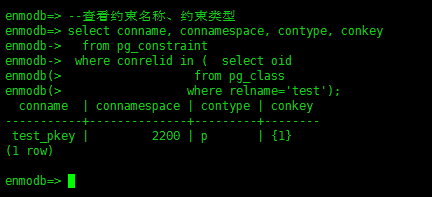
- 使用gsql的元命令\d tablename很方便地查看一个表上有哪些约束
enmodb=> \d test
             Table "public.test"
 Column |         Type          | Modifiers
--------+-----------------------+------------
 id     | bigint                | not null
 name   | character varying(50) | not null
 age    | integer               | default 20
Indexes:
    "test_pkey" PRIMARY KEY, btree (id) TABLESPACE enmotbs

enmodb=>- 查看一个表属于数据库的哪个模式
select * from information_schema.tables where table_name='test';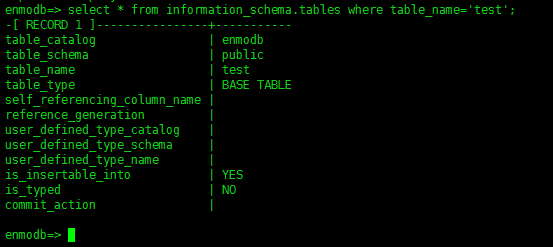
- 元命令\x的语法: \x [ on | off | auto ]
drop table if exists test;
create table test(id int,name varchar(20));
insert into test values(1,'zqf'),(2,'zfz');
select * from test;
\x on
select * from test;
\x off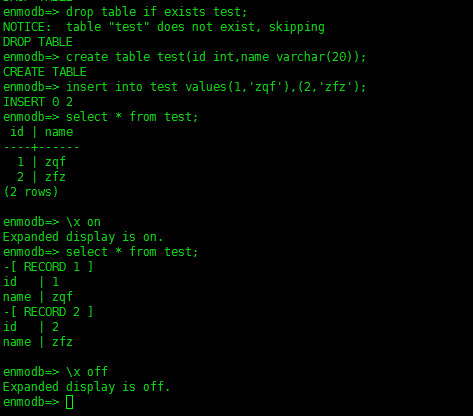
最后修改时间:2022-12-09 00:23:30
「喜欢这篇文章,您的关注和赞赏是给作者最好的鼓励」
关注作者
【版权声明】本文为墨天轮用户原创内容,转载时必须标注文章的来源(墨天轮),文章链接,文章作者等基本信息,否则作者和墨天轮有权追究责任。如果您发现墨天轮中有涉嫌抄袭或者侵权的内容,欢迎发送邮件至:contact@modb.pro进行举报,并提供相关证据,一经查实,墨天轮将立刻删除相关内容。
