



课程作业
1.创建一个名为testsm、testsm1的模式
2.创建一个用户john, 并将testsm的owner修改为john,且修改owner前后分别使用\dn+查看模式信息
3.重命名testsm为testsm2
4.在模式testsm1中建表t1、插入记录和查询记录
5.在会话级设置模式搜索顺序
6.在数据库级设置模式搜索顺序
7.在用户级设置模式搜索顺序
1.实验准备
su - omm
gsql -d omm -p 15400 -r
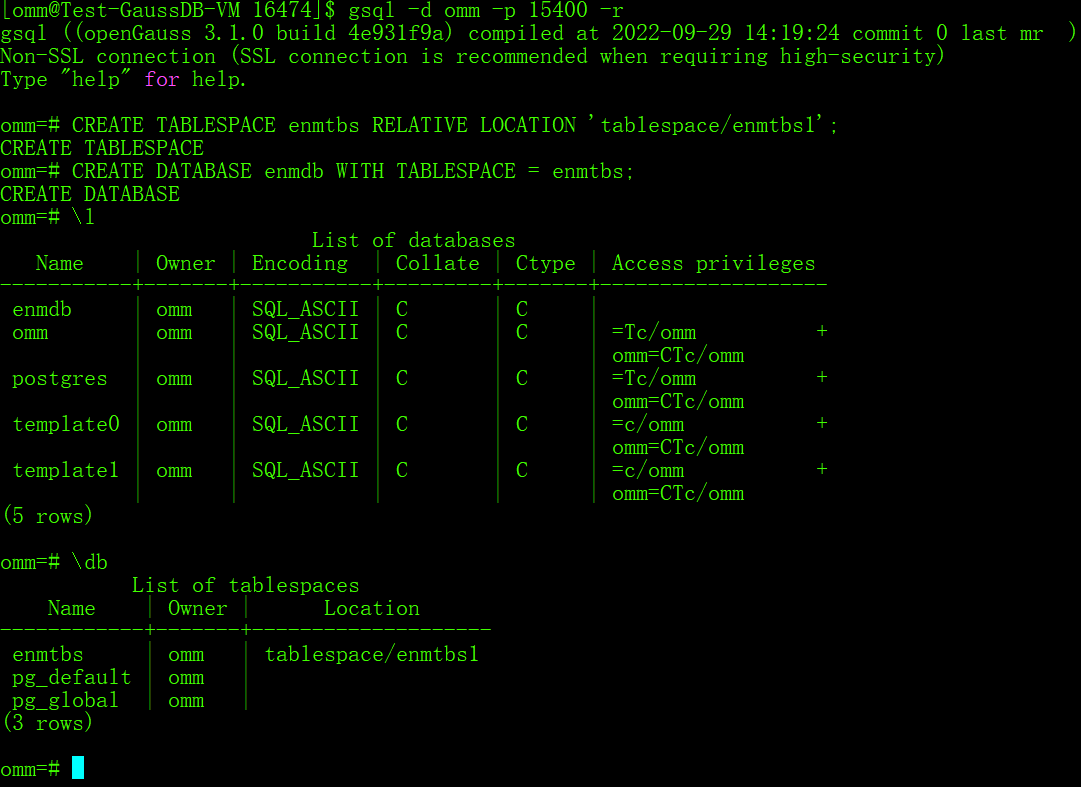
--执行如下的命令和SQL语句,创建表空间enmtbs和数据库enmdb:
CREATE TABLESPACE enmtbs RELATIVE LOCATION 'tablespace/enmtbs1';
CREATE DATABASE enmdb WITH TABLESPACE = enmtbs;
–执行下面的gsql元命令\l,查看openGauss数据库集群上有哪些数据库:
\l
--执行下面的gsql元命令\db,查看openGauss数据库集群上有哪些表空间:
\db
2.查看openGauss数据库上有哪些用户和模式
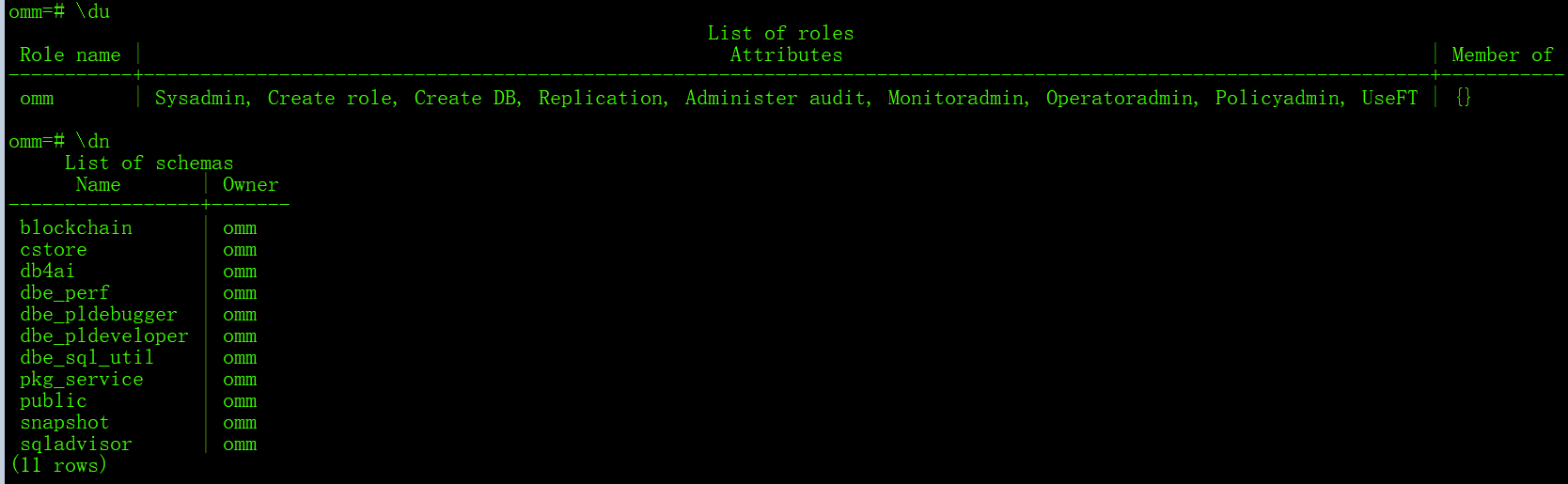
--执行下面的gsql元命令\du,查看openGauss数据库上有哪些用户:
\du
--执行下面的gsql元命令\dn,查看openGauss数据库上有哪些模式
\dn
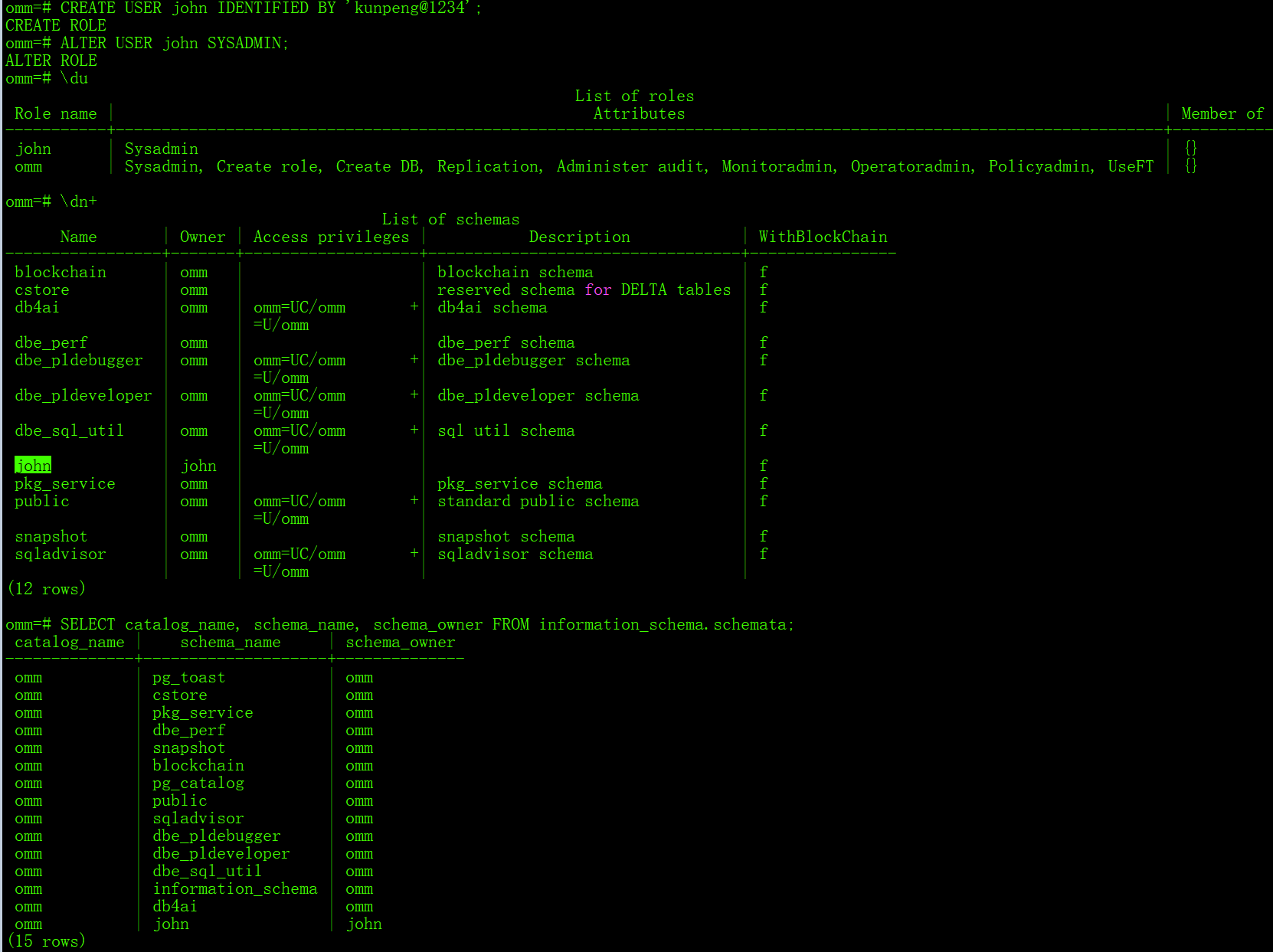
3.创建一个数据库用户john,其密码为kunpeng@1234,并授予数据库用户john SYSADMIN权限:
--创建数据库用户user1的同时,会在系统的omm数据库中创建一个与这个用户名同名的模式user1。
CREATE USER john IDENTIFIED BY 'kunpeng@1234';
ALTER USER john SYSADMIN;
--再次执行下面的gsql元命令\du,查看openGauss数据库上有哪些用户:
\du
--再次执行下面的gsql元命令\dn,查看openGauss数据库上有哪些模式
\dn+
--或
SELECT catalog_name, schema_name, schema_owner FROM information_schema.schemata;
--拓展查询
omm=# \dn+ john
                         List of schemas
 Name | Owner | Access privileges | Description | WithBlockChain
------+-------+-------------------+-------------+----------------
 john | john  |                   |             | f
(1 row)

omm=# SELECT catalog_name, schema_name, schema_owner FROM information_schema.schemata where schema_name='john';
 catalog_name | schema_name | schema_owner
--------------+-------------+--------------
 omm          | john        | john
(1 row)

omm=# \du john
           List of roles
 Role name | Attributes | Member of
-----------+------------+-----------
 john      | Sysadmin   | {}
4.为数据库创建模式
--一个用户可以创建多个模式
--创建一个模式schm1,属主是用户user1,并再次查看当前连接的数据库下有哪些模式:
create schema testsm AUTHORIZATION john;
--继续在数据库enmdb中,创建模式testsm1,属主是用户omm:
create schema testsm1;
\dn
omm=# ALTER SCHEMA testsm rename to testsm2;
ALTER SCHEMA
omm=# \du
                                                              List of roles
 Role name |                                                    Attributes                                                    | Member of
-----------+------------------------------------------------------------------------------------------------------------------+-----------
 john      | Sysadmin                                                                                                         | {}
 omm       | Sysadmin, Create role, Create DB, Replication, Administer audit, Monitoradmin, Operatoradmin, Policyadmin, UseFT | {}

omm=# \dn testsm*
 List of schemas
  Name   | Owner
---------+-------
 testsm1 | omm
 testsm2 | john
(2 rows)
5.PUBLIC模式、修改模式,模式中建表并插入数据
--openGauss在创建一个新的数据库时,会自动创建一个public模式。当用户登录到该数据库时,如果没有特殊的指定,都是操作在public模式中的数据库对象。
--默认情况下,用户新创建的表,位于public模式中
--执行下面的SQL语句,创建一个测试表test:
create table t1(col1 char(10));
--执行下面的gsql元命令\dt,查看 test表的Schema:
\dt t1
                        List of relations
 Schema | Name | Type  | Owner |             Storage
--------+------+-------+-------+----------------------------------
 public | t1   | table | omm   | {orientation=row,compression=no}
(1 row)
omm=# alter table t1 set schema john;
ALTER TABLE
omm=#  select * from pg_tables where tablename='t1';
 schemaname | tablename | tableowner | tablespace | hasindexes | hasrules | hastriggers | tablecreator |            created            |         last_ddl_time
------------+-----------+------------+------------+------------+----------+-------------+--------------+-------------------------------+-------------------------------
 john       | t1        | omm        |            | f          | f        | f           | omm          | 2022-12-09 09:30:34.757348+08 | 2022-12-09 09:33:53.941167+08
(1 row)

omm=# \dt t1
No matching relations found.
omm=# alter table john.t1 set schema testsm1;
ALTER TABLE
omm=# \dt
No relations found.
omm=# select * from pg_tables where tablename='t1';
 schemaname | tablename | tableowner | tablespace | hasindexes | hasrules | hastriggers | tablecreator |            created            |         last_ddl_time
------------+-----------+------------+------------+------------+----------+-------------+--------------+-------------------------------+-------------------------------
 testsm1    | t1        | omm        |            | f          | f        | f           | omm          | 2022-12-09 09:30:34.757348+08 | 2022-12-09 09:42:57.405181+08
(1 row)

omm=# \dt+ t1
No matching relations found.
omm=# \dt+ testsm1.t1
                                     List of relations
 Schema  | Name | Type  | Owner |  Size   |             Storage              | Description
---------+------+-------+-------+---------+----------------------------------+-------------
 testsm1 | t1   | table | omm   | 0 bytes | {orientation=row,compression=no} |
(1 row)
omm=# select * from testsm1.t1;
 col1
------
(0 rows)

omm=# insert into testsm1.t1 values ('test');
INSERT 0 1
omm=# insert into testsm1.t1 values ('test1');
INSERT 0 1
omm=# insert into testsm1.t1 values ('test2');
INSERT 0 1
omm=# select * from testsm1.t1;
    col1
------------
 test
 test1
 test2
(3 rows)
omm=# create table testsm2.t2(id int);
CREATE TABLE
omm=# insert into testsm2.t2 values (2);
INSERT 0 1
omm=# insert into testsm2.t2 values (3,4,5);
ERROR:  INSERT has more expressions than target columns
LINE 1: insert into testsm2.t2 values (3,4,5);
                                         ^
omm=# insert into testsm2.t2 values (3),(4);
INSERT 0 2
omm=# select * from testsm2.t2;
 id
----
  2
  3
  4
(3 rows)

omm=# \dt+ testsm2.t2
                                      List of relations
 Schema  | Name | Type  | Owner |    Size    |             Storage              | Description
---------+------+-------+-------+------------+----------------------------------+-------------
 testsm2 | t2   | table | omm   | 8192 bytes | {orientation=row,compression=no} |
(1 row)
6.查看和设置模式的搜索路径
--会话级设置模式搜索顺序
#在gsql客户端会话中,执行命令SET SEARCH_PATH TO schm1可以修改模式搜索路径,但只在gsql客户端会话的持续过程中起作用,一旦退出gsql客户端会话,这个设置就丢失了。重新登录gsql会话将模式搜索路径恢复为默认值"$user",public。
omm=# \dt+ testsm2.t2
                                      List of relations
 Schema  | Name | Type  | Owner |    Size    |             Storage              | Description
---------+------+-------+-------+------------+----------------------------------+-------------
 testsm2 | t2   | table | omm   | 8192 bytes | {orientation=row,compression=no} |
(1 row)

omm=#
omm=# show search_path;
  search_path
----------------
 "$user",public
(1 row)

omm=# \dt+ t2;
No matching relations found.
omm=# set search_path to testsm2;
SET
omm=# show search_path;
 search_path
-------------
 testsm2
(1 row)

omm=# \dt+ t2;
                                      List of relations
 Schema  | Name | Type  | Owner |    Size    |             Storage              | Description
---------+------+-------+-------+------------+----------------------------------+-------------
 testsm2 | t2   | table | omm   | 8192 bytes | {orientation=row,compression=no} |
(1 row)

omm=#
omm=# \q
[omm@Test-GaussDB-VM 16474]$ gsql -d omm -p 15400 -r
gsql ((openGauss 3.1.0 build 4e931f9a) compiled at 2022-09-29 14:19:24 commit 0 last mr  )
Non-SSL connection (SSL connection is recommended when requiring high-security)
Type "help" for help.

omm=# show search_path;
  search_path
----------------
 "$user",public
(1 row)

omm=# \dt+ t2;
No matching relations found.
omm=#
--数据库级设置模式搜索顺序
#修改数据库级别的搜索顺序后,数据库用户user1再次登录到数据库enmdb,其模式搜索路径已经变更为数据库默认的模式搜索路径schm1。
omm=# ALTER DATABASE enmdb SET SEARCH_PATH TO testsm2 ;
ALTER DATABASE
omm=# \c enmdb omm
Non-SSL connection (SSL connection is recommended when requiring high-security)
You are now connected to database "enmdb" as user "omm".
enmdb=# show SEARCH_PATH;
 search_path
-------------
 testsm2
(1 row)

--用户级设置模式搜索顺序
--设置数据库的用户user1的模式搜索顺序为模式testsm2:
ALTER USER john SET SEARCH_PATH TO testsm2;

omm=> \l+
                                                           List of databases
   Name    | Owner | Encoding  | Collate | Ctype | Access privileges | Size  | Tablespace |                Description
-----------+-------+-----------+---------+-------+-------------------+-------+------------+--------------------------------------------
 enmdb     | omm   | SQL_ASCII | C       | C     |                   | 13 MB | enmtbs     |
 omm       | omm   | SQL_ASCII | C       | C     | =Tc/omm          +| 13 MB | pg_default |
           |       |           |         |       | omm=CTc/omm       |       |            |
 postgres  | omm   | SQL_ASCII | C       | C     | =Tc/omm          +| 28 MB | pg_default | default administrative connection database
           |       |           |         |       | omm=CTc/omm       |       |            |
 template0 | omm   | SQL_ASCII | C       | C     | =c/omm           +| 13 MB | pg_default | default template for new databases
           |       |           |         |       | omm=CTc/omm       |       |            |
 template1 | omm   | SQL_ASCII | C       | C     | =c/omm           +| 13 MB | pg_default | unmodifiable empty database
           |       |           |         |       | omm=CTc/omm       |       |            |
(5 rows)

omm=> \dt+
                                      List of relations
 Schema  | Name | Type  | Owner |    Size    |             Storage              | Description
---------+------+-------+-------+------------+----------------------------------+-------------
 testsm2 | t2   | table | omm   | 8192 bytes | {orientation=row,compression=no} |
(1 row)

omm=> \dt+ testsm1.*
                                      List of relations
 Schema  | Name | Type  | Owner |    Size    |             Storage              | Description
---------+------+-------+-------+------------+----------------------------------+-------------
 testsm1 | t1   | table | omm   | 8192 bytes | {orientation=row,compression=no} |
(1 row)
7.搜索顺序的优先级
--会话级模式搜索顺序的优先级最高,用户级模式搜索顺序的优先级第2,数据库级模式搜索顺序的优先级最低。
omm=> alter table testsm1.t1 owner to john;
ALTER TABLE
omm=> select * from pg_tables where tablename like 't_';
 schemaname | tablename | tableowner | tablespace | hasindexes | hasrules | hastriggers | tablecreator |            created            |         last_ddl_time
------------+-----------+------------+------------+------------+----------+-------------+--------------+-------------------------------+-------------------------------
 testsm1    | t1        | john       |            | f          | f        | f           | omm          | 2022-12-09 09:30:34.757348+08 | 2022-12-09 10:27:12.991426+08
 testsm2    | t2        | omm        |            | f          | f        | f           | omm          | 2022-12-09 09:49:14.966124+08 | 2022-12-09 09:49:14.966124+08
(2 rows)

omm=> \dt+ testsm1.*
                                      List of relations
 Schema  | Name | Type  | Owner |    Size    |             Storage              | Description
---------+------+-------+-------+------------+----------------------------------+-------------
 testsm1 | t1   | table | john  | 8192 bytes | {orientation=row,compression=no} |
(1 row)

omm=> \dt+ testsm2.*
                                      List of relations
 Schema  | Name | Type  | Owner |    Size    |             Storage              | Description
---------+------+-------+-------+------------+----------------------------------+-------------
 testsm2 | t2   | table | omm   | 8192 bytes | {orientation=row,compression=no} |
(1 row)

omm=> \dn+ testsm*
                          List of schemas
  Name   | Owner | Access privileges | Description | WithBlockChain
---------+-------+-------------------+-------------+----------------
 testsm1 | omm   |                   |             | f
 testsm2 | john  |                   |             | f
(2 rows)

--session 会话级模式搜索顺序设置:
set search_path to testsm1;
--user 用户级模式搜索顺序设置(从新连接生效,当前session不生效):
ALTER USER omm SET SEARCH_PATH TO testsm2;
--database 数据库级模式搜索顺序设置:
ALTER DATABASE enmdb SET SEARCH_PATH TO testsm1;

## 验证过程
[omm@Test-GaussDB-VM 16474]$ gsql -d omm -p 15400 -r
gsql ((openGauss 3.1.0 build 4e931f9a) compiled at 2022-09-29 14:19:24 commit 0 last mr  )
Non-SSL connection (SSL connection is recommended when requiring high-security)
Type "help" for help.

omm=# \conninfo
You are connected to database "omm" as user "omm" via socket in "/opt/huawei/tmp" at port "15400".
omm=# show search_path;
  search_path
----------------
 "$user",public
(1 row)

omm=# ALTER DATABASE enmdb SET SEARCH_PATH TO testsm1;
ALTER DATABASE
omm=# show search_path;
  search_path
----------------
 "$user",public
(1 row)

omm=# \c enmdb omm
Non-SSL connection (SSL connection is recommended when requiring high-security)
You are now connected to database "enmdb" as user "omm".
enmdb=# show search_path;
 search_path
-------------
 testsm1
(1 row)

enmdb=# ALTER USER omm SET SEARCH_PATH TO testsm2;
ALTER ROLE
enmdb=# show search_path;
 search_path
-------------
 testsm1
(1 row)

enmdb=# \c omm omm
Non-SSL connection (SSL connection is recommended when requiring high-security)
You are now connected to database "omm" as user "omm".
omm=# show search_path;
 search_path
-------------
 testsm2
(1 row)

omm=# \c enmdb omm
Non-SSL connection (SSL connection is recommended when requiring high-security)
You are now connected to database "enmdb" as user "omm".
enmdb=# show search_path;
 search_path
-------------
 testsm2
(1 row)

enmdb=# set search_path to testsm1;
SET
enmdb=# show search_path;
 search_path
-------------
 testsm1
(1 row)

enmdb=#
8.查看模式有哪些表
--查看当前连接的数据库中,public模式下有哪些表:
select table_catalog,table_schema,table_name,table_type
 from information_schema.tables
 where table_schema = 'public';
--查看指定数据库中,public模式下有哪些表:
select table_catalog,table_schema,table_name,table_type
 from information_schema.tables
where table_catalog='omm' and table_schema = 'public';
最后修改时间:2022-12-09 10:50:34
「喜欢这篇文章,您的关注和赞赏是给作者最好的鼓励」
关注作者
【版权声明】本文为墨天轮用户原创内容,转载时必须标注文章的来源(墨天轮),文章链接,文章作者等基本信息,否则作者和墨天轮有权追究责任。如果您发现墨天轮中有涉嫌抄袭或者侵权的内容,欢迎发送邮件至:contact@modb.pro进行举报,并提供相关证据,一经查实,墨天轮将立刻删除相关内容。
