同事提了一个 MySQL 数据导入的问题,使用 load data 将本地文件(.csv)导入数据库表的时候,提示这个错误,
| Warning | 1265 | Data truncated for column 'c1' at row 1 |
一、准备工作
(1)csv测试文件,如下所示,简化了原始文件,包含两个日期类型的数据,和一个字符串类型的数据,
cat online.csv
"2022-01-01 00:00:00","A","2022-02-01 00:00:00"
"2022-01-02 00:00:00","B","2022-02-02 00:00:00"
"2022-01-03 00:00:00","C","2022-02-03 00:00:00"
"2022-01-04 00:00:00","D","2022-02-04 00:00:00"
"2022-01-05 00:00:00","E","2022-02-05 00:00:00"
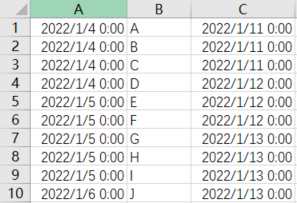
我们知道,csv 文件可以用 excel 打开,如下所示,
(2)测试表结构,如下所示,
bisal@mysqldb 18:21:  [test]> desc t;
+-------+-------------+------+-----+---------+----------------+
| Field | Type        | Null | Key | Default | Extra          |
+-------+-------------+------+-----+---------+----------------+
| id    | bigint      | NO   | PRI | NULL    | auto_increment |
| c1    | datetime    | YES  |     | NULL    |                |
| c2    | varchar(10) | YES  |     | NULL    |                |
| c3    | datetime    | YES  |     | NULL    |                |
+-------+-------------+------+-----+---------+----------------+
4 rows in set (0.00 sec)
(3)原始执行的导入指令是,
load data local infile '/home/mysql/online.csv'
into table test fields terminated by ',' lines terminated by '\n'
(c1, c2, c3)
set c1=date_format(@c1, '%Y-%m-%d %H:%i:%s'),
c3=date_format(@c3, '%Y-%m-%d %H:%i:%s');
P.S.如果执行出现这个错误,
ERROR 3948 (42000): Loading local data is disabled; this must be enabled on both the client and server sides
可以看下 local_infile 变量值,
bisal@mysqldb 18:23:  [test]> show global variables like 'local_infile';
+---------------+-------+
| Variable_name | Value |
+---------------+-------+
| local_infile  | OFF   |
+---------------+-------+
1 row in set (0.01 sec)
如果是OFF,需要改为ON,
bisal@mysqldb 18:23:  [test]> set global local_infile=1;
Query OK, 0 rows affected (0.00 sec)
再次执行导入,如果报这个错,
ERROR 2068 (HY000): LOAD DATA LOCAL INFILE file request rejected due to restrictions on access.
可以在客户端登录的时候,加上参数--local-infile=1,
mysql -ubisal -pbisal --local-infile=1
二、实际测试
如下导入指令,提示了1265的错误,
bisal@mysqldb 18:50:  [test]> load data local infile '/home/mysql/online.csv' into table t fields
    -> terminated by ',' lines terminated by '\n'
    -> (c1, c2, c3) set c1=date_format(@c1, '%Y-%m-%d %H:%i:%s'), c3=date_format(@c3, '%Y-%m-%d %H:%i:%s');
Query OK, 5 rows affected, 10 warnings (0.01 sec)
Records: 5  Deleted: 0  Skipped: 0  Warnings: 10

bisal@mysqldb 18:51:  [test]> show warnings;
+---------+------+-----------------------------------------+
| Level   | Code | Message                                 |
+---------+------+-----------------------------------------+
| Warning | 1265 | Data truncated for column 'c1' at row 1 |
| Warning | 1265 | Data truncated for column 'c3' at row 1 |
| Warning | 1265 | Data truncated for column 'c1' at row 2 |
| Warning | 1265 | Data truncated for column 'c3' at row 2 |
| Warning | 1265 | Data truncated for column 'c1' at row 3 |
| Warning | 1265 | Data truncated for column 'c3' at row 3 |
| Warning | 1265 | Data truncated for column 'c1' at row 4 |
| Warning | 1265 | Data truncated for column 'c3' at row 4 |
| Warning | 1265 | Data truncated for column 'c1' at row 5 |
| Warning | 1265 | Data truncated for column 'c3' at row 5 |
+---------+------+-----------------------------------------+
10 rows in set (0.00 sec)
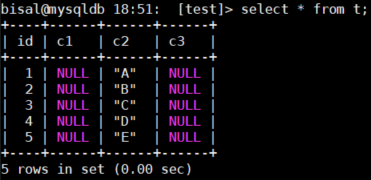
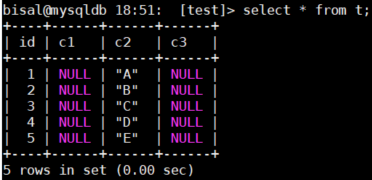
检索数据,虽然导入了文件中的5条记录,但日期字段,都给截断了,存储的是空值,
c1=date_format(@c1,'%Y-%m-%d%H:%i:%s')
c3=date_format(@c3,'%Y-%m-%d%H:%i:%s'),
因此,load data 指令中()括号内的字段,应该使用变量,
load data local infile '/home/mysql/online.csv' into table t fields
terminated by ',' lines terminated by '\n'
(@c1, c2, @c3)
set c1=date_format(@c1, '%Y-%m-%d %H:%i:%s'),
c3=date_format(@c3, '%Y-%m-%d %H:%i:%s');
修改指令,再次执行导入,还是报错了,但这次是1292的错误,根据报错的数据,文件中的第一个字段日期多了双引号,第三个字段日期则多了双引号和"\x0D"(了解ASCII的同学,肯定知道这是回车的意思),
bisal@mysqldb 18:51:  [test]> load data local infile '/home/mysql/online.csv' into table t fields
    -> terminated by ',' lines terminated by '\n'
    -> (@c1, c2, @c3) set c1=date_format(@c1, '%Y-%m-%d %H:%i:%s'), c3=date_format(@c3, '%Y-%m-%d %H:%i:%s');
Query OK, 5 rows affected, 10 warnings (0.02 sec)
Records: 5  Deleted: 0  Skipped: 0  Warnings: 10

bisal@mysqldb 18:51:  [test]> show warnings;
+---------+------+-------------------------------------------------------+
| Level   | Code | Message                                               |
+---------+------+-------------------------------------------------------+
| Warning | 1292 | Incorrect datetime value: '"2022-01-01 00:00:00"'     |
| Warning | 1292 | Incorrect datetime value: '"2022-02-01 00:00:00"\x0D' |
| Warning | 1292 | Incorrect datetime value: '"2022-01-02 00:00:00"'     |
| Warning | 1292 | Incorrect datetime value: '"2022-02-02 00:00:00"\x0D' |
| Warning | 1292 | Incorrect datetime value: '"2022-01-03 00:00:00"'     |
| Warning | 1292 | Incorrect datetime value: '"2022-02-03 00:00:00"\x0D' |
| Warning | 1292 | Incorrect datetime value: '"2022-01-04 00:00:00"'     |
| Warning | 1292 | Incorrect datetime value: '"2022-02-04 00:00:00"\x0D' |
| Warning | 1292 | Incorrect datetime value: '"2022-01-05 00:00:00"'     |
| Warning | 1292 | Incorrect datetime value: '"2022-02-05 00:00:00"\x0D' |
+---------+------+-------------------------------------------------------+
10 rows in set (0.00 sec)
当然这两个日期字段还是被截断的,
bisal@mysqldb 18:52:  [test]> load data local infile '/home/mysql/online.csv' into table t fields
    -> terminated by ',' enclosed by '"' lines terminated by '\n'
    -> (@c1, c2, @c3) set c1=date_format(@c1, '%Y-%m-%d %H:%i:%s'), c3=date_format(@c3, '%Y-%m-%d %H:%i:%s');
Query OK, 3 rows affected, 5 warnings (0.01 sec)
Records: 3  Deleted: 0  Skipped: 0  Warnings: 5

bisal@mysqldb 18:52:  [test]> show warnings;
+---------+------+----------------------------------------------------------------------------------+
| Level   | Code | Message                                                                          |
+---------+------+----------------------------------------------------------------------------------+
| Warning | 1292 | Truncated incorrect datetime value: '2022-02-01 00:00:00"
"2022-01-02 00:00:00' |
| Warning | 1262 | Row 1 was truncated; it contained more data than there were input columns        |
| Warning | 1292 | Truncated incorrect datetime value: '2022-02-03 00:00:00"
"2022-01-04 00:00:00' |
| Warning | 1262 | Row 2 was truncated; it contained more data than there were input columns        |
| Warning | 1292 | Incorrect datetime value: '"2022-02-05 00:00:00"
'                              |
+---------+------+----------------------------------------------------------------------------------+
5 rows in set (0.00 sec)
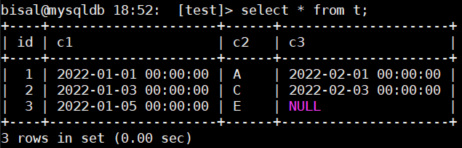
可以看到,有两行数据正确插入了,但是另外三行存在错误,要么是第三个字段被截断了,要么就是没插入进来,要解决回车问题,
除了回车问题,我们可以看到,此处用的是 date_format 函数,但实际上从文件中读到的是字符串,因此可改为 str_to_date 函数,格式相同,
bisal@mysqldb 18:53:  [test]> load data local infile '/home/mysql/online.csv' into table t fields
    -> terminated by ',' enclosed by '"' lines terminated by '\n'
    -> (@c1, c2, @c3) set c1=str_to_date(@c1, '%Y-%m-%d %H:%i:%s'), c3=str_to_date(@c3, '%Y-%m-%d %H:%i:%s');
Query OK, 3 rows affected, 5 warnings (0.01 sec)
Records: 3  Deleted: 0  Skipped: 0  Warnings: 5

bisal@mysqldb 18:53:  [test]> show warnings;
+---------+------+----------------------------------------------------------------------------------+
| Level   | Code | Message                                                                          |
+---------+------+----------------------------------------------------------------------------------+
| Warning | 1292 | Truncated incorrect datetime value: '2022-02-01 00:00:00"
"2022-01-02 00:00:00' |
| Warning | 1262 | Row 1 was truncated; it contained more data than there were input columns        |
| Warning | 1292 | Truncated incorrect datetime value: '2022-02-03 00:00:00"
"2022-01-04 00:00:00' |
| Warning | 1262 | Row 2 was truncated; it contained more data than there were input columns        |
| Warning | 1411 | Incorrect datetime value: '"2022-02-05 00:00:00"
' for function str_to_date     |
+---------+------+----------------------------------------------------------------------------------+
5 rows in set (0.00 sec)
数据还是没都插入成功,
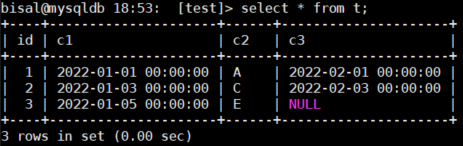
我们这次解决回车的问题,lines terminated by 增加 \r ,执行指令,正常,
bisal@mysqldb 18:53:  [test]> load data local infile '/home/mysql/online.csv' into table t fields
    -> terminated by ',' enclosed by '"' lines terminated by '\r\n'
    -> (@c1, c2, @c3) set c1=str_to_date(@c1, '%Y-%m-%d %H:%i:%s'), c3=str_to_date(@c3, '%Y-%m-%d %H:%i:%s');
Query OK, 5 rows affected (0.01 sec)
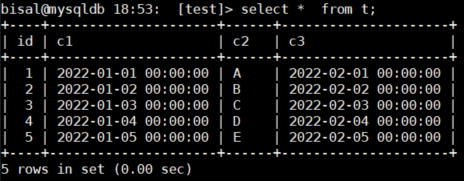
Records: 5  Deleted: 0  Skipped: 0  Warnings: 0
验证一下数据,都正常插入了,
(1)是否了解load data不让执行的原因,需要做什么配置改动。
(2)是否了解 load data 中各个参数的含义,terminated by 、enclosed by 、lines terminated by ,包括()括号内用的是字段名称还是@变量名称,set 二次处理数据应该怎么用。
(3)是否了解 csv 用 txt 和 excel 打开显示不同?用txt打开,会看到每个字段有双引号,逗号分隔,而 excel 打开,则是正常的单元格显示,会产生误解。
(4)是否了解 date_format 函数和 str_to_date 函数有什么不同?
(5)MySQL 中执行各种指令报错,通过 show warnings 显示的错误信息中,能看到些端倪,例如 Truncated incorrect date time value:'2022-02-0100:00:00" ,可以知道是文件中的第一个字段还是第三个字段存在问题,当然因为这是为了做测试,特意将数据做成有规律的,如果是生产实际执行的,不一定能很有规律的呈现出来,这就要更仔细地理解这些错误提示,从中找到线索,往往这种能力,除了具备天赋,是碰到更多的问题锻炼出来的,这就要关注平时的积累。
本文关键字:#数据导入# #load data# #str_to_date#
关于SQLE
爱可生开源社区的 SQLE 是一款面向数据库使用者和管理者,支持多场景审核,支持标准化上线流程,原生支持 MySQL 审核且数据库类型可扩展的 SQL 审核工具。
| 类型 | 地址 |
|---|---|
| 版本库 | https://github.com/actiontech/sqle |
| 文档 | https://actiontech.github.io/sqle-docs-cn/ |
| 发布信息 | https://github.com/actiontech/sqle/releases |
| 数据审核插件开发文档 | https://actiontech.github.io/sqle-docs-cn/3.modules/3.7_auditplugin/auditplugin_development.html |
更多关于 SQLE 的信息和交流,请加入官方QQ交流群:637150065...