



原本想爬国家专利网
但是
菜🐕如我
怎么都绕不过去那个点选验证码
后面我爬了下B站
B站可能凭运气可以登上

🙋第一步是初始化selenium的浏览器驱动,都是复制粘贴的内容。
def make_driver(headers):service = Service(r"D:/python/Scripts/msedgedriver.exe")egde_options = webdriver.EdgeOptions()egde_options.add_experimental_option("detach", True) ###浏览器闪退的2个原因:一是驱动与浏览器版本不匹配,需要更新驱动;二是需要增加该行egde_options.add_argument(headers)egde_options.add_argument("--disable-blink-features=AutomationControlled")driver = webdriver.Edge(service=service, options=egde_options)with open('stealth.min.js') as f:js = f.read()driver.execute_cdp_cmd("Page.addScriptToEvaluateOnNewDocument", {"source": js})driver.implicitly_wait(20) ##隐性等待20sreturn driver
🙋第二步是打开登录网页,输入账户密码信息。利用xpath找到要输入账户的地方,将账户名传输进去;密码同理;最后模拟点击登录。因为这里的框框是点击之后才弹出来的,所以需要增加这句跳回最外层的页面driver.switch_to.default_content(),要不然无法定位到需要的元素。
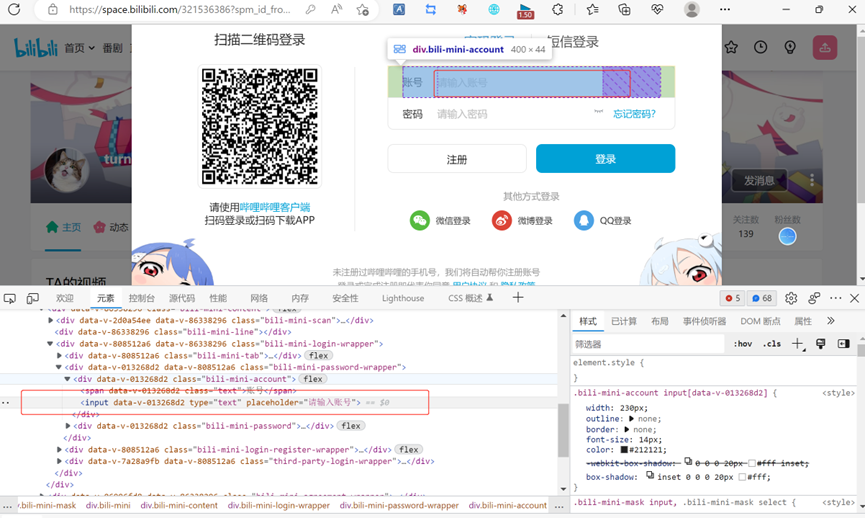
def login(driver,url,bili_ID,bili_password):driver.get(url) ##打开浏览器界面##1.点击登录按钮driver.find_element(By.XPATH,'//*[@id="i_cecream"]/div[2]/div[1]/div[1]/ul[2]/li[1]/li/div[1]/div/span').click()time.sleep(2)##2.转到弹出框框,输入账号密码driver.switch_to.default_content() ###转到最前面一层框框,因为登录框为弹出框,所以要重新定位。driver.find_element(By.XPATH, '/html/body/div[3]/div/div[2]/div[3]/div[2]/div[1]/input').send_keys(bili_ID)time.sleep(2)driver.find_element(By.XPATH, '/html/body/div[3]/div/div[2]/div[3]/div[2]/div[2]/div[1]/input').send_keys(bili_password)time.sleep(2)driver.find_element(By.XPATH, '/html/body/div[3]/div/div[2]/div[3]/div[3]/div[2]').click() ##点击登录time.sleep(2)##获取验证码图片driver.switch_to.default_content() ##定位到最上层图片!!!非常important,验证码为也弹出框time.sleep(random.randint(1, 2))return driver
🙋第三步:第2步完成之后就会弹出点选验证码的框框,同理右键复制xpath路径,定位到该元素,且将该元素截图保存为本地图片。将图片传送至超级鹰(https://www.chaojiying.com/price.html)人工打码平台,返回各个汉字的图片坐标,最后利用ActionChains模拟鼠标点选汉字。【超级鹰平台需要充值,但是比较便宜,2块钱可以用100次左右】,但是超级鹰返回的坐标有点不准(两个字的验证码可能准一点),y轴的坐标比较低,所以我将超级鹰的返回参数y坐标乘以了1.1倍,比原来的要好一点,但登录成功完全还是看运气。
🙋除此之外,因为超级鹰不大准,所以用try-except-finally做了一次登录不成功,二次登录的流程。
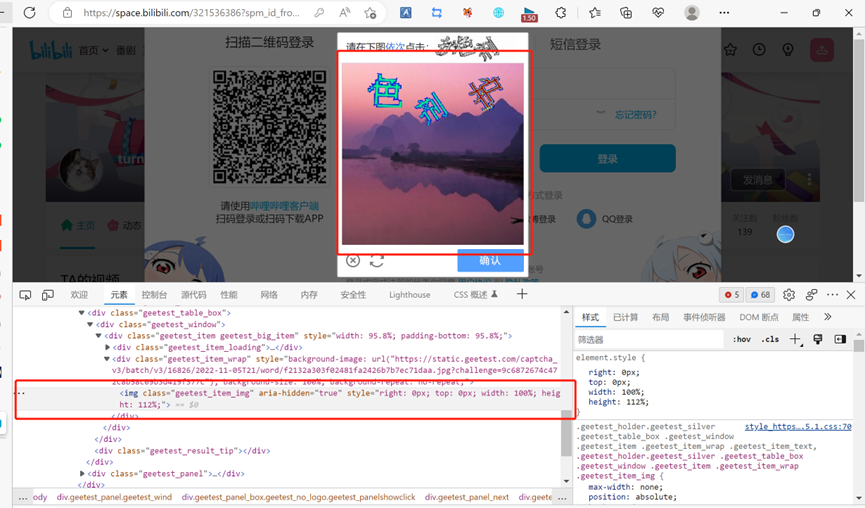
###3.获取验证码,并传输到超级鹰验证码平台,校对验证码登录def get_yanzhengma(driver,chaojiying_ID,chaojiying_password,soft_ID,codetype):###保存验证码图片yanzhengma = driver.find_element(By.XPATH,'/html/body/div[4]/div[2]/div[6]/div/div/div[2]/div[1]/div/div[2]/img')yanzhengma.screenshot("yanzhengma.png")time.sleep(3)##利用超级鹰图片打码chaojiying_Obj = Chaojiying_Client(username=chaojiying_ID, password=chaojiying_password, soft_id=soft_ID)###读取图片,并向超级鹰发送图片信息,返回图片坐标with open('yanzhengma.png', 'rb') as f:im = f.read()data = chaojiying_Obj.PostPic(im=im, codetype=codetype)###后台识别不是特别准,会返回多个字符,因此要删除一些多识别的字符,可以考虑人工辅助。###获取每个字的坐标,并点击postion_list = data['pic_str'].split('|')for postion in postion_list:postion = str(postion).split(',')x = postion[0]y = float(postion[1])*1.1 ###超级鹰识别不大准,可以改小一点。ActionChains(driver).move_to_element_with_offset(yanzhengma, x, y).click().perform()time.sleep(random.randint(1,2))time.sleep(3)querendenglu = driver.find_element(By.XPATH, '/html/body/div[4]/div[2]/div[6]/div/div/div[3]/a/div').click()time.sleep(5) ##留出跳转时间return driver
全文代码如下👇
# -*- coding: utf-8 -*-# author: 摸鱼大师from selenium import webdriverfrom selenium.webdriver.edge.service import Servicefrom selenium.webdriver.common.by import Byfrom chaojiying import Chaojiying_Client ##不能在同一文件之下from selenium.webdriver import ActionChains # 动作链import randomimport timedef main():headers = '*****' ##自己的浏览器headers,需要变换url = 'https://www.bilibili.com/' ##爬取对象链接,需要变换##bilibili账号密码bili_ID = '****'bili_password = '****'##超级鹰账号密码soft_ID = '*****'chaojiying_ID = '****'chaojiying_password = '****'codetype = 9004 ##超级鹰传输数据类型###1.初始化driver驱动driver = make_driver(headers)###2.打开登录界面,输入账户信息driver = login(driver, url, bili_ID, bili_password)###3.点触验证码登录driver = get_yanzhengma(driver, chaojiying_ID, chaojiying_password, soft_ID, codetype)time.sleep(3)try:zhaopian = driver.find_element(By.XPATH, '//*[@id="i_cecream"]/div[2]/div[1]/div[1]/ul[2]/li[1]/div[1]/a[1]/picture/img')zhaopian.screenshot("zhaopian.png")shifouchenggong = 'yes'print('登录成功!')print('接着跑后面的程序!')except:get_yanzhengma(driver, chaojiying_ID, chaojiying_password, soft_ID, codetype)finally:###if shifouchenggong == 'yes':passelse:try:zhaopian = driver.find_element(By.XPATH,'//*[@id="i_cecream"]/div[2]/div[1]/div[1]/ul[2]/li[1]/div[1]/a[1]/picture/img')zhaopian.screenshot("zhaopian.png")print('登录成功!')print('接着跑后面的程序!')except:print('2次验证都失败!')###1.初始化一个driver驱动def make_driver(headers):service = Service(r"D:/python/Scripts/msedgedriver.exe")egde_options = webdriver.EdgeOptions()egde_options.add_experimental_option("detach", True) ###浏览器闪退的2个原因:一是驱动与浏览器版本不匹配,需要更新驱动;二是需要增加该行egde_options.add_argument(headers)egde_options.add_argument("--disable-blink-features=AutomationControlled")driver = webdriver.Edge(service=service, options=egde_options)with open('stealth.min.js') as f:js = f.read()driver.execute_cdp_cmd("Page.addScriptToEvaluateOnNewDocument", {"source": js})driver.implicitly_wait(20) ##隐性等待20sreturn driver###2.打开登录界面,输入账户信息def login(driver,url,bili_ID,bili_password):driver.get(url) ##打开浏览器界面##1.点击登录按钮driver.find_element(By.XPATH,'//*[@id="i_cecream"]/div[2]/div[1]/div[1]/ul[2]/li[1]/li/div[1]/div/span').click()time.sleep(2)##2.转到弹出框框,输入账号密码driver.switch_to.default_content() ###转到最前面一层框框,因为登录框为弹出框,所以要重新定位。driver.find_element(By.XPATH, '/html/body/div[3]/div/div[2]/div[3]/div[2]/div[1]/input').send_keys(bili_ID)time.sleep(2)driver.find_element(By.XPATH, '/html/body/div[3]/div/div[2]/div[3]/div[2]/div[2]/div[1]/input').send_keys(bili_password)time.sleep(2)driver.find_element(By.XPATH, '/html/body/div[3]/div/div[2]/div[3]/div[3]/div[2]').click() ##点击登录time.sleep(2)##定位最上层框框driver.switch_to.default_content() ##定位到最上层图片!!!非常important,验证码为也弹出框time.sleep(random.randint(1, 2))return driver###3.获取验证码,并传输到超级鹰验证码平台,校对验证码登录def get_yanzhengma(driver,chaojiying_ID,chaojiying_password,soft_ID,codetype):###保存验证码图片yanzhengma = driver.find_element(By.XPATH,'/html/body/div[4]/div[2]/div[6]/div/div/div[2]/div[1]/div/div[2]/img')yanzhengma.screenshot("yanzhengma.png")time.sleep(3)##利用超级鹰图片打码chaojiying_Obj = Chaojiying_Client(username=chaojiying_ID, password=chaojiying_password, soft_id=soft_ID)###读取图片,并向超级鹰发送图片信息,返回图片坐标with open('yanzhengma.png', 'rb') as f:im = f.read()data = chaojiying_Obj.PostPic(im=im, codetype=codetype)###后台识别不是特别准,会返回多个字符,因此要删除一些多识别的字符,可以考虑人工辅助。###获取每个字的坐标,并点击postion_list = data['pic_str'].split('|')for postion in postion_list:postion = str(postion).split(',')x = postion[0]y = float(postion[1])*1.1 ###超级鹰识别不大准,可以改小一点。ActionChains(driver).move_to_element_with_offset(yanzhengma, x, y).click().perform()time.sleep(random.randint(1,2))time.sleep(3)querendenglu = driver.find_element(By.XPATH, '/html/body/div[4]/div[2]/div[6]/div/div/div[3]/a/div').click()time.sleep(5) ##留出跳转时间return driverif __name__ == '__main__':main()
操作效果如下👇
参考文章:
https://blog.csdn.net/m0_62298204/article/details/120919722
文章转载自筑基期摸鱼大师,如果涉嫌侵权,请发送邮件至:contact@modb.pro进行举报,并提供相关证据,一经查实,墨天轮将立刻删除相关内容。
