



索引是一个指向表中数据的指针。一个数据库中的索引与一本书的索引目录是非常相似的。
索引可以用来提高数据库查询性能,但是不恰当的使用将导致数据库性能下降。
opengauss
1)登陆postgres数据库
[root@enmoedu ~]# su - omm
Last login: Sat Dec 10 01:05:58 CST 2022 on pts/0
[omm@enmoedu ~]$ gs_om -t status
-----------------------------------------------------------------------

cluster_name    : dbCluster
cluster_state   : Normal
redistributing  : No

-----------------------------------------------------------------------
[omm@enmoedu ~]$ gs_om -t status --detail
[   Cluster State   ]

cluster_state   : Normal
redistributing  : No
current_az      : AZ_ALL

[  Datanode State   ]

    node   node_ip         port      instance                            state
----------------------------------------------------------------------------------------------
1  enmoedu 192.168.94.135  15400      6001 /opt/huawei/install/data/dn   P Primary Normal
[omm@enmoedu ~]$ gs_om -t start
Starting cluster.
=========================================
[SUCCESS] enmoedu:
[2022-12-10 09:32:38.892][7632][][gs_ctl]: gs_ctl started,datadir is /opt/huawei/install/data/dn
[2022-12-10 09:32:39.083][7632][][gs_ctl]:  another server might be running; Please use the restart command
=========================================
Successfully started.
[omm@enmoedu ~]$ gsql -d postgres -p 15400 -r
gsql ((openGauss 3.0.0 build 02c14696) compiled at 2022-04-01 18:12:34 commit 0 last mr  )
Non-SSL connection (SSL connection is recommended when requiring high-security)
Type "help" for help.

openGauss=#
2)切换至enmodb数据库
openGauss=# \c enmodb
Non-SSL connection (SSL connection is recommended when requiring high-security)
You are now connected to database "enmodb" as user "omm".
enmodb=#
1、创建表,在表中创建索引
- 为表test的testnum列创建一个索引
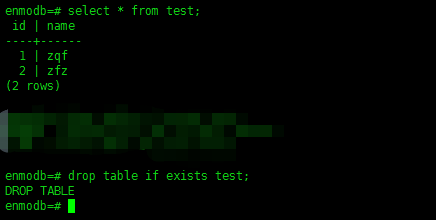
1)为了确保表在被创建的时候,不报错误的提示,可以使用类似if判断的语法,判断表如果存在则删除:
drop table if exists test;有的时候,我们并不知道或者忘记了库里面是否存在表,如test表,那么,如同下面的这种情况。可以确保,我们可以再次的使用test的表。
2)创建表
create table test(id serial primary key,testnum serial);
3)创建索引
create index idx_test_testnum on test(testnum);
- 查看索引
\di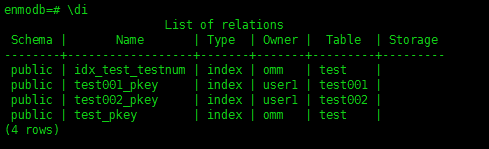
2、通过hint使用索引
- 创建表customer,并插入数据
1)创建表
create table customer
(ca_address_sk 		        integer 			not null ,
 ca_address_id 		        character(16),
 ca_street_number 	        character(10) ,
 ca_street_name 		character 			varying(60) ,
 ca_street_type 		character(15) ,
 ca_suite_number 	        character(10) ,
 ca_city 			character 			varying(60) ,
 ca_county 			character 			varying(30) ,
 ca_state 			character(2) ,
 ca_zip 			character(10) ,
 ca_country 			character 			varying(20) ,
 ca_gmt_offset 		        numeric(5,2) ,
 ca_location_type 	        character(20));
2)插入数据
insert into customer values
(1, 'AAAAAAAABAAAAAAA', '18', 'Jackson', 'Parkway', 'Suite 280', 'Fairfield', 'Maricopa County', 'AZ', '86192' ,'United States', -7.00, 'condo'),
(2, 'AAAAAAAACAAAAAAA', '362', 'Washington 6th', 'RD', 'Suite 80', 'Fairview', 'Taos County', 'NM', '85709', 'United States', -7.00, 'condo'),
(3, 'AAAAAAAADAAAAAAA', '585', 'Dogwood Washington', 'Circle', 'Suite Q', 'Pleasant Valley', 'York County', 'PA', '12477', 'United States', -5.00, 'single family');- 创建索引
create index customer_idx on customer(ca_address_sk);
- 通过hint强制使用索引,查看执行计划
explain select /*+ indexscan(customer customer_idx ) */
 * from customer where ca_address_sk<100;
3、rename索引
alter index idx_test_testnum rename to idx_test_testnum_new;
3.1)查看索引
\di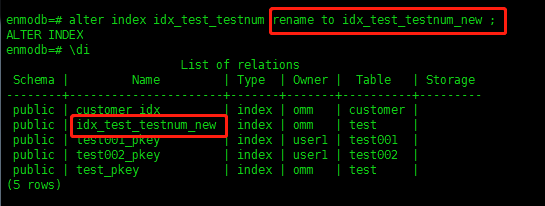
4、重建索引
- 重建一个单独索引
alter index idx_test_testnum_new rebuild;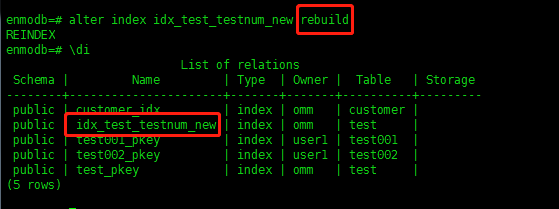
- 重建所有索引
reindex index idx_test_testnum_new;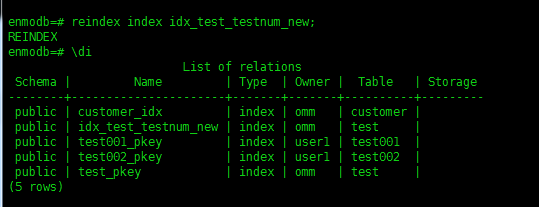
5、移动索引到其他表空间
- 创建表空间myindex_ts
create tablespace myindex_ts relative location 'tablespace/myindex_ts1';
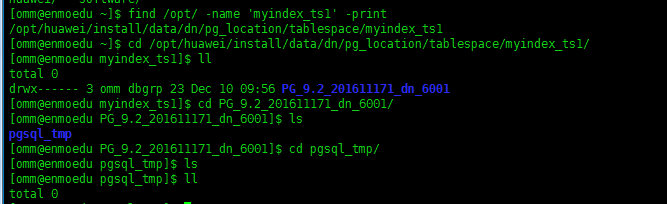
如果你想知道,你的表空间具体存放在物理磁盘中位置,你可以如下尝试:
[omm@enmoedu ~]$ find /opt/ -name 'myindex_ts1' -print
/opt/huawei/install/data/dn/pg_location/tablespace/myindex_ts1
- 将索引idx_test_testnum_new移动到表空间myindex_ts
alter index idx_test_testnum_new set tablespace myindex_ts;
上述的提示,意思是说,终端连接失败了,后又尝试重新连接,连接成功!

查看物理磁盘中,表空间是否有数据文件
cd /opt/huawei/install/data/dn/pg_location/tablespace/myindex_ts1/PG_9.2_201611171_dn_6001/
查看文件夹73729/里面的文件
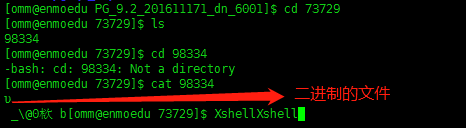
上面的二进制文件无法查看,被强制的退出enmodb数据库。
- 查看索引所在的表空间
select * from pg_indexes where tablename = 'test';
或者,查看索引所在的表空间
select * from pg_indexes where indexname = 'idx_test_testnum_new';
6、删除索引
- 删除表test上的索引idx_test_testnum_new
drop index idx_test_testnum_new;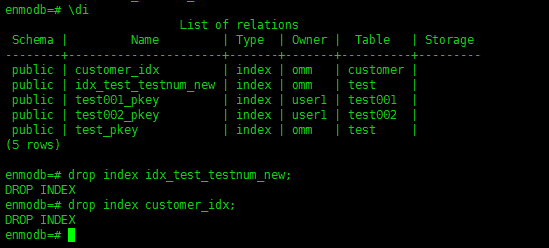
通过对上面索引管理的学习,我需要进一步的展开对opengauss的其它方面的学习:1)需要学习opengauss的数据类型,发现opengauss的数据类型与之前接触的Oracle的数据类型、MySQL的数据类型都不一样;包括最近接触的人大金仓也不一样。2)需要展开学习opengauss的hint。3)需要展开学习关于opengauss的索引调优。4)需要展开学习opengauss的元命令。
肯定还有其它需要学习的,后续跟进且持续更新学习。最后修改时间:2022-12-11 00:44:04
「喜欢这篇文章,您的关注和赞赏是给作者最好的鼓励」
关注作者
【版权声明】本文为墨天轮用户原创内容,转载时必须标注文章的来源(墨天轮),文章链接,文章作者等基本信息,否则作者和墨天轮有权追究责任。如果您发现墨天轮中有涉嫌抄袭或者侵权的内容,欢迎发送邮件至:contact@modb.pro进行举报,并提供相关证据,一经查实,墨天轮将立刻删除相关内容。
