



一、学习目标
本节课是本次实训的第十九节课,本次课重点是掌握openGauss的用户和角色管理。
对于openGauss用户和角色相关知识,查阅了openGauss官网,整理如下。
1.1 概念知识
1.1.1 用户
使用CREATE/ALTER USER可创建及管理数据库用户。数据库包含一个或多个已命名数据库。用户和角色在整个数据库范围内是共享的,但是其数据并不共享。即用户可以连接任何数据库,但当连接成功后,任何用户都只能访问连接请求里声明的那个数据库。
非三权分立下,GaussDB(for openGauss)用户帐户只能由系统管理员或拥有CREATEROLE属性的安全管理员创建和删除。三权分立时,用户帐户只能由初始用户和安全管理员创建。
在用户登录GaussDB(for openGauss)时会对其进行身份验证。用户可以拥有数据库和数据库对象(例如表),并且可以向用户和角色授予对这些对象的权限以控制谁可以访问哪个对象。除系统管理员外,具有CREATEDB属性的用户可以创建数据库并授予对这些数据库的权限。
openGauss用户分两种:私有用户和永久用户
- 私有用户
对于有多个业务部门,各部门间使用不同的数据库用户进行业务操作,同时有一个同级的数据库维护部门使用数据库管理员进行维护操作的场景下,业务部门可能希望在未经授权的情况下,管理员用户只能对各部门的数据进行控制操作(DROP、ALTER、TRUNCATE),但是不能进行访问操作(INSERT、DELETE、UPDATE、SELECT、COPY)。即针对管理员用户,表对象的控制权和访问权要能够分离,提高普通用户数据安全性。
三权分立情况下,管理员对其他用户放在属于各自模式下的表无权限。但是,这种无权限包含了无控制权限,因此不能满足上面的诉求。为此,GaussDB(for openGauss)提供了私有用户方案。即在非三权分立模式下,创建具有INDEPENDENT属性的私有用户。具备CREATEROLE权限或者是系统管理员权限的用户可以创建私有用户或者修改普通用户的属性为私有用户,普通用户也可以修改自己的属性为私有用户。
针对该用户的表对象,系统管理员和拥有CREATEROLE属性的安全管理员在未经其授权前,只能进行控制操作(DROP、ALTER、TRUNCATE),无权进行INSERT、DELETE、SELECT、UPDATE、COPY、GRANT、REVOKE、ALTER OWNER操作。
- 永久用户
GaussDB(for openGauss)提供永久用户方案:创建具有PERSISTENCE属性的永久用户。
只允许初始用户创建、修改和删除具有PERSISTENCE属性的永久用户。
1.1.2 角色
角色是一组用户的集合。通过GRANT把角色授予用户后,用户即具有了角色的所有权限。推荐使用角色进行高效权限分配。例如,可以为设计、开发和维护人员创建不同的角色,将角色GRANT给用户后,再向每个角色中的用户授予其工作所需数据的差异权限。在角色级别授予或撤消权限时,这些更改将作用到角色下的所有成员。
GaussDB(for openGauss)提供了一个隐式定义的拥有所有角色的组PUBLIC,所有创建的用户和角色默认拥有PUBLIC所拥有的权限。关于PUBLIC默认拥有的权限请参考GRANT。要撤销或重新授予用户和角色对PUBLIC的权限,可通过在GRANT和REVOKE指定关键字PUBLIC实现。
openGauss数据库里有一类特殊的角色叫内置角色,其含义及权限描述如下:
- 内置角色
GaussDB(for openGauss)提供了一组默认角色,以gs_role_开头命名。它们提供对特定的、通常需要高权限的操作的访问,可以将这些角色GRANT给数据库内的其他用户或角色,让这些用户能够使用特定的功能。在授予这些角色时应当非常小心,以确保它们被用在需要的地方。如下表所示展示了各种内置角色相关权限:
| 角色 | 权限描述 |
|---|---|
| gs_role_copy_files | 具有执行copy … to/from filename 的权限,但需要先打开GUC参数enable_copy_server_files |
| gs_role_signal_backend | 具有调用函数pg_cancel_backend、pg_terminate_backend和pg_terminate_session来取消或终止其他会话的权限,但不能操作属于初始用户和PERSISTENCE用户的会话 |
| gs_role_tablespace | 具有创建表空间(tablespace)的权限 |
| gs_role_replication | 具有调用逻辑复制相关函数的权限,例如kill_snapshot、pg_create_logical_replication_slot、pg_create_physical_replication_slot、pg_drop_replication_slot、pg_replication_slot_advance、pg_create_physical_replication_slot_extern、pg_logical_slot_get_changes、pg_logical_slot_peek_changes、pg_logical_slot_get_binary_changes、pg_logical_slot_peek_binary_changes |
| gs_role_account_lock | 具有加解锁用户的权限,但不能加解锁初始用户和PERSISTENCE用户 |
| gs_role_pldebugger | 具有执行dbe_pldebugger下调试函数的权限 |
| gs_role_directory_create | 具有执行创建directory对象的权限,但需要先打开GUC参数enable_access_server_directory |
| gs_role_directory_drop | 具有执行删除directory对象的权限,但需要先打开GUC参数enable_access_server_directory |
关于内置角色的管理有如下约束:
- 以gs_role_开头的角色名作为数据库的内置角色保留名,禁止新建以“gs_role_”开头的用户/角色,也禁止将已有的用户/角色重命名为以“gs_role_”开头。
- 禁止对内置角色的ALTER和DROP操作。
- 内置角色默认没有LOGIN权限,不设预置密码。
- gsql元命令\du和\dg不显示内置角色的相关信息,但若显示指定了pattern为特定内置角色则会显示。
- 三权分立关闭时,初始用户、具有SYSADMIN权限的用户和具有内置角色ADMIN OPTION权限的用户有权对内置角色执行GRANT/REVOKE管理。三权分立打开时,初始用户和具有内置角色ADMIN OPTION权限的用户有权对内置角色执行GRANT/REVOKE管理
二、测试练习
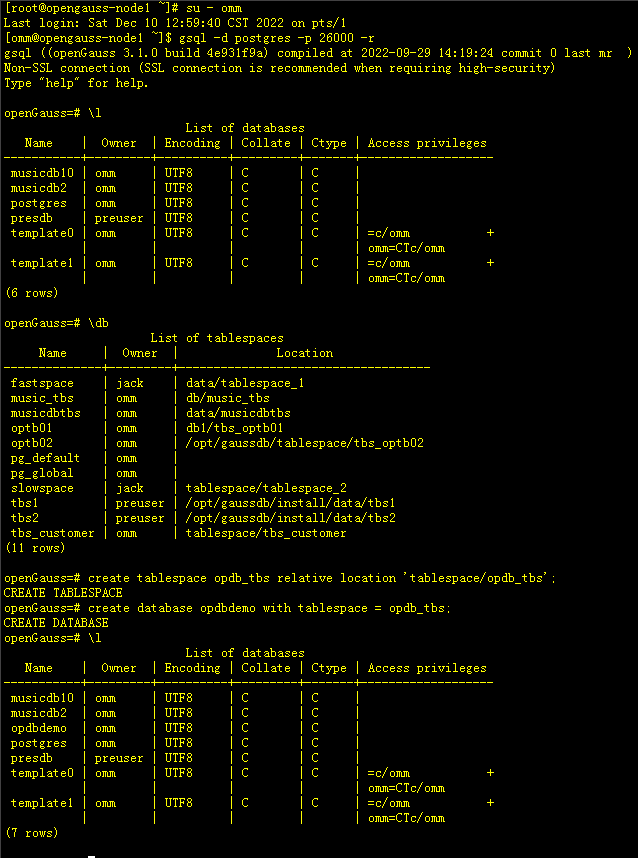
2.1 创建表空间及库
[root@opengauss-node1 ~]# su - omm
Last login: Sat Dec 10 12:59:40 CST 2022 on pts/1
[omm@opengauss-node1 ~]$ gsql -d postgres -p 26000 -r
gsql ((openGauss 3.1.0 build 4e931f9a) compiled at 2022-09-29 14:19:24 commit 0 last mr  )
Non-SSL connection (SSL connection is recommended when requiring high-security)
Type "help" for help.

openGauss=# \l
                          List of databases
   Name    |  Owner  | Encoding | Collate | Ctype | Access privileges
-----------+---------+----------+---------+-------+-------------------
 musicdb10 | omm     | UTF8     | C       | C     |
 musicdb2  | omm     | UTF8     | C       | C     |
 postgres  | omm     | UTF8     | C       | C     |
 presdb    | preuser | UTF8     | C       | C     |
 template0 | omm     | UTF8     | C       | C     | =c/omm           +
           |         |          |         |       | omm=CTc/omm
 template1 | omm     | UTF8     | C       | C     | =c/omm           +
           |         |          |         |       | omm=CTc/omm
(6 rows)

openGauss=# \db
                     List of tablespaces
     Name     |  Owner  |              Location
--------------+---------+------------------------------------
 fastspace    | jack    | data/tablespace_1
 music_tbs    | omm     | db/music_tbs
 musicdbtbs   | omm     | data/musicdbtbs
 optb01       | omm     | db1/tbs_optb01
 optb02       | omm     | /opt/gaussdb/tablespace/tbs_optb02
 pg_default   | omm     |
 pg_global    | omm     |
 slowspace    | jack    | tablespace/tablespace_2
 tbs1         | preuser | /opt/gaussdb/install/data/tbs1
 tbs2         | preuser | /opt/gaussdb/install/data/tbs2
 tbs_customer | omm     | tablespace/tbs_customer
(11 rows)

-- 采用相对位置创建表空间opdb_tbs
openGauss=# create tablespace opdb_tbs relative location 'tablespace/opdb_tbs';
CREATE TABLESPACE
-- 创建数据库opdbdemo 默认使用opdb_tbs表空间
openGauss=# create database opdbdemo with tablespace = opdb_tbs;
CREATE DATABASE
openGauss=# \l
                          List of databases
   Name    |  Owner  | Encoding | Collate | Ctype | Access privileges
-----------+---------+----------+---------+-------+-------------------
 musicdb10 | omm     | UTF8     | C       | C     |
 musicdb2  | omm     | UTF8     | C       | C     |
 opdbdemo  | omm     | UTF8     | C       | C     |
 postgres  | omm     | UTF8     | C       | C     |
 presdb    | preuser | UTF8     | C       | C     |
 template0 | omm     | UTF8     | C       | C     | =c/omm           +
           |         |          |         |       | omm=CTc/omm
 template1 | omm     | UTF8     | C       | C     | =c/omm           +
           |         |          |         |       | omm=CTc/omm
(7 rows)
2.2 创建用户及测试表
[omm@opengauss-node1 ~]$ gsql -d postgres -p 26000 -r
gsql ((openGauss 3.1.0 build 4e931f9a) compiled at 2022-09-29 14:19:24 commit 0 last mr  )
Non-SSL connection (SSL connection is recommended when requiring high-security)
Type "help" for help.
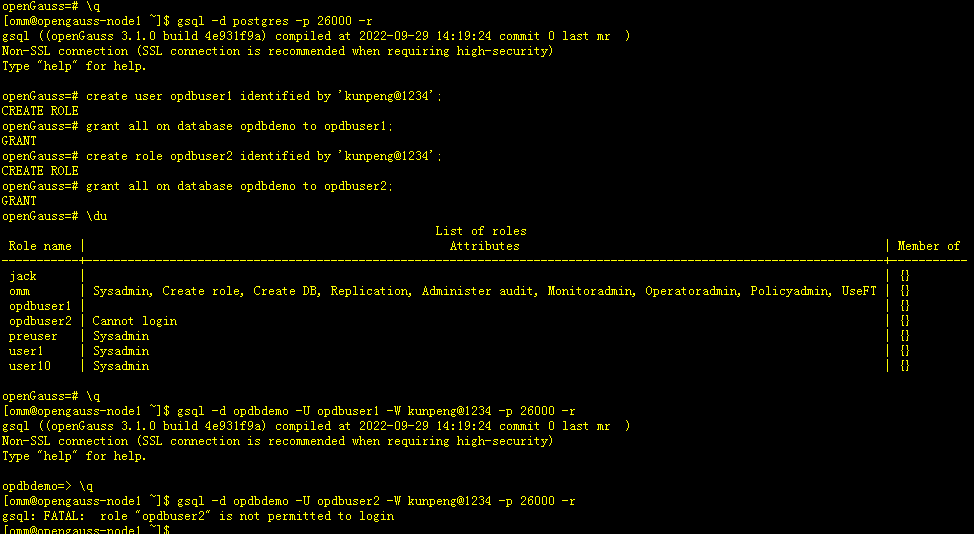
--使用create user创建用户
openGauss=# create user opdbuser1 identified by 'kunpeng@1234';
CREATE ROLE
-- 授予权限
openGauss=# grant all on database opdbdemo to opdbuser1;
GRANT
--使用create role创建用户
openGauss=# create role opdbuser2 identified by 'kunpeng@1234';
CREATE ROLE
-- 授予权限
openGauss=# grant all on database opdbdemo to opdbuser2;
GRANT
-- 查询当前系统有哪些用户
openGauss=# \du
                                                              List of roles
 Role name |                                                    Attributes                                                    | Member of
-----------+------------------------------------------------------------------------------------------------------------------+-----------
 jack      |                                                                                                                  | {}
 omm       | Sysadmin, Create role, Create DB, Replication, Administer audit, Monitoradmin, Operatoradmin, Policyadmin, UseFT | {}
 opdbuser1 |                                                                                                                  | {}
 opdbuser2 | Cannot login                                                                                                     | {}
 preuser   | Sysadmin                                                                                                         | {}
 user1     | Sysadmin                                                                                                         | {}
 user10    | Sysadmin                                                                                                         | {}

openGauss=# \q
[omm@opengauss-node1 ~]$ gsql -d opdbdemo -U opdbuser1 -W kunpeng@1234 -p 26000 -r
gsql ((openGauss 3.1.0 build 4e931f9a) compiled at 2022-09-29 14:19:24 commit 0 last mr  )
Non-SSL connection (SSL connection is recommended when requiring high-security)
Type "help" for help.
-- 使用create role创建的用户无法登陆数据库
opdbdemo=> \q
[omm@opengauss-node1 ~]$ gsql -d opdbdemo -U opdbuser2 -W kunpeng@1234 -p 26000 -r
gsql: FATAL:  role "opdbuser2" is not permitted to login
– 创建测试表
[omm@opengauss-node1 ~]$ gsql -d opdbdemo -U opdbuser1 -W kunpeng@1234 -p 26000 -r
gsql ((openGauss 3.1.0 build 4e931f9a) compiled at 2022-09-29 14:19:24 commit 0 last mr  )
Non-SSL connection (SSL connection is recommended when requiring high-security)
Type "help" for help.

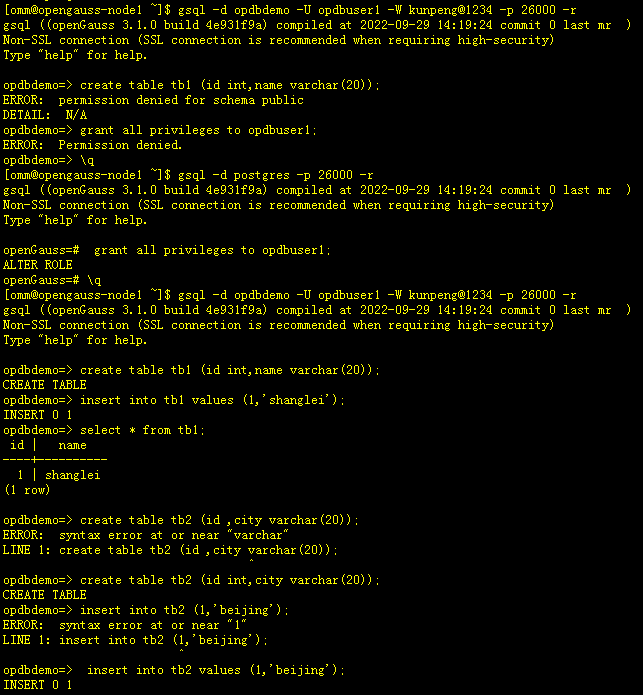
-- 发现grant all on database opdbdemo to opdbuser1创建的用户无法在public上创建表
opdbdemo=> create table tb1 (id int,name varchar(20));
ERROR:  permission denied for schema public
DETAIL:  N/A
opdbdemo=> grant all privileges to opdbuser1;
ERROR:  Permission denied.
opdbdemo=> \q
[omm@opengauss-node1 ~]$ gsql -d postgres -p 26000 -r
gsql ((openGauss 3.1.0 build 4e931f9a) compiled at 2022-09-29 14:19:24 commit 0 last mr  )
Non-SSL connection (SSL connection is recommended when requiring high-security)
Type "help" for help.

-- 需要为opdbuser1用户授予 grant all privileges 权限才行
openGauss=#  grant all privileges to opdbuser1;
ALTER ROLE
openGauss=# \q
[omm@opengauss-node1 ~]$ gsql -d opdbdemo -U opdbuser1 -W kunpeng@1234 -p 26000 -r
gsql ((openGauss 3.1.0 build 4e931f9a) compiled at 2022-09-29 14:19:24 commit 0 last mr  )
Non-SSL connection (SSL connection is recommended when requiring high-security)
Type "help" for help.

opdbdemo=> create table tb1 (id int,name varchar(20));
CREATE TABLE
opdbdemo=> insert into tb1 values (1,'shanglei');
INSERT 0 1
opdbdemo=> select * from tb1;
 id |   name
----+----------
  1 | shanglei
(1 row)

opdbdemo=> create table tb2 (id ,city varchar(20));
ERROR:  syntax error at or near "varchar"
LINE 1: create table tb2 (id ,city varchar(20));
                                   ^
opdbdemo=> create table tb2 (id int,city varchar(20));
CREATE TABLE
2.3 使用create role创建角色并登录数据库
[omm@opengauss-node1 ~]$ gsql -d postgres -p 26000 -r
gsql ((openGauss 3.1.0 build 4e931f9a) compiled at 2022-09-29 14:19:24 commit 0 last mr  )
Non-SSL connection (SSL connection is recommended when requiring high-security)
Type "help" for help.

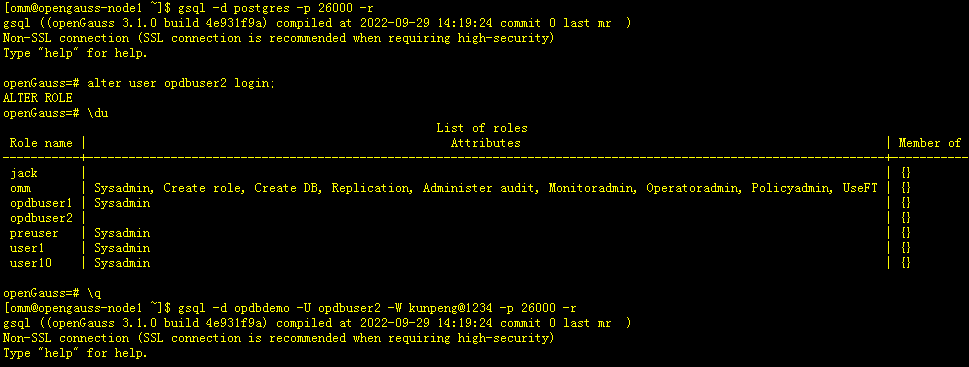
-- 为 opdbuser2 用户授予 login权限
openGauss=# alter user opdbuser2 login;
ALTER ROLE
openGauss=# \du
                                                              List of roles
 Role name |                                                    Attributes                                                    | Member of
-----------+------------------------------------------------------------------------------------------------------------------+-----------
 jack      |                                                                                                                  | {}
 omm       | Sysadmin, Create role, Create DB, Replication, Administer audit, Monitoradmin, Operatoradmin, Policyadmin, UseFT | {}
 opdbuser1 | Sysadmin                                                                                                         | {}
 opdbuser2 |                                                                                                                  | {}
 preuser   | Sysadmin                                                                                                         | {}
 user1     | Sysadmin                                                                                                         | {}
 user10    | Sysadmin                                                                                                         | {}

openGauss=# \q
-- 当用opdbuser2 被授予login权限后,可正常登陆数据库
[omm@opengauss-node1 ~]$ gsql -d opdbdemo -U opdbuser2 -W kunpeng@1234 -p 26000 -r
gsql ((openGauss 3.1.0 build 4e931f9a) compiled at 2022-09-29 14:19:24 commit 0 last mr  )
Non-SSL connection (SSL connection is recommended when requiring high-security)
Type "help" for help.

opdbdemo=>
2.4 删除表和用户及权限转赋测试
openGauss=# \l
                          List of databases
   Name    |  Owner  | Encoding | Collate | Ctype | Access privileges
-----------+---------+----------+---------+-------+-------------------
 dbdemo1   | omm     | UTF8     | C       | C     | =Tc/omm          +
           |         |          |         |       | omm=CTc/omm
 musicdb10 | omm     | UTF8     | C       | C     |
 musicdb2  | omm     | UTF8     | C       | C     |
 opdbdemo  | omm     | UTF8     | C       | C     | =Tc/omm          +
           |         |          |         |       | omm=CTc/omm      +
           |         |          |         |       | opdbuser1=CTc/omm+
           |         |          |         |       | opdbuser1=APm/omm+
           |         |          |         |       | opdbuser2=CTc/omm+
           |         |          |         |       | opdbuser2=APm/omm
 postgres  | omm     | UTF8     | C       | C     |
 presdb    | preuser | UTF8     | C       | C     |
 template0 | omm     | UTF8     | C       | C     | =c/omm           +
           |         |          |         |       | omm=CTc/omm
 template1 | omm     | UTF8     | C       | C     | =c/omm           +
           |         |          |         |       | omm=CTc/omm
(8 rows)

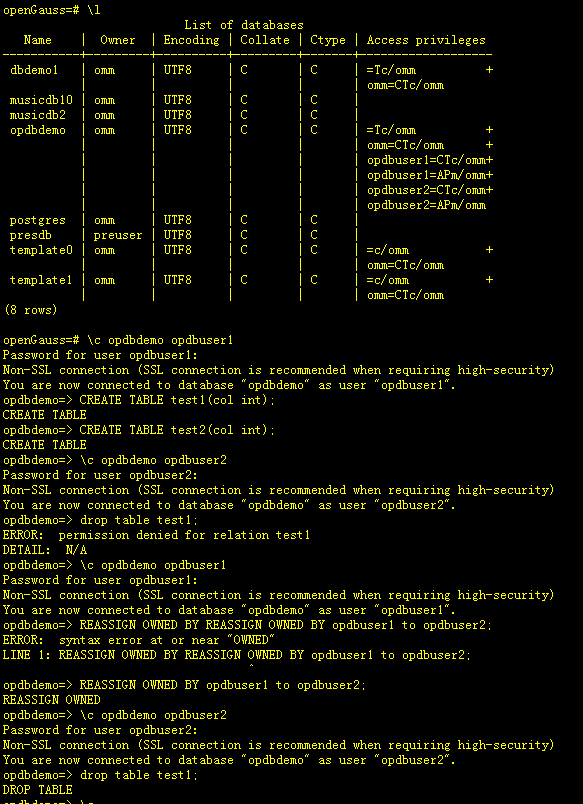
openGauss=# \c opdbdemo opdbuser1
Password for user opdbuser1:
Non-SSL connection (SSL connection is recommended when requiring high-security)
You are now connected to database "opdbdemo" as user "opdbuser1".
opdbdemo=> CREATE TABLE test1(col int);
CREATE TABLE
opdbdemo=> CREATE TABLE test2(col int);
CREATE TABLE
opdbdemo=> \c opdbdemo opdbuser2
Password for user opdbuser2:
Non-SSL connection (SSL connection is recommended when requiring high-security)
You are now connected to database "opdbdemo" as user "opdbuser2".
-- opdbuser2 无法删除opdbuser1用户创建的表 test1
opdbdemo=> drop table test1;
ERROR:  permission denied for relation test1
DETAIL:  N/A
opdbdemo=> \c opdbdemo opdbuser1
Password for user opdbuser1:
Non-SSL connection (SSL connection is recommended when requiring high-security)
You are now connected to database "opdbdemo" as user "opdbuser1".
opdbdemo=> REASSIGN OWNED BY REASSIGN OWNED BY opdbuser1 to opdbuser2;
ERROR:  syntax error at or near "OWNED"
LINE 1: REASSIGN OWNED BY REASSIGN OWNED BY opdbuser1 to opdbuser2;
                                   ^
-- 将opdbuser1的权限赋予给opdbuser2
opdbdemo=> REASSIGN OWNED BY opdbuser1 to opdbuser2;
REASSIGN OWNED
-- 切换到opdbuser1用户
opdbdemo=> \c opdbdemo opdbuser2
Password for user opdbuser2:
Non-SSL connection (SSL connection is recommended when requiring high-security)
You are now connected to database "opdbdemo" as user "opdbuser2".
-- 此时可以删除 opdbuser1 下的 test1表
opdbdemo=> drop table test1;
DROP TABLE
[omm@opengauss-node1 ~]$ gsql -d opdbdemo -U opdbuser1 -W kunpeng@1234 -p 26000 -r
gsql ((openGauss 3.1.0 build 4e931f9a) compiled at 2022-09-29 14:19:24 commit 0 last mr  )
Non-SSL connection (SSL connection is recommended when requiring high-security)
Type "help" for help.

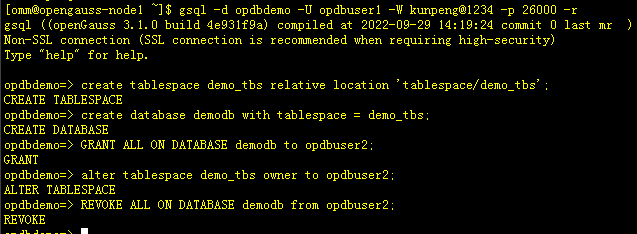
opdbdemo=> create tablespace demo_tbs relative location 'tablespace/demo_tbs';
CREATE TABLESPACE
opdbdemo=> create database demodb with tablespace = demo_tbs;
CREATE DATABASE
-- 授予opdbuser1用户创建的demodb数据库 所有权限给 opdbuser2
opdbdemo=> GRANT ALL ON DATABASE demodb to opdbuser2;
GRANT
-- 授予opdbuser1用户创建的demo_tbs表空间给 opdbuser2
opdbdemo=> alter tablespace demo_tbs owner to opdbuser2;
ALTER TABLESPACE
-- 回收数据库所有权限从opdbuser2用户
opdbdemo=> REVOKE ALL ON DATABASE demodb from opdbuser2;
REVOKE
2.5 删除用户测试
openGauss=# \du
                                                              List of roles
 Role name |                                                    Attributes                                                    | Member of
-----------+------------------------------------------------------------------------------------------------------------------+-----------
 jack      |                                                                                                                  | {}
 omm       | Sysadmin, Create role, Create DB, Replication, Administer audit, Monitoradmin, Operatoradmin, Policyadmin, UseFT | {}
 opdbuser2 |                                                                                                                  | {}
 preuser   | Sysadmin                                                                                                         | {}
 user1     | Sysadmin                                                                                                         | {}
 user10    | Sysadmin                                                                                                         | {}

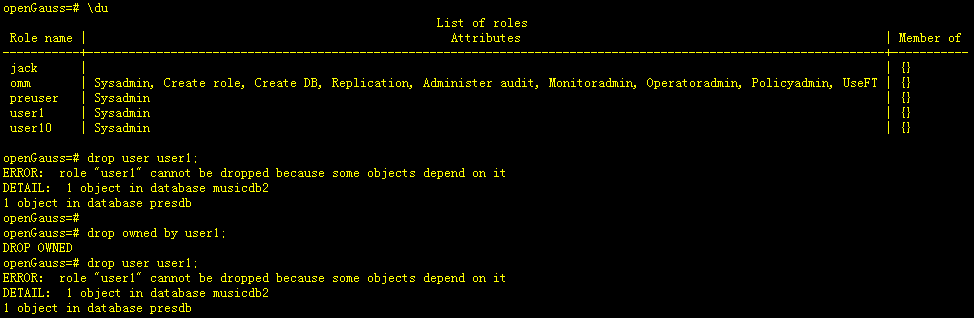
-- 当有其它对象依赖于用户时无法直接删除用户
openGauss=# drop user opdbuser2;
ERROR:  role "opdbuser2" cannot be dropped because some objects depend on it
DETAIL:  privileges for database opdbdemo
openGauss=#
openGauss=#
-- 使用级联删除用户下的对象
openGauss=# drop owned by opdbuser2 cascade;
DROP OWNED
-- 删除用户成功
openGauss=# drop user opdbuser2;
DROP ROLE
三、学习心得
通过学习本节课的内容,对openGauss创建角色有了一定了解,感觉和Oracle有些地方不太一样,对于这块还要多勤加练习好好了解其相关理论知识。
