



一、学习目标
1.1 备份与恢复概念
本节课是本次实训的第二十节课,本次课的重点是关于数据库的备份及恢复。
数据库备份非常重要,当数据库出现故障难以修复时,就需要使用备份信息进行数据库恢复。
对于数据库备份与恢复,openGauss在其官网上有专题讲解备份与恢复:
数据备份是保护数据安全的重要手段之一,为了更好的保护数据安全,openGauss数据库支持两种备份恢复类型、多种备份恢复方案,备份和恢复过程中提供数据的可靠性保障机制。
备份与恢复类型可分为逻辑备份与恢复、物理备份与恢复。
- 逻辑备份与恢复:通过逻辑导出对数据进行备份,逻辑备份只能基于备份时刻进行数据转储,所以恢复时也只能恢复到备份时保存的数据。对于故障点和备份点之间的数据,逻辑备份无能为力,逻辑备份适合备份那些很少变化的数据,当这些数据因误操作被损坏时,可以通过逻辑备份进行快速恢复。如果通过逻辑备份进行全库恢复,通常需要重建数据库,导入备份数据来完成,对于可用性要求很高的数据库,这种恢复时间太长,通常不被采用。由于逻辑备份具有平台无关性,所以更为常见的是,逻辑备份被作为一个数据迁移及移动的主要手段。
- 物理备份与恢复:通过物理文件拷贝的方式对数据库进行备份,以磁盘块为基本单位将数据备份。通过备份的数据文件及归档日志等文件,数据库可以进行完全恢复。物理备份速度快,一般被用作对数据进行备份和恢复,用于全量备份的场景。通过合理规划,可以低成本进行备份与恢复。
在 https://www.bookstack.cn/read/opengauss-1.1-zh/e736556d0ad84e8d.md 这一节有专门的备份恢复知识。
1.2 备份恢复工具
openGauss提供了多个备份恢复工具,部分备份恢复工具如下:
- gs_basebackup
gs_basebackup仅支持数据库全量热备份,不支持增量和压缩备份。数据库需要处于开启状态,gs_basebackup会连接数据,读取各文件路径信息,然后开始文件二进制拷贝工作。
- gs_dump
gs_dump是openGauss用于导出数据库相关信息的工具,用户可以自定义导出一个数据库或是其中的对象(模式、表、视图等)。gs_dump工具在进行数据导出时,其他用户可以读写openGauss数据库。
- gs_dumpall/gsql
gs_dumpall是openGauss用于导出所有数据库相关信息工具,其内部是在调用gs_dump命令。
gs_dumpall导出的结果为纯文本格式的SQL脚本文件,使用gsql运行该脚本文件可以恢复openGauss数据库。
- gs_restore
gs_restore是openGauss提供的针对gs_dump导出数据的导入工具。通过此工具可由gs_dump生成的导出文件进行导入。
gs_restore可以将dump文件导入到数据库,也可以生成dump文件对应的sql建库脚本。
gs_restore默认是以追加的方式进行数据导入。
- gs_backup
gs_backup工具可以备份和恢复openGauss数据库软件相关的二进制文件和参数文件,当数据库主机出现故障时,用于恢复openGauss软件环境。
二、课程学习
2.1 .为逻辑备份准备环境
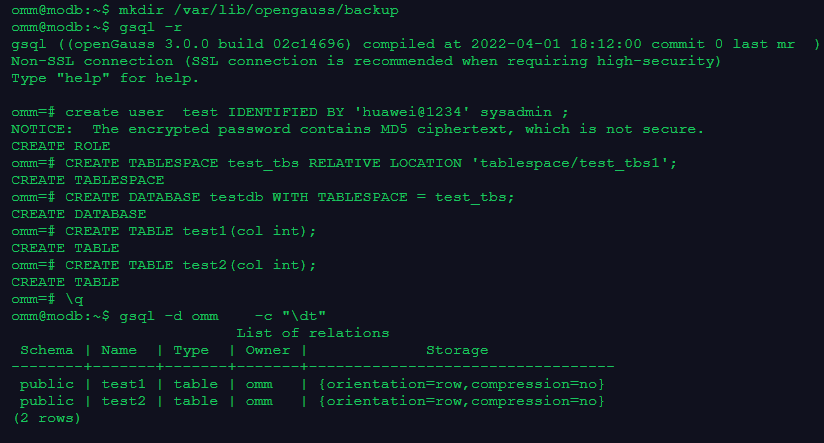
omm@modb:~$ mkdir /var/lib/opengauss/backup
omm@modb:~$ gsql -r
gsql ((openGauss 3.0.0 build 02c14696) compiled at 2022-04-01 18:12:00 commit 0 last mr  )
Non-SSL connection (SSL connection is recommended when requiring high-security)
Type "help" for help.

--创建备份恢复用户,需要具有super或者sysadmin权限
omm=# create user  test IDENTIFIED BY 'huawei@1234' sysadmin ;
NOTICE:  The encrypted password contains MD5 ciphertext, which is not secure.
CREATE ROLE
omm=# CREATE TABLESPACE test_tbs RELATIVE LOCATION 'tablespace/test_tbs1';
CREATE TABLESPACE
omm=# CREATE DATABASE testdb WITH TABLESPACE = test_tbs;
CREATE DATABASE
omm=# CREATE TABLE test1(col int);
CREATE TABLE
omm=# CREATE TABLE test2(col int);
CREATE TABLE
omm=# \q
omm@modb:~$ gsql -d omm    -c "\dt"
                         List of relations
 Schema | Name  | Type  | Owner |             Storage
--------+-------+-------+-------+----------------------------------
 public | test1 | table | omm   | {orientation=row,compression=no}
 public | test2 | table | omm   | {orientation=row,compression=no}
(2 rows)
2.2.逻辑备份和恢复案例1(sql格式)
– 逻辑备份
--使用test用户,备份数据库omm
omm@modb:~$ gs_dump -U test -W huawei@1234  omm -F p -f /var/lib/opengauss/backup/backup.sql
gs_dump[port='5432'][omm][2022-12-13 19:35:43]: The total objects number is 413.
gs_dump[port='5432'][omm][2022-12-13 19:35:43]: [100.00%] 413 objects have been dumped.
gs_dump[port='5432'][omm][2022-12-13 19:35:43]: total time: 1587  ms
gs_dump[port='5432'][omm][2022-12-13 19:35:43]: dump database omm successfully

– 逻辑恢复:
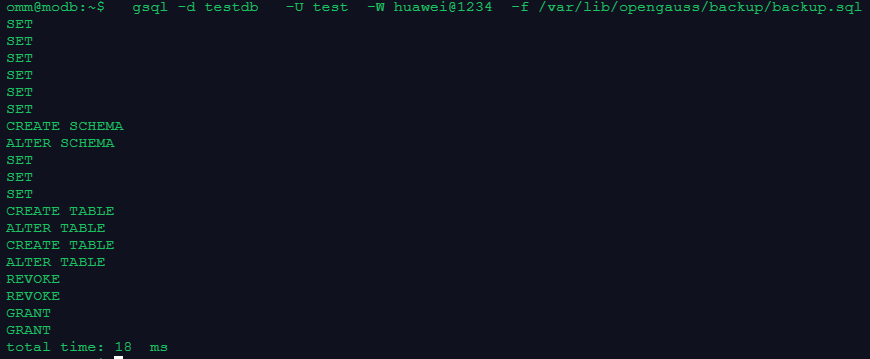
omm@modb:~$   gsql -d testdb   -U test  -W huawei@1234  -f /var/lib/opengauss/backup/backup.sql
SET
SET
SET
SET
SET
SET
CREATE SCHEMA
ALTER SCHEMA
SET
SET
SET
CREATE TABLE
ALTER TABLE
CREATE TABLE
ALTER TABLE
REVOKE
REVOKE
GRANT
GRANT
total time: 18  ms
– 恢复验证:
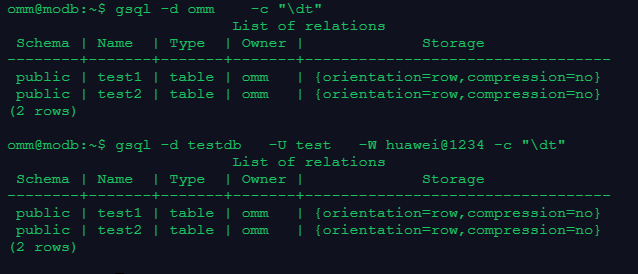
--验证数据库omm的备份已经被恢复到数据库testdb:
--源库(备份的数据库):
omm@modb:~$ gsql -d omm -c "\dt"
                         List of relations
 Schema | Name  | Type  | Owner |             Storage
--------+-------+-------+-------+----------------------------------
 public | test1 | table | omm   | {orientation=row,compression=no}
 public | test2 | table | omm   | {orientation=row,compression=no}
(2 rows)

--新库(恢复的数据库):
omm@modb:~$ gsql -d testdb  -U test -W huawei@1234 -c "\dt"
                         List of relations
 Schema | Name  | Type  | Owner |             Storage
--------+-------+-------+-------+----------------------------------
 public | test1 | table | omm   | {orientation=row,compression=no}
 public | test2 | table | omm   | {orientation=row,compression=no}
(2 rows)
2.3 openGauss数据库逻辑备份和恢复案例2(dump格式)
– 逻辑备份
omm@modb:~$ gsql -r
gsql ((openGauss 3.0.0 build 02c14696) compiled at 2022-04-01 18:12:00 commit 0 last mr  )
Non-SSL connection (SSL connection is recommended when requiring high-security)
Type "help" for help.

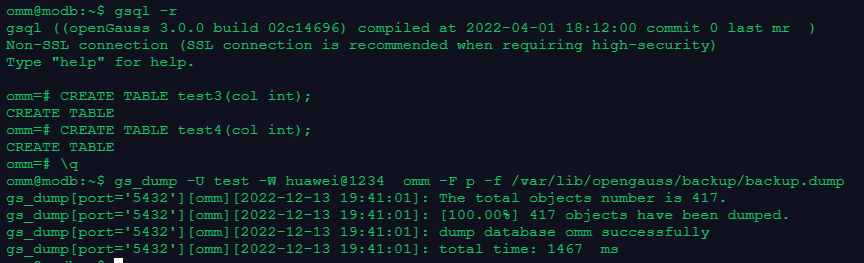
omm=# CREATE TABLE test3(col int);
CREATE TABLE
omm=# CREATE TABLE test4(col int);
CREATE TABLE
omm=# \q
--使用test用户,备份omm数据库,生成归档格式的备份文件:
omm@modb:~$ gs_dump -U test -W huawei@1234  omm -F p -f /var/lib/opengauss/backup/backup.dump
gs_dump[port='5432'][omm][2022-12-13 19:41:01]: The total objects number is 417.
gs_dump[port='5432'][omm][2022-12-13 19:41:01]: [100.00%] 417 objects have been dumped.
gs_dump[port='5432'][omm][2022-12-13 19:41:01]: dump database omm successfully
gs_dump[port='5432'][omm][2022-12-13 19:41:01]: total time: 1467  ms
– 逻辑恢复
--使用gs_dump生成的归档文件恢复数据库
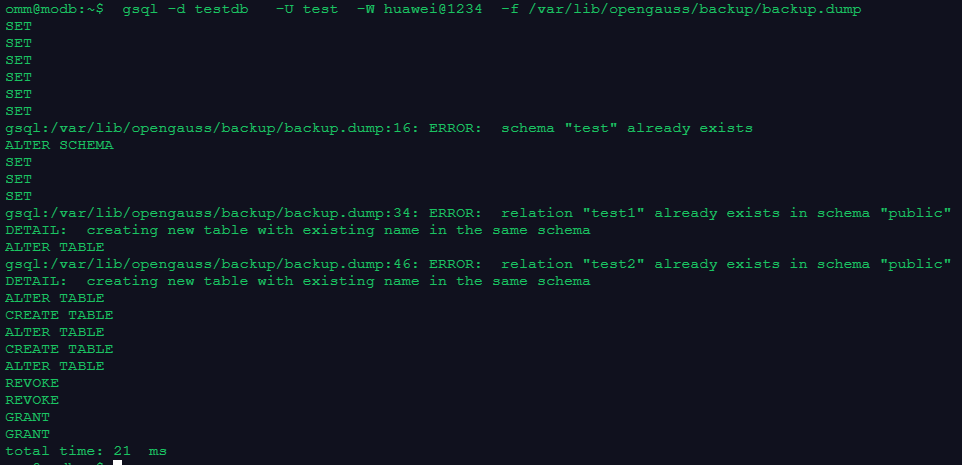
omm@modb:~$  gsql -d testdb   -U test  -W huawei@1234  -f /var/lib/opengauss/backup/backup.dump
SET
SET
SET
SET
SET
SET
gsql:/var/lib/opengauss/backup/backup.dump:16: ERROR:  schema "test" already exists
ALTER SCHEMA
SET
SET
SET
gsql:/var/lib/opengauss/backup/backup.dump:34: ERROR:  relation "test1" already exists in schema "public"
DETAIL:  creating new table with existing name in the same schema
ALTER TABLE
gsql:/var/lib/opengauss/backup/backup.dump:46: ERROR:  relation "test2" already exists in schema "public"
DETAIL:  creating new table with existing name in the same schema
ALTER TABLE
CREATE TABLE
ALTER TABLE
CREATE TABLE
ALTER TABLE
REVOKE
REVOKE
GRANT
GRANT
total time: 21  ms
–验证测试
----源库(备份的数据库):
omm@modb:~$ gsql -d omm    -c "\dt"
                         List of relations
 Schema | Name  | Type  | Owner |             Storage
--------+-------+-------+-------+----------------------------------
 public | test1 | table | omm   | {orientation=row,compression=no}
 public | test2 | table | omm   | {orientation=row,compression=no}
 public | test3 | table | omm   | {orientation=row,compression=no}
 public | test4 | table | omm   | {orientation=row,compression=no}
(4 rows)

----新库(恢复的数据库):
omm@modb:~$ gsql -d testdb   -U test   -W huawei@1234 -c "\dt"
                         List of relations
 Schema | Name  | Type  | Owner |             Storage
--------+-------+-------+-------+----------------------------------
 public | test1 | table | omm   | {orientation=row,compression=no}
 public | test2 | table | omm   | {orientation=row,compression=no}
 public | test3 | table | omm   | {orientation=row,compression=no}
 public | test4 | table | omm   | {orientation=row,compression=no}
(4 rows)
三、课程作业
3.1 使用sql格式进行备份和恢复数据库
– 创建测试用户、表空间、表及数据库
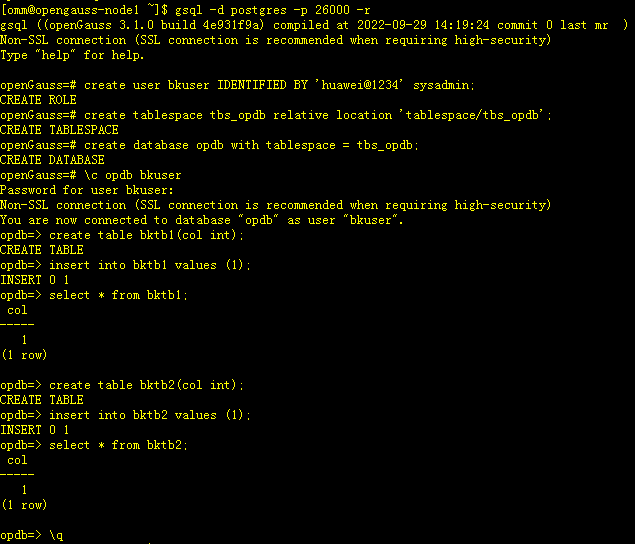
[omm@opengauss-node1 ~]$ gsql -d postgres -p 26000 -r
gsql ((openGauss 3.1.0 build 4e931f9a) compiled at 2022-09-29 14:19:24 commit 0 last mr  )
Non-SSL connection (SSL connection is recommended when requiring high-security)
Type "help" for help.

openGauss=# create user bkuser IDENTIFIED BY 'huawei@1234' sysadmin;
CREATE ROLE
openGauss=# create tablespace tbs_opdb relative location 'tablespace/tbs_opdb';
CREATE TABLESPACE
openGauss=# create database opdb with tablespace = tbs_opdb;
CREATE DATABASE
openGauss=# \c opdb bkuser
Password for user bkuser:
Non-SSL connection (SSL connection is recommended when requiring high-security)
You are now connected to database "opdb" as user "bkuser".
opdb=> create table bktb1(col int);
CREATE TABLE
opdb=> insert into bktb1 values (1);
INSERT 0 1
opdb=> select * from bktb1;
 col
-----
   1
(1 row)

opdb=> create table bktb2(col int);
CREATE TABLE
opdb=> insert into bktb2 values (1);
INSERT 0 1
opdb=> select * from bktb2;
 col
-----
   1
(1 row)

opdb=> \q
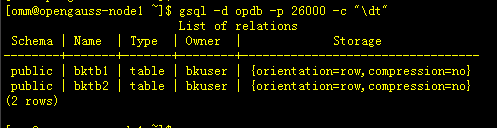
[omm@opengauss-node1 ~]$ gsql -d opdb -p 26000 -c "\dt"
                         List of relations
 Schema | Name  | Type  | Owner  |             Storage
--------+-------+-------+--------+----------------------------------
 public | bktb1 | table | bkuser | {orientation=row,compression=no}
 public | bktb2 | table | bkuser | {orientation=row,compression=no}
(2 rows)
– 备份数据库opdb 生成SQL文件
[omm@opengauss-node1 backup]$ gs_dump -p 26000 -U bkuser -W huawei@1234 opdb -F p -f /home/omm/backup/backup.sql
gs_dump[port='26000'][opdb][2022-12-13 19:53:34]: The total objects number is 431.
gs_dump[port='26000'][opdb][2022-12-13 19:53:34]: [100.00%] 431 objects have been dumped.
gs_dump[port='26000'][opdb][2022-12-13 19:53:34]: dump database opdb successfully
gs_dump[port='26000'][opdb][2022-12-13 19:53:34]: total time: 9485  ms

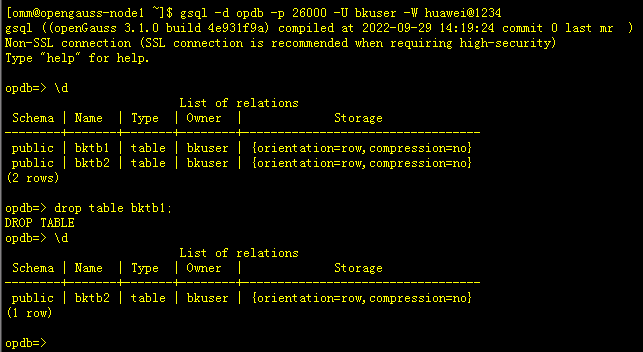
– 模拟删除表bktb1
[omm@opengauss-node1 ~]$ gsql -d opdb -p 26000 -U bkuser -W huawei@1234
gsql ((openGauss 3.1.0 build 4e931f9a) compiled at 2022-09-29 14:19:24 commit 0 last mr  )
Non-SSL connection (SSL connection is recommended when requiring high-security)
Type "help" for help.

opdb=> \d
                         List of relations
 Schema | Name  | Type  | Owner  |             Storage
--------+-------+-------+--------+----------------------------------
 public | bktb1 | table | bkuser | {orientation=row,compression=no}
 public | bktb2 | table | bkuser | {orientation=row,compression=no}
(2 rows)

opdb=> drop table bktb1;
DROP TABLE
opdb=> \d
                         List of relations
 Schema | Name  | Type  | Owner  |             Storage
--------+-------+-------+--------+----------------------------------
 public | bktb2 | table | bkuser | {orientation=row,compression=no}
(1 row)
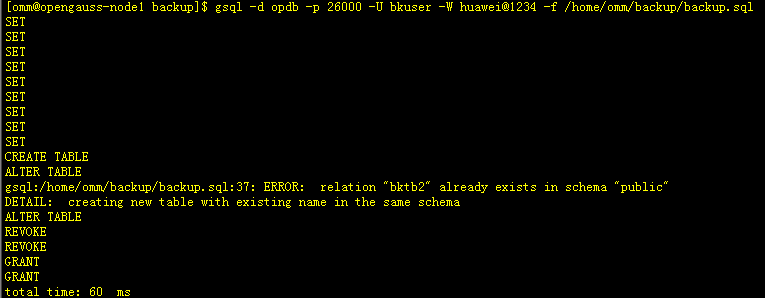
– 恢复数据库opdb
[omm@opengauss-node1 backup]$ gsql -d opdb -p 26000 -U bkuser -W huawei@1234 -f /home/omm/backup/backup.sql
SET
SET
SET
SET
SET
SET
SET
SET
SET
CREATE TABLE
ALTER TABLE
gsql:/home/omm/backup/backup.sql:37: ERROR:  relation "bktb2" already exists in schema "public"
DETAIL:  creating new table with existing name in the same schema
ALTER TABLE
REVOKE
REVOKE
GRANT
GRANT
total time: 60  ms
– 验证数据
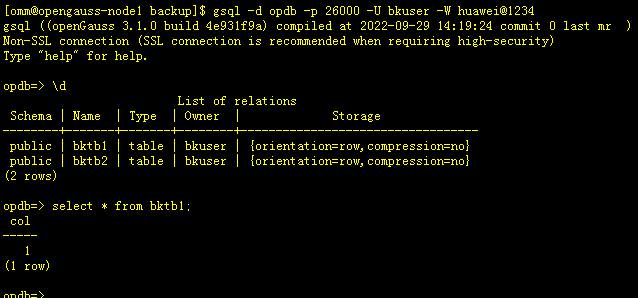
[omm@opengauss-node1 backup]$ gsql -d opdb -p 26000 -U bkuser -W huawei@1234
gsql ((openGauss 3.1.0 build 4e931f9a) compiled at 2022-09-29 14:19:24 commit 0 last mr  )
Non-SSL connection (SSL connection is recommended when requiring high-security)
Type "help" for help.

opdb=> \d
                         List of relations
 Schema | Name  | Type  | Owner  |             Storage
--------+-------+-------+--------+----------------------------------
 public | bktb1 | table | bkuser | {orientation=row,compression=no}
 public | bktb2 | table | bkuser | {orientation=row,compression=no}
(2 rows)

-- 可以看到数据已恢复
opdb=> select * from bktb1;
 col
-----
   1
(1 row)
3.2 使用dump格式进行备份和恢复数据库
– 使用gs_dump 备份数据库opdb
[omm@opengauss-node1 backup]$ gs_dump -p 26000 -U bkuser -W huawei@1234 opdb -F p -f /home/omm/backup/opdb_bak.dump
gs_dump[port='26000'][opdb][2022-12-13 20:00:18]: The total objects number is 431.
gs_dump[port='26000'][opdb][2022-12-13 20:00:18]: [100.00%] 431 objects have been dumped.
gs_dump[port='26000'][opdb][2022-12-13 20:00:18]: dump database opdb successfully
gs_dump[port='26000'][opdb][2022-12-13 20:00:18]: total time: 9784  ms
[omm@opengauss-node1 backup]$ ls -lrt /home/omm/backup/opdb_bak.dump
-rw------- 1 omm dbgrp 1223 Dec 13 20:00 /home/omm/backup/opdb_bak.dump
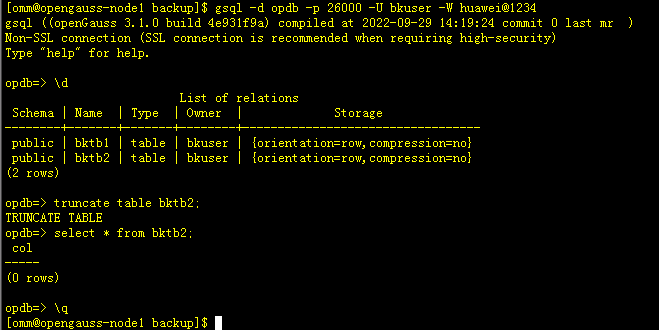
– 模拟清空表bktb2
[omm@opengauss-node1 backup]$ gsql -d opdb -p 26000 -U bkuser -W huawei@1234
gsql ((openGauss 3.1.0 build 4e931f9a) compiled at 2022-09-29 14:19:24 commit 0 last mr  )
Non-SSL connection (SSL connection is recommended when requiring high-security)
Type "help" for help.

opdb=> \d
                         List of relations
 Schema | Name  | Type  | Owner  |             Storage
--------+-------+-------+--------+----------------------------------
 public | bktb1 | table | bkuser | {orientation=row,compression=no}
 public | bktb2 | table | bkuser | {orientation=row,compression=no}
(2 rows)

opdb=> truncate table bktb2;
TRUNCATE TABLE
opdb=> select * from bktb2;
 col
-----
(0 rows)

opdb=> \q
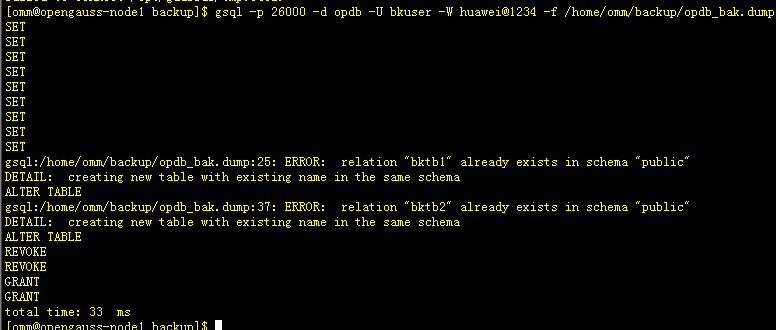
– 使用dump文件恢复opdb库
[omm@opengauss-node1 backup]$ gsql -p 26000 -d opdb -U bkuser -W huawei@1234 -f /home/omm/backup/opdb_bak.dump
SET
SET
SET
SET
SET
SET
SET
SET
SET
gsql:/home/omm/backup/opdb_bak.dump:25: ERROR:  relation "bktb1" already exists in schema "public"
DETAIL:  creating new table with existing name in the same schema
ALTER TABLE
gsql:/home/omm/backup/opdb_bak.dump:37: ERROR:  relation "bktb2" already exists in schema "public"
DETAIL:  creating new table with existing name in the same schema
ALTER TABLE
REVOKE
REVOKE
GRANT
GRANT
total time: 33  ms
– 验证数据
[omm@opengauss-node1 backup]$ gsql -d opdb -p 26000 -U bkuser -W huawei@1234
gsql ((openGauss 3.1.0 build 4e931f9a) compiled at 2022-09-29 14:19:24 commit 0 last mr  )
Non-SSL connection (SSL connection is recommended when requiring high-security)
Type "help" for help.

opdb=> \d
                         List of relations
 Schema | Name  | Type  | Owner  |             Storage
--------+-------+-------+--------+----------------------------------
 public | bktb1 | table | bkuser | {orientation=row,compression=no}
 public | bktb2 | table | bkuser | {orientation=row,compression=no}
(2 rows)

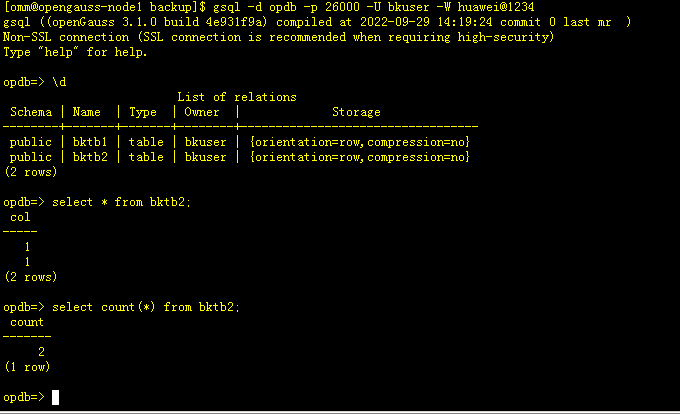
opdb=> select * from bktb2;
 col
-----
   1
   1
(2 rows)

opdb=> select count(*) from bktb2;
 count
-------
     2
(1 row)
四、心得体会
通过本课程的学习,初步了解和简单掌握了openGauss使用gs_dump和gsql备份和恢复数据库。
但最后在模拟使用gs_dump备份数据库,清空表数据,竟然在恢复时多了一条数据,好奇怪,现在还不清楚原因。
「喜欢这篇文章,您的关注和赞赏是给作者最好的鼓励」
关注作者
【版权声明】本文为墨天轮用户原创内容,转载时必须标注文章的来源(墨天轮),文章链接,文章作者等基本信息,否则作者和墨天轮有权追究责任。如果您发现墨天轮中有涉嫌抄袭或者侵权的内容,欢迎发送邮件至:contact@modb.pro进行举报,并提供相关证据,一经查实,墨天轮将立刻删除相关内容。
