



掌握openGauss数据库的逻辑备份和恢复技术。
理论部分学习:gs_dump
gs_dump是openGauss用于导出数据库相关信息的工具,用户可以自定义导出一个数据库或其中的对象(模式、表、视图等),回收站对象除外。支持导出的数据库可以是默认数据库postgres,也可以是自定义数据库。
gs_dump工具由操作系统用户omm执行。
gs_dump工具在进行数据导出时,其他用户可以访问openGauss数据库(读或写)。
gs_dump工具支持导出完整一致的数据。例如,T1时刻启动gs_dump导出A数据库,那么导出数据结果将会是T1时刻A数据库的数据状态,T1时刻之后对A数据库的修改不会被导出。
gs_dump时生成列不会被转储。
gs_dump支持导出兼容v1版本数据库的文本格式文件。
gs_dump支持将数据库信息导出至纯文本格式的SQL脚本文件或其他归档文件中。
1.为逻辑备份准备环境
--创建逻辑备份的存储目录:
mkdir /apps2/opengauss/backup
--创建备份恢复用户,需要具有super或者sysadmin权限
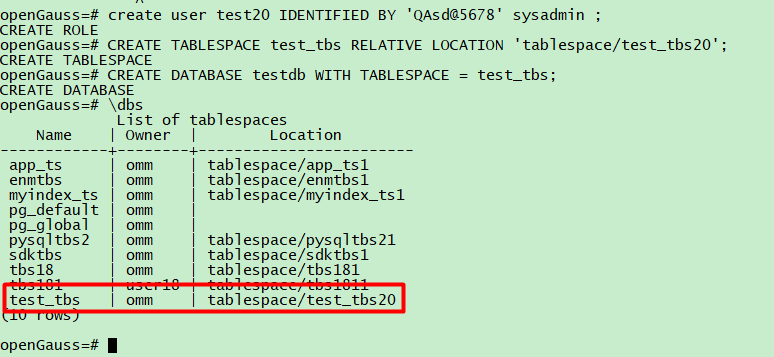
create user test20 IDENTIFIED BY 'QAsd@5678' sysadmin ;
--创建恢复测试数据库testdb
CREATE TABLESPACE test_tbs RELATIVE LOCATION 'tablespace/test_tbs20';
CREATE DATABASE testdb WITH TABLESPACE = test_tbs;
--在omm数据库上,创建测试表test1、test2:
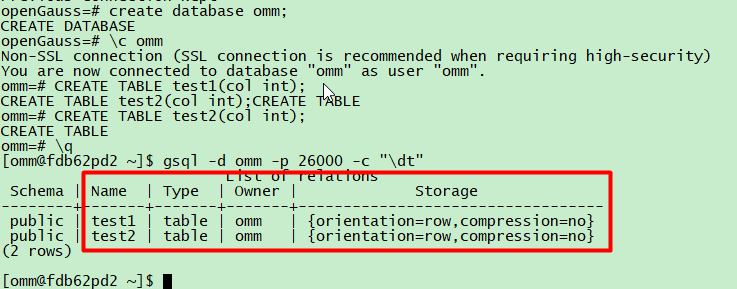
CREATE TABLE test1(col int);
CREATE TABLE test2(col int);
--查看数据
gsql -d omm -c "\dt"
- 逻辑备份和恢复案例1(sql格式)
逻辑备份,使用gs_dump备份数据库,生成sql文件:
--使用test用户,备份数据库omm:
gs_dump -U test -W QAsd@5678 omm -F p -f /apps2/opengauss/backup/backup.sql
[omm@fdb62pd2 ~]$ gs_dump -U test20 -p 26000 -W QAsd@5678 omm -F p -f /apps2/opengauss/backup/backup.sql
gs_dump[port='26000'][omm][2022-12-13 22:42:12]: The total objects number is 431.
gs_dump[port='26000'][omm][2022-12-13 22:42:12]: [100.00%] 431 objects have been dumped.
gs_dump[port='26000'][omm][2022-12-13 22:42:12]: dump database omm successfully
gs_dump[port='26000'][omm][2022-12-13 22:42:12]: total time: 2714 ms
逻辑恢复:
--使用用户test,执行用gs_dump生成的sql脚本,将数据恢复到testdb数据库中:
gsql -d testdb -U test20 -W QAsd@5678 -f /apps2/opengauss/backup/backup.sql
[omm@fdb62pd2 ~]$ gsql -d testdb -p 26000 -U test20 -W QAsd@5678 -f /apps2/opengauss/backup/backup.sql
SET
SET
SET
SET
SET
SET
SET
SET
SET
CREATE TABLE
ALTER TABLE
CREATE TABLE
ALTER TABLE
REVOKE
REVOKE
GRANT
GRANT
total time: 11 ms
恢复验证:
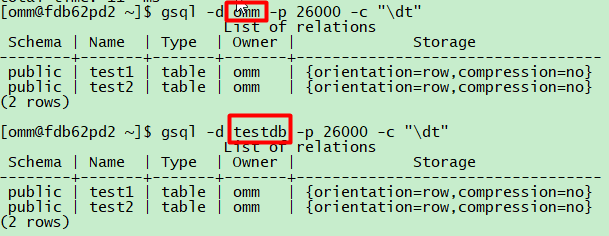
--验证数据库omm的备份已经被恢复到数据库testdb:
--源库(备份的数据库):
gsql -d omm -c "\dt"
--新库(恢复的数据库)
gsql -d testdb -U test -W QAsd@5678 -c "\dt"
openGauss数据库逻辑备份和恢复案例2(dump格式)
逻辑备份:使用gs_dump备份数据库,生成归档格式的备份文件
--创建测试数据
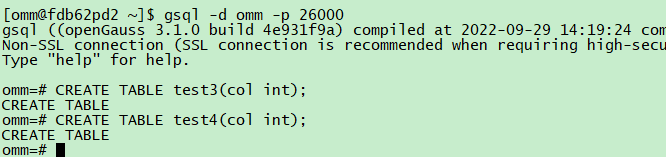
gsql -r
CREATE TABLE test3(col int);
CREATE TABLE test4(col int);
--使用test用户,备份omm数据库,生成归档格式的备份文件:
gs_dump -U test -W QAsd@5678 omm -F p -f /apps2/opengauss/backup/backup.dump
[omm@fdb62pd2 ~]$
[omm@fdb62pd2 ~]$ gs_dump -U test20 -p 26000 -W QAsd@5678 omm -F p -f /apps2/opengauss/backup/backup.dump
gs_dump[port='26000'][omm][2022-12-13 22:45:26]: The total objects number is 435.
gs_dump[port='26000'][omm][2022-12-13 22:45:26]: [100.00%] 435 objects have been dumped.
gs_dump[port='26000'][omm][2022-12-13 22:45:26]: dump database omm successfully
gs_dump[port='26000'][omm][2022-12-13 22:45:26]: total time: 2628 ms
逻辑恢复:
--使用gs_dump生成的归档文件恢复数据库
gsql -d testdb -U test20 -W QAsd@5678 -f /apps2/opengauss/backup/backup.dump
[omm@fdb62pd2 ~]$ gsql -d testdb -U test20 -p 26000 -W QAsd@5678 -f /apps2/opengauss/backup/backup.dump
SET
SET
SET
SET
SET
SET
SET
SET
SET
gsql:/apps2/opengauss/backup/backup.dump:25: ERROR: relation "test1" already exists in schema "public"
DETAIL: creating new table with existing name in the same schema
ALTER TABLE
gsql:/apps2/opengauss/backup/backup.dump:37: ERROR: relation "test2" already exists in schema "public"
DETAIL: creating new table with existing name in the same schema
ALTER TABLE
CREATE TABLE
ALTER TABLE
CREATE TABLE
ALTER TABLE
REVOKE
REVOKE
GRANT
GRANT
total time: 18 ms
恢复验证:
--源库(备份的数据库):
gsql -d omm -c "\dt"
--新库(恢复的数据库):
gsql -d testdb -U test -W QAsd@5678 -c "\dt"
[omm@fdb62pd2 ~]$ gsql -d omm -p 26000 -c "\dt"
List of relations
Schema | Name | Type | Owner | Storage
--------+-------+-------+-------+----------------------------------
public | test1 | table | omm | {orientation=row,compression=no}
public | test2 | table | omm | {orientation=row,compression=no}
public | test3 | table | omm | {orientation=row,compression=no}
public | test4 | table | omm | {orientation=row,compression=no}
(4 rows)
[omm@fdb62pd2 ~]$ gsql -d testdb -p 26000 -c "\dt"
List of relations
Schema | Name | Type | Owner | Storage
--------+-------+-------+-------+----------------------------------
public | test1 | table | omm | {orientation=row,compression=no}
public | test2 | table | omm | {orientation=row,compression=no}
public | test3 | table | omm | {orientation=row,compression=no}
public | test4 | table | omm | {orientation=row,compression=no}
(4 rows)
数据比对正常。
