



昨天在学习openGauss在线21天打卡学习时,学习到了openGauss的备份恢复知识,练习过程中,不知是哪一步出了问题,我清空一个表后,再用gsql恢复时,发现竟然多了一条,所以今天就希望再好好测试下,看看是否是我操作问题,以下是操作过程中,通过测试可以看到数据被清空后,通过gsql全量恢复了数据,并未出现昨日多一条数据情况。
 [omm@opengauss-node1 backup]$ gs_dump -p 26000 -U bkuser -W huawei@1234 opdb -F p -f /home/omm/backup/opdb_bak.dump
gs_dump[port='26000'][opdb][2022-12-13 20:00:18]: The total objects number is 431.
gs_dump[port='26000'][opdb][2022-12-13 20:00:18]: [100.00%] 431 objects have been dumped.
gs_dump[port='26000'][opdb][2022-12-13 20:00:18]: dump database opdb successfully
gs_dump[port='26000'][opdb][2022-12-13 20:00:18]: total time: 9784  ms
[omm@opengauss-node1 backup]$ ls -lrt /home/omm/backup/opdb_bak.dump
-rw------- 1 omm dbgrp 1223 Dec 13 20:00 /home/omm/backup/opdb_bak.dump
[omm@opengauss-node1 backup]$
[omm@opengauss-node1 backup]$
[omm@opengauss-node1 backup]$
[omm@opengauss-node1 backup]$
[omm@opengauss-node1 backup]$ gsql -d opdb -p 26000 -U bkuser -W huawei@1234
gsql ((openGauss 3.1.0 build 4e931f9a) compiled at 2022-09-29 14:19:24 commit 0 last mr  )
Non-SSL connection (SSL connection is recommended when requiring high-security)
Type "help" for help.

opdb=> \d
                         List of relations
 Schema | Name  | Type  | Owner  |             Storage
--------+-------+-------+--------+----------------------------------
 public | bktb1 | table | bkuser | {orientation=row,compression=no}
 public | bktb2 | table | bkuser | {orientation=row,compression=no}
(2 rows)

opdb=> truncate table bktb2;
TRUNCATE TABLE
opdb=> select * from bktb2;
 col
-----
(0 rows)

opdb=> \q
[omm@opengauss-node1 backup]$ gsql -d opdb -U bkuser -W huawei@1234 -f /home/omm/backup/opdb_bak.dump
failed to connect /opt/gaussdb/tmp:5432.
[omm@opengauss-node1 backup]$ gsql -p 26000 -d opdb -U bkuser -W huawei@1234 -f /home/omm/backup/opdb_bak.dump
SET
SET
SET
SET
SET
SET
SET
SET
SET
gsql:/home/omm/backup/opdb_bak.dump:25: ERROR:  relation "bktb1" already exists in schema "public"
DETAIL:  creating new table with existing name in the same schema
ALTER TABLE
gsql:/home/omm/backup/opdb_bak.dump:37: ERROR:  relation "bktb2" already exists in schema "public"
DETAIL:  creating new table with existing name in the same schema
ALTER TABLE
REVOKE
REVOKE
GRANT
GRANT
total time: 33  ms
[omm@opengauss-node1 backup]$ gsql -d opdb -p 26000 -U bkuser -W huawei@1234
gsql ((openGauss 3.1.0 build 4e931f9a) compiled at 2022-09-29 14:19:24 commit 0 last mr  )
Non-SSL connection (SSL connection is recommended when requiring high-security)
Type "help" for help.

opdb=> \d
                         List of relations
 Schema | Name  | Type  | Owner  |             Storage
--------+-------+-------+--------+----------------------------------
 public | bktb1 | table | bkuser | {orientation=row,compression=no}
 public | bktb2 | table | bkuser | {orientation=row,compression=no}
(2 rows)

opdb=> select * from bktb2;
 col
-----
   1
   1
(2 rows)

opdb=> select count(*) from bktb2;
 count
-------
     2
(1 row)

opdb=> select * from bktb1;
WARNING:  Session unused timeout.
FATAL:  terminating connection due to administrator command
could not send data to server: Broken pipe
The connection to the server was lost. Attempting reset: Failed.
!>
!> q
-> q
-> ^C
!> ^C
!> \q
[omm@opengauss-node1 backup]$ gsql -d opdb -p 26000 -U bkuser -W huawei@1234
gsql ((openGauss 3.1.0 build 4e931f9a) compiled at 2022-09-29 14:19:24 commit 0 last mr  )
Non-SSL connection (SSL connection is recommended when requiring high-security)
Type "help" for help.

opdb=> select * from bktb1;
 col
-----
   1
   1
(2 rows)

opdb=> \q
[omm@opengauss-node1 backup]$ ll
total 8
-rw------- 1 omm dbgrp 1221 Dec 13 19:53 backup.sql
-rw------- 1 omm dbgrp 1223 Dec 13 20:00 opdb_bak.dump
[omm@opengauss-node1 backup]$ rm *.dump
[omm@opengauss-node1 backup]$
[omm@opengauss-node1 backup]$
[omm@opengauss-node1 backup]$ ll
total 4
-rw------- 1 omm dbgrp 1221 Dec 13 19:53 backup.sql
[omm@opengauss-node1 backup]$ gsql -d opdb -p 26000 -U bkuser -W huawei@1234
gsql ((openGauss 3.1.0 build 4e931f9a) compiled at 2022-09-29 14:19:24 commit 0 last mr  )
Non-SSL connection (SSL connection is recommended when requiring high-security)
Type "help" for help.

opdb=> select count(*) from bktb1;
 count
-------
     2
(1 row)

opdb=> select count(*) from bktb2;
 count
-------
     2
(1 row)

opdb=> \q
[omm@opengauss-node1 backup]$ gs_dump -U bkuser -W huawei@1234 opdb -F p -f /home/omm/backup/opdb_bak.dump
connection to database "opdb" failed: connect to server failed: No such file or directory
 [omm@opengauss-node1 backup]$
[omm@opengauss-node1 backup]$
[omm@opengauss-node1 backup]$
[omm@opengauss-node1 backup]$ ll
total 4
-rw------- 1 omm dbgrp 1221 Dec 13 19:53 backup.sql
[omm@opengauss-node1 backup]$ gs_dump -U bkuser -W huawei@1234 opdb -F p -f /home/omm/backup/opdb_bak.dump
connection to database "opdb" failed: connect to server failed: No such file or directory
 [omm@opengauss-node1 backup]$
[omm@opengauss-node1 backup]$
[omm@opengauss-node1 backup]$
[omm@opengauss-node1 backup]$ ll
total 4
-rw------- 1 omm dbgrp 1221 Dec 13 19:53 backup.sql
[omm@opengauss-node1 backup]$ gsql -d opdb -p 26000 -U bkuser -W huawei@1234
gsql ((openGauss 3.1.0 build 4e931f9a) compiled at 2022-09-29 14:19:24 commit 0 last mr  )
Non-SSL connection (SSL connection is recommended when requiring high-security)
Type "help" for help.

opdb=> select count(*) from bktb1;
 count
-------
     2
(1 row)

opdb=> select count(*) from bktb2;
 count
-------
     2
(1 row)

opdb=> \q
[omm@opengauss-node1 backup]$ gs_dump -p 26000 -U bkuser -W huawei@1234 opdb -F p -f /home/omm/backup/opdb_bak.dump
gs_dump[port='26000'][opdb][2022-12-14 10:15:41]: The total objects number is 431.
gs_dump[port='26000'][opdb][2022-12-14 10:15:41]: [100.00%] 431 objects have been dumped.
gs_dump[port='26000'][opdb][2022-12-14 10:15:41]: dump database opdb successfully
gs_dump[port='26000'][opdb][2022-12-14 10:15:41]: total time: 9830  ms
[omm@opengauss-node1 backup]$ ll *.dump
-rw------- 1 omm dbgrp 1225 Dec 14 10:15 opdb_bak.dump
[omm@opengauss-node1 backup]$ gsql -d opdb -p 26000 -U bkuser -W huawei@1234
gsql ((openGauss 3.1.0 build 4e931f9a) compiled at 2022-09-29 14:19:24 commit 0 last mr  )
Non-SSL connection (SSL connection is recommended when requiring high-security)
Type "help" for help.

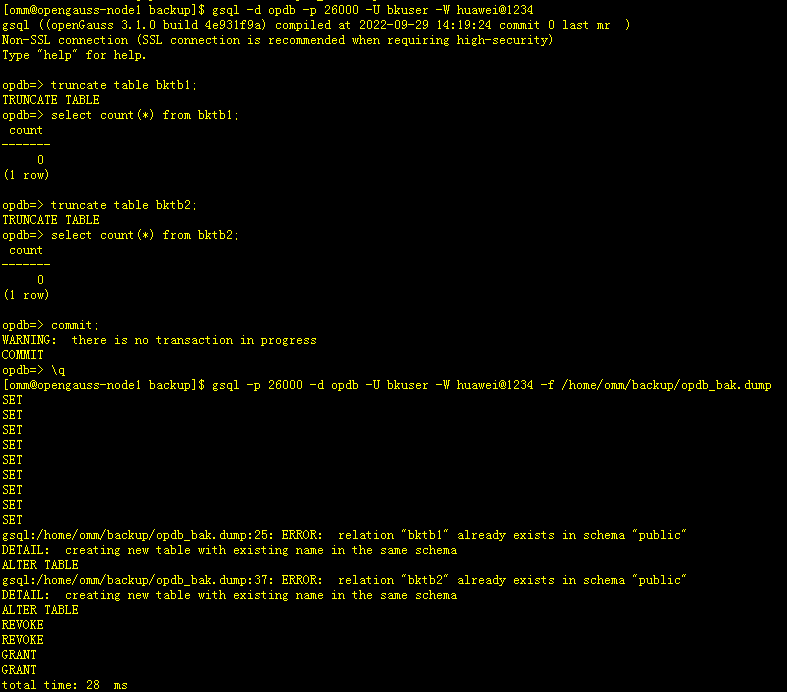
opdb=> truncate table bktb1;
TRUNCATE TABLE
opdb=> select count(*) from bktb1;
 count
-------
     0
(1 row)

opdb=> truncate table bktb2;
TRUNCATE TABLE
opdb=> select count(*) from bktb2;
 count
-------
     0
(1 row)

opdb=> commit;
WARNING:  there is no transaction in progress
COMMIT
opdb=> \q
[omm@opengauss-node1 backup]$ gsql -p 26000 -d opdb -U bkuser -W huawei@1234 -f /home/omm/backup/opdb_bak.dump
SET
SET
SET
SET
SET
SET
SET
SET
SET
gsql:/home/omm/backup/opdb_bak.dump:25: ERROR:  relation "bktb1" already exists in schema "public"
DETAIL:  creating new table with existing name in the same schema
ALTER TABLE
gsql:/home/omm/backup/opdb_bak.dump:37: ERROR:  relation "bktb2" already exists in schema "public"
DETAIL:  creating new table with existing name in the same schema
ALTER TABLE
REVOKE
REVOKE
GRANT
GRANT
total time: 28  ms
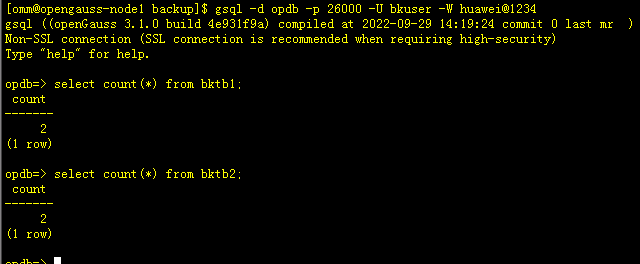
[omm@opengauss-node1 backup]$ gsql -d opdb -p 26000 -U bkuser -W huawei@1234
gsql ((openGauss 3.1.0 build 4e931f9a) compiled at 2022-09-29 14:19:24 commit 0 last mr  )
Non-SSL connection (SSL connection is recommended when requiring high-security)
Type "help" for help.

opdb=> select count(*) from bktb1;
 count
-------
     2
(1 row)

opdb=> select count(*) from bktb2;
 count
-------
     2
(1 row)

opdb=>
「喜欢这篇文章,您的关注和赞赏是给作者最好的鼓励」
关注作者
【版权声明】本文为墨天轮用户原创内容,转载时必须标注文章的来源(墨天轮),文章链接,文章作者等基本信息,否则作者和墨天轮有权追究责任。如果您发现墨天轮中有涉嫌抄袭或者侵权的内容,欢迎发送邮件至:contact@modb.pro进行举报,并提供相关证据,一经查实,墨天轮将立刻删除相关内容。
