
腾讯地图Android SDK是一套基于Android设备的应用程序接口,通过该接口,可以轻松访问腾讯地图服务和数据,构建功能丰富、交互性强的地图应用程序。腾讯地图Android SDK不仅包含构建地图的基本接口,还提供了诸如地图定位、地址编码、地址反编码、实时路况、POI搜索、周边搜索、公交线路搜索、驾车线路搜索等数据服务。
下面这个实例演示了在Android手机上设置腾讯地图的中心地点。
实例功能
此实例主要通过使用腾讯地图SDK的setCenter()方法,实现根据指定的纬度和经度值设置腾讯地图的中心地点。腾讯地图Android SDK是一套基于Android设备的应用程序接口,通过该接口,可以轻松访问腾讯地图服务和数据,构建功能丰富、交互性强的地图应用程序。腾讯地图Android SDK不仅包含构建地图的基本接口,还提供了诸如地图定位、地址编码、地址反编码、实时路况、POI搜索、周边搜索、公交线路搜索、驾车线路搜索等数据服务。
当实例运行之后,如果在“纬度经度值:”输入框中输入重庆的纬度和经度值“29.563748, 106.550545”,然后单击“设置该地为腾讯地图中心”按钮,将设置重庆为腾讯地图的中心,效果如图1(a)所示。如果在“纬度经度值:”输入框中输入武汉的纬度和经度值“30.593310,114.304692”,然后单击“设置该地为腾讯地图中心”按钮,将设置武汉为腾讯地图的中心,效果如图1(b)所示。
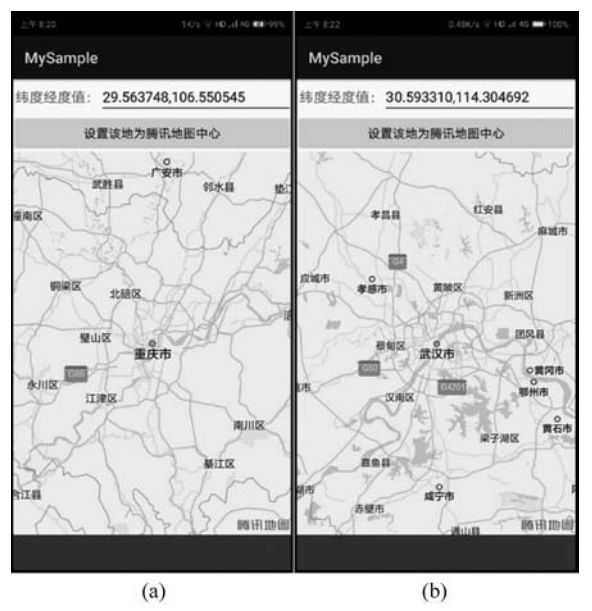
■ 图1
实现代码
public class MainActivity extends Activity {
 MapView myMapView;
 @Override
 protected void onCreate(Bundle savedInstanceState) {
  super.onCreate(savedInstanceState);
  setContentView(R.layout.activity_main);
  myMapView=(MapView)findViewById(R.id.myMapView);
 }
 public void onClickButton1(View v) { //响应单击按钮“设置该地为腾讯地图中心”
  //重庆市的纬度和经度值:29.563748,106.550545
  //武汉市的纬度和经度值:30.593310,114.304692
  EditText myEditLatlng = (EditText) findViewById(R.id.myEditLatlng);
  String myLatlng = myEditLatlng.getText().toString();
  double myLat =Double.parseDouble(myLatlng.substring(0, myLatlng.indexOf(',')));
  double myLng =Double.parseDouble(myLatlng.substring(myLatlng.indexOf(',') + 1));
  TencentMap myTencentMap=myMapView.getMap();
  myTencentMap.setZoom(9); //设置地图缩放级别为9
  myTencentMap.setCenter(new LatLng(myLat,myLng)); //设置该地为地图中心
 }
}
代码说明
上面这段代码在MyCode\MySampleH44\app\src\main\java\com\bin\luo\mysample\ MainActivity.java文件中。在这段代码中,TencentMap myTencentMap=myMapView.getMap()用于根据腾讯地图的显示控件MapView获取TencentMap,TencentMap是操作腾讯地图最主要、最基本的类。在布局文件中,MapView控件的主要代码如下面的粗体字所示:
<?xml version="1.0" encoding="utf-8"?>
<LinearLayout xmlns:android="http://schemas.android.com/apk/res/android"
    xmlns:tools="http://schemas.android.com/tools"
    android:id="@+id/activity_main"
    android:layout_width="match_parent"
    android:layout_height="match_parent"
    android:orientation="vertical"
    tools:context="com.bin.luo.mysample.MainActivity">
    <LinearLayout
        android:layout_width="match_parent"
        android:layout_height="wrap_content"
        android:orientation="horizontal">
        <TextView
            android:textSize="18dp"
            android:layout_width="wrap_content"
            android:layout_height="wrap_content"
            android:text=" 纬度经度值:"/>
        <EditText
            android:textSize="18dp"
            android:layout_width="match_parent"
            android:layout_height="wrap_content"
            android:id="@+id/myEditLatlng"
            android:text="30.593310,114.304692"/>
    </LinearLayout>
    <LinearLayout
        android:layout_width="match_parent"
        android:layout_height="wrap_content"
        android:orientation="horizontal">
        <Button
            android:layout_width="match_parent"
            android:layout_height="wrap_content"
            android:layout_weight="1"
            android:onClick="onClickButton1"
            android:text="设置该地为腾讯地图中心"
            android:textAllCaps="false"
            android:textSize="16dp" />
    </LinearLayout>
    <com.tencent.tencentmap.mapsdk.map.MapView
        android:id="@+id/myMapView"
        android:layout_width="match_parent"
        android:layout_height="match_parent"/>
</LinearLayout>
上面这段代码在MyCode\MySampleH44\app\src\main\res\layout\activity_main.xml文件中。需要说明的是,此实例需要引入腾讯地图SDK的开发文件,即MyCode\ MySampleH44\app\libs文件夹中的TencentMapSDK_Raster_v_1.2.8.1.c02ec64.jar文件(实际测试表明:不添加下面这行粗体字代码,也能正常编译执行,即正常导入文件TencentMapSDK_Raster_v_1.2.8.1.c02ec64.jar的内容),当在工程项目中添加了该文件之后,还需要按照下面的粗体字修改MyCode\MySampleH44\app\build.gradle文件:
apply plugin: 'com.android.application'

android {
    compileSdkVersion 29
    buildToolsVersion "29.0.2"
    defaultConfig {
        applicationId "com.bin.luo.mysample"
        minSdkVersion 27
        targetSdkVersion 29
        versionCode 1
        versionName "1.0"
        testInstrumentationRunner "androidx.test.runner.AndroidJUnitRunner"
    }
    buildTypes {
        release {
            minifyEnabled false
            proguardFiles getDefaultProguardFile('proguard-android-optimize.txt'), 'proguard-rules.pro'
        }
    }
}

dependencies {
    implementation fileTree(dir: 'libs', include: ['*.jar'])
    implementation 'androidx.appcompat:appcompat:1.0.2'
    implementation 'androidx.constraintlayout:constraintlayout:1.1.3'
    testImplementation 'junit:junit:4.12'
    androidTestImplementation 'androidx.test:runner:1.2.0'
    androidTestImplementation 'androidx.test.espresso:espresso-core:3.2.0'
    implementation files('libs/TencentMapSDK_Raster_v_1.2.8.1.c02ec64.jar')
}
此外,还要按照下面粗体字所示的内容修改MyCode\MySampleH44\app\src\main\ AndroidManifest.xml文件:
<?xml version="1.0" encoding="utf-8"?>
<manifest xmlns:android="http://schemas.android.com/apk/res/android"
    package="com.bin.luo.mysample">

    <application
        android:allowBackup="true"
        android:icon="@mipmap/ic_launcher"
        android:label="@string/app_name"
        android:roundIcon="@mipmap/ic_launcher_round"
        android:supportsRtl="true"
        android:theme="@style/AppTheme">
        <meta-data android:name="TencentMapSDK"
            android:value="2NQBZ-W3FWS-SZ6O7-6AMQN-ZCWAE-NOBVQ" />
        <activity android:name=".MainActivity">
            <intent-filter>
                <action android:name="android.intent.action.MAIN" />
                <category android:name="android.intent.category.LAUNCHER" />
            </intent-filter>
        </activity>
    </application>
    <uses-permission android:name="android.permission.INTERNET"/>
</manifest>
在这段代码中,2NQBZ-W3FWS-SZ6O7-6AMQN-ZCWAE-NOBVQ是腾讯地图的开发者Key,需要到腾讯位置服务(http://lbs.qq.com/console/mykey.html)申请。
此实例的完整代码在MyCode\MySampleH44文件夹中。
补充说明
在测试代码时,必须保持网络畅通。
源代码下载
关注微信公众号,后台回复关键词 “Android App开发超实用代码209” 即可获得完整源代码。
参考书籍


扫码优惠购书
《Android App开发超实用代码集锦——jQuery Mobile+OpenCV+O》
ISBN:9787302589358
作者:罗帅、罗斌
定价:99元
问题描述+解决方案+真实源码+效果截图
介绍jQuery Mobile、OpenCV、OpenGL等在Android平台运行的应用
300个实例,提供完整源代码,边看边做边学