



一、工作原理
FreeMarker是一种用Java语言编写的模板引擎(Java类库);可以基于模板生成输出文件(如HTML,电子邮件,代码等),并且不受限于容器,因此它的用途广泛,不只应用于Web方面;
在Web方面的主要应用:静态化页面
工作原理示意图
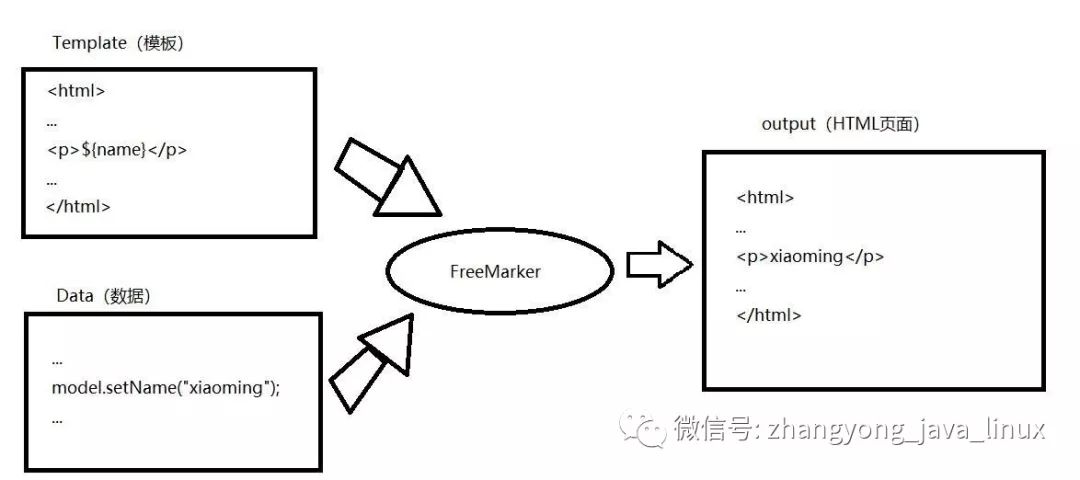
二、目的
将sql语句编写的xml中,然后在java代码中,传入参数,经过freemarker处理,得到处理完的SQL. 好处:
sql编写在xml中,便于阅读
可以使用freemarker语法,动态构建SQL
可以使用freemarker的include语句,提取公用SQL
三、maven配置
<!-- freemarker 集成 --><dependency><groupId>org.freemarker</groupId><artifactId>freemarker</artifactId><version>2.3.20</version></dependency>
四、SQL动态语法
package com.web.zhangyong168.cn.config.freemark;import java.io.File;import java.io.IOException;import java.io.StringWriter;import java.util.HashMap;import java.util.Map;import freemarker.template.Configuration;import freemarker.template.Template;/**** @description 通过freemark获取SQl表达式* @author 张勇* @version 0.0.1* @date 2019年10月30日下午10:35:43*/public class FreemarkToSqExp {private static final String TEMPLATE_PATH = "src/main/java/com/web/zhangyong168/cn/config/freemark/templates";public static void main(String[] args) throws IOException {Configuration configuration = new Configuration();StringWriter out = new StringWriter();try {获取模版路径configuration.setDirectoryForTemplateLoading(new File(TEMPLATE_PATH));创建数据模型Map<String, Object> dataMap = new HashMap<String, Object>();dataMap.put("username", null);dataMap.put("password", "123456");写入SQL表达式String sqlExp = " select * from tb_role_admin where 1=1 \r\n" + " <#if username ??>\r\n"+ " and username=${username} \r\n" + " </#if>\r\n" + " <#if password ??>\r\n"+ " and password=${password} \r\n" + " </#if>";加载模版文件Template template = new Template(null, sqlExp ,configuration); configuration.getTemplate("test.ftl");输出文件template.process(dataMap, out);System.out.print("打印文件流信息:" + out.toString());} catch (Exception e) {e.printStackTrace();} finally {try {out.close();} catch (Exception e2) {e2.printStackTrace();}}}}
五、编写test类
package com.web.zhangyong168.cn.config.freemark;import java.util.HashMap;import java.util.Map;import org.junit.jupiter.api.AfterAll;import org.junit.jupiter.api.AfterEach;import org.junit.jupiter.api.BeforeAll;import org.junit.jupiter.api.BeforeEach;import org.junit.jupiter.api.Test;/***** @description 测试类* @author 张勇* @version 0.0.1* @date 2019年10月30日下午10:20:01*/class FreemarkToSqExpModelTest {static FreemarkToSqExpModel testmodel=null;@BeforeAllstatic void setUpBeforeClass() throws Exception {testmodel=new FreemarkToSqExpModel();Map<String, Object> whereMap = new HashMap<String, Object>();whereMap.put("username", null);whereMap.put("password", "123456");//写入SQL表达式String sqlExp = " select * from tb_role_admin where 1=1 \r\n" + " <#if username ??>\r\n"+ " and username=${username} \r\n" + " </#if>\r\n" + " <#if password ??>\r\n"+ " and password=${password} \r\n" + " </#if>";testmodel.setWhereMap(whereMap);testmodel.setSqlExp(sqlExp);}@AfterAllstatic void tearDownAfterClass() throws Exception {}@BeforeEachvoid setUp() throws Exception {}@AfterEachvoid tearDown() throws Exception {}@Testpublic void getSqlExpResultTest(){long start=System.currentTimeMillis();String sqlExp=testmodel.getSqlExpResult();long end =System.currentTimeMillis();System.out.println("use time" +(end-start)+"ms,sql表達式: "+sqlExp);}}
六、核心逻辑步骤
友情提示:创建一个.fld的文件,文件是空的
1. 创建一个Configuration对象
2. 设置模板文件所在路径
3. 设置模板文件所使用的字符集
4. 根据路径加载模板文件,创建模板对象
5. 创建数据集对象,并向对象填充数据
6. 创建输出流对象Writer(此步骤是设置输出的文件所在的路径及其名字)
7. 调用模板对象的process方法输出(生成)HTML文件或其他文件
8. 关闭流对象
文章转载自大数据Java张勇Linux数据库LTL,如果涉嫌侵权,请发送邮件至:contact@modb.pro进行举报,并提供相关证据,一经查实,墨天轮将立刻删除相关内容。
