



前言
最近我将服务发现组件开源了:cloud-discovery,分享一下 Jar 包上传中央仓库过程遇到的问题与总结。需要说明的是,在下面两篇文章中已经将步骤写的非常清楚了,本文主要记录的是我在操作过程中遇到的一些坑,以供参考。
开源地址
• cloud-discovery:https://github.com/studeyang/cloud-discovery
参考文章
• https://juejin.cn/post/7130363900813377567
• https://juejin.cn/post/7089301165929660446
Sonatype Jira 账号注册
首先你要申请 groupId,例如 Spring 的 groupId 是org.springframework
。你也要申请自己的 groupId,这个很好理解,毕竟org.springframework
有很强的权威性,不是谁都能上传的。
groupId 就是在 Sonatype Jira 平台申请的。
第一,注册/登录账号
注册地址:https://issues.sonatype.org/secure/Signup!default.jspa
登录地址:https://issues.sonatype.org/login.jsp
第二,创建问题
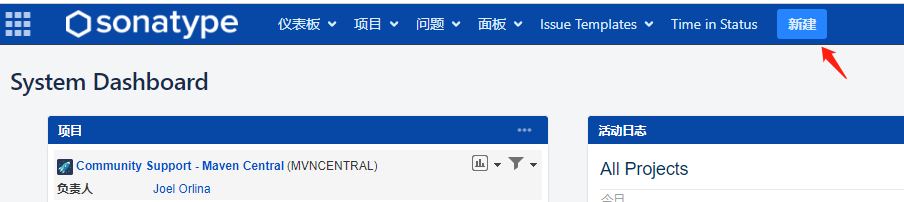
注意「项目」要先择「Community Support - Open Source Project Repository」,「问题类型」选择「New Project」。
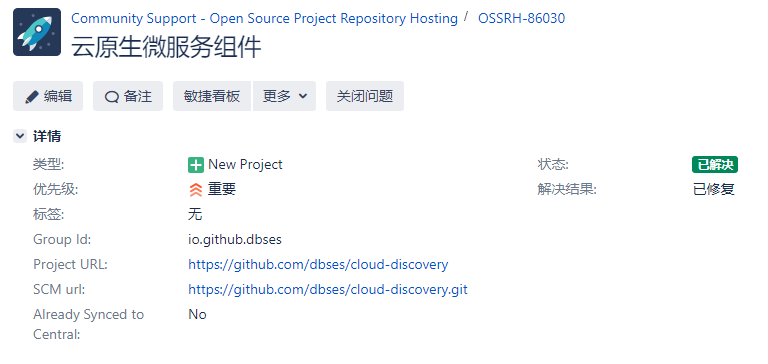
等待审核人员审核通过。
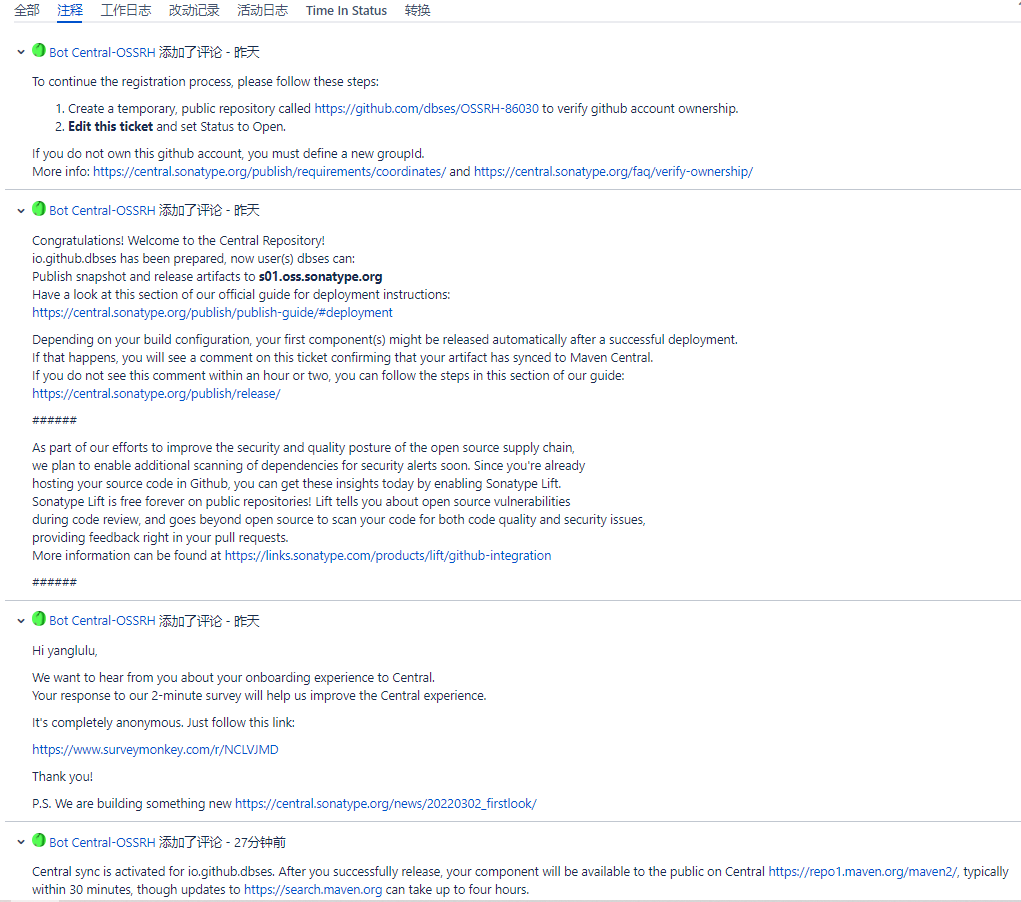
上图Congratulations!Welcome to the Central Repository!
,说明 groupId 已经申请通过了,通常你命名的格式是:io.github.{你的github用户名},基本上都能一次性申请通过。
接着,按照下面的文档操作就可以了。
https://central.sonatype.org/publish/publish-guide/#deployment
https://central.sonatype.org/publish/release/
Pom.xml 配置
接下来就要配置项目打包相关的信息了,在 pom.xml 文件里,需要额外加上下面的配置项,否则配置信息校验会不通过。
<name>,<description>,<url>,<licenses>,<scm>,<developers>
另外也会校验文档文件xx-javadoc.jar
和加密文件xx.jar.asc
。下面两个插件可以生成对应的文件。
maven-javadoc-plugin,maven-gpg-plugin
nexus-staging-maven-plugin
这个插件也简单介绍一下,Jar 包会先上传到 Staging Repository 仓库中,然后需要手动点击进行校验并通过后,才会到正式仓库。这个插件免去了手动点击的繁琐操作,直接进行校验。
完整的pom.xml
配置可以参考我的 Github 工程:https://github.com/studeyang/cloud-discovery/blob/master/pom.xml
Jar 包加密传输
Maven Pom 配置好后,你不能直接通过 mvn deploy
命令将 Jar 包传输到中央仓库,而是要经过加密软件的加密。
安装GnuPG软件
下载地址:https://gpg4win.org/thanks-for-download.html
(步骤一)这个软件是为了给要上传的 Jar 包加密用。使用gpg --gen-key
命令生成密钥。
C:\Users\Administrator>gpg --gen-key
gpg (GnuPG) 2.3.8; Copyright (C) 2021 g10 Code GmbH
This is free software: you are free to change and redistribute it.
There is NO WARRANTY, to the extent permitted by law.

Note: Use "gpg --full-generate-key" for a full featured key generation dialog.

GnuPG needs to construct a user ID to identify your key.

Real name: yanglulu
Email address: yanglu_u@126.com
You selected this USER-ID:
    "yanglulu <yanglu_u@126.com>"

Change (N)ame, (E)mail, or (O)kay/(Q)uit?
输入「o」回车。
Change (N)ame, (E)mail, or (O)kay/(Q)uit? o
We need to generate a lot of random bytes. It is a good idea to perform
some other action (type on the keyboard, move the mouse, utilize the
disks) during the prime generation; this gives the random number
generator a better chance to gain enough entropy.
We need to generate a lot of random bytes. It is a good idea to perform
some other action (type on the keyboard, move the mouse, utilize the
disks) during the prime generation; this gives the random number
generator a better chance to gain enough entropy.
gpg: directory 'C:\\Users\\Administrator\\AppData\\Roaming\\gnupg\\openpgp-revocs.d' created
gpg: revocation certificate stored as 'C:\\Users\\Administrator\\AppData\\Roaming\\gnupg\\openpgp-revocs.d\\6381681E82726235773B17D753A149DCE9EE4910.rev'
public and secret key created and signed.

pub   ed25519 2022-11-07 [SC] [expires: 2024-11-06]
      6381681E82726235773B17D753A149DCE9EE4910
uid                      yanglulu <yanglu_u@126.com>
sub   cv25519 2022-11-07 [E] [expires: 2024-11-06]
(步骤二)使用gpg --list-key
查看生成结果。
C:\Users\Administrator>gpg --list-key
gpg: checking the trustdb
gpg: marginals needed: 3  completes needed: 1  trust model: pgp
gpg: depth: 0  valid:   1  signed:   0  trust: 0-, 0q, 0n, 0m, 0f, 1u
gpg: next trustdb check due at 2024-11-06
C:\Users\Administrator\AppData\Roaming\gnupg\pubring.kbx
--------------------------------------------------------
pub   rsa4096 2021-10-25 [SC] [expires: 2025-10-25]
      1121AFDE66C7246282A7610448CB2369E978B6BA
uid           [unknown] yanglulu <yanglu_u@126.com>
sub   rsa4096 2021-10-25 [E] [expires: 2025-10-25]

pub   ed25519 2022-11-07 [SC] [expires: 2024-11-06]
      6381681E82726235773B17D753A149DCE9EE4910
uid           [ultimate] yanglulu <yanglu_u@126.com>
sub   cv25519 2022-11-07 [E] [expires: 2024-11-06]
踩坑1:使用错误的公钥加密文件,导致上传仓库失败
(步骤三)接着上面的步骤,把公钥发送到hkp://keyserver.ubuntu.com:11371
服务器。
C:\Users\Administrator>gpg --keyserver hkp://keyserver.ubuntu.com:11371 --send-keys 1121AFDE66C7246282A7610448CB2369E978B6BA
gpg: sending key 48CB2369E978B6BA to hkp://keyserver.ubuntu.com
看一下公钥的发送结果。
C:\Users\Administrator>gpg --keyserver hkp://keyserver.ubuntu.com:11371 --recv-keys 1121AFDE66C7246282A7610448CB2369E978B6BA
gpg: key 48CB2369E978B6BA: "yanglulu <yanglu_u@126.com>" not changed
gpg: Total number processed: 1
gpg:              unchanged: 1
(步骤四)公钥发送成功了,下面打 Jar 包。
D:\github\cloud-discovery>mvn -U clean deploy -P release
到这一步,出错了。
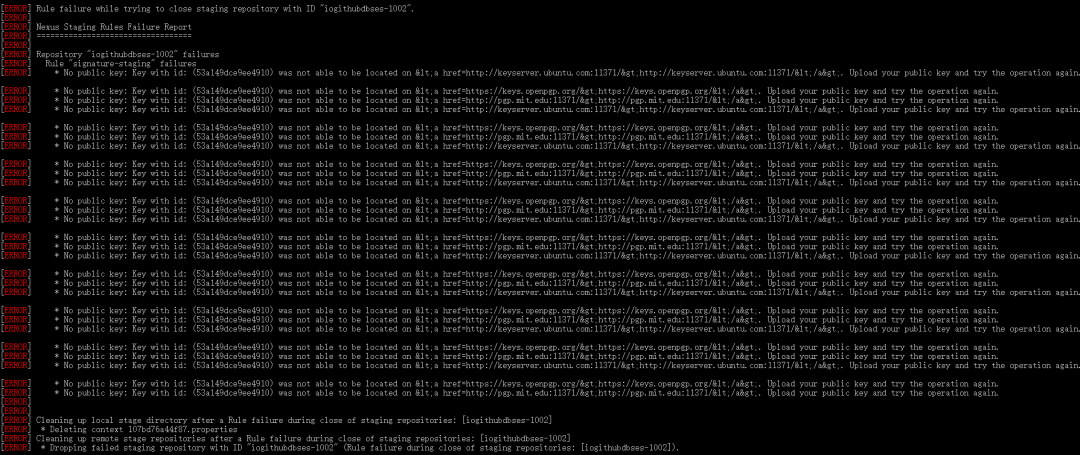
从提示来看,似乎是没有找到公钥,但是「步骤三」显示,我分明已经将公钥发送过去了,有点奇怪!
我们从「步骤一」再仔细捋一遍,找找问题的线索:
• 步骤一生成了两个密钥,一个 uid 标识为 [unknown],另一个标识为 [ultimate]
• 步骤三我把标识为[unknown]的公钥发了出去,并提示我 key 48CB2369E978B6BA 发送成功
• 步骤四的报错原因显示,53a149dce9ee4910 这个 key 找不到
会不会是 uid 标识为 [unknown] 的密钥有问题呢?
后来我尝试使用 [ultimate] 的公钥重新发送。
D:\github\cloud-discovery>gpg --keyserver hkp://keyserver.ubuntu.com:11371 --send-keys 6381681E82726235773B17D753A149DCE9EE4910
gpg: sending key 53A149DCE9EE4910 to hkp://keyserver.ubuntu.com:11371
D:\github\cloud-discovery>gpg --keyserver hkp://keyserver.ubuntu.com:11371 --recv-keys 6381681E82726235773B17D753A149DCE9EE4910
gpg: key 53A149DCE9EE4910: "yanglulu <yanglu_u@126.com>" not changed
gpg: Total number processed: 1
gpg:              unchanged: 1
结果显示 key 53A149DCE9EE4910 发送成功了,并且 53A149DCE9EE4910 也与报错中找不到的 key 吻合。我再进行后面的步骤,这个问题果然就不出现了。
踩坑2:401错误
继续后面的步骤,在mvn deploy
过程中返回了一个 401 错误码,这个问题原因就是 ossrh 账号密码配错了。
天真的我以为自己账号密码记得非常清楚,不会有错,尝试其他修改无果后,校验了一下密码,果然是密码写错了。TT
踩坑3:--recv-keys No data
补充一下,在踩坑1发送公钥步骤中,会出现下面的响应,这时再重试发送一次就好了。
D:\github\cloud-discovery>gpg --keyserver hkp://keyserver.ubuntu.com:11371 --recv-keys 6381681E82726235773B17D753A149DCE9EE4910
gpg: keyserver receive failed: No data
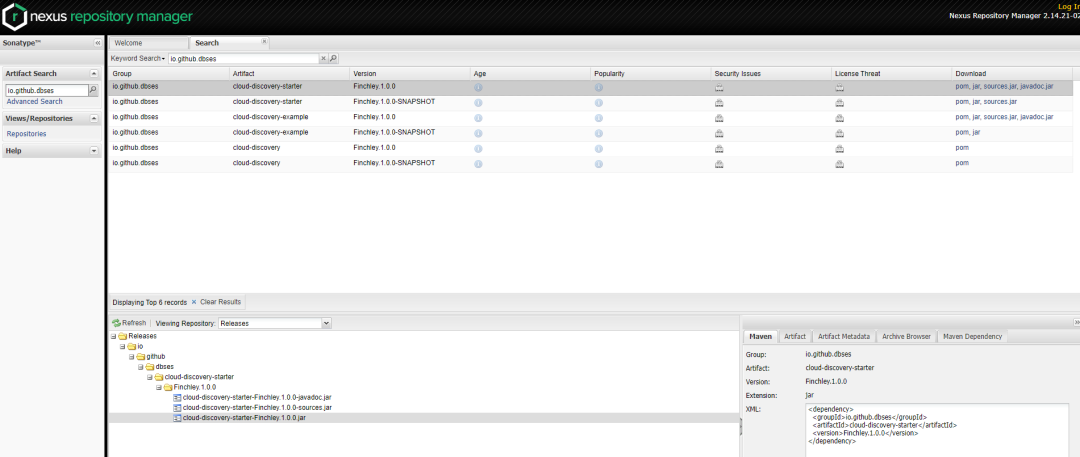
上传成功后,可以在https://s01.oss.sonatype.org/
查询到 Jar 包,此时就已经可以供用户下载了,同步至中央仓库还没有这么及时。
过两天再从中央仓库查询,Jar 包已经可以查到了。
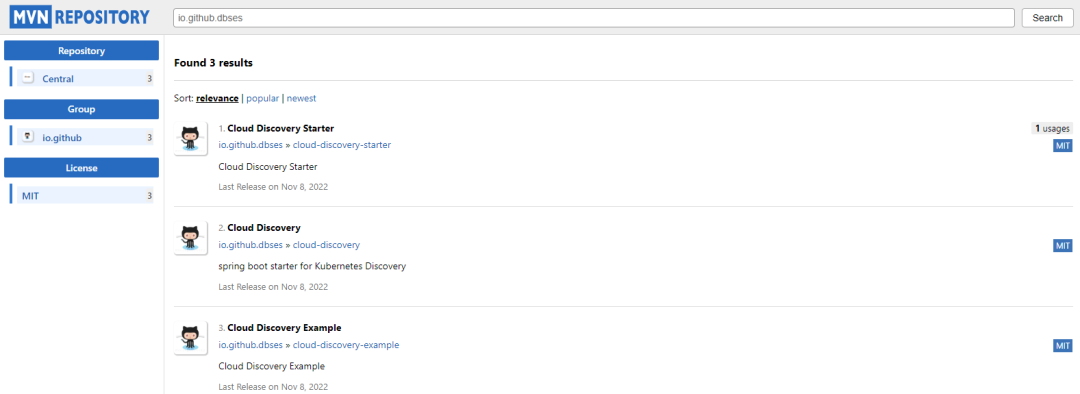
中央仓库地址是:https://mvnrepository.com/
小结
整个过程看起来容易,做起来就会遇过各种各样的问题。想要公开自己 Jar 包的小伙伴赶紧操作起来吧!
