



11g
 1SELECT a.snap_id,
 2       c.tablespace_name ts_name,
 3       to_char(to_date(a.rtime, 'mm/dd/yyyy hh24:mi:ss'), 'yyyy-mm-dd hh24:mi') rtime,
 4       round(a.tablespace_size * c.block_size / 1024 / 1024, 2) ts_size_mb,
 5       round(a.tablespace_usedsize * c.block_size / 1024 / 1024, 2) ts_used_mb,
 6       round((a.tablespace_size - a.tablespace_usedsize) * c.block_size / 1024 / 1024,
 7             2) ts_free_mb,
 8       round(a.tablespace_usedsize / a.tablespace_size * 100, 2) pct_used
 9  FROM dba_hist_tbspc_space_usage a,
10       (SELECT tablespace_id,
11               substr(rtime, 1, 10) rtime,
12               max(snap_id) snap_id
13          FROM dba_hist_tbspc_space_usage nb
14         group by tablespace_id, substr(rtime, 1, 10)) b,
15         dba_tablespaces c,
16         v$tablespace d
17 where a.snap_id = b.snap_id
18   and a.tablespace_id = b.tablespace_id
19   and a.tablespace_id=d.TS#
20   and d.NAME=c.tablespace_name
21     and  to_date(a.rtime, 'mm/dd/yyyy hh24:mi:ss') >=sysdate-30
22   order by a.tablespace_id,to_date(a.rtime, 'mm/dd/yyyy hh24:mi:ss') desc;
12c
 1SELECT a.snap_id,
 2       a.con_id,
 3       e.name pdbname,
 4       c.tablespace_name ts_name,
 5       to_char(to_date(a.rtime, 'mm/dd/yyyy hh24:mi:ss'), 'yyyy-mm-dd hh24:mi') rtime,
 6       round(a.tablespace_size * c.block_size / 1024 / 1024, 2) ts_size_mb,
 7       round(a.tablespace_usedsize * c.block_size / 1024 / 1024, 2) ts_used_mb,
 8       round((a.tablespace_size - a.tablespace_usedsize) * c.block_size / 1024 / 1024,
 9             2) ts_free_mb,
10       round(a.tablespace_usedsize / a.tablespace_size * 100, 2) pct_used
11  FROM cdb_hist_tbspc_space_usage a,
12       (SELECT tablespace_id,
13               nb.con_id,
14               substr(rtime, 1, 10) rtime,
15               max(snap_id) snap_id
16          FROM dba_hist_tbspc_space_usage nb
17         group by tablespace_id, nb.con_id,substr(rtime, 1, 10)) b,
18         cdb_tablespaces c,
19         v$tablespace d,
20         V$CONTAINERS e
21 where a.snap_id = b.snap_id
22   and a.tablespace_id = b.tablespace_id
23   and a.con_id=b.con_id
24   and a.con_id=c.con_id
25   and a.con_id=d.con_id
26   and a.con_id=e.con_id
27   and a.tablespace_id=d.TS#
28   and d.NAME=c.tablespace_name
29     and  to_date(a.rtime, 'mm/dd/yyyy hh24:mi:ss') >=sysdate-30
30   order by a.CON_ID,a.tablespace_id,to_date(a.rtime, 'mm/dd/yyyy hh24:mi:ss') desc;
其它sql
 1select u.snap_id,
 2       to_char(s.begin_interval_time, 'yyyy-mm-dd hh24') begin_time,
 3       to_char(s.end_interval_time, 'yyyy-mm-dd hh24') end_time,
 4       t.name,
 5       round(u.tablespace_size * ts.block_size / 1024 / 1024, 2) ts_size_mb,
 6       round(u.tablespace_usedsize * ts.block_size / 1024 / 1024, 2) ts_used_mb,
 7       round((u.tablespace_size - u.tablespace_usedsize) * ts.block_size / 1024 / 1024, 2) ts_free_mb,
 8       round(u.tablespace_usedsize / u.tablespace_size * 100, 2) pct_used
 9  from dba_hist_tbspc_space_usage u,
10       v$tablespace               t,
11       dba_hist_snapshot          s,
12       dba_tablespaces            ts
13 where u.tablespace_id = t.ts#
14   and u.snap_id = s.snap_id
15   and t.name = ts.tablespace_name
16   and s.instance_number = 1
17   and t.name = 'SYSTEM'
18   and s.end_interval_time > sysdate - 7
19     order by snap_id desc;
如何估算oracle ,数据库对象历史增长情况
-----最近七天数据库的增长情况,这个只是一个估算值。
 1select sum(space_used_total)/1024/1024/1024 "last 7 days db increase - G"
 2from
 3dba_hist_seg_stat s,
 4dba_hist_seg_stat_obj o,
 5dba_hist_snapshot sn
 6where
 7s.obj# = o.obj#
 8and sn.snap_id = s.snap_id
 9and begin_interval_time > sysdate-8
10order by
11begin_interval_time;
查看数据库历史增长情况
查看数据库历史增长情况
此处是通过计算数据库所有表空间的历史增长情况来计算数据库历史情况。
不含undo和temp
 1with tmp as
 2(select rtime,
 3sum(tablespace_usedsize_kb) tablespace_usedsize_kb,
 4sum(tablespace_size_kb) tablespace_size_kb
 5from (select rtime,
 6e.tablespace_id,
 7(e.tablespace_usedsize) * (f.block_size) / 1024 tablespace_usedsize_kb,
 8(e.tablespace_size) * (f.block_size) / 1024 tablespace_size_kb
 9from dba_hist_tbspc_space_usage e,
10dba_tablespaces f,
11v$tablespace g
12where e.tablespace_id = g.TS#
13and f.tablespace_name = g.NAME
14and f.contents not in ('TEMPORARY','UNDO'))
15group by rtime)
16select tmp.rtime,
17tablespace_usedsize_kb,
18tablespace_size_kb,
19(tablespace_usedsize_kb -
20LAG(tablespace_usedsize_kb, 1, NULL) OVER(ORDER BY tmp.rtime)) AS DIFF_KB
21from tmp,
22(select max(rtime) rtime
23from tmp
24group by substr(rtime, 1, 10)) t2
25where t2.rtime = tmp.rtime;
含undo和temp
 1with tmp as
 2(select min(rtime) rtime,
 3sum(tablespace_usedsize_kb) tablespace_usedsize_kb,
 4sum(tablespace_size_kb) tablespace_size_kb
 5from (select rtime,
 6e.tablespace_id,
 7(e.tablespace_usedsize) * (f.block_size) / 1024 tablespace_usedsize_kb,
 8(e.tablespace_size) * (f.block_size) / 1024 tablespace_size_kb
 9from dba_hist_tbspc_space_usage e,
10dba_tablespaces f,
11v$tablespace g
12where e.tablespace_id = g.TS#
13and f.tablespace_name = g.NAME)
14group by rtime)
15select tmp.rtime,
16tablespace_usedsize_kb,
17tablespace_size_kb,
18(tablespace_usedsize_kb -
19LAG(tablespace_usedsize_kb, 1, NULL) OVER(ORDER BY tmp.rtime)) AS DIFF_KB
20from tmp,
21(select min(rtime) rtime
22from tmp
23group by substr(rtime, 1, 10)) t2 where t2.rtime = tmp.rtime;
列出相关段对象在 快照时间内的使用空间的历史变化信息
 1column owner format a16
 2column object_name format a36
 3column start_day format a11
 4column block_increase format 9999999999
 5
 6select obj.owner, obj.object_name,
 7to_char(sn.BEGIN_INTERVAL_TIME,'RRRR-MON-DD') start_day,
 8sum(a.db_block_changes_delta) block_increase
 9from dba_hist_seg_stat a,
10dba_hist_snapshot sn,
11dba_objects obj
12where sn.snap_id = a.snap_id
13and obj.object_id = a.obj#
14and obj.owner not in ('SYS','SYSTEM')
15and end_interval_time between to_timestamp('17-FEB-2014','DD-MON-RRRR')
16and to_timestamp('25-FEB-2014','DD-MON-RRRR')
17group by obj.owner, obj.object_name,
18to_char(sn.BEGIN_INTERVAL_TIME,'RRRR-MON-DD')
19order by obj.owner, obj.object_name ;
统计 Oracle 数据库每年数据增长量
统计数据库的规模一般会从两个维度考虑,一个是真实的数据库对象所占的空间,另一个是物理磁盘需要占多少空间。
前者是逻辑对象的数据规模,后者是磁盘上实际的数据文件大小。逻辑对象是存在物理文件中的,文件提前分好了空间,文件内容会等待逻辑对象填满。比如提前分好了一个32GB的表空间,数据没存满前,文件大小不会变,但对象所占的空间是在增长的。
统计数据库数据量大小的 SQL 语句如下:
1-- 对象大小
2select sum(t.bytes)/1024/1024/1024/1024 TB
3  from dba_segments t;
4-- 数据文件大小
5select sum(t.bytes)/1024/1024/1024/1024 TB
6  from dba_data_files t;
如果需要统计每年的数据库的数据量的增长量,一种笨办法则是每年统计一次,将结果存下来,多年之后再将数据取出来进行分析。Oracle中并不会记录数据增长的历史,唯一一种可以近似得到数据增长历史的地方是v datafile统计的数据增长量如下:
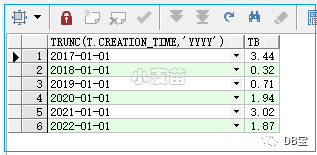
SQL语句为:
1SELECT trunc(t.creation_time, 'yyyy'),
2       round(SUM(t.bytes) / 1024 / 1024 / 1024 / 1024, 2) tb
3  FROM v$datafile t
4 GROUP BY trunc(t.creation_time, 'yyyy')
5 ORDER BY 1;
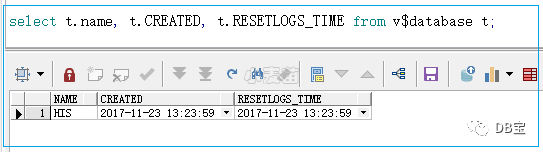
这里有一个问题就是如果数据库的生命周期不完整了,比如经历过数据迁移、resetlog 导致归档日志不再连接,此时 v$datafile 中记录的数据文件创建时间已经被重置,之前的历史记录会丢失。此时数据库相当于重生了,之前的数据文件创建时间都被重置为数据库的第一次打开时间。比如上面的记录 2017 年以前的数据文件增长记录都无法考证了,原因是经历过 resetlog 打开数据库。
文章转载自DB宝,如果涉嫌侵权,请发送邮件至:contact@modb.pro进行举报,并提供相关证据,一经查实,墨天轮将立刻删除相关内容。
