



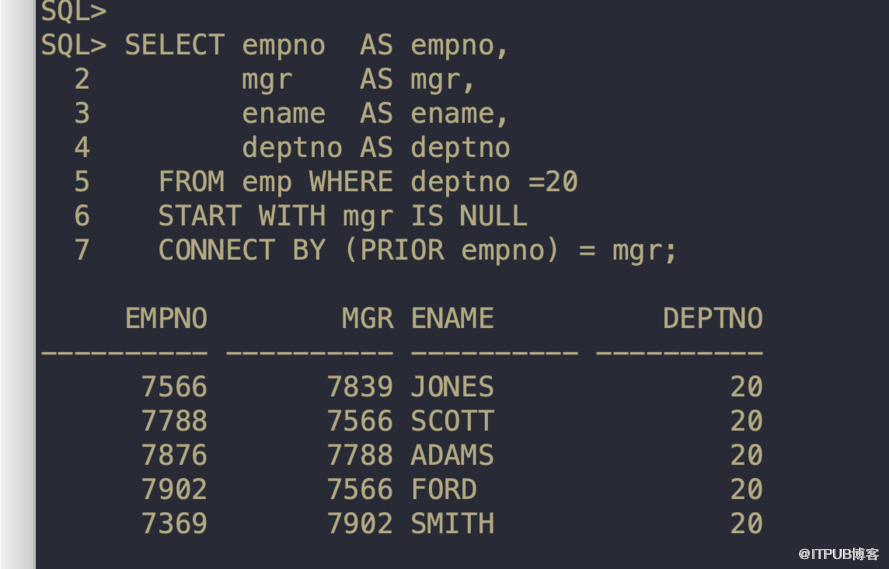
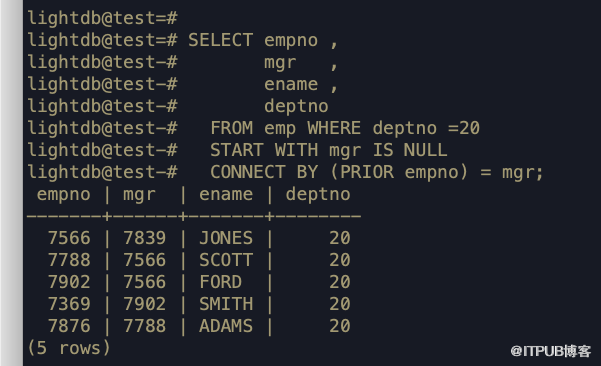
LightDB支持start with 支持树形查询
Oracle:
LightDB:
支持sys_connect_by_path语句
lightdb@test=#
lightdb@test=# SELECT empno,ename,SUBSTR(sys_connect_by_path(ename,'->'),3) AS sys_connect_by_path_col
lightdb@test-#   FROM EMP
lightdb@test-#  START WITH ENAME = 'KING' /*mgr is null*/
lightdb@test-# CONNECT BY MGR = (PRIOR EMPNO);
 empno | ename  |  sys_connect_by_path_col
-------+--------+---------------------------
  7839 | KING   | KING
  7566 | JONES  | KING->JONES
  7698 | BLAKE  | KING->BLAKE
  7782 | CLARK  | KING->CLARK
  7499 | ALLEN  | KING->BLAKE->ALLEN
  7521 | WARD   | KING->BLAKE->WARD
  7654 | MARTIN | KING->BLAKE->MARTIN
  7788 | SCOTT  | KING->JONES->SCOTT
  7844 | TURNER | KING->BLAKE->TURNER
  7900 | JAMES  | KING->BLAKE->JAMES
  7902 | FORD   | KING->JONES->FORD
  7934 | MILLER | KING->CLARK->MILLER
  7369 | SMITH  | KING->JONES->FORD->SMITH
  7876 | ADAMS  | KING->JONES->SCOTT->ADAMS
(14 rows)
lightdb@test=# SELECT LEVEL,empno,ename,mgr -- , (PRIOR ename) AS mgr_name
lightdb@test-#   FROM EMP
lightdb@test-#  START WITH ENAME = 'KING'
lightdb@test-# CONNECT BY MGR = (PRIOR EMPNO);
 level | empno | ename  | mgr
-------+-------+--------+------
     1 |  7839 | KING   |
     2 |  7566 | JONES  | 7839
     2 |  7698 | BLAKE  | 7839
     2 |  7782 | CLARK  | 7839
     3 |  7499 | ALLEN  | 7698
     3 |  7521 | WARD   | 7698
     3 |  7654 | MARTIN | 7698
     3 |  7788 | SCOTT  | 7566
     3 |  7844 | TURNER | 7698
     3 |  7900 | JAMES  | 7698
     3 |  7902 | FORD   | 7566
     3 |  7934 | MILLER | 7782
     4 |  7369 | SMITH  | 7902
     4 |  7876 | ADAMS  | 7788
(14 rows)
lt_restore支持–table_exists_action
如下使用
lt_dump -U lightdb -d test -n public -Fd -f test -v
导出完后使用lt_restore恢复数据,默认情况下,会报表冲突
[lightdb@node1 ~]$ lt_restore test -U lightdb -d test -n public  -v
lt_restore: connecting to database for restore
lt_restore: creating TABLE "public.dept"
lt_restore: while PROCESSING TOC:
lt_restore: from TOC entry 571; 1259 24124 TABLE dept lightdb
lt_restore: error: could not execute query: ERROR:  relation "dept" already exists
Command was: CREATE TABLE public.dept (
    deptno numeric(2,0) NOT NULL,
    dname varchar2(14),
    loc varchar2(13)
);
lt_restore: creating TABLE "public.emp"
lt_restore: from TOC entry 570; 1259 24116 TABLE emp lightdb
lt_restore: error: could not execute query: ERROR:  relation "emp" already exists
Command was: CREATE TABLE public.emp (
    empno numeric(4,0) NOT NULL,
    ename varchar2(10),
添加–table-exists-action参数之后
[lightdb@node1 ~]$ lt_restore test -U lightdb -d test -n public --table_exists_action=replace -v
lt_restore: connecting to database for restore
lt_restore: table public.dept exists, drop table before restore due to table_exists_action of replace.
lt_restore: creating TABLE "public.dept"
lt_restore: table public.emp exists, drop table before restore due to table_exists_action of replace.
lt_restore: creating TABLE "public.emp"
lt_restore: processing data for table "public.dept"
lt_restore: processing data for table "public.emp"
lt_restore: creating CONSTRAINT "public.dept pk_dept"
lt_restore: creating CONSTRAINT "public.emp pk_emp"
对Oracle q语句语法支持
lightdb@test=# select q'[alter table ]' || table_name from user_tables;
     ?column?
------------------
 alter table EMP
 alter table DEPT
(2 rows)
「喜欢这篇文章,您的关注和赞赏是给作者最好的鼓励」
关注作者
【版权声明】本文为墨天轮用户原创内容,转载时必须标注文章的来源(墨天轮),文章链接,文章作者等基本信息,否则作者和墨天轮有权追究责任。如果您发现墨天轮中有涉嫌抄袭或者侵权的内容,欢迎发送邮件至:contact@modb.pro进行举报,并提供相关证据,一经查实,墨天轮将立刻删除相关内容。
