



- Service 方式
# 查看 postgresql 状态
[root@192 ~]# service postgresql status
pg_ctl: server is running (PID: 1531)
/opt/pgsql/postgresql/bin/postgres "-D" "/opt/pgsql/postgresql/data"

# postgresql停止
[root@192 ~]# service postgresql stop
Stopping PostgreSQL: ok
[root@192 ~]# service postgresql status
pg_ctl: no server running

# postgresql启动
[root@192 ~]# service postgresql start
Starting PostgreSQL: ok
[root@192 ~]# service postgresql status
pg_ctl: server is running (PID: 6568)
/opt/pgsql/postgresql/bin/postgres "-D" "/opt/pgsql/postgresql/data"

# postgresql重启
[root@192 ~]# service postgresql restart
Restarting PostgreSQL: ok
[root@192 ~]# service postgresql status
pg_ctl: server is running (PID: 6661)
/opt/pgsql/postgresql/bin/postgres "-D" "/opt/pgsql/postgresql/data"

# 查看系统中运行的postgres进程
[root@192 ~]# ps -ef | grep postgres
postgres   6661      1  0 11:43 ?        00:00:00 /opt/pgsql/postgresql/bin/postmaster -D /opt/pgsql/postgresql/data
postgres   6663   6661  0 11:43 ?        00:00:00 postgres: checkpointer
postgres   6664   6661  0 11:43 ?        00:00:00 postgres: background writer
postgres   6665   6661  0 11:43 ?        00:00:00 postgres: walwriter
postgres   6666   6661  0 11:43 ?        00:00:00 postgres: autovacuum launcher
postgres   6667   6661  0 11:43 ?        00:00:00 postgres: stats collector
postgres   6668   6661  0 11:43 ?        00:00:00 postgres: logical replication launcher
root       6739   6295  0 11:46 pts/1    00:00:00 grep --color=auto postgres
- pg_ctl 方式
pg_ctl是postgresql中初始化数据目录,启动、停止、重启、重加载数据库服务,或者查看数据库服务状态的工具,pg_ctl提供了丰富的控制项,执行pg_ctl命令需要操作系统用户使用su命令切换到postgresql。
启动数据库
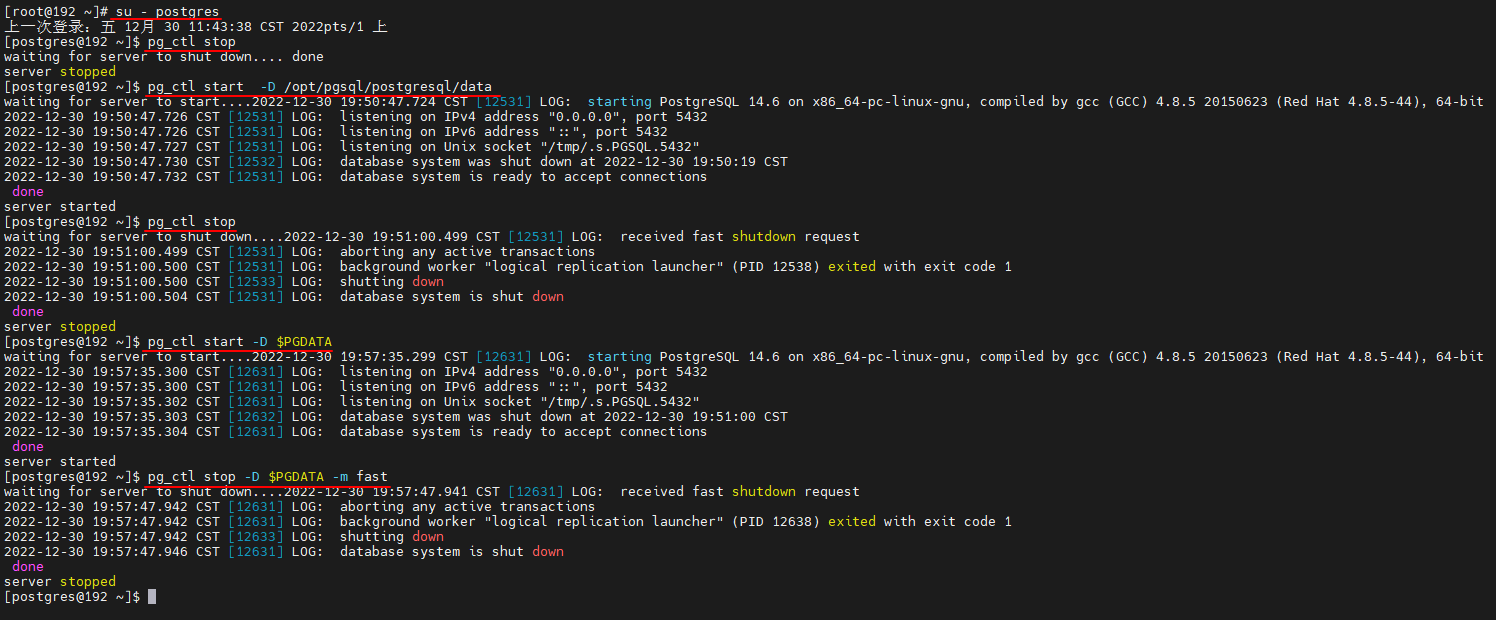
[postgres@192 ~]$ pg_ctl start  -D /opt/pgsql/postgresql/data
waiting for server to start....2022-12-30 19:50:47.724 CST [12531] LOG:  starting PostgreSQL 14.6 on x86_64-pc-linux-gnu, compiled by gcc (GCC) 4.8.5 20150623 (Red Hat 4.8.5-44), 64-bit
2022-12-30 19:50:47.726 CST [12531] LOG:  listening on IPv4 address "0.0.0.0", port 5432
2022-12-30 19:50:47.726 CST [12531] LOG:  listening on IPv6 address "::", port 5432
2022-12-30 19:50:47.727 CST [12531] LOG:  listening on Unix socket "/tmp/.s.PGSQL.5432"
2022-12-30 19:50:47.730 CST [12532] LOG:  database system was shut down at 2022-12-30 19:50:19 CST
2022-12-30 19:50:47.732 CST [12531] LOG:  database system is ready to accept connections
 done
server started


[postgres@192 ~]$ pg_ctl start -D $PGDATA
waiting for server to start....2022-12-30 19:57:35.299 CST [12631] LOG:  starting PostgreSQL 14.6 on x86_64-pc-linux-gnu, compiled by gcc (GCC) 4.8.5 20150623 (Red Hat 4.8.5-44), 64-bit
2022-12-30 19:57:35.300 CST [12631] LOG:  listening on IPv4 address "0.0.0.0", port 5432
2022-12-30 19:57:35.300 CST [12631] LOG:  listening on IPv6 address "::", port 5432
2022-12-30 19:57:35.302 CST [12631] LOG:  listening on Unix socket "/tmp/.s.PGSQL.5432"
2022-12-30 19:57:35.303 CST [12632] LOG:  database system was shut down at 2022-12-30 19:51:00 CST
2022-12-30 19:57:35.304 CST [12631] LOG:  database system is ready to accept connections
 done
server started
停止数据库
# pg_ctl stop -D $PGDATA [-m shutdown-mode]

# -m shutdown-mode指数据库停止的方法,有以下三种:

# smart: 等所有的连接终止后关闭数据库。如果客户端连接不终止,则无法关闭数据库。

# fast: 会回滚所有的活动的事务,并强制断开客户端的连接然后关闭数据库(默认,相当于oracle数据库的immdiate模式)

# immediate:会立即终止所有服务器进程,当下一次数据库启动的时候会首先进入恢复状态( 相当于使用 kill 工具杀死进程[此方式不会干净的关闭数据库且会造成数据丢失] ,相当于oracle数据库的abort模式)

# 在写命令的时候,这 个值可以分别简写为“-ms”、“-mf”、“-mi” ,例如使用 smart 模式启动数据库的命令如下所示

[postgres@192 ~]$ pg_ctl start -D $PGDATA -mf
waiting for server to start....2022-12-30 20:03:54.412 CST [12717] LOG:  starting PostgreSQL 14.6 on x86_64-pc-linux-gnu, compiled by gcc (GCC) 4.8.5 20150623 (Red Hat 4.8.5-44), 64-bit
2022-12-30 20:03:54.413 CST [12717] LOG:  listening on IPv4 address "0.0.0.0", port 5432
2022-12-30 20:03:54.413 CST [12717] LOG:  listening on IPv6 address "::", port 5432
2022-12-30 20:03:54.415 CST [12717] LOG:  listening on Unix socket "/tmp/.s.PGSQL.5432"
2022-12-30 20:03:54.417 CST [12718] LOG:  database system was shut down at 2022-12-30 19:57:47 CST
2022-12-30 20:03:54.418 CST [12717] LOG:  database system is ready to accept connections
 done
server started

# 例如使用 smart 模式启动数据库的命令如下所示

[postgres@192 ~]$ pg_ctl stop -D $PGDATA -mf
waiting for server to shut down....2022-12-30 20:04:05.009 CST [12717] LOG:  received fast shutdown request
2022-12-30 20:04:05.010 CST [12717] LOG:  aborting any active transactions
2022-12-30 20:04:05.010 CST [12717] LOG:  background worker "logical replication launcher" (PID 12724) exited with exit code 1
2022-12-30 20:04:05.010 CST [12719] LOG:  shutting down
2022-12-30 20:04:05.015 CST [12717] LOG:  database system is shut down
 done
server stopped


[postgres@192 ~]$ pg_ctl stop
waiting for server to shut down....2022-12-30 19:51:00.499 CST [12531] LOG:  received fast shutdown request
2022-12-30 19:51:00.499 CST [12531] LOG:  aborting any active transactions
2022-12-30 19:51:00.500 CST [12531] LOG:  background worker "logical replication launcher" (PID 12538) exited with exit code 1
2022-12-30 19:51:00.500 CST [12533] LOG:  shutting down
2022-12-30 19:51:00.504 CST [12531] LOG:  database system is shut down
 done
server stopped


[postgres@192 ~]$ pg_ctl stop -D $PGDATA -m fast
waiting for server to shut down....2022-12-30 19:57:47.941 CST [12631] LOG:  received fast shutdown request
2022-12-30 19:57:47.942 CST [12631] LOG:  aborting any active transactions
2022-12-30 19:57:47.942 CST [12631] LOG:  background worker "logical replication launcher" (PID 12638) exited with exit code 1
2022-12-30 19:57:47.942 CST [12633] LOG:  shutting down
2022-12-30 19:57:47.946 CST [12631] LOG:  database system is shut down
 done
server stopped

「喜欢这篇文章,您的关注和赞赏是给作者最好的鼓励」
关注作者
【版权声明】本文为墨天轮用户原创内容,转载时必须标注文章的来源(墨天轮),文章链接,文章作者等基本信息,否则作者和墨天轮有权追究责任。如果您发现墨天轮中有涉嫌抄袭或者侵权的内容,欢迎发送邮件至:contact@modb.pro进行举报,并提供相关证据,一经查实,墨天轮将立刻删除相关内容。
