



PostgreSQL 配置远程访问
环境
- postgresql 14.6
- CentOS Linux release 7.9.2009 (Core)
配置远程访问
默认情况下,PostgreSQL只允许localhost(127.0.0.1)的连接。如果数据库服务器和程序不在一台服务器上,那么将无法远程连接。
开启相应的防火墙端口,允许端口5432
# 添加指定端口
[root@192 ~]# firewall-cmd --add-port=5432/tcp --permanent
success

# 重载入端口
[root@192 ~]# firewall-cmd --reload
success

# 查询端口是否开启成功
[root@192 ~]# firewall-cmd --query-port=5432/tcp
yes
修改配置文件
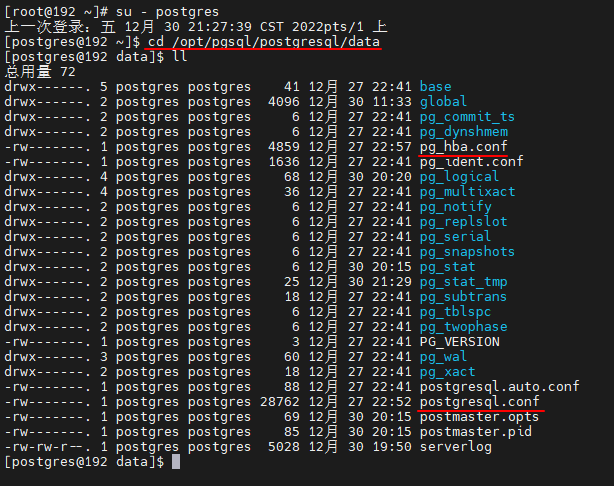
- 修改默认安装目录(/opt/pgsql/postgresql/data)目录下的两个文件。
- postgresql.conf 配置PostgreSQL数据库服务器的相应的参数。
- pg_hba.conf 配置对数据库的访问权限。
[root@192 ~]# su - postgres
上一次登录:五 12月 30 21:27:39 CST 2022pts/1 上
[postgres@192 ~]$ cd /opt/pgsql/postgresql/data
[postgres@192 data]$ ll
总用量 72
drwx------. 5 postgres postgres    41 12月 27 22:41 base
drwx------. 2 postgres postgres  4096 12月 30 11:33 global
drwx------. 2 postgres postgres     6 12月 27 22:41 pg_commit_ts
drwx------. 2 postgres postgres     6 12月 27 22:41 pg_dynshmem
-rw-------. 1 postgres postgres  4859 12月 27 22:57 pg_hba.conf
-rw-------. 1 postgres postgres  1636 12月 27 22:41 pg_ident.conf
drwx------. 4 postgres postgres    68 12月 30 20:20 pg_logical
drwx------. 4 postgres postgres    36 12月 27 22:41 pg_multixact
drwx------. 2 postgres postgres     6 12月 27 22:41 pg_notify
drwx------. 2 postgres postgres     6 12月 27 22:41 pg_replslot
drwx------. 2 postgres postgres     6 12月 27 22:41 pg_serial
drwx------. 2 postgres postgres     6 12月 27 22:41 pg_snapshots
drwx------. 2 postgres postgres     6 12月 30 20:15 pg_stat
drwx------. 2 postgres postgres    25 12月 30 21:29 pg_stat_tmp
drwx------. 2 postgres postgres    18 12月 27 22:41 pg_subtrans
drwx------. 2 postgres postgres     6 12月 27 22:41 pg_tblspc
drwx------. 2 postgres postgres     6 12月 27 22:41 pg_twophase
-rw-------. 1 postgres postgres     3 12月 27 22:41 PG_VERSION
drwx------. 3 postgres postgres    60 12月 27 22:41 pg_wal
drwx------. 2 postgres postgres    18 12月 27 22:41 pg_xact
-rw-------. 1 postgres postgres    88 12月 27 22:41 postgresql.auto.conf
-rw-------. 1 postgres postgres 28762 12月 27 22:52 postgresql.conf
-rw-------. 1 postgres postgres    69 12月 30 20:15 postmaster.opts
-rw-------. 1 postgres postgres    85 12月 30 20:15 postmaster.pid
-rw-rw-r--. 1 postgres postgres  5028 12月 30 19:50 serverlog

# 修改数据库配置文件postgresql.conf

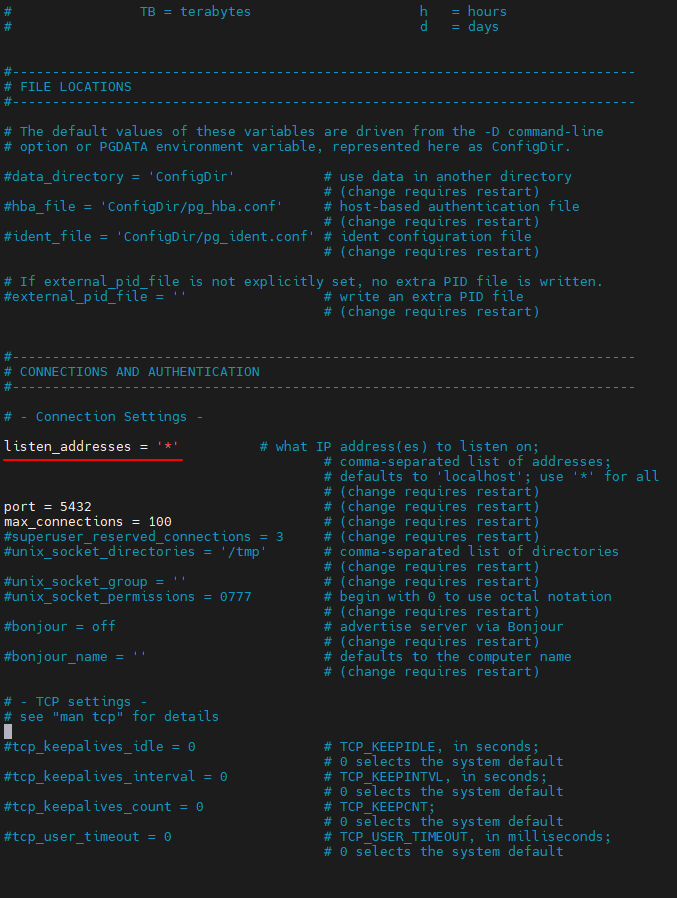
[postgres@192 data]$ vi postgresql.conf

# 监听端口注释打开,并修改为*,表示可以任意ip访问

listen_addresses = '*'

# 修改数据库客户端授权配置文件pg_hba.conf

[postgres@192 data]$ vi pg_hba.conf

# 在ipv4链接设置中添加一行(IPv4 local connections)
host    all             all             0.0.0.0/0               trust


# 修改完配置文件后重启数据库即可

[root@192 ~]# service postgresql restart
Restarting PostgreSQL: ok
「喜欢这篇文章,您的关注和赞赏是给作者最好的鼓励」
关注作者
【版权声明】本文为墨天轮用户原创内容,转载时必须标注文章的来源(墨天轮),文章链接,文章作者等基本信息,否则作者和墨天轮有权追究责任。如果您发现墨天轮中有涉嫌抄袭或者侵权的内容,欢迎发送邮件至:contact@modb.pro进行举报,并提供相关证据,一经查实,墨天轮将立刻删除相关内容。
