



PostgreSQL 登录
pgAdmin 登录
在pgAdminIII中创建一个新的服务器连接
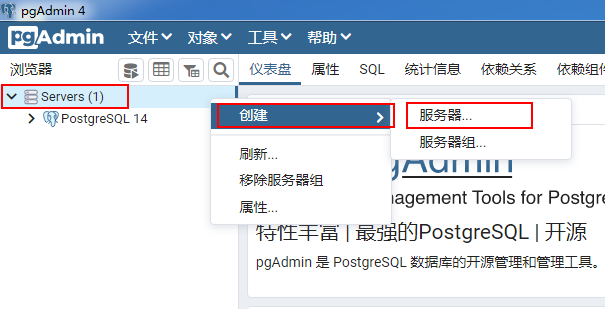
- 右击Servers,依次点击“创建”、“服务器…”;
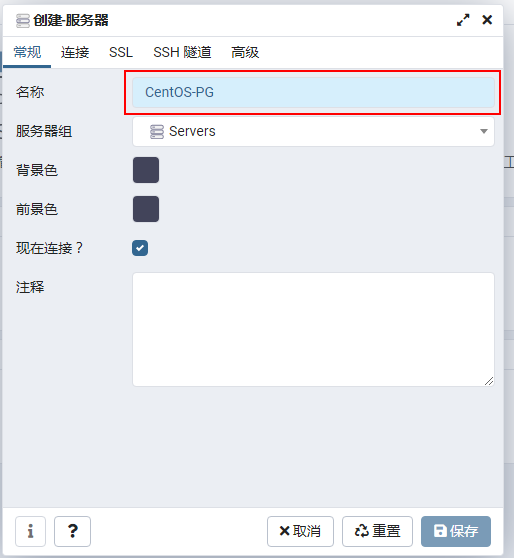
- 在“创建-服务器”窗口的“常规”标签页的“名称”文本框中,为此服务器连接命名;
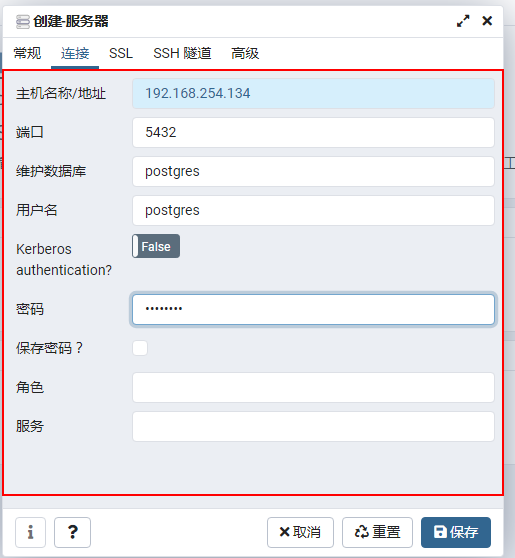
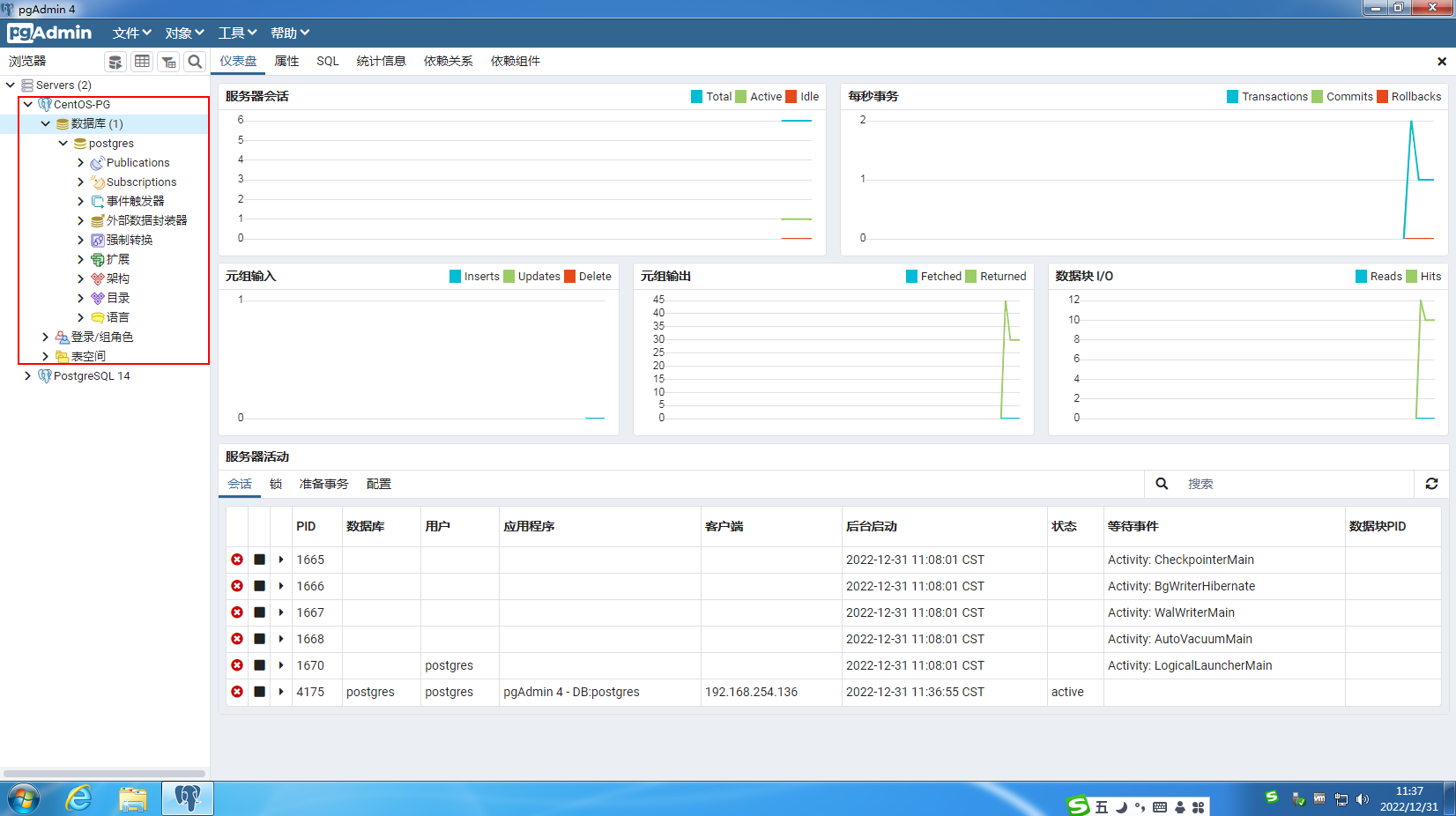
- 在“创建-服务器”窗口的“连接”标签页,分别输入服务器的IP地址、要登录的数据库、用户名、密码,点击“保存”按钮;




在默认配置条件下,本机访问PostgreSQL
在UNIX平台中安装PostgreSQL之后,PostgreSQL会在UNIX系统中创建一个名为“postgres”当用户。PostgreSQL的默认用户名和数据库也是“postgres”。
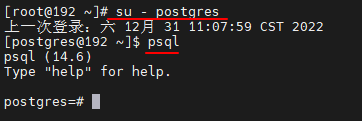
# 切换到Linux用户postgres,然后执行psql

[root@192 ~]# su - postgres
上一次登录:六 12月 31 11:07:59 CST 2022
[postgres@192 ~]$ psql
psql (14.6)
Type "help" for help.

postgres=#


# psql (连接数据库,默认用户和数据库都是postgres)
# 相当于系统用户postgres以同名数据库用户的身份,登录数据库,这是不用输入密码的。如果一切正常,系统提示符会变为"postgres=#",表示这时已经进入了数据库控制台。

#退出CTRL+D   \q退出

命令行登录
#psql -h 服务器 -U 用户名  -d 数据库 -p 端口地址  // -U 是大写

[postgres@192 ~]$ psql -d postgres -U postgres -h 192.168.254.134 -p 5432
psql (14.6)
Type "help" for help.

postgres=#


[postgres@192 ~]$ psql --help
psql is the PostgreSQL interactive terminal.

Usage:
  psql [OPTION]... [DBNAME [USERNAME]]

General options:
  -c, --command=COMMAND    run only single command (SQL or internal) and exit
  -d, --dbname=DBNAME      database name to connect to (default: "postgres")
  -f, --file=FILENAME      execute commands from file, then exit
  -l, --list               list available databases, then exit
  -v, --set=, --variable=NAME=VALUE
                           set psql variable NAME to VALUE
                           (e.g., -v ON_ERROR_STOP=1)
  -V, --version            output version information, then exit
  -X, --no-psqlrc          do not read startup file (~/.psqlrc)
  -1 ("one"), --single-transaction
                           execute as a single transaction (if non-interactive)
  -?, --help[=options]     show this help, then exit
      --help=commands      list backslash commands, then exit
      --help=variables     list special variables, then exit

Input and output options:
  -a, --echo-all           echo all input from script
  -b, --echo-errors        echo failed commands
  -e, --echo-queries       echo commands sent to server
  -E, --echo-hidden        display queries that internal commands generate
  -L, --log-file=FILENAME  send session log to file
  -n, --no-readline        disable enhanced command line editing (readline)
  -o, --output=FILENAME    send query results to file (or |pipe)
  -q, --quiet              run quietly (no messages, only query output)
  -s, --single-step        single-step mode (confirm each query)
  -S, --single-line        single-line mode (end of line terminates SQL command)

Output format options:
  -A, --no-align           unaligned table output mode
      --csv                CSV (Comma-Separated Values) table output mode
  -F, --field-separator=STRING
                           field separator for unaligned output (default: "|")
  -H, --html               HTML table output mode
  -P, --pset=VAR[=ARG]     set printing option VAR to ARG (see \pset command)
  -R, --record-separator=STRING
                           record separator for unaligned output (default: newline)
  -t, --tuples-only        print rows only
  -T, --table-attr=TEXT    set HTML table tag attributes (e.g., width, border)
  -x, --expanded           turn on expanded table output
  -z, --field-separator-zero
                           set field separator for unaligned output to zero byte
  -0, --record-separator-zero
                           set record separator for unaligned output to zero byte

Connection options:
  -h, --host=HOSTNAME      database server host or socket directory (default: "local socket")
  -p, --port=PORT          database server port (default: "5432")
  -U, --username=USERNAME  database user name (default: "postgres")
  -w, --no-password        never prompt for password
  -W, --password           force password prompt (should happen automatically)

For more information, type "\?" (for internal commands) or "\help" (for SQL
commands) from within psql, or consult the psql section in the PostgreSQL
documentation.

Report bugs to <pgsql-bugs@lists.postgresql.org>.
PostgreSQL home page: <https://www.postgresql.org/>
「喜欢这篇文章,您的关注和赞赏是给作者最好的鼓励」
关注作者
【版权声明】本文为墨天轮用户原创内容,转载时必须标注文章的来源(墨天轮),文章链接,文章作者等基本信息,否则作者和墨天轮有权追究责任。如果您发现墨天轮中有涉嫌抄袭或者侵权的内容,欢迎发送邮件至:contact@modb.pro进行举报,并提供相关证据,一经查实,墨天轮将立刻删除相关内容。
