



云上一台服务器使用yum -y update升级内核后重启不起来,从云平台vnc方式连接后重启发现默认启动项不能正常启动,选择第二个选项后可以正常启动
查看启动文件/boot/grub2/grub.cfg,发现默认启动项为:
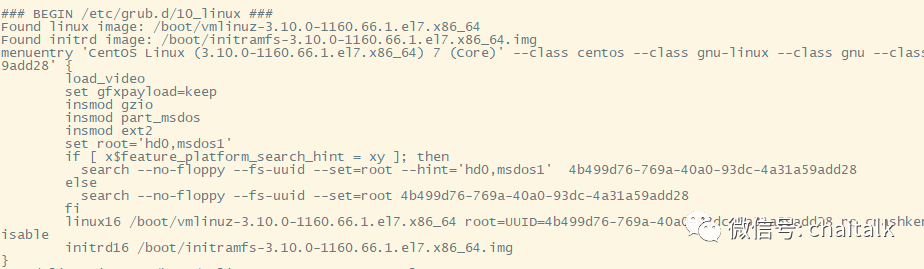
menuentry 'CentOS Linux (3.10.0-1160.59.1.el7.x86_64) 7 (Core)' --class centos --class gnu-linux --class gnu --class os --unrestricted $menuentry_id_option 'gnulinux-3.10.0-1160.59.1.el7.x86_64-advanced-4b499d76-769a-40a0-93dc-4a31a59add28' {load_videoset gfxpayload=keepinsmod gzioinsmod part_msdosinsmod ext2set root='hd0,msdos1'if [ x$feature_platform_search_hint = xy ]; thensearch --no-floppy --fs-uuid --set=root --hint='hd0,msdos1' 4b499d76-769a-40a0-93dc-4a31a59add28elsesearch --no-floppy --fs-uuid --set=root 4b499d76-769a-40a0-93dc-4a31a59add28filinux16 boot/vmlinuz-3.10.0-1160.59.1.el7.x86_64 root=UUID=4b499d76-769a-40a0-93dc-4a31a59add28 ro crashkernel=auto console=ttyS0,115200 console=tty0 panic=5 net.ifnames=0 biosdevname=0 intel_idle.max_cstate=1 intel_pstate=disableinitrd16 boot/initramfs-3.10.0-1160.59.1.el7.x86_64.img}
查看启动文件,发现/boot/initramfs-3.10.0-1160.59.1.el7.x86_64.img文件缺失,故障原因应该为缺少启动文件导致
解决方法:
重建/boot/grub2/grub.cfg去除默认引导选项
#将存在的vmlinuz移动到备份目录cd /bootmkdir -p /boot/bakmv /boot/vmlinuz-3.10.0-1160.59.1.el7.x86_64 /boot/bak#重建/boot/grub2/grub.cfggrub2-mkconfig -o /boot/grub2/gurb.cfg
检查新生成的/boot/grub2/grub.cfg,已经成功去除失败的引导项CentOS Linux (3.10.0-1160.59.1.el7.x86_64) 7 (Core),重启正常
文章转载自老柴杂货铺,如果涉嫌侵权,请发送邮件至:contact@modb.pro进行举报,并提供相关证据,一经查实,墨天轮将立刻删除相关内容。
