本文在龙芯3A5000+统信UOS桌面操作系统下,使用WPS 2019编写完成。
本文编写的初衷:
展示在龙芯3A5000+统信UOS桌面操作系统的环境中,源码编译安装PostgreSQL的过程。实际上,这是本文作者第一次在龙芯3A5000环境中源码编译PostgreSQL数据库软件。在此之前,作者把在龙芯3A5000上源码编译安装PostgreSQL想象得跟火箭发射那么复杂。但是实际安装一遍却发现,就是标准的源码编译PostgreSQL的命令而已。
熟悉Oracle数据库的工程师都知道,在support.oracle.com上,Oracle公司维护了在各种操作系统下安装Oracle数据库软件的最佳实践(Best Practice)。相比之下,本文不能作为龙芯3A5000下安装PostgreSQL的最佳实践,只能称之为龙芯3A5000下安装PostgreSQL最初体验。龙芯3A5000下安装PostgreSQL数据库软件的最佳实践,还有待于广大龙芯CPU爱好者以及PostgreSQL数据库爱好者进行补充与完善,这也正是开源精神的具体体现。
一、硬件环境:
主机信息:
scott@scott-PC:~/Desktop$ sudo dmidecode | grep "System Information" -A9 | egrep "Manufacturer|Product|Serial"
        Manufacturer: Loongson
        Product Name: Loongson-3A5000-HV-7A2000-1w-V0.1-EVB
        Serial Number: Not Specified
scott@scott-PC:~/Desktop$
cpu:龙芯3A5000
scott@scott-PC:~/Desktop$ lscpu
Architecture:        loongarch64
Byte Order:          Little Endian
CPU(s):              4
On-line CPU(s) list: 0-3
Thread(s) per core:  1
Core(s) per socket:  4
Socket(s):           1
NUMA node(s):        1
CPU family:          Loongson-64bit
Model name:          Loongson-3A5000-HV
BogoMIPS:            5000.00
L1d cache:           256 KiB
L1i cache:           256 KiB
L2 cache:            1 MiB
L3 cache:            16 MiB
NUMA node0 CPU(s):   0-3
Flags:               cpucfg lam ual fpu lsx lasx complex crypto lvz lbt_x86 lbt_arm lbt_mips
scott@scott-PC:~/Desktop$
scott@scott-PC:~/Desktop$ uname -m
loongarch64
scott@scott-PC:~/Desktop$

scott@scott-PC:~/Desktop$ cat /proc/cpuinfo
system type             : generic-loongson-machine
processor               : 0
package                 : 0
core                    : 0
cpu family              : Loongson-64bit
model name              : Loongson-3A5000-HV
CPU Revision            : 0x11
FPU Revision            : 0x00
CPU MHz                 : 2500.00
BogoMIPS                : 5000.00
TLB entries             : 2112
Address sizes           : 48 bits physical, 48 bits virtual
isa                     : loongarch32 loongarch64
features                : cpucfg lam ual fpu lsx lasx complex crypto lvz lbt_x86 lbt_arm lbt_mips
hardware watchpoint     : yes, iwatch count: 8, dwatch count: 8

processor               : 1
package                 : 0
core                    : 1
cpu family              : Loongson-64bit
model name              : Loongson-3A5000-HV
CPU Revision            : 0x11
FPU Revision            : 0x00
CPU MHz                 : 2500.00
BogoMIPS                : 5000.00
TLB entries             : 2112
Address sizes           : 48 bits physical, 48 bits virtual
isa                     : loongarch32 loongarch64
features                : cpucfg lam ual fpu lsx lasx complex crypto lvz lbt_x86 lbt_arm lbt_mips
hardware watchpoint     : yes, iwatch count: 8, dwatch count: 8

processor               : 2
package                 : 0
core                    : 2
cpu family              : Loongson-64bit
model name              : Loongson-3A5000-HV
CPU Revision            : 0x11
FPU Revision            : 0x00
CPU MHz                 : 2500.00
BogoMIPS                : 5000.00
TLB entries             : 2112
Address sizes           : 48 bits physical, 48 bits virtual
isa                     : loongarch32 loongarch64
features                : cpucfg lam ual fpu lsx lasx complex crypto lvz lbt_x86 lbt_arm lbt_mips
hardware watchpoint     : yes, iwatch count: 8, dwatch count: 8

processor               : 3
package                 : 0
core                    : 3
cpu family              : Loongson-64bit
model name              : Loongson-3A5000-HV
CPU Revision            : 0x11
FPU Revision            : 0x00
CPU MHz                 : 2500.00
BogoMIPS                : 5000.00
TLB entries             : 2112
Address sizes           : 48 bits physical, 48 bits virtual
isa                     : loongarch32 loongarch64
features                : cpucfg lam ual fpu lsx lasx complex crypto lvz lbt_x86 lbt_arm lbt_mips
hardware watchpoint     : yes, iwatch count: 8, dwatch count: 8

scott@scott-PC:~/Desktop$
内存:
scott@scott-PC:~/Desktop$ free -m
              total        used        free      shared  buff/cache   available
Mem:          32464        2812       24193         192        5458       27280
Swap:         16383           0       16383
scott@scott-PC:~/Desktop$
内存是2条单条16GB紫光国芯内存条
硬盘:
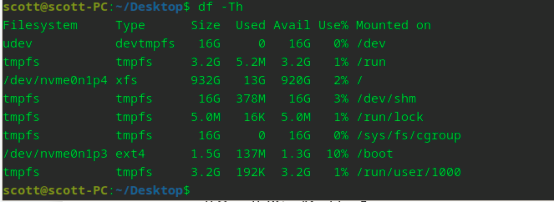
长江存储,致态 1TB SSD
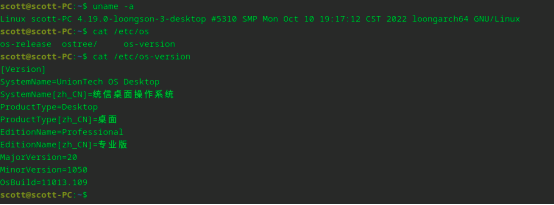
内核版本与操作系统版本:
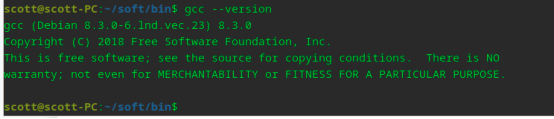
gcc版本:
二、编译安装PostgreSQL
PostgreSQL软件下载:
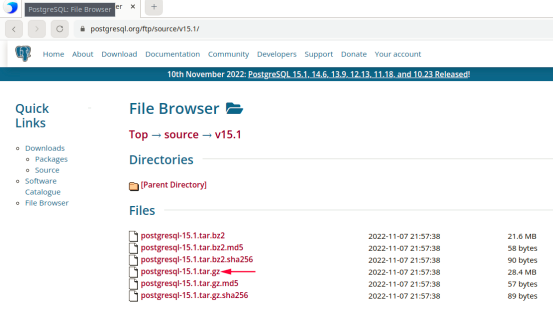
请注意,下图中的浏览器是统信桌面操作系统专业版自带的浏览器Browser
scott@scott-PC:~/Downloads$ tar -xvf postgresql-15.1.tar.gz
scott@scott-PC:~/Downloads$ cd postgresql-15.1/
scott@scott-PC:~/Downloads/postgresql-15.1$ pwd
/home/scott/Downloads/postgresql-15.1
scott@scott-PC:~/Downloads/postgresql-15.1$ sudo ./configure --prefix=/home/scott/soft --without-zlib --without-readline --with-blocksize=16 --with-wal-blocksize=16
scott@scott-PC:~/Downloads/postgresql-15.1$ make   --->本步骤耗时6分钟
scott@scott-PC:~/Downloads/postgresql-15.1$ make install

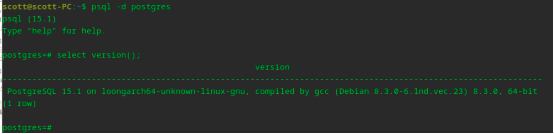
initdb

pg_ctl start -D /home/scott/data
三、注意事项
1.关于pagesize:
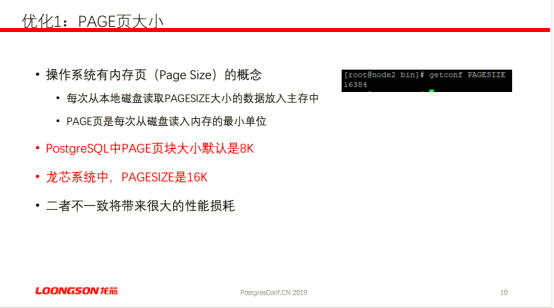
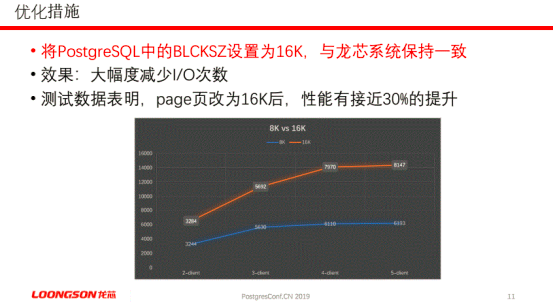
上面的2个ppt摘自在中国开源软件推进联盟PostgreSQL分会举办的PostgreConf.CN 2019大会上龙芯中科靳国杰老师的主题演讲”PostgreSQL与龙芯应用实践之路”。
另外,有关pagesize的大小,有如下论述:
The page size is hardwired in the CPU architecture, specifically, in the Memory Management Unit (MMU). The MMU determines which pagesizes are supported.
上述英文来源:https://access.redhat.com/solutions/37930
Can we create an ext3, ext4, or xfs filesystem with a blocksize larger than 4096 (such as 8192)?
2.PAGESIZE与Hugepagesize
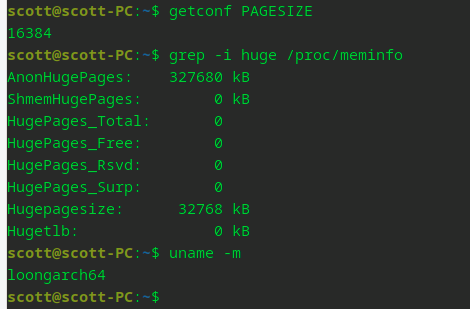
在这里,特别强调一点:龙芯CPU下,操作系统的pagesize和Hugepagesize的大小。
从上面的命令可以看到,pagesize是16384,单位是Bytes。Hugepagesize是32768 kB。
因此,在龙芯CPU(包括但是不限于3A5000)下开Hugepage时,一定要注意单个Hugepage的大小是32MB,不是通常x86-84 CPU下的2MB,别算错了,按照2MB去计算龙芯环境中的Hugepage总大小的话,那大概率会把物理内存吃光,进而会导致重启OS时,OS起不来。
3.操作系统的文件系统的block size对PostgreSQL性能有什么影响?
The filesystem block size must not be larger than the kernel's page size. The compiled in page size can be influenced by the underlying processor architecture. For the most x86 systems the kernel's page size is 4KiB; therefore the maximum filesystem block size can not exceed 4KiB. The 4KiB size is also the vfs cache page size. The page size is set at kernel compile time.
上述英文来源:https://access.redhat.com/solutions/37930
Can we create an ext3, ext4, or xfs filesystem with a blocksize larger than 4096 (such as 8192)?
特别说明:此处只提出该问题,有待后续有时间的时候进行验证。
查看已mount的xfs文件系统的block size的方法如下:
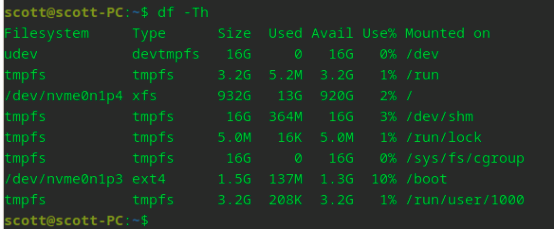
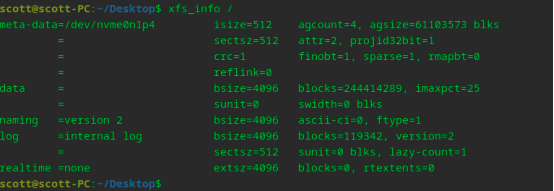
查看未mount的XFS文件系统的blocksize
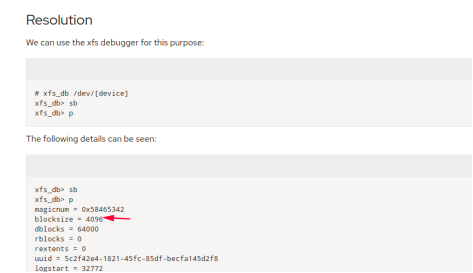
上述截图来源:How to show characteristics of a not mounted XFS Fielsystem?
https://access.redhat.com/solutions/3047121
四、致谢清单
致谢清单之软件部分:
1.PostgreSQL数据库软件全球开发组及各个版本的PostgreSQL数据库软件贡献者。
2.珠海金山办公软件有限公司(WPS Office软件)
3.统信软件(UOS操作系统)
4.山东神仓信息技术有限公司(友情提供access.redhat.com付费账号)
致谢清单之硬件部分:
1.龙芯中科技术股份有限公司(龙芯3A5000 CPU)
2.浪潮集团有限公司(德国奇梦达中国研发中心被浪潮集团收购,后又被紫光国芯收购)
3.西安紫光国芯半导体有限公司(紫光国芯内存条)
4.长江存储科技有限责任公司(致态固态硬盘)
五、附注
本文使用的台式机是DIY而来,核心部件的购买渠道如下:
1.龙芯3A5000的cpu主板套装(天创者TIMCREATE L5A2台式机主板+CPU)购自JD龙芯生态产品官方京东自营旗舰店。
2.紫光内存条( UniIC) 16GB DDR4 3200台式机内存条购自JD紫光存储京东自营旗舰店。
3.长江存储致态TiPlus5000系列固态硬盘购自JD致态(ZhiTai)长江存储京东自营旗舰店。