



PostgreSQL 进程结构
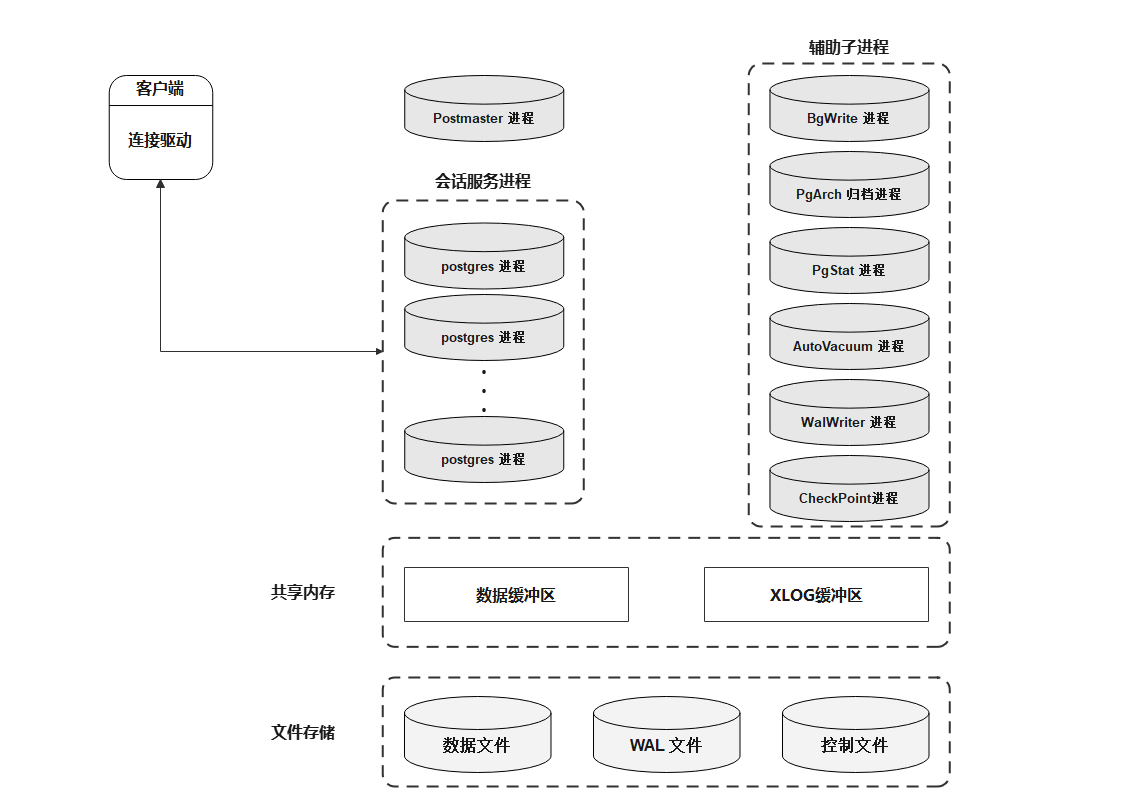

[root@192 ~]# ps -ef | grep postgres
postgres   1550      1  0 19:59 ?        00:00:00 /opt/pgsql/postgresql/bin/postmaster -D /opt/pgsql/postgresql/data
postgres   1740   1550  0 19:59 ?        00:00:00 postgres: checkpointer
postgres   1741   1550  0 19:59 ?        00:00:00 postgres: background writer
postgres   1742   1550  0 19:59 ?        00:00:00 postgres: walwriter
postgres   1743   1550  0 19:59 ?        00:00:00 postgres: autovacuum launcher
postgres   1744   1550  0 19:59 ?        00:00:00 postgres: stats collector
postgres   1745   1550  0 19:59 ?        00:00:00 postgres: logical replication launcher
root       3144   3032  0 20:03 pts/0    00:00:00 grep --color=auto postgres
Postmaster主进程和服务进程
PostMaster进程是整个数据库实例的总控进程,负责启动关闭该数据实例。
BgWriter(后台写)进程
把共享内存中的脏页写到磁盘上的进程。主要是为了提高插入、更新和删除数据的性能。
- 定期把脏数据从内存缓冲区刷出到磁盘中,减少查询时的阻塞;
- postgresql在定期作检查点时需要把所有脏页写出到磁盘,通过BgWriter预先写出一些脏页,可以减少设置检查点(CheckPoint,数据库恢复技术的一种)时要进行的IO操作,使系统的IO负载趋向平稳;
- postgresql.conf文件中与 BgWriter 进程相关的参数。
# - Background Writer -

# bgwriter_delay:backgroud writer进程连续两次flush数据之间的时间的间隔。默认值是200,单位是毫秒。

#bgwriter_delay = 200ms                 # 10-10000ms between rounds

# bgwriter_lru_maxpages:backgroud writer进程每次写的最多数据量,默认值是100,单位buffers。如果脏数据量小于该数值时,写操作全部由backgroud writer进程完成;反之,大于该值时,大于的部分将有server process进程完成。设置该值为0时表示禁用backgroud writer写进程,完全有server process来完成;配置为-1时表示所有脏数据都由backgroud writer来完成。(这里不包括checkpoint操作)

#bgwriter_lru_maxpages = 100            # max buffers written/round, 0 disables

# bgwriter_lru_multiplier:这个参数表示每次往磁盘写数据块的数量,当然该值必须小于bgwriter_lru_maxpages。设置太小时需要写入的脏数据量大于每次写入的数据量,这样剩余需要写入磁盘的工作需要server process进程来完成,将会降低性能;值配置太大说明写入的脏数据量多于当时所需buffer的数量,方便了后面再次申请buffer工作,同时可能出现IO的浪费。该参数的默认值是2.0。
# bgwriter的最大数据量计算方式:
# 1000/bgwriter_delay*bgwriter_lru_maxpages*8K=最大数据量

#bgwriter_lru_multiplier = 2.0          # 0-10.0 multiplier on buffers scanned/round

# bgwriter_flush_after:数据页大小达到bgwriter_flush_after时触发BgWriter,默认是512KB。

#bgwriter_flush_after = 512kB           # measured in pages, 0 disables
PgArch(归档)进程
WAL日志会被循环使用,PgArch在归档前会把WAL日志备份出来。通过PITY (Pointin Time Recovery)技术,可以对数据库进行一次全量备份后,该技术将备份时间点之后的WAL日志通过归档进行备份,使用数据库的全量备份再加上后面产生的WAL日志,即可把数据库向前推到全量备份后的任意一个时间点。
postgresql.conf文件中与 PgArch 进程相关的参数。
# - Archiving -

# archive_mode:表示是否进行归档操作,可选择为off(关闭)、on(启动)和always(总是开启),默认值为off(关闭)。

#archive_mode = off		# enables archiving; off, on, or always
				# (change requires restart)

# archive_command:由管理员设置的用于归档WAL日志的命令。在用于归档的命令中,预定义变量“%p”用来指代需要归档的WAL全路径文件名,“%f”表示不带路径的文件名(这里的路径都是相对于当前工作目录的路径)。每个WAL段文件归档时将调用archive_command所指定的命令。当归档命令返回0时,PostgreSQL就会认为文件被成功归档,然后就会删除或循环使用该WAL段文件。否则,如果返回一个非零值,PostgreSQL会认为文件没有被成功归档,便会周期性地重试直到成功。

#archive_command = ''		# command to use to archive a logfile segment
				# placeholders: %p = path of file to archive
				#               %f = file name only
				# e.g. 'test ! -f /mnt/server/archivedir/%f && cp %p /mnt/server/archivedir/%f'

# archive_timeout:表示归档周期,在超过该参数设定的时间时强制切换WAL段,默认值为0(表示禁用该功能)。

#archive_timeout = 0		# force a logfile segment switch after this
				# number of seconds; 0 disables
PgStat(统计收集)进程
做数据的统计收集工作。主要用于查询优化时的代价估算,包括一个表和索引进行了多少次的插入、更新、删除操作。磁盘块读写的次数、行的读次数。pg_statistic中存储了PgStat收集的各类信息。
postgresql.conf文件中与 PgStat 进程相关的参数。
#------------------------------------------------------------------------------
# STATISTICS
#------------------------------------------------------------------------------

# - Query and Index Statistics Collector -

# track_activities:表示是否对会话中当前执行的命令开启统计信息收集功能,该参数只对超级用户和会话所有者可见,默认值为on(开启)。

#track_activities = on

# track_activity_query_size:设置用于跟踪每一个活动会话的当前执行命令的字节数,默认值为1024,只能在数据库启动后设置。

#track_activity_query_size = 1024	# (change requires restart)

# track_counts:表示是否对数据库活动开启统计信息收集功能,由于在AutoVacuum自动清理进程中选择清理的数据库时,需要数据库的统计信息,因此该参数默认值为on。

#track_counts = on

# track_io_timing:定时调用数据块I/O,默认是off,因为设置为开启状态会反复的调用数据库时间,这给数据库增加了很多开销。只有超级用户可以设置

#track_io_timing = off

#track_wal_io_timing = off

# track_functions:表示是否开启函数的调用次数和调用耗时统计。

#track_functions = none			# none, pl, all

# stats_temp_directory:统计信息的临时存储路径。路径可以是相对路径或者绝对路径,参数默认为pg_stat_tmp,设置此参数可以减少数据库的物理I/O,提高性能。此参数只能在postgresql.conf文件或者服务器命令行中修改。

#stats_temp_directory = 'pg_stat_tmp'
AutoVacuum(系统自动清理)进程
在PostgreSQL数据库中,对表进行delete操作后,旧的数据并不会立即被删除,并且,在更新数据时,也并不会在旧的数据上做更新,而是新生成一行数据。
旧的数据只是被标识为删除状态,只有在没有并发的其他事务读到这些旧数据时,他们才会被清除。这个清除工作就由AutoVacuum进程完成。
postgresql.conf文件中与 AutoVacuum 进程相关的参数。
#------------------------------------------------------------------------------
# AUTOVACUUM
#------------------------------------------------------------------------------
# autovacuum:是否启动系统自动清理功能,默认值为on。

#autovacuum = on			# Enable autovacuum subprocess?  'on'
					# requires track_counts to also be on.

# autovacuum_max_workers:设置系统自动清理工作进程的最大数量。

#autovacuum_max_workers = 3		# max number of autovacuum subprocesses
					# (change requires restart)

# autovacuum_naptime:设置两次系统自动清理操作之间的间隔时间。

#autovacuum_naptime = 1min		# time between autovacuum runs

# autovacuum_vacuum_threshold和autovacuum_analyze_threshold:设置当表上被更新的元组数的阈值超过这些阈值时分别需要执行vacuum和analyze。

#autovacuum_vacuum_threshold = 50	# min number of row updates before
					# vacuum
#autovacuum_vacuum_insert_threshold = 1000	# min number of row inserts
					# before vacuum; -1 disables insert
					# vacuums
#autovacuum_analyze_threshold = 50	# min number of row updates before
					# analyze

# autovacuum_vacuum_scale_factor和autovacuum_analyze_scale_factor:设置表大小的缩放系数。

#autovacuum_vacuum_scale_factor = 0.2	# fraction of table size before vacuum
#autovacuum_vacuum_insert_scale_factor = 0.2	# fraction of inserts over table
					# size before insert vacuum
#autovacuum_analyze_scale_factor = 0.1	# fraction of table size before analyze

# autovacuum_freeze_max_age:设置需要强制对数据库进行清理的XID上限值。

#autovacuum_freeze_max_age = 200000000	# maximum XID age before forced vacuum
					# (change requires restart)
#autovacuum_multixact_freeze_max_age = 400000000	# maximum multixact age
					# before forced vacuum
					# (change requires restart)

# autovacuum_vacuum_cost_delay:当autovacuum进程即将执行时,对 vacuum 执行 cost 进行评估,如果超过 autovacuum_vacuum_cost_limit设置值时,则延迟,这个延迟的时间即为 autovacuum_vacuum_cost_delay。如果值为 -1, 表示使用 vacuum_cost_delay 值,默认值为 20 ms。

#autovacuum_vacuum_cost_delay = 2ms	# default vacuum cost delay for
					# autovacuum, in milliseconds;
					# -1 means use vacuum_cost_delay

# autovacuum_vacuum_cost_limit:这个值为 autovacuum 进程的评估阀值, 默认为 -1, 表示使用 "vacuum_cost_limit " 值,如果在执行 autovacuum 进程期间评估的cost 超过 autovacuum_vacuum_cost_limit, 则 autovacuum 进程则会休眠。

#autovacuum_vacuum_cost_limit = -1	# default vacuum cost limit for
					# autovacuum, -1 means use
					# vacuum_cost_limit
WalWriter(预写式日志)进程
Write Ahead Log (预写式日志),在修改数据之前把修改操作记录到磁盘中,以便后面更新实时数据时不需要数据持久化到文件中。
postgresql.conf文件中与 WalWriter 进程相关的参数。
#------------------------------------------------------------------------------
# WRITE-AHEAD LOG
#------------------------------------------------------------------------------

# - Settings -

# wal_level:控制wal存储的级别。wal_level决定有多少信息被写入到WAL中。 默认值是最小的(minimal),其中只写入从崩溃或立即关机中恢复的所需信息。replica 增加 wal 归档信息 同时包括 只读服务器需要的信息。
# logical 主要用于logical decoding 场景

#wal_level = replica			# minimal, replica, or logical
					# (change requires restart)

# fsync:该参数直接控制日志是否先写入磁盘。默认值是ON(先写入),表示更新数据写入磁盘时系统必须等待WAL的写入完成。可以配置该参数为OFF,表示更新数据写入磁盘完全不用等待WAL的写入完成。

#fsync = on				# flush data to disk for crash safety
					# (turning this off can cause
					# unrecoverable data corruption)
# synchronous_commit:参数配置是否等待WAL完成后才返回给用户事务的状态信息。默认值是ON,表明必须等待WAL完成后才返回事务状态信息;配置成OFF能够更快地反馈回事务状态。

#synchronous_commit = on		# synchronization level;
					# off, local, remote_write, remote_apply, or on

# wal_sync_method:WAL写入磁盘的控制方式,默认值是fsync,可选用值包括open_datasync、fdatasync、fsync_writethrough、fsync、open_sync。open_datasync和open_sync分别表示在打开WAL文件时使用O_DSYNC和O_SYNC标志;fdatasync和fsync分别表示在每次提交时调用fdatasync和fsync函数进行数据写入,两个函数都是把操作系统的磁盘缓存写回磁盘,但前者只写入文件的数据部分,而后者还会同步更新文件的属性;fsync_writethrough表示在每次提交并写回磁盘会保证操作系统磁盘缓存和内存中的内容一致。

#wal_sync_method = fsync		# the default is the first option
					# supported by the operating system:
					#   open_datasync
					#   fdatasync (default on Linux and FreeBSD)
					#   fsync
					#   fsync_writethrough
					#   open_sync

# full_page_writes:表明是否将整个page写入WAL。

#full_page_writes = on			# recover from partial page writes

#wal_log_hints = off			# also do full page writes of non-critical updates
					# (change requires restart)
#wal_compression = off			# enable compression of full-page writes
#wal_init_zero = on			# zero-fill new WAL files
#wal_recycle = on			# recycle WAL files

# wal_buffers:用于存放WAL数据的内存空间大小,系统默认值是64K,该参数还受wal_writer_delay、commit_delay两个参数的影响。

#wal_buffers = -1			# min 32kB, -1 sets based on shared_buffers
					# (change requires restart)

# wal_writer_delay:WalWriter进程的写间隔时间,默认值是200毫秒,如果时间过长可能造成WAL缓冲区的内存不足;时间过短将会引起WAL的不断写入,增加磁盘I/O负担。

#wal_writer_delay = 200ms		# 1-10000 milliseconds

# wal_writer_flush_after:commit_delay:表示一个已经提交的数据在WAL缓冲区中存放的时间,默认值是0毫秒,表示不用延迟;设置为非0值时事务执行commit后不会立即写入WAL中,而仍存放在WAL缓冲区中,等待WalWriter进程周期性地写入磁盘。

#wal_writer_flush_after = 1MB		# measured in pages, 0 disables
#wal_skip_threshold = 2MB

#commit_delay = 0			# range 0-100000, in microseconds

# commit_siblings:表示当一个事务发出提交请求时,如果数据库中正在执行的事务数量大于commit_siblings值,则该事务将等待一段时间(commit_delay的值);否则该事务则直接写入WAL。系统默认值是5,该参数还决定了commit_delay的有效性。

#commit_siblings = 5			# range 1-1000
CheckPoint(检查点)进程
heckpoint又名检查点,一般checkpoint会将某个时间点之前的脏数据全本刷新到磁盘,以实现数据的一致性与完整性。
postgresql.conf文件中与 CheckPoint 进程相关的参数。
# - Checkpoints -

#checkpoint_timeout = 5min		# range 30s-1d
#checkpoint_completion_target = 0.9	# checkpoint target duration, 0.0 - 1.0
#checkpoint_flush_after = 0		# measured in pages, 0 disables
#checkpoint_warning = 30s		# 0 disables
SysLogger(系统日志)进程
在postgresql.conf里启用运行日志(pg_log)后,会有SysLogger进程。SysLogger会在日志文件达到指定的大小时关闭当前日志文件,产生新的日志文件。
postgresql.conf文件中与 SysLogger 进程相关的参数。
#------------------------------------------------------------------------------
# REPORTING AND LOGGING
#------------------------------------------------------------------------------

# - Where to Log -

# log_destination:配置日志输出目标,根据不同的运行平台会设置不同的值,Linux下默认为stderr。

#log_destination = 'stderr'		# Valid values are combinations of
					# stderr, csvlog, syslog, and eventlog,
					# depending on platform.  csvlog
					# requires logging_collector to be on.

# This is used when logging to stderr:
# logging_collector:是否开启日志收集器,当设置为on时启动日志功能;否则,系统将不产生系统日志辅助进程。

#logging_collector = off		# Enable capturing of stderr and csvlog
					# into log files. Required to be on for
					# csvlogs.
					# (change requires restart)

# These are only used if logging_collector is on:
# log_directory:配置日志输出文件夹。

#log_directory = 'log'			# directory where log files are written,
					# can be absolute or relative to PGDATA

# log_filename:配置日志文件名称命名规则。

#log_filename = 'postgresql-%Y-%m-%d_%H%M%S.log'	# log file name pattern,
					# can include strftime() escapes
#log_file_mode = 0600			# creation mode for log files,
					# begin with 0 to use octal notation
#log_rotation_age = 1d			# Automatic rotation of logfiles will
					# happen after that time.  0 disables.

# log_rotation_size:配置日志文件大小,当前日志文件达到这个大小时会被关闭,然后创建一个新的文件来作为当前日志文件。

#log_rotation_size = 10MB		# Automatic rotation of logfiles will
					# happen after that much log output.
					# 0 disables.
#log_truncate_on_rotation = off		# If on, an existing log file with the
					# same name as the new log file will be
					# truncated rather than appended to.
					# But such truncation only occurs on
					# time-driven rotation, not on restarts
					# or size-driven rotation.  Default is
					# off, meaning append to existing files
					# in all cases.

# These are relevant when logging to syslog:
#syslog_facility = 'LOCAL0'
#syslog_ident = 'postgres'
#syslog_sequence_numbers = on
#syslog_split_messages = on

# This is only relevant when logging to eventlog (Windows):
# (change requires restart)
#event_source = 'PostgreSQL'

# - When to Log -

#log_min_messages = warning		# values in order of decreasing detail:
					#   debug5
					#   debug4
					#   debug3
					#   debug2
					#   debug1
					#   info
					#   notice
					#   warning
					#   error
					#   log
					#   fatal
					#   panic

#log_min_error_statement = error	# values in order of decreasing detail:
					#   debug5
					#   debug4
					#   debug3
					#   debug2
					#   debug1
					#   info
					#   notice
					#   warning
					#   error
					#   log
					#   fatal
					#   panic (effectively off)

#log_min_duration_statement = -1	# -1 is disabled, 0 logs all statements
					# and their durations, > 0 logs only
					# statements running at least this number
					# of milliseconds

#log_min_duration_sample = -1		# -1 is disabled, 0 logs a sample of statements
					# and their durations, > 0 logs only a sample of
					# statements running at least this number
					# of milliseconds;
					# sample fraction is determined by log_statement_sample_rate

#log_statement_sample_rate = 1.0	# fraction of logged statements exceeding
					# log_min_duration_sample to be logged;
					# 1.0 logs all such statements, 0.0 never logs


#log_transaction_sample_rate = 0.0	# fraction of transactions whose statements
					# are logged regardless of their duration; 1.0 logs all
					# statements from all transactions, 0.0 never logs

# - What to Log -

#debug_print_parse = off
#debug_print_rewritten = off
#debug_print_plan = off
#debug_pretty_print = on
#log_autovacuum_min_duration = -1	# log autovacuum activity;
					# -1 disables, 0 logs all actions and
					# their durations, > 0 logs only
					# actions running at least this number
					# of milliseconds.
#log_checkpoints = off
#log_connections = off
#log_disconnections = off
#log_duration = off
#log_error_verbosity = default		# terse, default, or verbose messages
#log_hostname = off
#log_line_prefix = '%m [%p] '		# special values:
					#   %a = application name
					#   %u = user name
					#   %d = database name
					#   %r = remote host and port
					#   %h = remote host
					#   %b = backend type
					#   %p = process ID
					#   %P = process ID of parallel group leader
					#   %t = timestamp without milliseconds
					#   %m = timestamp with milliseconds
					#   %n = timestamp with milliseconds (as a Unix epoch)
					#   %Q = query ID (0 if none or not computed)
					#   %i = command tag
					#   %e = SQL state
					#   %c = session ID
					#   %l = session line number
					#   %s = session start timestamp
					#   %v = virtual transaction ID
					#   %x = transaction ID (0 if none)
					#   %q = stop here in non-session
					#        processes
					#   %% = '%'
					# e.g. '<%u%%%d> '
#log_lock_waits = off			# log lock waits >= deadlock_timeout
#log_recovery_conflict_waits = off	# log standby recovery conflict waits
					# >= deadlock_timeout
#log_parameter_max_length = -1		# when logging statements, limit logged
					# bind-parameter values to N bytes;
					# -1 means print in full, 0 disables
#log_parameter_max_length_on_error = 0	# when logging an error, limit logged
					# bind-parameter values to N bytes;
					# -1 means print in full, 0 disables
#log_statement = 'none'			# none, ddl, mod, all
#log_replication_commands = off
#log_temp_files = -1			# log temporary files equal or larger
					# than the specified size in kilobytes;
					# -1 disables, 0 logs all temp files
log_timezone = 'Asia/Shanghai'
