



数据文件命名
在数据库中创建对象,例如表、索引时首先会为表和索引分配段 。 在 PostgreSQL 中,每个表和索引都用一个文件存储,新创建的表文件以表的 OID 命名 , 对于大小超出 l GB 的表数据文件, PostgreSQL 会自动将其切分为多个文件来存储,切分出的文件用 OID.<顺序号〉来命名 。 但表文件并不是总是“ OID .< 顺序号 > ”命名 ,实际上真正管理表文件的是pg_class 表中的 relfilenode 字段的值,在新创建对象时会在 pg_class 系统表中插入该表的记录,默认会以 OID 作为 relfilenode 的值,但经过几次 VACUUM 、 TRUNCATE 操作之后,relfilenode 的值会发生变化 。
postgres=# select oid,relfilenode from pg_class where relname='t';
  oid  | relfilenode
-------+-------------
 24639 |       24639
(1 row)

postgres=# \! ls -l /usr/local/pgsql/data/base/13892/24639*
-rw-------. 1 postgres postgres      8192 Oct 23 00:31 /usr/local/pgsql/data/base/13892/24639
默认情况下 , tbl 表的 OID 为 24639 , relfilenode 也是 24639 ,表 的物理文件为“/usr/local/pgsql/data/base/13892/24639 ” 。 依次 TRUNCATE 清空 t 表的所有数据
postgres=# create table test(id int4 primary key);
CREATE TABLE
postgres=# select oid,relfilenode from pg_class where relname='test';
oid | relfilenode
-------+-------------
24647 | 24647
(1 row)
postgres=# \! ls -l /usr/local/pgsql/data/base/13892/24647*
-rw-------. 1 postgres postgres 0 Oct 24 21:19 /usr/local/pgsql/data/base/13892/24647
postgres=# truncate table test;
TRUNCATE TABLE
postgres=# checkpoint;
CHECKPOINT
postgres=# \! ls -l /usr/local/pgsql/data/base/13892/24647*
ls: cannot access /usr/local/pgsql/data/base/13892/24647*: No such file or directory
postgres=# select oid,relfilenode from pg_class where relname='test';
oid | relfilenode
-------+-------------
24647 | 24652
(1 row)
postgres=# \! ls -l /usr/local/pgsql/data/base/13892/24652*
-rw-------. 1 postgres postgres 0 Oct 24 21:20 /usr/local/pgsql/data/base/13892/24652
在 默认情况下 表的物理文件为“ /usr/local/pgsql/data/base/13892/24647 ” 。 依次 TRUNCATE 清空表的所有数据后它的命名规则为 <relfilenode >.<顺序号>/usr/local/pgsql/data/base/13892/24652
CREATE TABLE tbl(ival int4,description text,create_time timestamp(6));
insert into tbl(ival,description,create_time) select (random()*(2*10^9))::integer as ival,substr('abcdffddddddd',1,(random()*26)::integer)
as description,date(generate_series(now(),now()+'1 week','1 day')) as create_time from generate_series(1,2000000);
postgres=# select pg_size_pretty(pg_relation_size('tbl'::regclass));
pg_size_pretty
----------------
850 MB
(1 row)
通过上述命令看到 tbl 表的大小目前为 850MB ,执行一些 UPDATE 操作后再次查看数据文件
postgres=# ! ls -lh /usr/local/pgsql/data/base/13892/24654*
-rw-------. 1 postgres postgres 1.0G Oct 24 22:01 /usr/local/pgsql/data/base/13892/24654
-rw-------. 1 postgres postgres 677M Oct 24 22:02 /usr/local/pgsql/data/base/13892/24654.1
-rw-------. 1 postgres postgres 448K Oct 24 22:02 /usr/local/pgsql/data/base/13892/24654_fsm
-rw-------. 1 postgres postgres 32K Oct 24 22:01 /usr/local/pgsql/data/base/13892/24654_vm
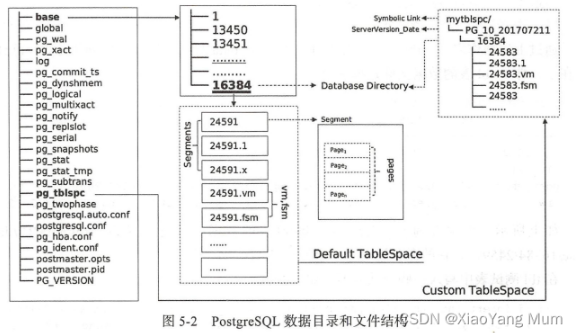
如前文所述,数据文件的命名规则为 <relfilenode> .<顺序号>, tbl 表的大小超过 lGB,tbl 表的 relfilenode 为 24591 ,超出 lGB 之外的 数据会按每 GB 切割 , 在文件系统中查看时就是名称为 24654.1 的数据文件 。 在上述输出结果中,后缀为_fsm 和_vm 的这两个表文件的附属文件是空 闲空 间映射表文件和可见性映射表文件 。 空 闲空间映射用来映射表文件中可用的空 间 ,可见性映射表文件跟踪哪些页面只包含己知对所有活动事务可见的元组,它
也跟踪哪些页面只包含未被冻结的元组 。 图 5 -2 显示了 PostgreSQL 数据目录、表空间以及文件的结构概貌 。
原文链接:https://blog.csdn.net/qq961573863/article/details/127482874
