



Table of Contents
AWT 事件监听器(Event Listeners) - AWT
TutorialsPoint AWT 教程
来源:易百教程
AWT 教程
JAVA提供了一组丰富的平台无关的方式来创建图形用户界面的库。在这篇文章中,我们将看看在AWT(抽象窗口工具包)。
读者
本教程是专为愿意学习JAVA的GUI编程软件专业人员提供简单轻松的入门步骤。本教程将让你对JAVA的GUI编程有一个概念的理解,并完成本教程后,您可以把自己的专业知识水平较高的专业技术水平。
必备条件
继续本教程之前,你应该有Java编程语言的一个基本的了解,文本编辑器和执行程序等
AWT 概述介绍 - AWT
图形用户界面
图形用户界面(GUI)提供用户交互通过一些图形组件。例如,我们的基础操作系统,还提供了GUI,通过窗口,框架,面板,按钮,文本区域,列表框,组合框,标签,复选框等,这些都被称为组件。使用这些组件,我们可以创建一个应用程序交互的用户界面。
完全是基于GUI提供的结果为最终用户响应唤起events.GUI事件。例如点击一个按钮,关闭窗口,打开一个窗口,输入的东西在一个textarea等,这些活动被称为events.GUI使得它更容易为最终用户使用的应用程序。这也使得他们有趣。
基本名词术语
术语 | 描述 |
Component | 组件是一个对象,具有可以显示在屏幕上,并且可以与用户交互的图形表示。对于例子按钮,复选框,列表和滚动条的图形用户界面。 |
Container | 容器对象中是一个组件,它可以含有其它成分。添加到容器中的组件列表中的被跟踪。列表中的顺序将定义组件的堆叠顺序从前到后的容器内。如果未指定索引,将一个组件添加到容器中时,它会被添加到列表的末尾。 |
Panel | 面板提供了空间,在其中一个应用程序可以连接任何其他组件,包括其他面板。 |
Window | 窗口是显示在屏幕上的一个矩形区域。在不同的窗口中,我们可以执行不同的程序,并显示不同的数据。窗口为我们提供了多任务环境。一个窗口,必须有一个框,对话框,或定义为它的主人时,它的构造的另一个窗口。 |
Frame | Frame是带有标题和边框的顶层窗口。帧的大小,包括任何指定为边界的区域。帧封装窗口。它有标题栏,菜单栏,边框和调整大小角落。 |
Canvas | Canvas组件表示空白屏幕上的应用程序可以绘制矩形区域。应用程序也可以使用Canvas组件,空白区域捕获输入事件。 |
基于GUI的应用实例
以下是一些基于图形用户界面的应用程序的例子。
- 自动取款机 (ATM)
- 航空票务系统
- 在火车站的信息服务亭
- 移动应用程序
- 导航系统
图形用户界面较字符界面的优点
- GUI提供图形化的图标进行互动,而CUI(字符用户界面)提供简单的基于文本的接口。
- 图形用户界面,使应用更多的娱乐性和趣味性,另一方面CUI没有(或不多)。
- GUI提供点击和执行环境,而在CUI我们每次都要输入命令任务。
- 新的用户可以很容易地与图形用户界面交互的视觉指示器,但很难在字符的用户界面。
- GUI提供了很多的文件系统的控制和操作系统,而在CUI,必须使用命令很难记住。
- Windows概念在GUI中允许用户查看,操纵和控制的多个应用程序一次,而在CUI用户可以在同一时间控制一个任务。
- GUI提供了多任务环境中,使CUI也没有,但CUI不提供的GUI容易操作。
- 使用图形用户界面,它更容易控制和导航的操作系统,它在命令的用户界面变得非常慢。 GUI可以轻松定制。
AWT 环境设置 - AWT
本节将指导如何下载并设置Java在您的机器上。请按照下列步骤来设置环境。
Java SE 是免费提供下载的链接Download Java. 所以,根据您的操作系统下载一个版本。
按照说明下载java和运行.exe文件在你的机器上安装Java。一旦在你的机器上安装了Java,就需要设置环境变量指向正确的安装目录:
设置窗口XP/WIN7路径:
假设您已经安装了Java在c:Program Filesjavajdk 目录:
- 右键点击“我的电脑”,选择“属性”。
- 点击“环境变量”按钮下的“高级”选项卡。
- 现在改变的“路径”变量,因此,它也包含Java可执行文件的路径。例如,如果路径当前设置为'C:WINDOWSSYSTEM32',然后可更改您的路径'C:WINDOWSSYSTEM32;c:Program Filesjavajdkin'.
适用于Linux,UNIX,Solaris和FreeBSD的路径:
应设置环境变量PATH指向已经安装Java二进制文件。如果这样做有困难,请参阅shell文件。
例如,如果使用bash作为shell,添加以下行到结束行'.bashrc: export PATH=/path/to/java:$PATH'
流行的Java编辑器:
编写Java程序,您将需要一个文本编辑器。有更复杂的IDE,可以在市场上。但现在,可以考虑以下几种:
- Notepad : 在Windows机器上,你可以使用任何简单的文本编辑器(如记事本)(本教程推荐),TextPad。
- Netbeans : 是一个Java IDE,是开源和免费,可以直接从网上下载 http://www.netbeans.org/index.html.
- Eclipse : 也是一个Java IDE Eclipse开源社区开发的,可以直接从网上下载 http://www.eclipse.org/.
AWT控件(Controls) - AWT
每一个用户界面参考主要有以下三个方面:
- UI 元素: 有核心可视化元素最终用户看到并与之交互。 GWT提供了一个巨大的名单变化复杂,我们将在本教程从基本的广泛使用和常见的元素。
- 布局: 他们定义的UI元素如何应安排在屏幕上,并提供一个最终的外观和感觉的GUI(图形用户界面)。在“布局”一章,这部分将被覆盖。
- 行为: 这些事件发生时,与用户交互的UI元素。这部分将被覆盖在"事件处理"一章。
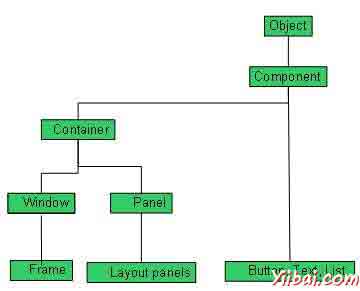
每个AWT控件继承组件类的属性。
Sr. No. | 控件与描述 |
1 | Component 组件是一个抽象的超类的GUI控件,并用图形表示,它代表了一个对象。 |
AWT的UI元素:
以下是常用的控件列表而设计的图形用户界面使用AWT。
Sr.No. | 控件与描述 |
1 | Label 标签对象是在容器中放置文本的一个组成部分。 |
2 | Button 该类创建标记的按钮。 |
3 | Check Box 复选框是一个图形化的组件,它可以在一个(真)或关闭(假)的状态。 |
4 | Check Box Group CheckboxGroup 类用于分组组复选框。 |
5 | List List组件为用户提供了一个滚动的文本项列表。 |
6 | Text Field TextField对象是一个文本组件,它允许编辑的单行文本。 |
7 | Text Area 一个textarea对象是一个文本组件,它允许编辑的多行文本。 |
8 | Choice 一个选择控制用于显示弹出菜单选择。所选选项将显示在顶部的菜单。 |
9 | Canvas Canvas控件代表一个矩形区域,应用程序可以画的东西,或者可以由用户创建的接收输入。 |
10 | Image 图像控制是表示图形图像的所有图像类的超类。 |
11 | Scroll Bar 代表一个滚动条的滚动条控制组件以让用户选择的值来自范围。 |
12 | Dialog 一个对话框控制是一个顶层窗口,采取某种形式的用户输入的标题和边框。 |
13 | File Dialog 一个FileDialog的控制代表一个对话框窗口,用户可以选择一个文件。 |
AWT Component类 - AWT
介绍
Component 类 是一个非菜单用户界面控件,是AWT一个抽象基类。组件表示图形表示的对象。
类的声明
以下是声明的java.awt.Component类:
public abstract class Component
extends Object
implements ImageObserver, MenuContainer, Serializable
字段域
以下是 java.awt.Component 类的字段:
- static float BOTTOM_ALIGNMENT -- 易于使用的常数getAlignmentY.
- static float CENTER_ALIGNMENT -- 易于使用的常数 getAlignmentY 和 getAlignmentX。
- static float LEFT_ALIGNMENT -- 易于使用常数getAlignmentX。
- static float RIGHT_ALIGNMENT -- 易于使用常数getAlignmentX。
- static float TOP_ALIGNMENT -- 易于使用的常数 getAlignmentY().
类的构造函数
S.N. | 构造函数与说明 |
1 | protected Component() 这将创建一个新的组件。 |
类方法
S.N. | 方法和说明 |
1 | boolean action(Event evt, Object what) Deprecated. As of JDK version 1.1, should register this component as ActionListener on component which fires action events. |
2 | void add(PopupMenu popup) Adds the specified popup menu to the component. |
3 | void addComponentListener(ComponentListener l) Adds the specified component listener to receive component events from this component. |
4 | void addFocusListener(FocusListener l) Adds the specified focus listener to receive focus events from this component when this component gains input focus. |
5 | void addHierarchyBoundsListener(HierarchyBoundsListener l) Adds the specified hierarchy bounds listener to receive hierarchy bounds events from this component when the hierarchy to which this container belongs changes. |
6 | void addHierarchyListener(HierarchyListener l) Adds the specified hierarchy listener to receive hierarchy changed events from this component when the hierarchy to which this container belongs changes. |
7 | void addInputMethodListener(InputMethodListener l) Adds the specified input method listener to receive input method events from this component. |
8 | void addKeyListener(KeyListener l) Adds the specified key listener to receive key events from this component. |
9 | void addMouseListener(MouseListener l) Adds the specified mouse listener to receive mouse events from this component. |
10 | void addMouseMotionListener(MouseMotionListener l) Adds the specified mouse motion listener to receive mouse motion events from this component. |
11 | void addMouseWheelListener(MouseWheelListener l) Adds the specified mouse wheel listener to receive mouse wheel events from this component. |
12 | void addNotify() Makes this Component displayable by connecting it to a native screen resource. |
13 | void addPropertyChangeListener(PropertyChangeListener listener) Adds a PropertyChangeListener to the listener list. |
14 | void addPropertyChangeListener(String propertyName, PropertyChangeListener listener) Adds a PropertyChangeListener to the listener list for a specific property. |
15 | void applyComponentOrientation(ComponentOrientation orientation) Sets the ComponentOrientation property of this component and all components contained within it. |
16 | boolean areFocusTraversalKeysSet(int id) Returns whether the Set of focus traversal keys for the given focus traversal operation has been explicitly defined for this Component. |
17 | int checkImage(Image image, ImageObserver observer) Returns the status of the construction of a screen representation of the specified image. |
18 | int checkImage(Image image,int width,int height, ImageObserver observer) Returns the status of the construction of a screen representation of the specified image. |
19 | boolean contains(int x,int y) Checks whether this component "contains" the specified point, where x and y are defined to be relative to the coordinate system of this component. |
20 | boolean contains(Point p) Checks whether this component "contains" the specified point, where the point's x and y coordinates are defined to be relative to the coordinate system of this component. |
21 | Image createImage(ImageProducer producer) Creates an image from the specified image producer. |
22 | Image createImage(int width,int height) Creates an off-screen drawable image to be used for double buffering. |
23 | VolatileImage createVolatileImage(int width,int height) Creates a volatile off-screen drawable image to be used for double buffering. |
24 | VolatileImage createVolatileImage(int width,int height, ImageCapabilities caps) Creates a volatile off-screen drawable image, with the given capabilities. |
25 | void deliverEvent(Event e) Deprecated. As of JDK version 1.1, replaced by dispatchEvent(AWTEvent e). |
26 | void disable() Deprecated. As of JDK version 1.1, replaced by setEnabled(boolean). |
27 | protected void disableEvents(long eventsToDisable) Disables the events defined by the specified event mask parameter from being delivered to this component. |
28 | void dispatchEvent(AWTEvent e) Dispatches an event to this component or one of its sub components. |
29 | void doLayout() Prompts the layout manager to lay out this component. |
30 | void enable() Deprecated. As of JDK version 1.1, replaced by setEnabled(boolean). |
31 | void enable(boolean b) Deprecated. As of JDK version 1.1, replaced by setEnabled(boolean). |
32 | protected void enableEvents(long eventsToEnable) Enables the events defined by the specified event mask parameter to be delivered to this component. |
33 | void enableInputMethods(boolean enable) Enables or disables input method support for this component. |
34 | protected void firePropertyChange(String propertyName, boolean oldValue, boolean newValue) Support for reporting bound property changes for boolean properties. |
35 | void firePropertyChange(String propertyName, byte oldValue, byte newValue) Reports a bound property change. |
36 | void firePropertyChange(String propertyName, char oldValue, char newValue) Reports a bound property change. |
37 | void firePropertyChange(String propertyName, double oldValue, double newValue) Reports a bound property change. |
38 | void firePropertyChange(String propertyName, float oldValue, float newValue) Reports a bound property change. |
39 | void firePropertyChange(String propertyName, long oldValue, long newValue) Reports a bound property change. |
40 | protected void firePropertyChange(String propertyName, Object oldValue, Object newValue) Support for reporting bound property changes for Object properties. |
41 | void firePropertyChange(String propertyName, short oldValue, short newValue) Reports a bound property change. |
42 | AccessibleContext getAccessibleContext() Gets the AccessibleContext associated with this Component. |
43 | float getAlignmentX() Returns the alignment along the x axis. |
44 | float getAlignmentY() Returns the alignment along the y axis. |
45 | Color getBackground() Gets the background color of this component. |
46 | int getBaseline(int width,int height) Returns the baseline. |
47 | Component.BaselineResizeBehavior getBaselineResizeBehavior() Returns an enum indicating how the baseline of the component changes as the size changes. |
48 | Rectangle getBounds() Gets the bounds of this component in the form of a Rectangle object. |
49 | Rectangle getBounds(Rectangle rv) Stores the bounds of this component into return value rv and return rv. |
50 | ColorModel getColorModel() Gets the instance of ColorModel used to display the component on the output device. |
51 | Component getComponentAt(int x,int y) Determines if this component or one of its immediate subcomponents contains the (x, y) location, and if so, returns the containing component. |
52 | Component getComponentAt(Point p) Returns the component or subcomponent that contains the specified point. |
53 | ComponentListener[] getComponentListeners() Returns an array of all the component listeners registered on this component. |
54 | ComponentOrientation getComponentOrientation() Retrieves the language-sensitive orientation that is to be used to order the elements or text within this component. |
55 | Cursor getCursor() Gets the cursor set in the component. |
56 | DropTarget getDropTarget() Gets the DropTarget associated with this Component. |
57 | Container getFocusCycleRootAncestor() Returns the Container which is the focus cycle root of this Component's focus traversal cycle. |
58 | FocusListener[] getFocusListeners() Returns an array of all the focus listeners registered on this component. |
59 | Set<AWTKeyStroke> getFocusTraversalKeys(int id) Returns the Set of focus traversal keys for a given traversal operation for this Component. |
60 | boolean getFocusTraversalKeysEnabled() Returns whether focus traversal keys are enabled for this Component. |
61 | Font getFont() Gets the font of this component. |
62 | FontMetrics getFontMetrics(Font font) Gets the font metrics for the specified font. |
63 | Color getForeground() Gets the foreground color of this component. |
64 | Graphics getGraphics() Creates a graphics context for this component. |
65 | GraphicsConfiguration getGraphicsConfiguration() Gets the GraphicsConfiguration associated with this Component. |
66 | int getHeight() Returns the current height of this component. |
67 | HierarchyBoundsListener[] getHierarchyBoundsListeners() Returns an array of all the hierarchy bounds listeners registered on this component. |
68 | HierarchyListener[] getHierarchyListeners() Returns an array of all the hierarchy listeners registered on this component. |
69 | boolean getIgnoreRepaint() |
70 | InputContext getInputContext() Gets the input context used by this component for handling the communication with input methods when text is entered in this component. |
71 | InputMethodListener[] getInputMethodListeners() Returns an array of all the input method listeners registered on this component. |
72 | InputMethodRequests getInputMethodRequests() Gets the input method request handler which supports requests from input methods for this component. |
73 | KeyListener[] getKeyListeners() Returns an array of all the key listeners registered on this component. |
74 | <T extends EventListener> T[] getListeners(Class<T> listenerType) Returns an array of all the objects currently registered as FooListeners upon this Component. |
75 | Locale getLocale() Gets the locale of this component. |
76 | Point getLocation() Gets the location of this component in the form of a point specifying the component's top-left corner. |
77 | Point getLocation(Point rv) Stores the x,y origin of this component into return value rv and return rv. |
78 | Point getLocationOnScreen() Gets the location of this component in the form of a point specifying the component's top-left corner in the screen's coordinate space. |
79 | Dimension getMaximumSize() Gets the maximum size of this component. |
80 | Dimension getMinimumSize() Gets the mininimum size of this component. |
81 | MouseListener[] getMouseListeners() Returns an array of all the mouse listeners registered on this component. |
82 | MouseMotionListener[] getMouseMotionListeners() Returns an array of all the mouse motion listeners registered on this component. |
83 | Point getMousePosition() Returns the position of the mouse pointer in this Component's coordinate space if the Component is directly under the mouse pointer, otherwise returns null. |
84 | MouseWheelListener[] getMouseWheelListeners() Returns an array of all the mouse wheel listeners registered on this component. |
85 | String getName() Gets the name of the component. |
86 | Container getParent() Gets the parent of this component. |
87 | java.awt.peer.ComponentPeer getPeer() Deprecated. As of JDK version 1.1, programs should not directly manipulate peers; replaced by boolean isDisplayable(). |
88 | Dimension getPreferredSize() Gets the preferred size of this component. |
89 | PropertyChangeListener[] getPropertyChangeListeners() Returns an array of all the property change listeners registered on this component. |
90 | PropertyChangeListener[] getPropertyChangeListeners(String propertyName) Returns an array of all the listeners which have been associated with the named property. |
91 | Dimension getSize() Returns the size of this component in the form of a Dimension object. |
92 | Dimension getSize(Dimension rv)Stores the width/height of this component into return value rv and return rv. |
93 | Toolkit getToolkit() Gets the toolkit of this component. |
94 | Object getTreeLock() Gets this component's locking object (the object that owns the thread sychronization monitor) for AWT component-tree and layout operations. |
95 | int getWidth() Returns the current width of this component. |
96 | int getX() Returns the current x coordinate of the components origin. |
97 | int getY() Returns the current y coordinate of the components origin. |
98 | boolean gotFocus(Event evt, Object what) Deprecated. As of JDK version 1.1, replaced by processFocusEvent(FocusEvent) . |
99 | boolean handleEvent(Event evt) Deprecated. As of JDK version 1.1 replaced by processEvent(AWTEvent). |
100 | boolean hasFocus() Returns true if this Component is the focus owner. |
101 | void hide() Deprecated. As of JDK version 1.1, replaced by setVisible(boolean). |
102 | boolean imageUpdate(Image img,int infoflags,int x,int y,int w,int h) Repaints the component when the image has changed. |
103 | boolean inside(int x,int y) Deprecated. As of JDK version 1.1, replaced by contains(int, int). |
104 | void invalidate() Invalidates this component. |
105 | boolean isBackgroundSet() Returns whether the background color has been explicitly set for this Component. |
106 | boolean isCursorSet() Returns whether the cursor has been explicitly set for this Component. |
107 | boolean isDisplayable() Determines whether this component is displayable. |
108 | boolean isDoubleBuffered() Returns true if this component is painted to an offscreen image (buffer) that's copied to the screen later. |
109 | boolean isEnabled() Determines whether this component is enabled. |
110 | boolean isFocusable() Returns whether this Component can be focused. |
111 | boolean isFocusCycleRoot(Container container) Returns whether the specified Container is the focus cycle root of this Component's focus traversal cycle. |
112 | boolean isFocusOwner() Returns true if this Component is the focus owner. |
113 | boolean isFocusTraversable() Deprecated. As of 1.4, replaced by isFocusable(). |
114 | boolean isFontSet() Returns whether the font has been explicitly set for this Component. |
115 | boolean isForegroundSet() Returns whether the foreground color has been explicitly set for this Component. |
116 | boolean isLightweight() A lightweight component doesn't have a native toolkit peer. |
117 | boolean isMaximumSizeSet() Returns true if the maximum size has been set to a non-null value otherwise returns false. |
118 | boolean isMinimumSizeSet() Returns whether or not setMinimumSize has been invoked with a non-null value. |
119 | boolean isOpaque() Returns true if this component is completely opaque, returns false by default. |
120 | boolean isPreferredSizeSet() Returns true if the preferred size has been set to a non-null value otherwise returns false. |
121 | boolean isShowing() Determines whether this component is showing on screen. |
122 | boolean isValid() Determines whether this component is valid. |
123 | boolean isVisible() Determines whether this component should be visible when its parent is visible. |
124 | boolean keyDown(Event evt,int key) Deprecated. As of JDK version 1.1, replaced by processKeyEvent(KeyEvent). |
125 | boolean keyUp(Event evt,int key) Deprecated. As of JDK version 1.1, replaced by processKeyEvent(KeyEvent). |
126 | void layout() Deprecated. As of JDK version 1.1, replaced by doLayout(). |
127 | void list() Prints a listing of this component to the standard system output stream System.out. |
128 | void list(PrintStream out) Prints a listing of this component to the specified output stream. |
129 | void list(PrintStream out,int indent) Prints out a list, starting at the specified indentation, to the specified print stream. |
130 | void list(PrintWriter out) Prints a listing to the specified print writer. |
131 | void list(PrintWriter out,int indent) Prints out a list, starting at the specified indentation, to the specified print writer. |
132 | Component locate(int x,int y) Deprecated. As of JDK version 1.1, replaced by getComponentAt(int, int). |
133 | Point location() Deprecated. As of JDK version 1.1, replaced by getLocation(). |
134 | boolean lostFocus(Event evt, Object what) Deprecated. As of JDK version 1.1, replaced by processFocusEvent(FocusEvent). |
135 | boolean mouseDown(Event evt,int x,int y) Deprecated. As of JDK version 1.1, replaced by processMouseEvent(MouseEvent). |
136 | boolean mouseDrag(Event evt,int x,int y) Deprecated. As of JDK version 1.1, replaced by processMouseMotionEvent(MouseEvent). |
137 | boolean mouseEnter(Event evt,int x,int y) Deprecated. As of JDK version 1.1, replaced by processMouseEvent(MouseEvent). |
138 | boolean mouseExit(Event evt,int x,int y) Deprecated. As of JDK version 1.1, replaced by processMouseEvent(MouseEvent).. |
139 | boolean mouseMove(Event evt,int x,int y) Deprecated. As of JDK version 1.1, replaced by processMouseMotionEvent(MouseEvent).. |
140 | boolean mouseUp(Event evt,int x,int y) Deprecated. As of JDK version 1.1, replaced by processMouseEvent(MouseEvent). |
141 | void move(int x,int y) Deprecated. As of JDK version 1.1, replaced by setLocation(int, int). |
142 | void nextFocus() Deprecated. As of JDK version 1.1, replaced by transferFocus(). |
143 | void paint(Graphics g) Paints this component. |
144 | void paintAll(Graphics g) Paints this component and all of its subcomponents. |
145 | boolean postEvent(Event e) Deprecated. As of JDK version 1.1, replaced by dispatchEvent(AWTEvent). |
146 | boolean prepareImage(Image image,int width,int height, ImageObserver observer) Prepares an image for rendering on this component at the specified width and height. |
147 | void print(Graphics g) Prints this component. |
148 | void printAll(Graphics g) Prints this component and all of its subcomponents. |
149 | protectedvoid processComponentEvent(ComponentEvent e) Processes component events occurring on this component by dispatching them to any registered ComponentListener objects. |
150 | protected void processEvent(AWTEvent e) Processes events occurring on this component. |
151 | protected void processFocusEvent(FocusEvent e) Processes focus events occurring on this component by dispatching them to any registered FocusListener objects. |
152 | protected void processHierarchyBoundsEvent(HierarchyEvent e) Processes hierarchy bounds events occurring on this component by dispatching them to any registered HierarchyBoundsListener objects. |
153 | protected void processHierarchyEvent(HierarchyEvent e) Processes hierarchy events occurring on this component by dispatching them to any registered HierarchyListener objects. |
154 | protectedvoid processInputMethodEvent(InputMethodEvent e) Processes input method events occurring on this component by dispatching them to any registered InputMethodListener objects. |
155 | protected void processKeyEvent(KeyEvent e) Processes key events occurring on this component by dispatching them to any registered KeyListener objects. |
156 | protected void processMouseEvent(MouseEvent e) Processes mouse events occurring on this component by dispatching them to any registered MouseListener objects. |
157 | protected void processMouseMotionEvent(MouseEvent e) Processes mouse motion events occurring on this component by dispatching them to any registered MouseMotionListener objects. |
158 | protected void processMouseWheelEvent(MouseWheelEvent e) Processes mouse wheel events occurring on this component by dispatching them to any registered MouseWheelListener objects. |
159 | void remove(MenuComponent popup) Removes the specified popup menu from the component. |
160 | void removeComponentListener(ComponentListener l) Removes the specified component listener so that it no longer receives component events from this component. |
161 | void removeFocusListener(FocusListener l) Removes the specified focus listener so that it no longer receives focus events from this component. |
162 | void removeHierarchyBoundsListener(HierarchyBoundsListener l) Removes the specified hierarchy bounds listener so that it no longer receives hierarchy bounds events from this component. |
163 | void removeHierarchyListener(HierarchyListener l) Removes the specified hierarchy listener so that it no longer receives hierarchy changed events from this component. |
164 | void removeInputMethodListener(InputMethodListener l) Removes the specified input method listener so that it no longer receives input method events from this component. |
165 | void removeKeyListener(KeyListener l) Removes the specified key listener so that it no longer receives key events from this component. |
166 | void removeMouseListener(MouseListener l) Removes the specified mouse listener so that it no longer receives mouse events from this component. |
167 | void removeMouseMotionListener(MouseMotionListener l) Removes the specified mouse motion listener so that it no longer receives mouse motion events from this component. |
168 | void removeMouseWheelListener(MouseWheelListener l) Removes the specified mouse wheel listener so that it no longer receives mouse wheel events from this component. |
169 | void removeNotify() Makes this Component undisplayable by destroying it native screen resource. |
170 | void removePropertyChangeListener(PropertyChangeListener listener) Removes a PropertyChangeListener from the listener list. |
171 | void removePropertyChangeListener(String propertyName, PropertyChangeListener listener) Removes a PropertyChangeListener from the listener list for a specific property. |
172 | void repaint() Repaints this component. |
173 | void repaint(int x,int y,int width,int height) Repaints the specified rectangle of this component. |
174 | void repaint(long tm) Repaints the component. |
175 | void repaint(long tm,int x,int y,int width,int height) Repaints the specified rectangle of this component within tm milliseconds. |
176 | void requestFocus() Requests that this Component get the input focus, and that this Component's top-level ancestor become the focused Window. |
177 | protected boolean requestFocus(boolean temporary) Requests that this Component get the input focus, and that this Component's top-level ancestor become the focused Window. |
178 | boolean requestFocusInWindow() Requests that this Component get the input focus, if this Component's top-level ancestor is already the focused Window. |
179 | protected boolean requestFocusInWindow(boolean temporary) Requests that this Component get the input focus, if this Component's top-level ancestor is already the focused Window. |
180 | void reshape(int x,int y,int width,int height) Deprecated. As of JDK version 1.1, replaced by setBounds(int, int, int, int). |
181 | void resize(Dimension d) Deprecated. As of JDK version 1.1, replaced by setSize(Dimension). |
182 | void resize(int width,int height) Deprecated. As of JDK version 1.1, replaced by setSize(int, int). |
183 | void setBackground(Color c) Sets the background color of this component. |
184 | void setBounds(int x,int y,int width,int height) Moves and resizes this component. |
185 | void setBounds(Rectangle r) Moves and resizes this component to conform to the new bounding rectangle r. |
186 | void setComponentOrientation(ComponentOrientation o) Sets the language-sensitive orientation that is to be used to order the elements or text within this component. |
187 | void setCursor(Cursor cursor) Sets the cursor image to the specified cursor. |
188 | void setDropTarget(DropTarget dt) Associate a DropTarget with this component. |
189 | void setEnabled(boolean b) Enables or disables this component, depending on the value of the parameter b. |
190 | void setFocusable(boolean focusable) Sets the focusable state of this Component to the specified value. |
191 | void setFocusTraversalKeys(int id, Set<? extends AWTKeyStroke> keystrokes) Sets the focus traversal keys for a given traversal operation for this Component. |
192 | void setFocusTraversalKeysEnabled(boolean focusTraversalKeysEnabled) Sets whether focus traversal keys are enabled for this Component. |
193 | void setFont(Font f) Sets the font of this component. |
194 | void setForeground(Color c) Sets the foreground color of this component. |
195 | void setIgnoreRepaint(boolean ignoreRepaint) Sets whether or not paint messages received from the operating system should be ignored. |
196 | void setLocale(Locale l) Sets the locale of this component. |
197 | void setLocation(int x,int y) Moves this component to a new location. |
198 | void setLocation(Point p) Moves this component to a new location. |
199 | void setMaximumSize(Dimension maximumSize) Sets the maximum size of this component to a constant value. |
200 | void setMinimumSize(Dimension minimumSize) Sets the minimum size of this component to a constant value. |
201 | void setName(String name) Sets the name of the component to the specified string. |
202 | void setPreferredSize(Dimension preferredSize) Sets the preferred size of this component to a constant value. |
203 | void setSize(Dimension d) Resizes this component so that it has width d.width and height d.height. |
204 | void setSize(int width,int height) Resizes this component so that it has width width and height height. |
205 | void setVisible(boolean b) Shows or hides this component depending on the value of parameter b. |
206 | void show() Deprecated. As of JDK version 1.1, replaced by setVisible(boolean). |
207 | void show(boolean b) Deprecated. As of JDK version 1.1, replaced by setVisible(boolean). |
208 | Dimension size() Deprecated. As of JDK version 1.1, replaced by getSize(). |
209 | String toString() Returns a string representation of this component and its values. |
210 | void transferFocus() Transfers the focus to the next component, as though this Component were the focus owner. |
211 | void transferFocusBackward() Transfers the focus to the previous component, as though this Component were the focus owner. |
212 | void transferFocusUpCycle() Transfers the focus up one focus traversal cycle. |
213 | void update(Graphics g) Updates this component. |
214 | void validate() Ensures that this component has a valid layout. |
215 | Rectangle bounds() Deprecated. As of JDK version 1.1, replaced by getBounds(). |
216 | protected AWTEvent coalesceEvents(AWTEvent existingEvent, AWTEvent newEvent) Potentially coalesce an event being posted with an existing event. |
217 | protected String paramString() Returns a string representing the state of this component. |
218 | protected void firePropertyChange(String propertyName,int oldValue,int newValue) Support for reporting bound property changes for integer properties. |
219 | Dimension preferredSize() Deprecated. As of JDK version 1.1, replaced by getPreferredSize(). |
220 | boolean prepareImage(Image image, ImageObserver observer) Prepares an image for rendering on this component. |
221 | Dimension minimumSize() Deprecated. As of JDK version 1.1, replaced by getMinimumSize(). |
继承的方法
这个类继承的方法从以下类:
- java.lang.Object
AWT Label类 - AWT
介绍
标签是一种被动的控制,因为它不会由用户访问产生任何事件。 Label控件是一个对象标签。一个标签显示一行只读文本。然而,文本可以由应用程序改变,但不能由最终用户以任何方式改变。
类的声明
以下是声明的java.awt.Label类:
public class Label
extends Component
implements Accessible
字段域
以下是java.awt.Component 类的字段:
- static int CENTER -- 表示标签应为中心对齐。
- static int LEFT -- 表示应左对齐标签。
- static int RIGHT -- 表示应右对齐标签。
类的构造函数
S.N. | 构造函数与说明 |
1 | Label() Constructs an empty label. |
2 | Label(String text) Constructs a new label with the specified string of text, left justified. |
3 | Label(String text, int alignment) Constructs a new label that presents the specified string of text with the specified alignment. |
类方法
S.N. | 方法和说明 |
1 | void addNotify() Creates the peer for this label. |
2 | AccessibleContext getAccessibleContext() Gets the AccessibleContext associated with this Label. |
3 | int getAlignment() Gets the current alignment of this label. |
4 | String getText() Gets the text of this label. |
5 | protected String paramString() Returns a string representing the state of this Label. |
6 | void setAlignment(int alignment) Sets the alignment for this label to the specified alignment. |
7 | void setText(String text) Sets the text for this label to the specified text. |
继承的方法
这个类继承的方法从以下类:
- java.awt.Component
- java.lang.Object
标签示例
说在您选择使用编辑器创建以下java程序 D:/ > AWT > com > yiibai.com > gui >
AwtControlDemo
package com.yiibai.gui;
import java.awt.*;
import java.awt.event.*;
public class AwtControlDemo {
private Frame mainFrame;
private Label headerLabel;
private Label statusLabel;
private Panel controlPanel;
public AwtControlDemo(){
prepareGUI();
}
public static void main(String[] args){
AwtControlDemo awtControlDemo = new AwtControlDemo();
awtControlDemo.showLabelDemo();
}
private void prepareGUI(){
mainFrame = new Frame("Java AWT Examples");
mainFrame.setSize(400,400);
mainFrame.setLayout(new GridLayout(3, 1));
mainFrame.addWindowListener(new WindowAdapter() {
public void windowClosing(WindowEvent windowEvent){
System.exit(0);
}
});
headerLabel = new Label();
headerLabel.setAlignment(Label.CENTER);
statusLabel = new Label();
statusLabel.setAlignment(Label.CENTER);
statusLabel.setSize(350,100);
controlPanel = new Panel();
controlPanel.setLayout(new FlowLayout());
mainFrame.add(headerLabel);
mainFrame.add(controlPanel);
mainFrame.add(statusLabel);
mainFrame.setVisible(true);
}
private void showLabelDemo(){
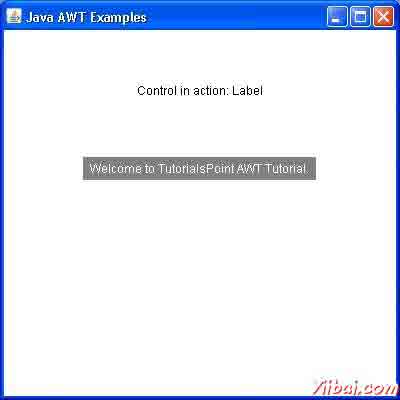
headerLabel.setText("Control in action: Label");
Label label = new Label();
label.setText("Welcome to TutorialsPoint AWT Tutorial.");
label.setAlignment(Label.CENTER);
label.setBackground(Color.GRAY);
label.setForeground(Color.WHITE);
controlPanel.add(label);
mainFrame.setVisible(true);
}
}
编译程序,使用命令提示符。到 D:/ > AWT 然后键入以下命令。
D:AWT>javac comyiibaiguiAwtControlDemo.java
如果没有错误出现,这意味着编译成功。使用下面的命令来运行程序。
D:AWT>java com.yiibai.gui.AwtControlDemo
验证下面的输出
AWT Button类 - AWT
介绍
按钮是一个控制组件,按下时有一个标签,并生成一个事件。当按钮被按下和释放,AWT发送ActionEvent的一个实例的按钮,通过调用按钮上的processEvent。按钮的processEvent方法接收所有事件的按钮,它通过一个动作事件以及调用其自身的processActionEvent方法。后一种方法通过操作事件的动作的已注册侦听此按钮所产生的动作事件。
如果一个应用程序需要一个按钮被按下和释放的基础上执行一些动作,但要实现ActionListener并注册新的侦听器接收事件从这个按钮,调用按钮的addActionListener方法。应用程序可以利用按钮的动作命令的消息传递协议。
类的声明
以下是声明的 java.awt.Button类:
public class Button
extends Component
implements Accessible
类的构造函数
S.N. | 构造函数与说明 |
1 | Button() Constructs a button with an empty string for its label. |
2 | Button(String text) Constructs a new button with specified label. |
类方法
S.N. | 方法和说明 |
1 | void addActionListener(ActionListener l) Adds the specified action listener to receive action events from this button. |
2 | void addNotify() Creates the peer of the button. |
3 | AccessibleContext getAccessibleContext() Gets the AccessibleContext associated with this Button. |
4 | String getActionCommand() Returns the command name of the action event fired by this button. |
5 | ActionListener[] getActionListeners() Returns an array of all the action listeners registered on this button. |
6 | String getLabel() Gets the label of this button. |
7 | <T extends EventListener> T[] getListeners(Class<T> listenerType) Returns an array of all the objects currently registered as FooListeners upon this Button. |
8 | protected String paramString() Returns a string representing the state of this Button. |
9 | protected void processActionEvent(ActionEvent e) Processes action events occurring on this button by dispatching them to any registered ActionListener objects. |
10 | protected void processEvent(AWTEvent e) Processes events on this button. |
11 | void removeActionListener(ActionListener l) Removes the specified action listener so that it no longer receives action events from this button. |
12 | void setActionCommand(String command) Sets the command name for the action event fired by this button. |
13 | void setLabel(String label) Sets the button's label to be the specified string. |
继承的方法
这个类继承的方法从以下类:
- java.awt.Component
- java.lang.Object
按钮实例
选择使用编辑器创建以下java程序 D:/ > AWT > com > yiibai.com > gui >
AwtControlDemo.java
package com.yiibai.gui;
import java.awt.*;
import java.awt.event.*;
public class AwtControlDemo {
private Frame mainFrame;
private Label headerLabel;
private Label statusLabel;
private Panel controlPanel;
public AwtControlDemo(){
prepareGUI();
}
public static void main(String[] args){
AwtControlDemo awtControlDemo = new AwtControlDemo();
awtControlDemo.showButtonDemo();
}
private void prepareGUI(){
mainFrame = new Frame("Java AWT Examples");
mainFrame.setSize(400,400);
mainFrame.setLayout(new GridLayout(3, 1));
mainFrame.addWindowListener(new WindowAdapter() {
public void windowClosing(WindowEvent windowEvent){
System.exit(0);
}
});
headerLabel = new Label();
headerLabel.setAlignment(Label.CENTER);
statusLabel = new Label();
statusLabel.setAlignment(Label.CENTER);
statusLabel.setSize(350,100);
controlPanel = new Panel();
controlPanel.setLayout(new FlowLayout());
mainFrame.add(headerLabel);
mainFrame.add(controlPanel);
mainFrame.add(statusLabel);
mainFrame.setVisible(true);
}
private void showButtonDemo(){
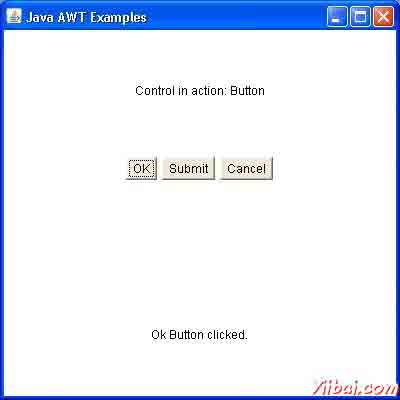
headerLabel.setText("Control in action: Button");
Button okButton = new Button("OK");
Button submitButton = new Button("Submit");
Button cancelButton = new Button("Cancel");
okButton.addActionListener(new ActionListener() {
public void actionPerformed(ActionEvent e) {
statusLabel.setText("Ok Button clicked.");
}
});
submitButton.addActionListener(new ActionListener() {
public void actionPerformed(ActionEvent e) {
statusLabel.setText("Submit Button clicked.");
}
});
cancelButton.addActionListener(new ActionListener() {
public void actionPerformed(ActionEvent e) {
statusLabel.setText("Cancel Button clicked.");
}
});
controlPanel.add(okButton);
controlPanel.add(submitButton);
controlPanel.add(cancelButton);
mainFrame.setVisible(true);
}
}
编译程序,使用命令提示符。到 D:/ > AWT 然后键入以下命令。
D:AWT>javac comyiibaiguiAwtControlDemo.java
如果没有错误出现,这意味着编译成功。使用下面的命令来运行程序。
D:AWT>java com.yiibai.gui.AwtControlDemo
验证下面的输出
AWT CheckBox类 - AWT
介绍
CheckBox控件是用来开启选项(true)或关闭(false)。每个复选框标签代表的复选框做什么。通过点击它可以改变一个复选框的状态。
类的声明
以下是声明的java.awt.Checkbox类:
public class Checkbox
extends Component
implements ItemSelectable,Accessible
类的构造函数
S.N. | 构造函数与说明 |
1 | Checkbox() Creates a check box with an empty string for its label. |
2 | Checkbox(String label) Creates a check box with the specified label. |
3 | Checkbox(String label, boolean state) Creates a check box with the specified label and sets the specified state. |
4 | Checkbox(String label, boolean state, CheckboxGroup group) Constructs a Checkbox with the specified label, set to the specified state, and in the specified check box group. |
5 | Checkbox(String label, CheckboxGroup group, boolean state) Creates a check box with the specified label, in the specified check box group, and set to the specified state. |
类方法
S.N. | 方法和说明 |
1 | void addItemListener(ItemListener l) Adds the specified item listener to receive item events from this check box. |
2 | void addNotify() Creates the peer of the Checkbox. |
3 | AccessibleContext getAccessibleContext() Gets the AccessibleContext associated with this Checkbox. |
4 | CheckboxGroup getCheckboxGroup() Determines this check box's group. |
5 | ItemListener[] getItemListeners() Returns an array of all the item listeners registered on this checkbox. |
6 | String getLabel() Gets the label of this check box. |
7 | <T extends EventListener>T[] getListeners(Class<T> listenerType) Returns an array of all the objects currently registered as FooListeners upon this Checkbox. |
8 | Object[] getSelectedObjects() Returns an array (length 1) containing the checkbox label or null if the checkbox is not selected. |
9 | boolean getState() Determines whether this check box is in the on or off state. |
10 | protected String paramString() Returns a string representing the state of this Checkbox. |
11 | protected void processEvent(AWTEvent e) Processes events on this check box. |
12 | protected void processItemEvent(ItemEvent e) Processes item events occurring on this check box by dispatching them to any registered ItemListener objects. |
13 | void removeItemListener(ItemListener l) Removes the specified item listener so that the item listener no longer receives item events from this check box. |
14 | void setCheckboxGroup(CheckboxGroup g) Sets this check box's group to the specified check box group. |
15 | void setLabel(String label) Sets this check box's label to be the string argument. |
16 | void setState(boolean state) Sets the state of this check box to the specified state. |
继承的方法
这个类继承的方法从以下类:
- java.awt.Component
- java.lang.Object
CheckBox的示例
说在您选择使用的编辑器创建以下java程序 D:/ > AWT > com > yiibai.com > gui >
AwtControlDemo.java
package com.yiibai.gui;
import java.awt.*;
import java.awt.event.*;
public class AwtControlDemo {
private Frame mainFrame;
private Label headerLabel;
private Label statusLabel;
private Panel controlPanel;
public AwtControlDemo(){
prepareGUI();
}
public static void main(String[] args){
AwtControlDemo awtControlDemo = new AwtControlDemo();
awtControlDemo.showCheckBoxDemo();
}
private void prepareGUI(){
mainFrame = new Frame("Java AWT Examples");
mainFrame.setSize(400,400);
mainFrame.setLayout(new GridLayout(3, 1));
mainFrame.addWindowListener(new WindowAdapter() {
public void windowClosing(WindowEvent windowEvent){
System.exit(0);
}
});
headerLabel = new Label();
headerLabel.setAlignment(Label.CENTER);
statusLabel = new Label();
statusLabel.setAlignment(Label.CENTER);
statusLabel.setSize(350,100);
controlPanel = new Panel();
controlPanel.setLayout(new FlowLayout());
mainFrame.add(headerLabel);
mainFrame.add(controlPanel);
mainFrame.add(statusLabel);
mainFrame.setVisible(true);
}
private void showCheckBoxDemo(){
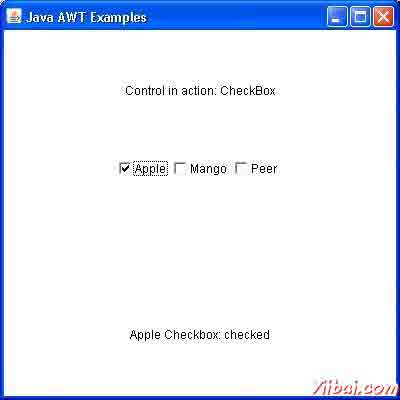
headerLabel.setText("Control in action: CheckBox");
Checkbox chkApple = new Checkbox("Apple");
Checkbox chkMango = new Checkbox("Mango");
Checkbox chkPeer = new Checkbox("Peer");
chkApple.addItemListener(new ItemListener() {
public void itemStateChanged(ItemEvent e) {
statusLabel.setText("Apple Checkbox: "
+ (e.getStateChange()==1?"checked":"unchecked"));
}
});
chkMango.addItemListener(new ItemListener() {
public void itemStateChanged(ItemEvent e) {
statusLabel.setText("Mango Checkbox: "
+ (e.getStateChange()==1?"checked":"unchecked"));
}
});
chkPeer.addItemListener(new ItemListener() {
public void itemStateChanged(ItemEvent e) {
statusLabel.setText("Peer Checkbox: "
+ (e.getStateChange()==1?"checked":"unchecked"));
}
});
controlPanel.add(chkApple);
controlPanel.add(chkMango);
controlPanel.add(chkPeer);
mainFrame.setVisible(true);
}
}
编译程序,使用命令提示符。到 D:/ > AWT 然后键入以下命令。
D:AWT>javac comyiibaiguiAwtControlDemo.java
如果没有错误出现,这意味着编译成功。使用下面的命令来运行程序。
D:AWT>java com.yiibai.gui.AwtControlDemo
验证下面的输出
AWT List类 - AWT
介绍
List是一个文本项列表。该列表可以被配置给该用户可以选择一个或多个项目。
类的声明
以下是的声明类java.awt.List:
public class List
extends Component
implements ItemSelectable, Accessible
类的构造函数
S.N. | 构造函数与说明 |
1 | List() Creates a new scrolling list. |
2 | List(int rows) Creates a new scrolling list initialized with the specified number of visible lines. |
3 | List(int rows, boolean multipleMode) Creates a new scrolling list initialized to display the specified number of rows. |
类方法
T[] getListeners(Class listenerType) 目前注册的所有对象作为FooListeners名单后返回一个数组。
S.N. | Method & Description |
1 | void add(String item) Adds the specified item to the end of scrolling list. |
2 | void add(String item, int index) Adds the specified item to the the scrolling list at the position indicated by the index. |
3 | void addActionListener(ActionListener l) Adds the specified action listener to receive action events from this list. |
4 | void addItem(String item) Deprecated. replaced by add(String). |
5 | void addItem(String item, int index) Deprecated. replaced by add(String, int). |
6 | void addItemListener(ItemListener l) Adds the specified item listener to receive item events from this list. |
7 | void addNotify() Creates the peer for the list. |
8 | boolean allowsMultipleSelections() Deprecated. As of JDK version 1.1, replaced by isMultipleMode(). |
9 | void clear() Deprecated. As of JDK version 1.1, replaced by removeAll(). |
10 | int countItems() Deprecated. As of JDK version 1.1, replaced by getItemCount(). |
11 | void delItem(int position) Deprecated. replaced by remove(String) and remove(int). |
12 | void delItems(int start, int end) Deprecated. As of JDK version 1.1, Not for public use in the future. This method is expected to be retained only as a package private method. |
13 | void deselect(int index) Deselects the item at the specified index. |
14 | AccessibleContext getAccessibleContext() Gets the AccessibleContext associated with this List. |
15 | ActionListener[] getActionListeners() Returns an array of all the action listeners registered on this list. |
16 | String getItem(int index) Gets the item associated with the specified index. |
17 | int getItemCount() Gets the number of items in the list. |
18 | ItemListener[] getItemListeners() Returns an array of all the item listeners registered on this list. |
19 | String[] getItems() Gets the items in the list. |
20 | Dimension getMinimumSize() Determines the minimum size of this scrolling list. |
21 | Dimension getMinimumSize(int rows) Gets the minumum dimensions for a list with the specified number of rows. |
22 | Dimension getPreferredSize() Gets the preferred size of this scrolling list. |
23 | Dimension getPreferredSize(int rows) Gets the preferred dimensions for a list with the specified number of rows. |
24 | int getRows() Gets the number of visible lines in this list. |
25 | int getSelectedIndex() Gets the index of the selected item on the list, |
26 | int[] getSelectedIndexes() Gets the selected indexes on the list. |
27 | String getSelectedItem() Gets the selected item on this scrolling list. |
28 | String[] getSelectedItems() Gets the selected items on this scrolling list. |
29 | Object[] getSelectedObjects() Gets the selected items on this scrolling list in an array of Objects. |
30 | int getVisibleIndex() Gets the index of the item that was last made visible by the method makeVisible. |
31 | boolean isIndexSelected(int index) Determines if the specified item in this scrolling list is selected. |
32 | boolean isMultipleMode() Determines whether this list allows multiple selections. |
33 | boolean isSelected(int index) Deprecated. As of JDK version 1.1, replaced by isIndexSelected(int). |
34 | void makeVisible(int index) Makes the item at the specified index visible. |
35 | Dimension minimumSize() Deprecated. As of JDK version 1.1, replaced by getMinimumSize(). |
36 | Dimension minimumSize(int rows) Deprecated. As of JDK version 1.1, replaced by getMinimumSize(int). |
37 | protected String paramString() Returns the parameter string representing the state of this scrolling list. |
38 | Dimension preferredSize() Deprecated. As of JDK version 1.1, replaced by getPreferredSize(). |
39 | Dimension preferredSize(int rows) Deprecated. As of JDK version 1.1, replaced by getPreferredSize(int). |
40 | protected void processActionEvent(ActionEvent e) Processes action events occurring on this component by dispatching them to any registered ActionListener objects. |
41 | protected void processEvent(AWTEvent e) Processes events on this scrolling list. |
42 | protected void processItemEvent(ItemEvent e) Processes item events occurring on this list by dispatching them to any registered ItemListener objects. |
43 | void remove(int position) Removes the item at the specified position from this scrolling list. |
44 | void remove(String item) Removes the first occurrence of an item from the list. |
45 | void removeActionListener(ActionListener l) Removes the specified action listener so that it no longer receives action events from this list. |
46 | void removeAll() Removes all items from this list. |
47 | void removeItemListener(ItemListener l) Removes the specified item listener so that it no longer receives item events from this list. |
48 | void removeNotify() Removes the peer for this list. |
49 | void replaceItem(String newValue, int index) Replaces the item at the specified index in the scrolling list with the new string. |
50 | void select(int index) Selects the item at the specified index in the scrolling list. |
51 | void setMultipleMode(boolean b) Sets the flag that determines whether this list allows multiple selections. |
52 | void setMultipleSelections(boolean b) Deprecated. As of JDK version 1.1, replaced by setMultipleMode(boolean). |
继承的方法
这个类从以下类继承的方法:
- java.awt.Component
- java.lang.Object
List 示例
选择使用任何编辑器创建以下java程序 D:/ > AWT > com > yiibai.com > gui >
AwtControlDemo
package com.yiibai.gui;
import java.awt.*;
import java.awt.event.*;
public class AwtControlDemo {
private Frame mainFrame;
private Label headerLabel;
private Label statusLabel;
private Panel controlPanel;
public AwtControlDemo(){
prepareGUI();
}
public static void main(String[] args){
AwtControlDemo awtControlDemo = new AwtControlDemo();
awtControlDemo.showListDemo();
}
private void prepareGUI(){
mainFrame = new Frame("Java AWT Examples");
mainFrame.setSize(400,400);
mainFrame.setLayout(new GridLayout(3, 1));
mainFrame.addWindowListener(new WindowAdapter() {
public void windowClosing(WindowEvent windowEvent){
System.exit(0);
}
});
headerLabel = new Label();
headerLabel.setAlignment(Label.CENTER);
statusLabel = new Label();
statusLabel.setAlignment(Label.CENTER);
statusLabel.setSize(350,100);
controlPanel = new Panel();
controlPanel.setLayout(new FlowLayout());
mainFrame.add(headerLabel);
mainFrame.add(controlPanel);
mainFrame.add(statusLabel);
mainFrame.setVisible(true);
}
private void showListDemo(){
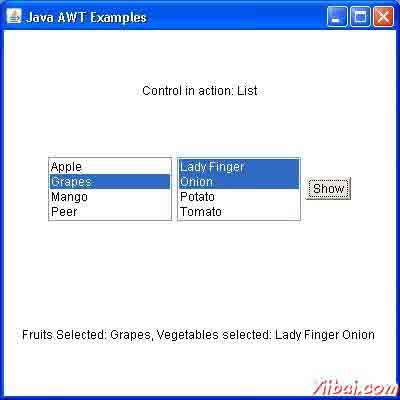
headerLabel.setText("Control in action: List");
final List fruitList = new List(4,false);
fruitList.add("Apple");
fruitList.add("Grapes");
fruitList.add("Mango");
fruitList.add("Peer");
final List vegetableList = new List(4,true);
vegetableList.add("Lady Finger");
vegetableList.add("Onion");
vegetableList.add("Potato");
vegetableList.add("Tomato");
Button showButton = new Button("Show");
showButton.addActionListener(new ActionListener() {
public void actionPerformed(ActionEvent e) {
String data = "Fruits Selected: "
+ fruitList.getItem(fruitList.getSelectedIndex());
data += ", Vegetables selected: ";
for(String vegetable:vegetableList.getSelectedItems()){
data += vegetable + " ";
}
statusLabel.setText(data);
}
});
controlPanel.add(fruitList);
controlPanel.add(vegetableList);
controlPanel.add(showButton);
mainFrame.setVisible(true);
}
}
编译程序,使用命令提示符。到 D:/ > AWT 然后键入以下命令。
D:AWT>javac comyiibai.comguiAwtControlDemo.java
如果没有错误出现,这意味着编译成功。使用下面的命令来运行程序。
D:AWT>java com.yiibai.gui.AwtControlDemo
验证下面的输出
AWT Choice类 - AWT
介绍
选择用于控制显示弹出菜单选择。所选选项将显示在顶部的菜单。
类的声明
以下是声明的java.awt.Choice类:
public class Choice
extends Component
implements ItemSelectable, Accessible
类的构造函数
S.N. | 构造函数& 描述 |
1 | Choice() () Creates a new choice menu. |
类方法
S.N. | 方法 & 描述 |
1 | void add(String item) Adds an item to this Choice menu. |
2 | void addItem(String item) Obsolete as of Java 2 platform v1.1. |
3 | void addItemListener(ItemListener l) Adds the specified item listener to receive item events from this Choice menu. |
4 | void addNotify() Creates the Choice's peer. |
5 | int countItems() Deprecated. As of JDK version 1.1, replaced by getItemCount(). |
6 | AccessibleContext getAccessibleContext() Gets the AccessibleContext associated with this Choice. |
7 | String getItem(int index) Gets the string at the specified index in this Choice menu. |
8 | int getItemCount() Returns the number of items in this Choice menu. |
9 | ItemListener[] getItemListeners() Returns an array of all the item listeners registered on this choice. |
10 | <T extends EventListener> T[] getListeners(Class<T> listenerType) Returns an array of all the objects currently registered as FooListeners upon this Choice. |
11 | int getSelectedIndex() Returns the index of the currently selected item. |
12 | String getSelectedItem() Gets a representation of the current choice as a string. |
13 | Object[] getSelectedObjects() Returns an array (length 1) containing the currently selected item. |
14 | void insert(String item, int index) Inserts the item into this choice at the specified position. |
15 | protected String paramString() Returns a string representing the state of this Choice menu. |
16 | protected void processEvent(AWTEvent e) Processes events on this choice. |
17 | protected void processItemEvent(ItemEvent e) Processes item events occurring on this Choice menu by dispatching them to any registered ItemListener objects. |
18 | void remove(int position) Removes an item from the choice menu at the specified position. |
19 | void remove(String item) Removes the first occurrence of item from the Choice menu. |
20 | void removeAll() Removes all items from the choice menu. |
21 | void removeItemListener(ItemListener l) Removes the specified item listener so that it no longer receives item events from this Choice menu. |
22 | void select(int pos) Sets the selected item in this Choice menu to be the item at the specified position. |
23 | void select(String str) Sets the selected item in this Choice menu to be the item whose name is equal to the specified string. |
继承的方法
这个类继承的方法从以下类:
- java.awt.Component
- java.lang.Object
Choice 实例
选择使用任何编辑器创建以下java程序 D:/ > AWT > com > yiibai > gui >
AwtControlDemo.java
package com.yiibai.gui;
import java.awt.*;
import java.awt.event.*;
public class AwtControlDemo {
private Frame mainFrame;
private Label headerLabel;
private Label statusLabel;
private Panel controlPanel;
public AwtControlDemo(){
prepareGUI();
}
public static void main(String[] args){
AwtControlDemo awtControlDemo = new AwtControlDemo();
awtControlDemo.showChoiceDemo();
}
private void prepareGUI(){
mainFrame = new Frame("Java AWT Examples");
mainFrame.setSize(400,400);
mainFrame.setLayout(new GridLayout(3, 1));
mainFrame.addWindowListener(new WindowAdapter() {
public void windowClosing(WindowEvent windowEvent){
System.exit(0);
}
});
headerLabel = new Label();
headerLabel.setAlignment(Label.CENTER);
statusLabel = new Label();
statusLabel.setAlignment(Label.CENTER);
statusLabel.setSize(350,100);
controlPanel = new Panel();
controlPanel.setLayout(new FlowLayout());
mainFrame.add(headerLabel);
mainFrame.add(controlPanel);
mainFrame.add(statusLabel);
mainFrame.setVisible(true);
}
private void showChoiceDemo(){
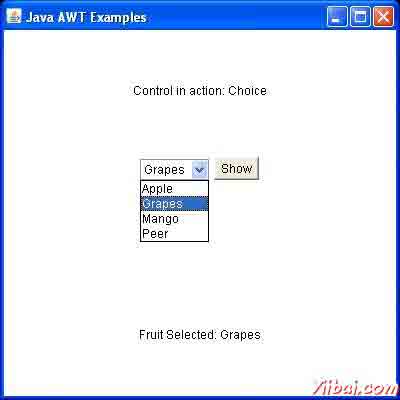
headerLabel.setText("Control in action: Choice");
final Choice fruitChoice = new Choice();
fruitChoice.add("Apple");
fruitChoice.add("Grapes");
fruitChoice.add("Mango");
fruitChoice.add("Peer");
Button showButton = new Button("Show");
showButton.addActionListener(new ActionListener() {
public void actionPerformed(ActionEvent e) {
String data = "Fruit Selected: "
+ fruitChoice.getItem(fruitChoice.getSelectedIndex());
statusLabel.setText(data);
}
});
controlPanel.add(fruitChoice);
controlPanel.add(showButton);
mainFrame.setVisible(true);
}
}
编译程序,使用命令提示符。到 D:/ > AWT 然后键入以下命令。
D:AWT>javac comyiibaiguiAwtControlDemo.java
如果没有错误出现,这意味着编译成功。使用下面的命令来运行程序。
D:AWT>java com.yiibai.gui.AwtControlDemo
验证下面的输出
AWT事件处理 - AWT
事件是什么?
一个对象的状态变化被称为事件,即事件描述源状态的变化。事件产生的结果与用户交互的图形用户界面组件。例如,点击一个按钮,移动鼠标,通过键盘输入一个字符,从列表中选择一个项目,滚动页面的活动,使一个事件的发生。
事件的类型
事件可以被大致分为两类:
- 前台事件 - 这些事件需要用户直接互动。在图形用户界面中的图形组件交互的人产生的后果。例如,点击一个按钮,移动鼠标,通过键盘输入一个字符,从列表中选择一个项目,滚动页面等
- 后台事件 - 这些事件,需要最终用户的交互是已知的作为后台的事件。操作系统的中断,硬件或软件故障,定时器到期时,操作完成的后台事件的例子。
事件处理是什么?
事件处理机制,控制的事件,并决定如果一个事件发生时,会发生什么。这种机制被称为事件处理程序,在事件发生时执行的代码。 Java使用代理事件模型来处理事件。该模型定义了标准的机制来生成和处理事件。让我们简要介绍这种模式。
代理事件模型具有以下的主要参与者,即:
- 源 - 源是一个对象,在该对象上的事件发生。它的处理器提供发生事件的信息来源是可靠的。 JAVA提供源对象的类。
- 监听器 - 它也被称为事件处理程序。监听器是负责生成响应事件。从Java实现的角度来看,监听器也是一个对象。等待,直到它接收到一个事件监听器。一旦收到事件,监听器进程的事件然后返回。
这种方法的好处是,用户界面逻辑完全分开,生成该事件的逻辑。用户界面元素是能够代理的事件处理单独的一段代码。在这个模型中,需要与源对象注册监听使侦听器能够接收事件通知。这是一个有效的方式处理事件,因为这些事件通知只发送给那些监听器想要它们接收。
参与事件处理的步骤
- 用户单击该按钮时产生该事件。
- 现在有关事件类的对象是自动创建的信息源和事件在同一对象得到填充。
- 事件对象被转发注册监听器类的方法。
- 该方法现在得到执行和返回。
要记住的有关监听器要点
- 为了设计一个监听类,我们必须制定一些监听器接口。这些监听器接口预测一些公共的抽象监听器类必须实现的回调方法。
- 如果不实现任何预定义的接口,你的类不能作为源对象的监听器类。
回调方法
这些方法所提供的API提供者,被定义为应用程序员和应用程序开发者调用。这里的回调方法代表一个事件的方法。在响应一个事件的Java JRE将触发回调方法。所有这些回调方法的监听器接口。
如果一个组件需要一些监听器将监听的事件源必须注册自己的监听器。
事件处理示例
选择使用任何编辑器创建以下java程序 D:/ > AWT > com > yiibai > gui >
AwtControlDemo
package com.yiibai.gui;
import java.awt.*;
import java.awt.event.*;
public class AwtControlDemo {
private Frame mainFrame;
private Label headerLabel;
private Label statusLabel;
private Panel controlPanel;
public AwtControlDemo(){
prepareGUI();
}
public static void main(String[] args){
AwtControlDemo awtControlDemo = new AwtControlDemo();
awtControlDemo.showEventDemo();
}
private void prepareGUI(){
mainFrame = new Frame("Java AWT Examples");
mainFrame.setSize(400,400);
mainFrame.setLayout(new GridLayout(3, 1));
mainFrame.addWindowListener(new WindowAdapter() {
public void windowClosing(WindowEvent windowEvent){
System.exit(0);
}
});
headerLabel = new Label();
headerLabel.setAlignment(Label.CENTER);
statusLabel = new Label();
statusLabel.setAlignment(Label.CENTER);
statusLabel.setSize(350,100);
controlPanel = new Panel();
controlPanel.setLayout(new FlowLayout());
mainFrame.add(headerLabel);
mainFrame.add(controlPanel);
mainFrame.add(statusLabel);
mainFrame.setVisible(true);
}
private void showEventDemo(){
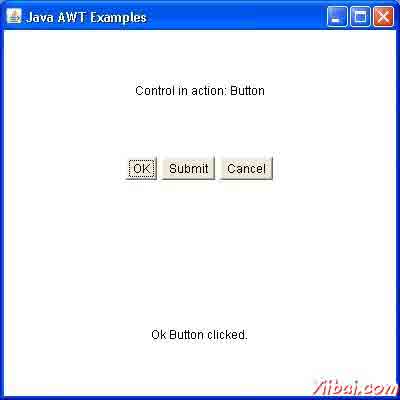
headerLabel.setText("Control in action: Button");
Button okButton = new Button("OK");
Button submitButton = new Button("Submit");
Button cancelButton = new Button("Cancel");
okButton.setActionCommand("OK");
submitButton.setActionCommand("Submit");
cancelButton.setActionCommand("Cancel");
okButton.addActionListener(new ButtonClickListener());
submitButton.addActionListener(new ButtonClickListener());
cancelButton.addActionListener(new ButtonClickListener());
controlPanel.add(okButton);
controlPanel.add(submitButton);
controlPanel.add(cancelButton);
mainFrame.setVisible(true);
}
private class ButtonClickListener implements ActionListener{
public void actionPerformed(ActionEvent e) {
String command = e.getActionCommand();
if( command.equals( "OK" )) {
statusLabel.setText("Ok Button clicked.");
}
else if( command.equals( "Submit" ) ) {
statusLabel.setText("Submit Button clicked.");
}
else {
statusLabel.setText("Cancel Button clicked.");
}
}
}
}
编译程序,使用命令提示符。到 D:/ > AWT 然后键入以下命令。
D:AWT>javac comyiibaiguiAwtControlDemo.java
如果没有错误出现,这意味着编译成功。使用下面的命令来运行程序。
D:AWT>java com.yiibai.gui.AwtControlDemo
验证下面的输出
AWT Event类 - AWT
事件类代表了本次活动。 Java提供了各种事件类,但我们将讨论那些被更频繁地使用。
EventObject 类
它是根类,应得到所有事件状态对象。构造一个对象的引用,所有事件的源,这是逻辑上被认为是事件最初发生时的对象。这个类定义在java.util包。
类的声明
以下是声明为java.util.EventObject类:
public class EventObject
extends Object
implements Serializable
字段域
以下是类java.util.EventObject 的字段:
- protected Object source -- 在其最初的事件发生的对象。
类的构造函数
S.N. | 构造函数&说明 |
1 | EventObject(Object source) Constructs a prototypical Event. |
类方法
S.N. | 方法和说明 |
1 | Object getSource() The object on which the Event initially occurred. |
2 | String toString() Returns a String representation of this EventObject. |
继承的方法
这个类从以下类继承的方法:
- java.lang.Object
AWT事件类:
以下是常用的事件类的列表。
Sr.No. | 控制与说明 |
1 | AWTEvent 它是所有AWT事件的根事件类。这个类及其子类取代原来的java.awt.Event类。 |
2 | ActionEvent 按钮被点击时,都会生成ActionEvent双击或列表中的项目。 |
3 | InputEvent InputEvent类是所有组件级别输入事件的根事件类。 |
4 | KeyEvent 输入字符键事件产生。 |
5 | MouseEvent 此事件表明在一个组件中发生鼠标动作。 |
6 | TextEvent 这个类的对象表示文本事件。 |
7 | WindowEvent 这个类的对象表示一个窗口的状态的变化。 |
8 | AdjustmentEvent 这个类的对象代表可调对象发出的调整事件。 |
9 | ComponentEvent 这个类的对象表示一个窗口的状态的变化。 |
10 | ContainerEvent 这个类的对象表示一个窗口的状态的变化。 |
11 | MouseMotionEvent 这个类的对象表示一个窗口的状态的变化。 |
12 | PaintEvent 这个类的对象表示一个窗口的状态的变化。 |
AWT 事件监听器(Event Listeners) - AWT
事件侦听器代表负责处理事件的接口。Java提供了各种事件监听器类,但我们将讨论那些被更频繁地使用。每一个事件侦听器方法具有方法的EventObject类的子类的对象,这是作为一个单独的参数。例如,鼠标事件侦听器方法将接受MouseEvent的实例,其中派生的事件的EventObject。
EventListner接口
它是一个标记接口,每一个监听器接口扩展。这个类定义在java.util包。
类的声明
以下是声明java.util.EventListener 接口:
public interface EventListener
AWT Event Listener 接口:
以下是常用的事件侦听器列表。
Sr. No. | 控制&说明 |
1 | ActionListener 该接口用于接收动作事件。 |
2 | ComponentListener 该接口用于接收组件事件。 |
3 | ItemListener 该接口用于接收项目事件。 |
4 | KeyListener 该接口用于接收键事件。 |
5 | MouseListener 该接口用于接收鼠标事件。 |
6 | TextListener 该接口用于接收文本事件。 |
7 | WindowListener 该接口用于接收窗口事件。 |
8 | AdjustmentListener 该接口用于接收调整事件。 |
9 | ContainerListener 该接口用于接收容器事件。 |
10 | MouseMotionListener 此接口用于接收鼠标移动事件。 |
11 | FocusListener 该接口用于接收焦点事件。 |
AWT 适配器(Adapters) - AWT
适配器是抽象类,用于接收各种事件。这些类中的方法是空的。这些类存在的目的是方便创建侦听器对象。
AWT 适配器:
以下是常用的适配器监听AWT GUI事件列表。
Sr. No. | 适配器&说明 |
1 | FocusAdapter 接收焦点事件的抽象适配器类。 |
2 | KeyAdapter 接收按键事件的抽象适配器类。 |
3 | MouseAdapter 接收鼠标事件的抽象适配器类。 |
4 | MouseMotionAdapter 接收鼠标移动事件的抽象适配器类。 |
5 | WindowAdapter 接收窗口事件的抽象适配器类。 |
AWT 布局(Layouts) - AWT
介绍
布局的意味着,在容器内的配置的组件。在其他的方式,我们可以说,在一个特定的容器内的位置放置组件。布局管理器所控制布点的任务是自动完成的。
布局管理器
布局管理器自动定位容器内的所有组件。如果我们不使用布局管理器,然后定位组件的默认布局管理器。这是可能的手工布局的控制,但由于以下两个原因,它变得非常困难。
- 这是非常繁琐的容器内处理大量的控制。
- 通常当我们需要来排列它们没有给出一个组件的宽度和高度信息。
Java为我们提供了各种布局管理器来定位控制。属性,如大小,形状和排列变化从一个布局管理器,其他的布局管理器。的小应用程序或应用程序窗口的大小改变时,即布局管理器applet浏览器或应用程序窗口的尺寸适应于响应的大小,形状和排列的组件也随之变化。
布局管理器关联的与每个容器对象。每一个布局管理器是实现布局管理接口的类的一个对象。
以下是接口定义布局管理器的功能。
Sr. No. | 接口与说明 |
1 | LayoutManager LayoutManager 接口声明了类,其对象将充当一个布局管理器需要实现这些方法。 |
2 | LayoutManager2 LayoutManager2中的子接口布局管理。这个接口是为那些知道如何布局容器的基础上布局约束对象的类。 |
AWT布局管理器类:
以下是常用的控件列表而设计的图形用户界面使用AWT。
Sr. No. | 布局管理说明 |
1 | BorderLayout BorderLayout 排列组件,以适应在五个区域:东部,西部,北部,南部和中心。 |
2 | CardLayout CardLayout对象将卡片作为一个容器中的每个组件。在一个时间只有一个卡片是可见的。 |
3 | FlowLayout FlowLayout将是默认的布局。它的布局有向流中的组件。 |
4 | GridLayout GridLayout 管理组件的矩形网格的形式。 |
5 | GridBagLayout 这是最灵活的布局管理器类。 GridBagLayout中的对象对齐的组件垂直方向,水平方向或沿它们的基线相同的大小,而不需要的组件。 |
AWT 容器(Containers) - AWT
容器是AWT GUI组件的组成部分。其中一个组件可以位于容器提供空间。 AWT 容器本身是一个组件,它增加了添加组件本身的能力。以下要考虑要点。
- Container 的子类被称为容器。例如面板,框架和窗口。
- 容器只能添加组件本身。
- 默认的布局使用每个容器的setLayout方法可以覆盖使用。
Sr. No. | 容器和说明 |
1 | Container 这是一个通用的容器对象中,可以包含其他AWT组件。 |
AWT的UI元素:
以下是常用的容器而设计的图形用户界面使用AWT。
Sr. No. | 容器和说明 |
1 | Panel 面板是最简单的容器。它提供了空间,在其中可以放置任何其他组件,包括其他面板。 |
2 | Frame Frame是一个顶层的窗口标题和边框 |
3 | Window Window对象是一个没有边界和菜单栏的顶层窗口 |
AWT菜单控制 - AWT
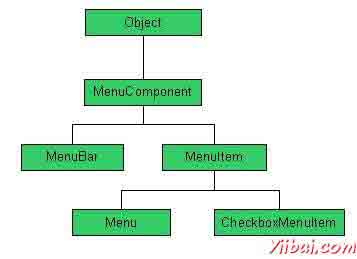
正如我们所知道相关的每一个顶层窗口有一个菜单栏。此菜单栏包括提供给最终用户的各种菜单的选择。此外,每个选择包含这就是所谓的下拉菜单中的选项列表。菜单和菜单项的控件是的MenuComponent类的子类。
菜单层次结构
菜单控件
Sr. No. | 控件与说明 |
1 | MenuComponent 它是顶级类的所有菜单相关的控制。 |
2 | MenuBar MenuBar对象相关联的顶层窗口。 |
3 | MenuItem 菜单中的项目必须属于MenuItem或任何其子类。 |
4 | Menu Menu对象是从菜单栏中显示一个下拉菜单组件。 |
5 | CheckboxMenuItem CheckboxMenuItem是菜单项的子类。 |
6 | PopupMenu PopupMenu 弹出式菜单,可以在一个组件内的指定位置动态弹出。 |
AWT图形控件 - AWT
图形控件允许应用程序组件或图像上绘制。
图形控件
Sr. No. | 控制与说明 |
1 | Graphics 这是所有图形上下文顶层抽象类。 |
2 | Graphics2D 这是一个Graphics类的子类,并提供了更复杂的几何坐标变换,色彩管理,和文本布局的控制权。 |
3 | Arc2D Arc2D是抽象父类的所有对象存储框架矩形定义一个二维弧,开始角度,棱角分明的程度(弧长)和闭合类型(OPEN,CHORD或PIE)。 |
4 | CubicCurve2D CubicCurve2D类是抽象的超类FPR存储2D三次曲线段的所有对象,它定义的三次参数曲线段(X,Y)坐标空间。 |
5 | Ellipse2D Ellipse2D的是抽象超类的所有对象存储2D椭圆形,它描述了一种椭圆形,是指由一划分矩形。 |
6 | Rectangle2D Rectangle2D类是一个抽象父类的所有对象存储2D矩形所定义的位置(X,Y)和尺寸(宽x高),它描述了一个矩形。 |
7 | QuadCurve2D QuadCurve2D类是一个抽象父类的所有对象存储2D二次曲线段,它描述了一个二次参数曲线段(X,Y)坐标空间。 |
8 | Line2D Line2D表示(的x,y)坐标空间中的线段。 |
9 | Font Font类表示字体,它是在一个可见的方式呈现文本。 |
10 | Color Color类用于封装默认sRGB颜色空间或颜色的任意颜色空间中的颜色标识的颜色。 |
11 | BasicStroke BasicStroke的类定义了一套基本的轮廓基本图形,这是一个Graphics2D对象有其行程的属性设置与此BasicStroke呈现的渲染属性。 |
