



Windows 下可以使用的工具比较少,当出现端口占用的情况时,查端口被谁占用比较费劲。
常用的方法是先通过 netstat 查占用端口的进程ID,然后再通过 tasklist 查对应的进程。
C:\> netstat -ano | findstr 7890TCP 127.0.0.1:7890 127.0.0.1:54351 ESTABLISHED 10748C:\> tasklist | findstr 10748clash-win64.exe 10748 Console 4 34,520 K
我们可以使用 Python 的 psutil 库,遍历 connections() 找到对应端口的 pid 后打印进程信息。
测试打印所有端口对应的进程信息如下:
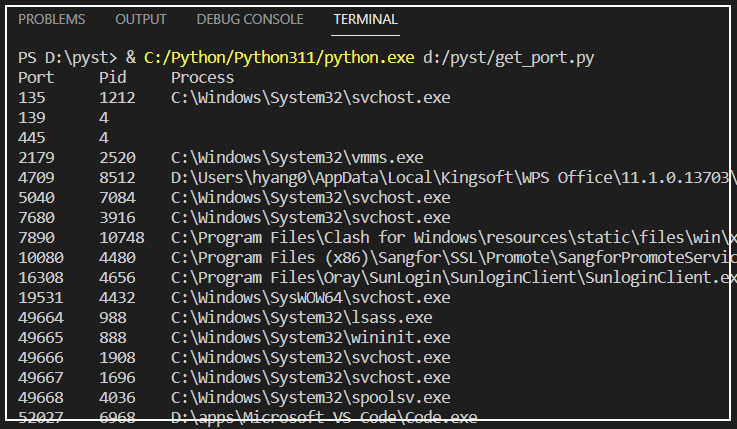
在运行测试代码前,要先安装 psutil 模块:
c:\> pip install psutil
测试代码如下 ,以下例子遍历了所有可能使用的端口号。在实际使用中,我们只需要查询单个端口号,可以将程序改写一下,接受命令行参数,单独查某个端口的进程占用信息。
#!python3import psutildef get_process(port):'''根据端口查进程'''P = dict()for s in psutil.net_connections(kind='tcp4'):if s.laddr.port == port:p = psutil.Process(s.pid)try:P[s.pid] = p.exe()except:passfor pid, exe in P.items():print(port, '\t', pid, '\t', exe)if __name__ == '__main__':print('Port\t Pid\t Process')for i in range(65535):get_process(i)
全文完。
如果转发本文,文末务必注明:“转自微信公众号:生有可恋”。
文章转载自生有可恋,如果涉嫌侵权,请发送邮件至:contact@modb.pro进行举报,并提供相关证据,一经查实,墨天轮将立刻删除相关内容。
