



1 原理
在分布式场景中,对某些数据表进行在线导出,需要使得导出文件中的数据是全局事务一致的,从而保证各个分片的数据导入文件后在某一时刻是也是全局事务一致性的。
KunDB采用基于TSO全局时间戳的技术来保证分布式数据库的全局一致性导出和导入。
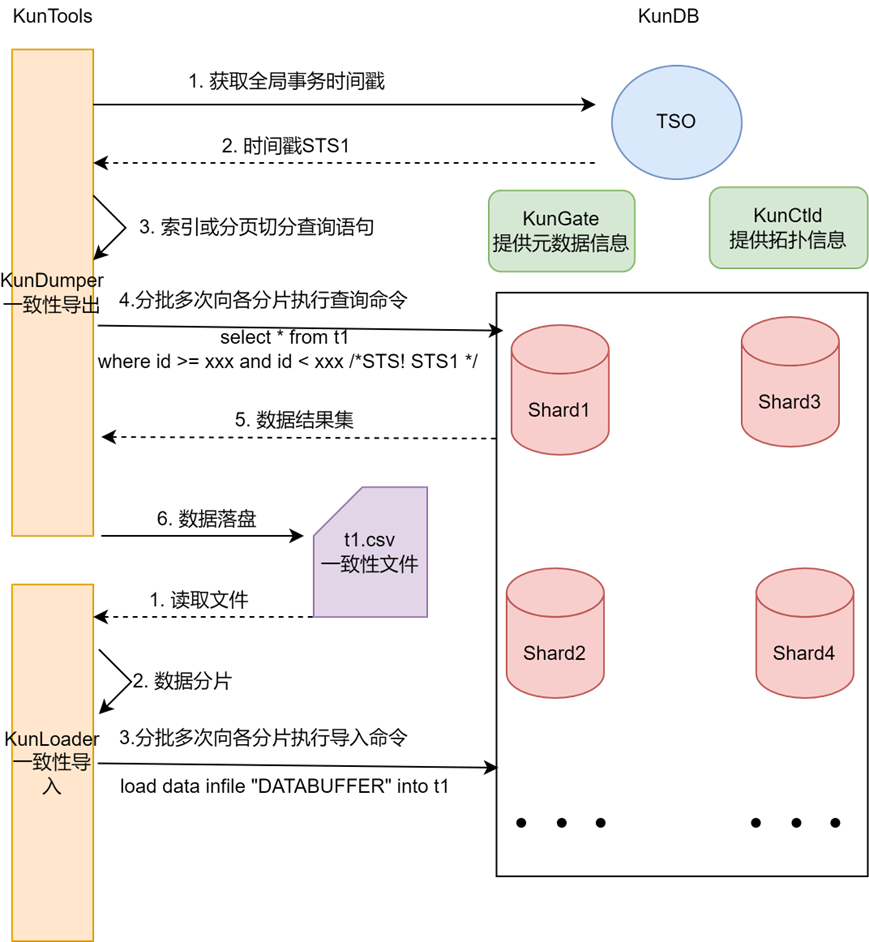
TSO: KunDB全局时间戳管理组件,负责维护分发全局唯一时间戳。
KunGate: KunDB入口及元数据管理组件,为KunTools提供元数据信息。
KunCtld: KunDB拓扑管理组件,为Kuntools提供各分片连接信息。
KunTools: KunDumper/KunLoader的统称。
KunDumper : 导出工具,将KunDB分片的表数据格式化输出至文件中。
KunLoader : 导入工具,将格式化文件中的数据导入至KunDB数据分片中。
STS(Snapshot-TS):当前事务的全局快照
优点
导出时通过指定单个分片当前快照时间戳,可以保证单个分片每次导出查询的数据都是同一时刻的。
导出时通过指定各个分片为同一个全局快照时间戳,可以保证多个分片之间导出的数据在某一时刻是全局一致的。
即使分布式数据库存在在线业务,导出仍然可以通过全局快照时间戳保证导出数据的全局一致性。
导入时可以利用导出的一致性数据文件,直接进行离线导入,导入完成后表内的数据是全局一致的。
2 备份步骤
bash kunkun.sh -t -s "-c ../conf/sample/full_dump.sample.yml -d"
配置文件full_dump.sample.yml(下方列出一般情况需要修改的配置项)
#需要备份的数据库表名,若不配置tables则为整库
databases:
  - dbName: test # 备份test数据库
    # 可以指定 tables, views, procedures, functions, triggers
    tables:
       - item    # 的item表

dumpExtConf:
  # 备份目录,必须指定(备份数据存放路径)
  outputDirPath: /home/h/kundr/dump

#config of kuntools
# ctld、gate的ip端口可以从manager的配置中查看
kundb:
  kunctld:
    #transwarp
    cellName: "transwarp"
    #kunctld connection information
    host: 192.168.124.129
    port: 15999
    #kunctld grpc authentication
    # 默认值
    username: "grpc_client"
    password: "password"
  #kungate connection information
  kungate:
    host: 192.168.124.129
    port: 15307
    username: "vt_app"
    password: "123"
  #shard connection information
  shard:
    username: vt_app
    password: password
3 恢复步骤
bash kunkun.sh -t -s "-c ../conf/sample/full_restore.sample.yml -r -i your_backup_id"
配置文件full_restore.sample.yml(下方列出一般情况需要修改的配置项)
databases:
  - dbName: test
    # 可以指定 tables, views, procedures, functions, triggers
    tables:
      - item9
restoreExtConf:
  # dump出来的数据文件的根目录, 将从此目录获取数据进行还原
  # 需要和导出时的路径一致
  restoreDir: /home/h/kundr/dump
  # 存储restore时候的状态
  statusDir: /home/h/kundr/restore/status
#config of kuntools
kundb:
  kunctld:
    #transwarp
    # 默认值
    cellName: "transwarp"
    #kunctld connection information
    host: 192.168.124.129
    port: 15999
    #kunctld grpc authentication
    # 默认值
    username: "grpc_client"
    password: "password"
  #kungate connection information
  kungate:
    host: 192.168.124.129
    port: 15307
    username: "vt_app"
    password: "123"
  #shard connection information
  shard:
    username: vt_app
    password: password
「喜欢这篇文章,您的关注和赞赏是给作者最好的鼓励」
关注作者
【版权声明】本文为墨天轮用户原创内容,转载时必须标注文章的来源(墨天轮),文章链接,文章作者等基本信息,否则作者和墨天轮有权追究责任。如果您发现墨天轮中有涉嫌抄袭或者侵权的内容,欢迎发送邮件至:contact@modb.pro进行举报,并提供相关证据,一经查实,墨天轮将立刻删除相关内容。
