



1 主备角色切换
1.1 DG切换方式
1.1.1 Failover
灾难发生,主库无法工作,强制异地的备库成为主库提供服务,这个时候已经是最后的防线了,当使用这个方式的时候一般是主库已经彻底奔溃了。
1.1.2 Switchover
按计划主动进行主备库切换
开库顺序:先备库、后主库(备库要保证数据同步,需要先行开启,备库就像是一个仆人,没事就先候着了。)
关库顺序:先主库、后备库(主库就像一个主人,有事先撤了。如果不先把主库关了,先关备库的话,如果主库有新的数据产生,就无法同步数据到备库了)。
1.2 Swithover方式测试
主备库角色切换
(主库主机名primary,备库主机名standby)
备库先启动
[oracle@standby ~]$ sqlplus / as sysdba
SQL> startup
ORACLE instance started.

Total System Global Area  271437824 bytes
Fixed Size                  2252336 bytes
Variable Size             213909968 bytes
Database Buffers           50331648 bytes
Redo Buffers                4943872 bytes
Database mounted.
Database opened.
只要启动备库就使能recover功能
SQL> recover managed standby database disconnect from session;
查询备库日志号
SQL> select max(sequence#) from v$archived_log;

MAX(SEQUENCE#)
--------------
            25
备库启动
SQL> startup
ORACLE instance started.

Total System Global Area 2455228416 bytes
Fixed Size                  2255712 bytes
Variable Size             620758176 bytes
Database Buffers         1811939328 bytes
Redo Buffers               20275200 bytes
Database mounted.
Database opened.
主库信息查询以及日志对比
SQL> set pagesize 300
SQL> set linesize 360
SQL> col file_name  for a50
SQL> select tablespace_name,file_name from dba_data_files;

TABLESPACE_NAME                                              FILE_NAME
------------------------------------------------------------ --------------------------------------------------
USERS                                                        /oracle/app/oracle/oradata/oracle/users01.dbf
UNDOTBS1                                                     /oracle/app/oracle/oradata/oracle/undotbs01.dbf
SYSAUX                                                       /oracle/app/oracle/oradata/oracle/sysaux01.dbf
SYSTEM                                                       /oracle/app/oracle/oradata/oracle/system01.dbf
TEST                                                         /oracle/app/oracle/oradata/oracle/test01.dbf
对比主备库日志,同步才能做下一步。
SQL> select max(sequence#) from v$archived_log;

MAX(SEQUENCE#)
--------------
            25
可以看到当前的日志序列号都是25,可以进行下一步操作。
切换时要停库,最后没有其他session连接
查看当前库有哪些session连接。
SQL> select username,sid from v$session where username is not null;
指定SID杀会话
SQL> set linesize 300
SQL> col uername for a10
SQL> col event for a30
SQL> col machine for a20
SQL> col program for a35
SQL> select a.username, a.inst_id,to_char(a.sid) sid,a.serial#,'kill -9 '||b.spid,a.status
  2  from gv$session a,gv$process b
  3  where a.paddr=b.addr
  4  and sid in (
  5  'SID'
  6  )
  7  order by a.inst_id;
查询主库当前状态
SQL> select name,open_mode,database_role,protection_mode,switchover_status from v$database;
NAME               OPEN_MODE                                DATABASE_ROLE                    PROTECTION_MODE                          SWITCHOVER_STATUS
------------------ ---------------------------------------- -------------------------------- ---------------------------------------- -----------------
ORACLE             READ WRITE                               PRIMARY                          MAXIMUM PERFORMANCE                      TO STANDBY
备库查询当前状态
SQL> set pagesize 300
SQL> set linesize 360
SQL> select name,database_role,protection_mode,switchover_status from v$database;

NAME               DATABASE_ROLE                    PROTECTION_MODE                          SWITCHOVER_STATUS
------------------ -------------------------------- ---------------------------------------- ----------------------------------------
ORACLE             PHYSICAL STANDBY                 MAXIMUM PERFORMANCE                      NOT ALLOWED
 粗体
粗体
没有其他用户登录
SQL> alter database commit to switchover to standby;
Database altered.
有用户登录,强制切换
SQL> alter database commit to switchover to standby with session shutdown;
查看日志输出
主库输出日志
Tue Feb 07 10:30:50 2023
alter database commit to switchover to standby
ALTER DATABASE COMMIT TO SWITCHOVER TO PHYSICAL STANDBY [Process Id: 14118] (oracle)
Waiting for all non-current ORLs to be archived...
All non-current ORLs have been archived.
Waiting for all FAL entries to be archived...
All FAL entries have been archived.
Waiting for potential Physical Standby switchover target to become synchronized...
Active, synchronized Physical Standby switchover target has been identified
Switchover End-Of-Redo Log thread 1 sequence 26 has been fixed
Switchover: Primary highest seen SCN set to 0x0.0x125533
ARCH: Noswitch archival of thread 1, sequence 26
ARCH: End-Of-Redo Branch archival of thread 1 sequence 26
ARCH: LGWR is actively archiving destination LOG_ARCHIVE_DEST_2
ARCH: Standby redo logfile selected for thread 1 sequence 26 for destination LOG_ARCHIVE_DEST_2
Archived Log entry 35 added for thread 1 sequence 26 ID 0x77421a56 dest 1:
ARCH: Archiving is disabled due to current logfile archival
Primary will check for some target standby to have received alls redo
Final check for a synchronized target standby. Check will be made once.
LOG_ARCHIVE_DEST_2 is a potential Physical Standby switchover target
Active, synchronized target has been identified
Target has also received all redo
Backup controlfile written to trace file /oracle/app/oracle/diag/rdbms/oracle/oracle/trace/oracle_ora_14118.trc
Clearing standby activation ID 2000820822 (0x77421a56)
The primary database controlfile was created using the
'MAXLOGFILES 16' clause.
There is space for up to 13 standby redo logfiles
Use the following SQL commands on the standby database to create
standby redo logfiles that match the primary database:
ALTER DATABASE ADD STANDBY LOGFILE 'srl1.f' SIZE 52428800;
ALTER DATABASE ADD STANDBY LOGFILE 'srl2.f' SIZE 52428800;
ALTER DATABASE ADD STANDBY LOGFILE 'srl3.f' SIZE 52428800;
ALTER DATABASE ADD STANDBY LOGFILE 'srl4.f' SIZE 52428800;
Archivelog for thread 1 sequence 26 required for standby recovery
Switchover: Primary controlfile converted to standby controlfile succesfully.
Switchover: Complete - Database shutdown required
USER (ospid: 14118): terminating the instance
Instance terminated by USER, pid = 14118
Completed: alter database commit to switchover to standby
Shutting down instance (abort)
备库输出日志
Tue Feb 07 10:30:52 2023
RFS[3]: Assigned to RFS process 14114
RFS[3]: Selected log 5 for thread 1 sequence 26 dbid 2000759894 branch 1127682456
Tue Feb 07 10:30:52 2023
Archived Log entry 15 added for thread 1 sequence 26 ID 0x77421a56 dest 1:
Tue Feb 07 10:30:52 2023
RFS[1]: Possible network disconnect with primary database
Tue Feb 07 10:30:52 2023
RFS[4]: Assigned to RFS process 14110
RFS[4]: Possible network disconnect with primary database
Tue Feb 07 10:30:57 2023
Media Recovery Log /oracle/arch/arch_1_1127682456_26.log
Identified End-Of-Redo (switchover) for thread 1 sequence 26 at SCN 0x0.125533
Resetting standby activation ID 2000820822 (0x77421a56)
Media Recovery End-Of-Redo indicator encountered
Media Recovery Continuing
Media Recovery Waiting for thread 1 sequence 27
将primary主机启动到mount状态
SQL> startup mount
ORACLE instance started.

Total System Global Area 2455228416 bytes
Fixed Size                  2255712 bytes
Variable Size             620758176 bytes
Database Buffers         1811939328 bytes
Redo Buffers               20275200 bytes
Database mounted.
SQL> select name,open_mode,database_role,protection_mode,switchover_status from v$database;
在alert日志文件中发现了以下信息:
There is space for up to 13 standby redo logfiles
Use the following SQL commands on the standby database to create
standby redo logfiles that match the primary database:
ALTER DATABASE ADD STANDBY LOGFILE 'srl1.f' SIZE 52428800;
ALTER DATABASE ADD STANDBY LOGFILE 'srl2.f' SIZE 52428800;
ALTER DATABASE ADD STANDBY LOGFILE 'srl3.f' SIZE 52428800;
ALTER DATABASE ADD STANDBY LOGFILE 'srl4.f' SIZE 52428800;
Archivelog for thread 1 sequence 26 required for standby recovery
在切换后的备库中执行命令:
SQL> ALTER DATABASE ADD STANDBY LOGFILE 'srl1.f' SIZE 52428800;
     ALTER DATABASE ADD STANDBY LOGFILE 'srl2.f' SIZE 52428800;
     ALTER DATABASE ADD STANDBY LOGFILE 'srl3.f' SIZE 52428800;
     ALTER DATABASE ADD STANDBY LOGFILE 'srl4.f' SIZE 52428800;
Database altered.
standy主机操作:
SQL> select name,open_mode,database_role,protection_mode,switchover_status from v$database;

切换成主库
SQL> alter database commit to switchover to primary with session shutdown;
SQL> select name,open_mode,database_role,protection_mode,switchover_status from v$database;

primary主机操作
SQL> alter database open;
SQL> set linesize 360
SQL> set pagesize 300
SQL> select name,database_role,protection_mode,switchover_status from v$database;

NAME               DATABASE_ROLE                    PROTECTION_MODE                          SWITCHOVER_STATUS
------------------ -------------------------------- ---------------------------------------- ----------------------------------------
ORACLE             PHYSICAL STANDBY                 MAXIMUM PERFORMANCE                      RECOVERY NEEDED
从主库恢复日志
SQL> recover managed standby database disconnect from session;
Media recovery complete.
alert日志输出内容
ALTER DATABASE RECOVER  managed standby database disconnect from session
Attempt to start background Managed Standby Recovery process (oracle)
Tue Feb 07 11:44:29 2023
MRP0 started with pid=27, OS id=17888
MRP0: Background Managed Standby Recovery process started (oracle)
 started logmerger process
Tue Feb 07 11:44:34 2023
Managed Standby Recovery not using Real Time Apply
Parallel Media Recovery started with 4 slaves
Waiting for all non-current ORLs to be archived...
All non-current ORLs have been archived.
Clearing online redo logfile 1 /oracle/app/oracle/oradata/oracle/redo01.log
Clearing online log 1 of thread 1 sequence number 25
Clearing online redo logfile 1 complete
Clearing online redo logfile 2 /oracle/app/oracle/oradata/oracle/redo02.log
Clearing online log 2 of thread 1 sequence number 28
Completed: ALTER DATABASE RECOVER  managed standby database disconnect from session
Clearing online redo logfile 2 complete
Clearing online redo logfile 3 /oracle/app/oracle/oradata/oracle/redo03.log
Clearing online log 3 of thread 1 sequence number 29
Clearing online redo logfile 3 complete
Media Recovery Log /oracle/arch/1_27_1127682456.dbf
Media Recovery Log /oracle/arch/1_28_1127682456.dbf
Media Recovery Waiting for thread 1 sequence 29 (in transit)
查询恢复后的备库状态
SQL> select name,database_role,protection_mode,switchover_status from v$database;

NAME               DATABASE_ROLE                    PROTECTION_MODE                          SWITCHOVER_STATUS
------------------ -------------------------------- ---------------------------------------- ----------------------------------------
ORACLE             PHYSICAL STANDBY                 MAXIMUM PERFORMANCE                      NOT ALLOWED
建个表空间测试一下,是否可以同步
查询当前主库(standby主机)有哪些表空间
SQL> col file_name  for a50;
SQL> select tablespace_name,file_name from dba_data_files;

TABLESPACE_NAME                                              FILE_NAME
------------------------------------------------------------ --------------------------------------------------
USERS                                                        /oracle/app/oracle/oradata/oraclest/users01.dbf
UNDOTBS1                                                     /oracle/app/oracle/oradata/oraclest/undotbs01.dbf
SYSAUX                                                       /oracle/app/oracle/oradata/oraclest/sysaux01.dbf
SYSTEM                                                       /oracle/app/oracle/oradata/oraclest/system01.dbf
TEST                                                         /oracle/app/oracle/oradata/oraclest/test01.dbf
创建表空间
SQL> create tablespace john datafile '/oracle/app/oracle/oradata/oraclest/john.dbf' size 5m;

Tablespace created.
切换日志
SQL> alter system switch logfile;

System altered.
查看备库的alert日志,就可以看到备库在恢复主库的数据了
Tue Feb 07 11:52:23 2023
Archived Log entry 39 added for thread 1 sequence 29 ID 0x7748accb dest 1:
Tue Feb 07 11:52:23 2023
Primary database is in MAXIMUM PERFORMANCE mode
RFS[4]: Assigned to RFS process 18286
RFS[4]: Selected log 4 for thread 1 sequence 30 dbid 2000759894 branch 1127682456
Tue Feb 07 11:52:26 2023
Media Recovery Log /oracle/arch/1_29_1127682456.dbf
Recovery created file /oracle/app/oracle/oradata/oracle/john.dbf
Successfully added datafile 6 to media recovery
Datafile #6: '/oracle/app/oracle/oradata/oracle/john.dbf'
Media Recovery Waiting for thread 1 sequence 30 (in transit)
到备库查看表空间是否有被同步
SQL> set pagesize 300
SQL> set linesize 360
SQL> col FILE_NAME for a50
SQL> select tablespace_name,file_name from dba_data_files;

可以看到,主库的表空间已经传输过来了。
1.3 主备切换恢复原状
SQL> select name,open_mode,database_role,protection_mode,switchover_status from v$database;
SQL> alter database commit to switchover to standby;

Database altered.
启动数据库到mount状态
SQL> startup mount
ORACLE instance started.

Total System Global Area  271437824 bytes
Fixed Size                  2252336 bytes
Variable Size             213909968 bytes
Database Buffers           50331648 bytes
Redo Buffers                4943872 bytes
Database mounted.
查看备库数据库状态
SQL> select name,open_mode,database_role,protection_mode,switchover_status from v$database;
SQL> alter database commit to switchover to primary;

再次查看数据库状态
SQL> select name,open_mode,database_role,protection_mode,switchover_status from v$database;

把数据库启动到open
SQL> alter database open;

Database altered.
从主库恢复数据
SQL> recover managed standby database disconnect from session;
Media recovery complete.
观察日志输出
ALTER DATABASE RECOVER  managed standby database disconnect from session
Attempt to start background Managed Standby Recovery process (oraclest)
Tue Feb 07 13:40:08 2023
MRP0 started with pid=27, OS id=23929
MRP0: Background Managed Standby Recovery process started (oraclest)
 started logmerger process
Tue Feb 07 13:40:13 2023
Managed Standby Recovery not using Real Time Apply
Parallel Media Recovery started with 4 slaves
Waiting for all non-current ORLs to be archived...
All non-current ORLs have been archived.
Clearing online redo logfile 1 /oracle/app/oracle/oradata/oraclest/redo01.log
Clearing online log 1 of thread 1 sequence number 36
Clearing online redo logfile 1 complete
Clearing online redo logfile 2 /oracle/app/oracle/oradata/oraclest/redo02.log
Clearing online log 2 of thread 1 sequence number 31
Clearing online redo logfile 2 complete
Clearing online redo logfile 3 /oracle/app/oracle/oradata/oraclest/redo03.log
Clearing online log 3 of thread 1 sequence number 35
Clearing online redo logfile 3 complete
Completed: ALTER DATABASE RECOVER  managed standby database disconnect from session
Media Recovery Log /oracle/arch/arch_1_1127682456_33.log
Media Recovery Log /oracle/arch/arch_1_1127682456_34.log
Media Recovery Log /oracle/arch/arch_1_1127682456_35.log
Media Recovery Waiting for thread 1 sequence 36 (in transit)
再次查看备库状态
SQL> set pagesize 300
SQL> set linesize 360
SQL> select name,database_role,protection_mode,switchover_status from v$database;
主库创建用户,并切换日志测试
SQL> create user john identified by "EAsq#6688";

User created.

SQL> alter system switch logfile;
System altered.
备库查询用户
SQL> set linesize 400
SQL> col username for a20
SQL> col account_status for a20
SQL> col lock_date for a40
SQL> col expiry_date for a40
SQL> col USERNAME for a30
SQL> col PROFILE for a20
SQL> select username,DEFAULT_TABLESPACE,PROFILE,CREATED,account_status,lock_date,expiry_date from dba_users where username like '%&username%';
Enter value for username: JOHN
old   1: select username,DEFAULT_TABLESPACE,PROFILE,CREATED,account_status,lock_date,expiry_date from dba_users where username like '%&username%'
new   1: select username,DEFAULT_TABLESPACE,PROFILE,CREATED,account_status,lock_date,expiry_date from dba_users where username like '%JOHN%'

1.4 failover方式
主库执行
SQL> select name,open_mode,database_role,protection_mode,switchover_status from v$database;
假设主机被奔溃
SQL> shutdown abort
ORACLE instance shut down.
备库执行
SQL> select name,open_mode,database_role,protection_mode,switchover_status from v$database;
把recover停掉
SQL> recover managed standby database cancel;
可以看到已经无法切换了
SQL> alter database commit to switchover to primary with session shutdown;
alter database commit to switchover to primary with session shutdown
*
ERROR at line 1:
ORA-16139: media recovery required
只能强制将备库使能为主库
SQL> alter database recover managed standby database finish force;
Database altered.
这一步是万不得已的时候才能做的,当主库奔溃无法启动时,我们让备库强制关闭recover,并转换为主库模式,但从此失去recover能力,原来的DG环境被破坏。
SQL> select name,open_mode,database_role,protection_mode,switchover_status from v$database;
SQL> alter database commit to switchover to primary with session shutdown;
Database altered.
再次查看,数据库状态已经切换成了主库模式
SQL> select name,open_mode,database_role,protection_mode,switchover_status from v$database;
2 DG保护模式切换
2.1 DG的保护模式
2.1.1 最大保护模式(Maximum Protection)
这种模式能够保证绝无数据丢失。要实现这一步当然是有代价的,它要求所有的事务在提交前其redo不仅被写入到本地的Online Redologs,还要同时写入到Standby数据库的standby Redologs,并确认REDO数据至少在一个Standby数据库中可用(如果有多个的话),然后才会在Primary 数据库上提交。如果出现了什么故障导致Standby数据库不可用的话(比如网络中断),Primary 数据库会被Shutdown,以防止数据丢失。使用这种方式要求Standby Database必须配置Standby Redo Log,而 Primary Database必须使用LGWR,SYNC,AFFIRM方式归档到Standby Database。
2.1.2 最高可用性(Maximum availability)
这种模式在不影响 Primary 数据库可用前提下,提供最高级别的数据保护策略。其实现方式与最大保护模式类似,也是要求本地事务在提交前必须至少写入一台
Standby 数据库的 Standby Redologs 中,不过与最大保护模式不同的是,如果出现故障导致Standby数据库无法访问,Primary数据库并不会被Shutdown,而是自动转为最高性能模式,等Standby数据库恢复正常之后,Primary数据库又会自动转换成最高可用性模式。这种方式虽然会尽量避免数据丢失,但不能绝对保证数据完全一致。这种方式要求Standby Database必须配置Standby Redo Log,而Primary Database 必须使用LGWR SYNC,AFFIRM方式归档到Standby Database。
2.1.3 最高性能(Maximum performance)
缺省模式。这种模式在不影响Primary数据库性能前提下,提供最高级别的数据保护策略。事务可以随时提交,当前Primary 数据库的REDO数据至少需要写入一个Standby数据库,不过这种写入可以是不同步的。如果网络条件理想的话,这种模式能够提供类似最高可用性的数据保护,而仅对 Primary 数据库的性能有轻微影响。
这也是创建Standby数据库时,系统的默认保护模式。这种方式可以使用 LGWR ASYNC 或者 ARCH 进程实现,Standby Database也不要求使用Standby Redo Log
2.2 从最大性能模式改换成最大保护模式
(1)增加standby log
主库添加
alter database add standby logfile '/oracle/app/oracle/oradata/oracle/std_redo01.log' size 50m;
alter database add standby logfile '/oracle/app/oracle/oradata/oracle/std_redo02.log' size 50m;
alter database add standby logfile '/oracle/app/oracle/oradata/oracle/std_redo03.log' size 50m;
alter database add standby logfile '/oracle/app/oracle/oradata/oracle/std_redo04.log' size 50m;
备库添加
备库需要先取消MRP进程,否则会报错
SQL> recover managed standby database cancel;
alter database add standby logfile '/oracle/app/oracle/oradata/oraclest/std_redo01.log' size 50m;
alter database add standby logfile '/oracle/app/oracle/oradata/oraclest/std_redo02.log' size 50m;
alter database add standby logfile '/oracle/app/oracle/oradata/oraclest/std_redo03.log' size 50m;
alter database add standby logfile '/oracle/app/oracle/oradata/oraclest/std_redo04.log' size 50m;
主库查看log_archive_dest_2
SQL> show parameter log_archive_dest_2

NAME                                 TYPE                   VALUE
------------------------------------ ---------------------- ------------------------------
log_archive_dest_2                   string                 SERVICE=oraclest ASYNC
                                                              VALID_FOR=(ONLINE_LOGFILES,P
                                                            RIMARY_ROLE)
                                                              DB_UNIQUE_NAME=oraclest
log_archive_dest_20                  string
log_archive_dest_21                  string
log_archive_dest_22                  string
log_archive_dest_23                  string
log_archive_dest_24                  string
log_archive_dest_25                  string
log_archive_dest_26                  string

NAME                                 TYPE                   VALUE
------------------------------------ ---------------------- ------------------------------
log_archive_dest_27                  string
log_archive_dest_28                  string
log_archive_dest_29                  string
做个备份
SQL> create pfile from spfile;

File created.
SQL> alter system set log_archive_dest_2=
  2  ' SERVICE=oraclest sync affirm VALID_FOR=(ONLINE_LOGFILES,PRIMARY_ROLE) DB_UNIQUE_NAME=oraclest';

System altered.
备库操作
SQL> show parameter log_archive_dest_2
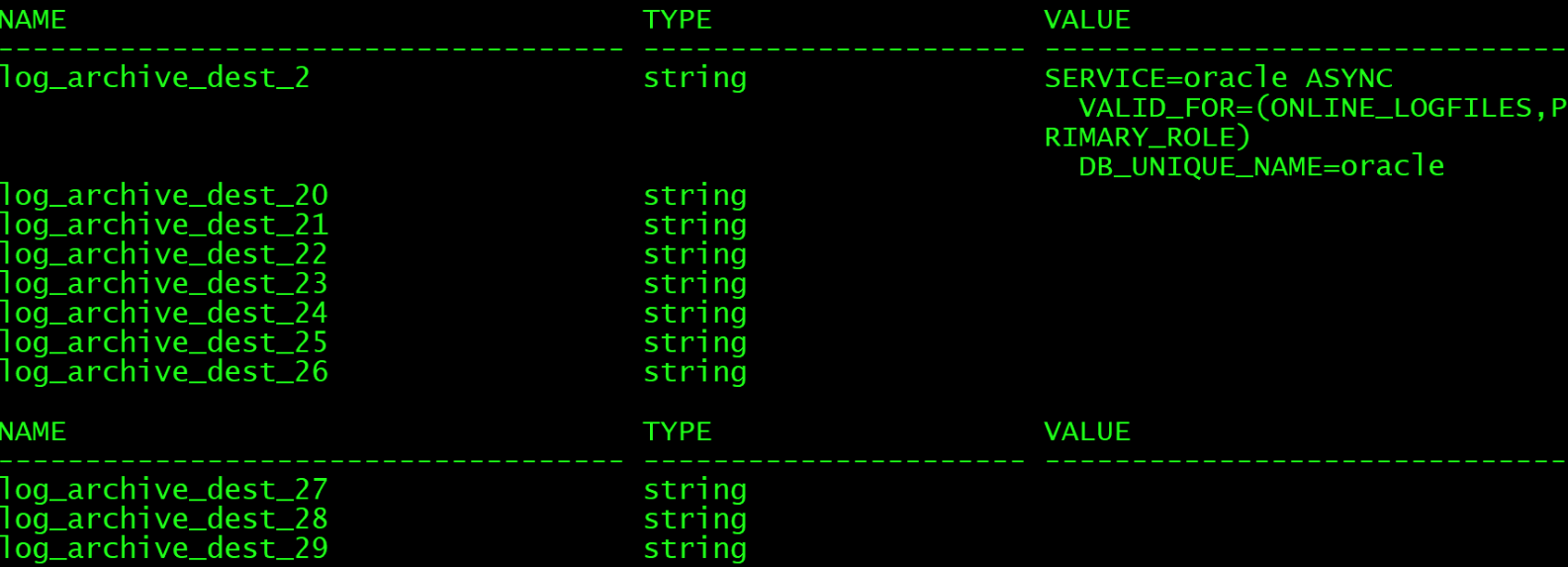
SQL> create pfile from spfile;
File created.
SQL> alter system set log_archive_dest_2=
2 ' SERVICE=oracle sync affirm VALID_FOR=(ONLINE_LOGFILES,PRIMARY_ROLE) DB_UNIQUE_NAME=oracle';
System altered.
主备库关库
SQL> shutdown immediate
将主备库启动到mount状态
SQL> startup mount
主库查询数据库状态
SQL> select name,open_mode,database_role,protection_mode,switchover_status from v$database;

备库状态查询
SQL> select name,open_mode,database_role,protection_mode,switchover_status from v$database;

主库切换成保护模式
SQL> alter database set standby database to maximize protection;
Database altered.
将主库启动到open状态
SQL> alter database open;
Database altered.
备库也会自动变成保护模式
SQL> alter database set standby database to maximize protection;

Database altered.
查看备库日志输出
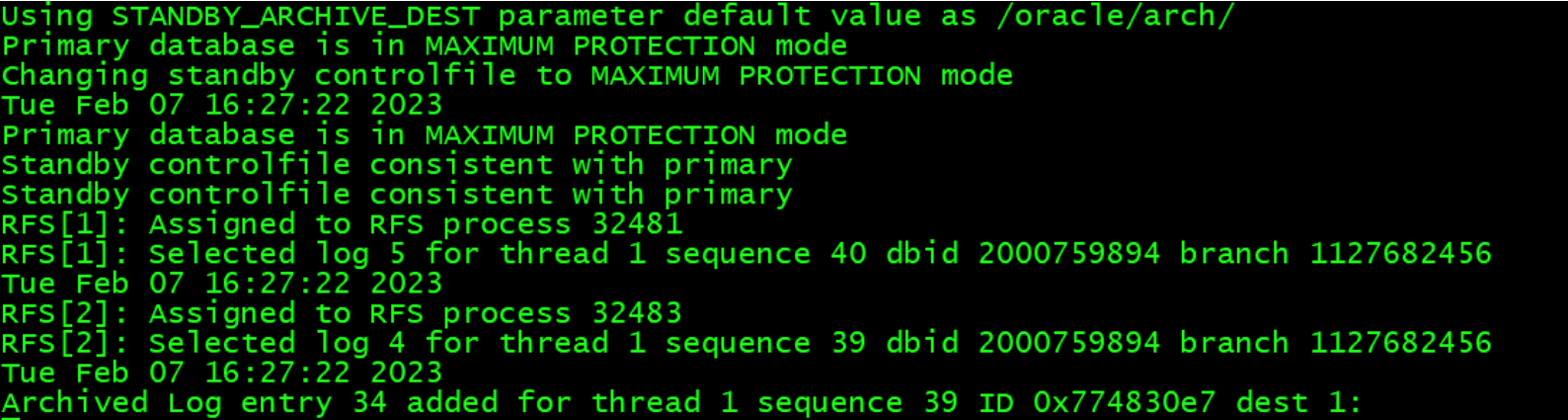
查看备库状态
SQL> select name,open_mode,database_role,protection_mode,switchover_status from v$database;

2.3 Real Time Apply(实时应用)
当主库commit时,日志同步写到备库的standbylog,然后立即从standbylog中实施recover,不需要等到归档再recover
开启备库
SQL> alter database open;

Database altered.
取消日志应用
SQL> recover managed standby database cancel;
开启实时应用日志
SQL> recover managed standby database using current logfile disconnect from session;
Media recovery complete.
ALTER DATABASE RECOVER  managed standby database using current logfile disconnect from session
Attempt to start background Managed Standby Recovery process (oraclest)
Tue Feb 07 16:48:11 2023
MRP0 started with pid=28, OS id=33507
MRP0: Background Managed Standby Recovery process started (oraclest)
 started logmerger process
Tue Feb 07 16:48:16 2023
Managed Standby Recovery starting Real Time Apply
Parallel Media Recovery started with 4 slaves
Waiting for all non-current ORLs to be archived...
All non-current ORLs have been archived.
Media Recovery Log /oracle/arch/arch_1_1127682456_37.log
Media Recovery Log /oracle/arch/arch_1_1127682456_38.log
Media Recovery Log /oracle/arch/arch_1_1127682456_39.log
Media Recovery Waiting for thread 1 sequence 40 (in transit)
Recovery of Online Redo Log: Thread 1 Group 5 Seq 40 Reading mem 0
  Mem# 0: /oracle/app/oracle/oradata/oraclest/redo05.log
Completed: ALTER DATABASE RECOVER  managed standby database using current logfile disconnect from session
测试
SQL> create table scott.emp1 as select * from scott.emp;

Table created.

SQL> insert into scott.emp1 select * from scott.emp;

14 rows created.

SQL> commit;

Commit complete.
DDL操作暗含commit,备库立马就可以看到,insert要等待提交之后,才能在备库看到。不提交等会儿自动shutdown abort会rollback
如果网络断开,备库等待10分钟仍不能通信会自行shutdown abort。
将主备库关闭
SQL> shutdown immediate
先启动主库会报错,最大保护模式,备库要完好,主库找到备库才能启动
SQL> startup
ORACLE instance started.

Total System Global Area 2455228416 bytes
Fixed Size                  2255712 bytes
Variable Size             620758176 bytes
Database Buffers         1811939328 bytes
Redo Buffers               20275200 bytes
Database mounted.
ORA-03113: end-of-file on communication channel
Process ID: 34487
Session ID: 191 Serial number: 3alter database convert to snapshot standby
2.4 闪回DG
如果想在备库上做些测试,希望备库能提供读写操作(DML操作),可以利用11G中新特性shotsshot DG。其基本原理是可以对备库先做一个数据库快照,然后通过alter database convert to snapshot standby命令将备库切换到读写模式,这时备库会停止recover,但是会继续接收日志,当测试完成后,再用闪回数据库技术恢复到备库的原始状态,当然测试的数据已不在保留,再通过recover将备库与主库同步到一致状态。
测试步骤:
1 在主备库设置闪回数据库
2 在备库做快照snapshot
(1) 停止MRP
alter database recover managed standby database cancel;
(2)转换为snapshot standby模式
alter database convert to snapshot standby;
3 在snapshot standby做DML操作测试
select name,open_mode,database_role,protection_mode,switchover_status from v$database;
(1)备库上可以做些DML操作
(2)在主库做日志切换,看到备库节点的告警日志也可以接收日志做恢复。
4 切换回主备同步状态
alter database convert to physical standby;
