



实践内容:
1. 下载Docker 镜像:OceanBase 官方社区版镜像 114 。
2. 使用 OBD 命令完成后续的 OceanBase 集群部署。
3. 创建一个业务租户、一个业务数据库,以及一些表等。
1.
Docker 环境准备
OS : Win10 专业版
CPU :8 Core
Memory : 16G
1.1 安装Docker Desktop :https://www.docker.com/
默认路径是 C:\Program Files\Docker 或者
C:\Users[用户名]\AppData\Local\Docker
1.2
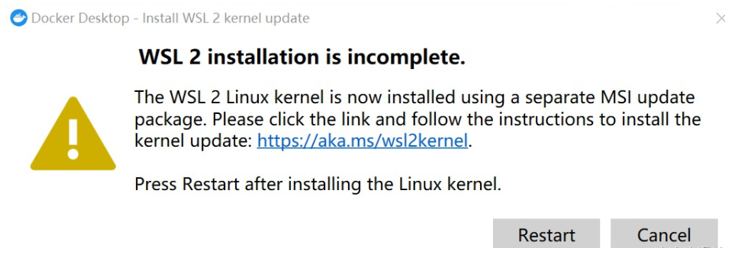
安装以后报错,提示WSL 没有安装
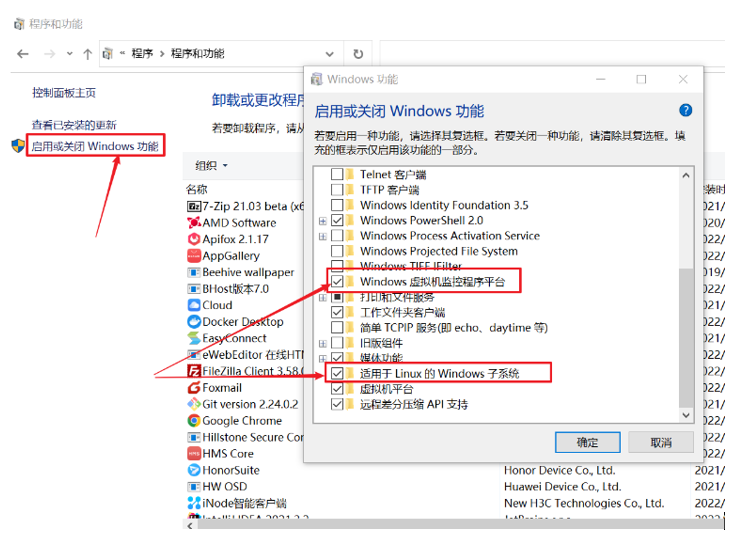
1.3 在window 控制面板-》程序-》 程序和功能中安装WSL 子系统
1.4 检查Docker Desktop 可以正常启动
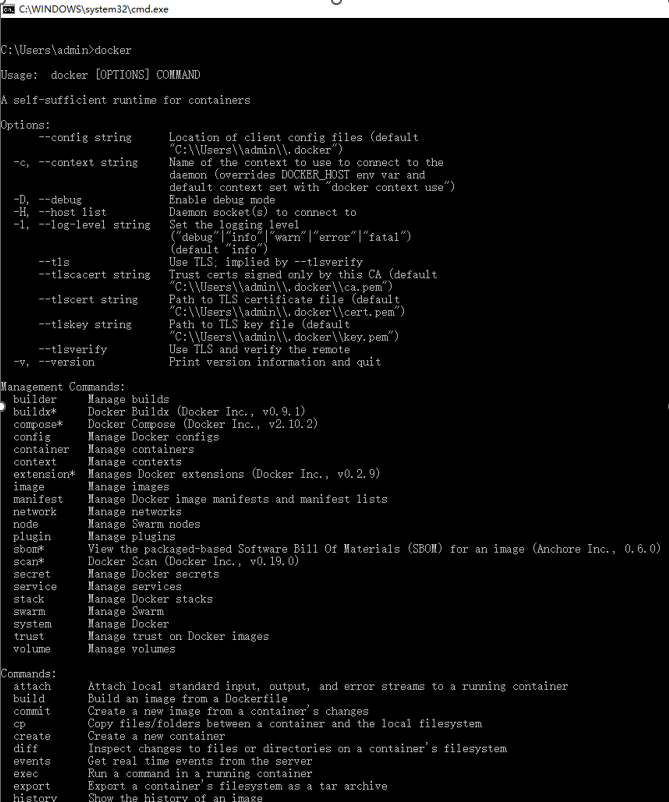
1.5 Docker 常用命令
Window 开始中启动一个cmd 命令窗口
Docker images
Docker search oceanbase
Docker pull
Docker ps
Docker run/rm
1.6 下载Oceanbase官方镜像文件
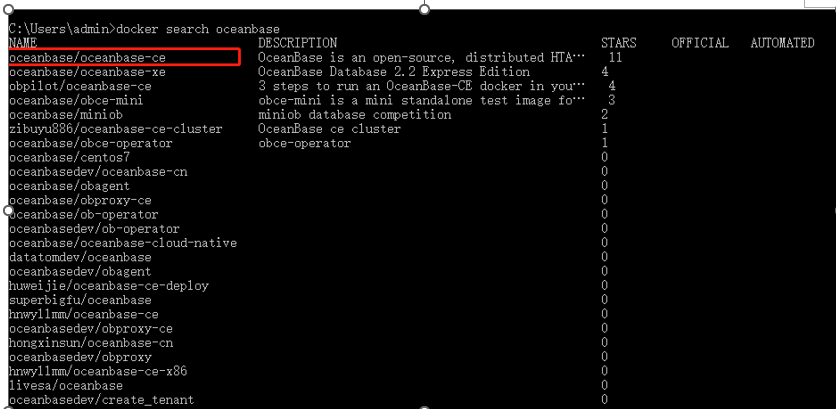
在cmd 命令窗口中输入 docker search oceanbase,找到官方镜像文件
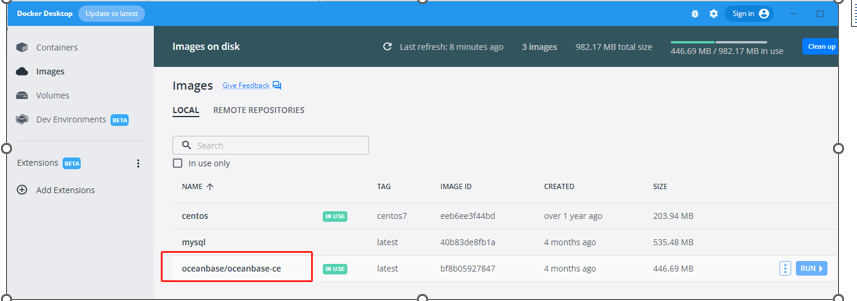
1.7 继续运行命令: docker pull oceanbase/oceanbase-ce,之后在desktop UI 界面可以看到镜像文件
2. 使用 OBD 命令完成后续的 OceanBase 集群部署
2.1 创建oceanbase 单机环境
docker run -p
2881:2881 --name obstandalone -e MINI_MODE=1 -d oceanbase/oceanbase-ce

2.2 初始化oceanbase 集群
sh-4.2#
obd cluster list
+------------------------------------------------------------+
| Cluster List |
+-----------+------------------------------+-----------------+
| Name
| Configuration Path |
Status (Cached) |
+-----------+------------------------------+-----------------+
| obcluster | /root/.obd/cluster/obcluster
| running |
+-----------+------------------------------+-----------------+
sh-4.2# obd cluster start obcluster
Get local repositories ok
Search plugins ok
Open ssh connection ok
Load cluster param plugin ok
Cluster status check ok
Deploy "obcluster" is running
sh-4.2# obd cluster stop obcluster
Get local repositories ok
Search plugins ok
Open ssh connection ok
Stop observer ok
Stop obagent ok
obcluster stopped
sh-4.2# obd cluster start obcluster
Get local repositories ok
Search plugins ok
Open ssh connection ok
Load cluster param plugin ok
Check before start observer ok
[WARN] (127.0.0.1) The recommended value of
fs.aio-max-nr is 1048576 (Current value: 65536)
[WARN] OBD-2000: (127.0.0.1) not enough
memory. (Free: 3.9G, Need: 3.0G)
Check before start obagent ok
Start observer ok
observer program health check ok
Connect to observer ok
Initialize cluster ok
Start obagent ok
obagent program health check ok
Wait for observer init ok
+---------------------------------------------+
| observer |
+-----------+---------+------+-------+--------+
| ip
| version | port | zone | status
|
+-----------+---------+------+-------+--------+
| 127.0.0.1 | 4.0.0.0 | 2881 | zone1 |
ACTIVE |
+-----------+---------+------+-------+--------+
obclient -h127.0.0.1 -P2881 -uroot
-Doceanbase -A
+------------------------------------------------+
| obagent |
+------------+-------------+------------+--------+
| ip
| server_port | pprof_port | status |
+------------+-------------+------------+--------+
| 172.17.0.2 | 8088 | 8089 | active |
+------------+-------------+------------+--------+
obcluster running
sh-4.2# obclient -h127.1 -P2881
Welcome to the OceanBase. Commands end with ; or \g.
Your OceanBase connection id is 3221487617
Server version: OceanBase_CE 4.0.0.0
(r100000272022110114-6af7f9ae79cd0ecbafd4b1b88e2886ccdba0c3be) (Built Nov 1 2022 14:57:18)
Copyright (c) 2000, 2018, OceanBase and/or
its affiliates. All rights reserved.
Type 'help;' or '\h' for help. Type '\c' to
clear the current input statement.
obclient [(none)]>
3.创建一个业务租户、一个业务数据库,以及一些表等
3.1 创建业务租户
obclient [oceanbase]> CREATE RESOURCE
UNIT unit1
-> max_cpu = 1,
-> memory_size = 2684354560,
-> max_iops = 10000,
-> min_iops = 10000,
-> iops_weight = 1,
-> log_disk_size =
2684354560;
Query OK, 0 rows affected (0.018 sec)
obclient [oceanbase]> CREATE RESOURCE
POOL pool1
-> UNIT = 'unit1',
-> UNIT_NUM = 1,
-> ZONE_LIST = ('zone1');
Query OK, 0 rows affected (0.020 sec)
obclient [oceanbase]> create tenant
obtenant resource_pool_list=('pool1'), zone_list=('zone1'),
primary_zone='zone1',comment 'mysql tenant/instance', charset='utf8' set
ob_tcp_invited_nodes='%', ob_compatibility_mode='mysql';
Query OK, 0 rows affected (17.695 sec)
obclient [oceanbase]> select * from
__all_unit_config;
+----------------------------+----------------------------+----------------+-----------------+---------+---------+-------------+---------------+----------+----------+-------------+
| gmt_create | gmt_modified | unit_config_id | name | max_cpu | min_cpu | memory_size |
log_disk_size | max_iops | min_iops | iops_weight |
+----------------------------+----------------------------+----------------+-----------------+---------+---------+-------------+---------------+----------+----------+-------------+
| 2023-02-24 22:59:09.550122 | 2023-02-24
22:59:09.550122 | 1 |
sys_unit_config | 1 | 1 |
2147483648 | 2147483648 | 10000 |
10000 | 1 |
| 2023-02-24 23:43:18.259169 | 2023-02-24
23:43:18.259169 | 1003 |
unit1 | 1 |
1 | 2684354560 | 2684354560 | 10000 |
10000 | 1 |
+----------------------------+----------------------------+----------------+-----------------+---------+---------+-------------+---------------+----------+----------+-------------+
2 rows in set (0.001 sec)
obclient [oceanbase]> select * from
__all_resource_pool;
+----------------------------+----------------------------+------------------+----------+------------+----------------+-----------+-----------+--------------+--------------------+
| gmt_create | gmt_modified | resource_pool_id | name | unit_count | unit_config_id | zone_list
| tenant_id | replica_type | is_tenant_sys_pool |
+----------------------------+----------------------------+------------------+----------+------------+----------------+-----------+-----------+--------------+--------------------+
| 2023-02-24 22:59:09.556937 | 2023-02-24
22:59:09.578771 | 1 |
sys_pool | 1 | 1 | zone1 |
1 | 0 | 0 |
| 2023-02-24 23:43:25.161506 | 2023-02-24
23:43:40.765286 | 1004 |
pool1 | 1 | 1003 | zone1 |
1008 | 0 | 0 |
+----------------------------+----------------------------+------------------+----------+------------+----------------+-----------+-----------+--------------+--------------------+
2 rows in set (0.001 sec)
obclient [oceanbase]> select * from
__all_tenant;
+----------------------------+----------------------------+-----------+-------------+-----------+--------------+--------+----------------+-----------------------+---------------+-------------------+-----------------------+--------------------+------------------+--------+---------------+
| gmt_create | gmt_modified | tenant_id | tenant_name |
zone_list | primary_zone | locked | collation_type | info | locality | previous_locality |
default_tablegroup_id | compatibility_mode | drop_tenant_time | status |
in_recyclebin |
+----------------------------+----------------------------+-----------+-------------+-----------+--------------+--------+----------------+-----------------------+---------------+-------------------+-----------------------+--------------------+------------------+--------+---------------+
| 2023-02-24 22:59:09.593284 | 2023-02-24
22:59:09.593284 | 1 | sys | zone1 | RANDOM |
0 | 0 | system
tenant | FULL{1}@zone1 | | -1 | 0 | -1 | NORMAL | 0 |
| 2023-02-24 23:43:40.759747 | 2023-02-24
23:43:56.188312 | 1007 |
META$1008 | zone1 | zone1 |
0 | 0 | mysql
tenant/instance | FULL{1}@zone1 | | -1 | 0 | -1 | NORMAL | 0 |
| 2023-02-24 23:43:40.759747 | 2023-02-24
23:43:56.235902 | 1008 |
obtenant | zone1 | zone1 |
0 | 0 | mysql
tenant/instance | FULL{1}@zone1 | | -1 | 0 | -1 | NORMAL | 0 |
+----------------------------+----------------------------+-----------+-------------+-----------+--------------+--------+----------------+-----------------------+---------------+-------------------+-----------------------+--------------------+------------------+--------+---------------+
3 rows in set (0.001 sec)
3.2 创建数据库
sh-4.2# obclient -h127.1 -P2881
-uroot@obtenant -P2881
Welcome to the OceanBase. Commands end with ; or \g.
Your OceanBase connection id is 3221487630
Server version: OceanBase_CE 4.0.0.0
(r100000272022110114-6af7f9ae79cd0ecbafd4b1b88e2886ccdba0c3be) (Built Nov 1 2022 14:57:18)
Copyright (c) 2000, 2018, OceanBase and/or
its affiliates. All rights reserved.
Type 'help;' or '\h' for help. Type '\c' to
clear the current input statement.
obclient [(none)]> show tenant;
+---------------------+
| Current_tenant_name |
+---------------------+
| obtenant |
+---------------------+
1 row in set (0.003 sec)
obclient [(none)]> SELECT
effective_tenant_id();
+-----------------------+
| effective_tenant_id() |
+-----------------------+
| 1008 |
+-----------------------+
1 row in set (0.001 sec)
obclient [(none)]> show databases;
+--------------------+
| Database |
+--------------------+
| information_schema |
| mysql |
| oceanbase |
| test |
+--------------------+
4 rows in set (0.013 sec)
obclient [(none)]> create database
testdb;
Query OK, 1 row affected (0.117 sec)
obclient [(none)]> use testdb;
Database changed
3.3 创建表和数据
sh-4.2# obclient -h127.1 -P2881 -uroot@obtenant -P2881
Welcome to the OceanBase. Commands end with ; or \g.
Your OceanBase connection id is 3221487631
Server version: OceanBase_CE 4.0.0.0 (r100000272022110114-6af7f9ae79cd0ecbafd4b1b88e2886ccdba0c3be) (Built Nov 1 2022 14:57:18)
Copyright (c) 2000, 2018, OceanBase and/or its affiliates. All rights reserved.
Type 'help;' or '\h' for help. Type '\c' to clear the current input statement.
obclient [(none)]> use testdb;
Database changed
obclient [testdb]>
obclient [testdb]>
obclient [testdb]>
obclient [testdb]> show tenant;
+---------------------+
| Current_tenant_name |
+---------------------+
| obtenant |
+---------------------+
1 row in set (0.003 sec)
obclient [testdb]> create table t1(id int ,name varchar(10));
Query OK, 0 rows affected (0.279 sec)
obclient [testdb]> show tables;
+------------------+
| Tables_in_testdb |
+------------------+
| t1 |
+------------------+
1 row in set (0.003 sec)
obclient [testdb]> insert into t1 values(1,'2');
Query OK, 1 row affected (0.083 sec)
obclient [testdb]> select * from t1;
+------+------+
| id | name |
+------+------+
| 1 | 2 |
+------+------+
1 row in set (0.005 sec)
obclient [testdb]>
That is all !
