



主要内容:
1. (必选)手动部署一个 OB 单副本集群,包括一个 OBProxy 节点。
2. (必选)创建一个业务租户、一个业务数据库,以及一些表等。
1.
先准备一台虚拟机 :
docker run --name obtest -p 60001:22 -p
28811:2881 --privileged centos:centos7 /usr/sbin/init
docker exec -it obtest bash
安装必要的软件
yum install net-tools.x86_64 -y
yum install openssh-server.x86_64 -y
yum install openssh-clients.x86_64 -y
yum install wget -y
systemctl restart sshd --重启ssh
passwd --修改密码
2. 检查环境配置
[root@aef5e48102b1 /]# lscpu
Architecture: x86_64
CPU op-mode(s): 32-bit, 64-bit
Byte Order: Little Endian
CPU(s): 6
On-line CPU(s) list: 0-5
Thread(s) per core: 2
Core(s) per socket: 3
Socket(s): 1
Vendor ID: GenuineIntel
CPU family: 6
Model: 60
Model name: Intel(R) Core(TM) i7-4790 CPU @
3.60GHz
Stepping: 3
CPU MHz: 3591.689
BogoMIPS: 7183.37
Hypervisor vendor: Microsoft
Virtualization type: full
L1d cache: 32K
L1i cache: 32K
L2 cache: 256K
L3 cache: 8192K
Flags: fpu vme de pse tsc msr pae mce
cx8 apic sep mtrr pge mca cmov pat pse36 clflush mmx fxsr sse sse2 ss ht
syscall nx pdpe1gb rdtscp lm constant_tsc rep_good nopl xtopology cpuid pni
pclmulqdq ssse3 fma cx16 pcid sse4_1 sse4_2 movbe popcnt aes xsave avx f16c
rdrand hypervisor lahf_lm abm invpcid_single pti ssbd ibrs ibpb stibp fsgsbase
bmi1 avx2 smep bmi2 erms invpcid xsaveopt flush_l1d arch_capabilities
[root@aef5e48102b1 /]# free -h
total used free shared
buff/cache available
Mem: 11G 503M 9G 9.9M 1.2G 10G
Swap: 0B 0B 0B
[root@aef5e48102b1 /]# cat
/etc/redhat-release
CentOS Linux release 7.9.2009 (Core)
[root@aef5e48102b1 /]# uname -a
Linux aef5e48102b1
5.10.16.3-microsoft-standard-WSL2 #1 SMP Fri Apr 2 22:23:49 UTC 2021 x86_64 x86_64
x86_64 GNU/Linux
[root@aef5e48102b1 /]# df -h
Filesystem Size
Used Avail Use% Mounted on
overlay 251G
2.3G 236G 1% /
tmpfs 64M 0
64M 0% /dev
tmpfs 5.9G 0
5.9G 0% /sys/fs/cgroup
shm 64M 0
64M 0% /dev/shm
/dev/sdb 251G
2.3G 236G 1% /etc/hosts
tmpfs 5.9G
8.2M 5.9G 1% /run
[root@aef5e48102b1 /]#
之前由于内存不足导致OB 服务起不来,这次调整docker desktop内存,步骤:
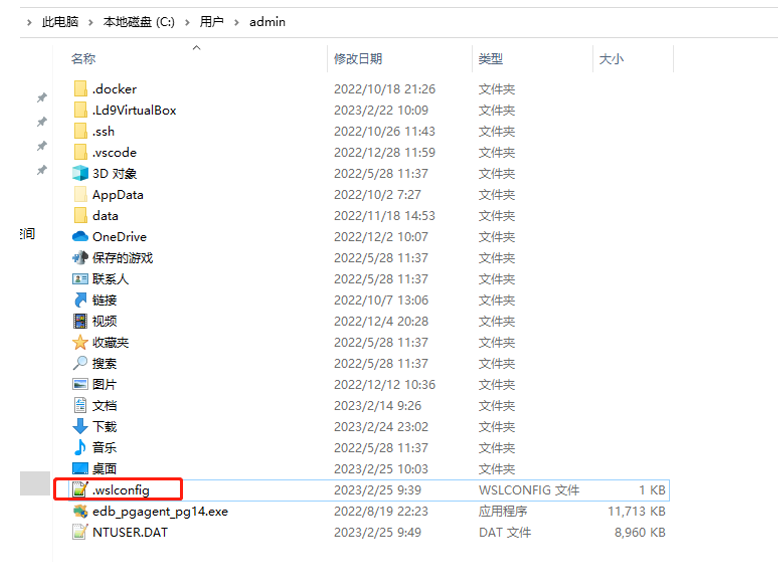
1.按下Windows + R 键,输入 %UserProfile% 并运行进入用户文件夹
新建文件 .wslconfig ,然后记事本编辑
[wsl2]
memory=12GB
processors=6
swap=0
localhostForwarding=true
3 . 手动部署一个 OB 单副本集群,包括一个 OBProxy 节点。
下载link :https://www.oceanbase.com/softwarecenter
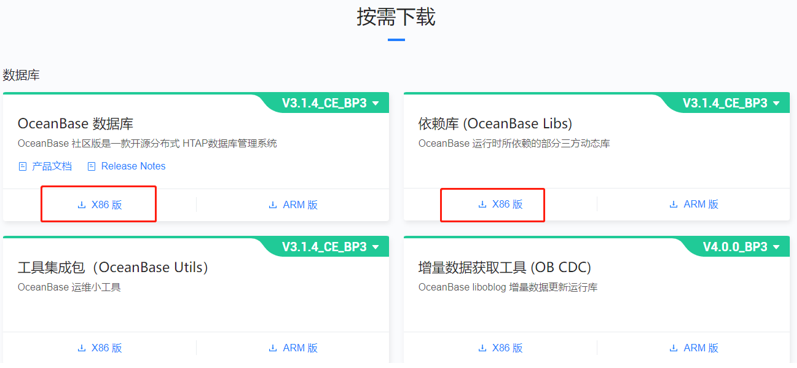
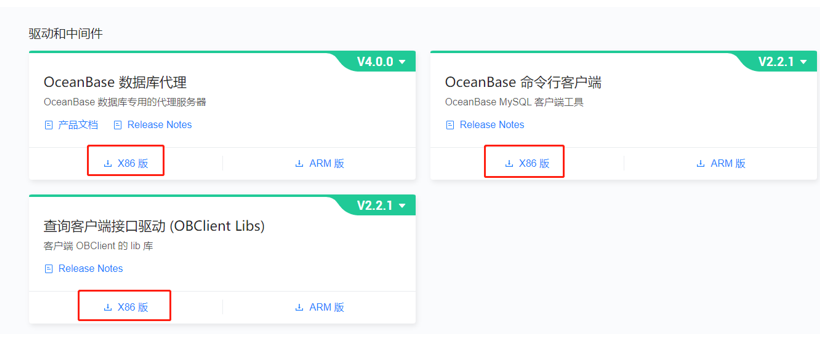
3.1 下载到本地,然后上传rpm包
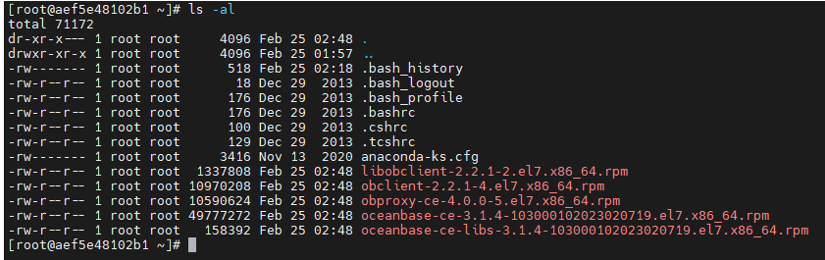
3.2 创建用户和文件夹,部署安装包
useradd admin
usermod admin -G wheel
passwd admin
id admin
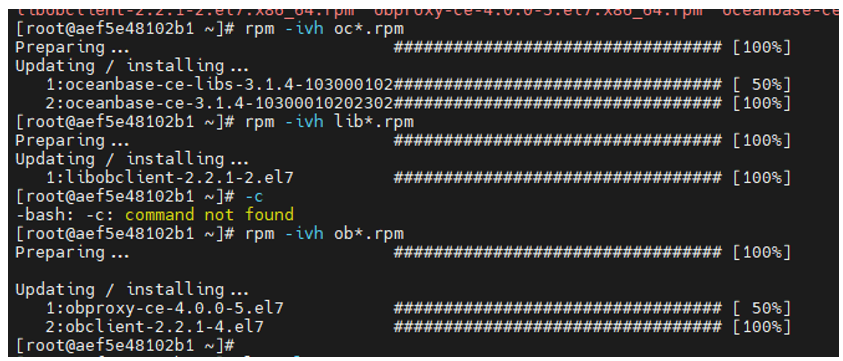
rpm -ivh oc*.rpm
rpm -ivh lib*.rpm
rpm -ivh ob*.rpm
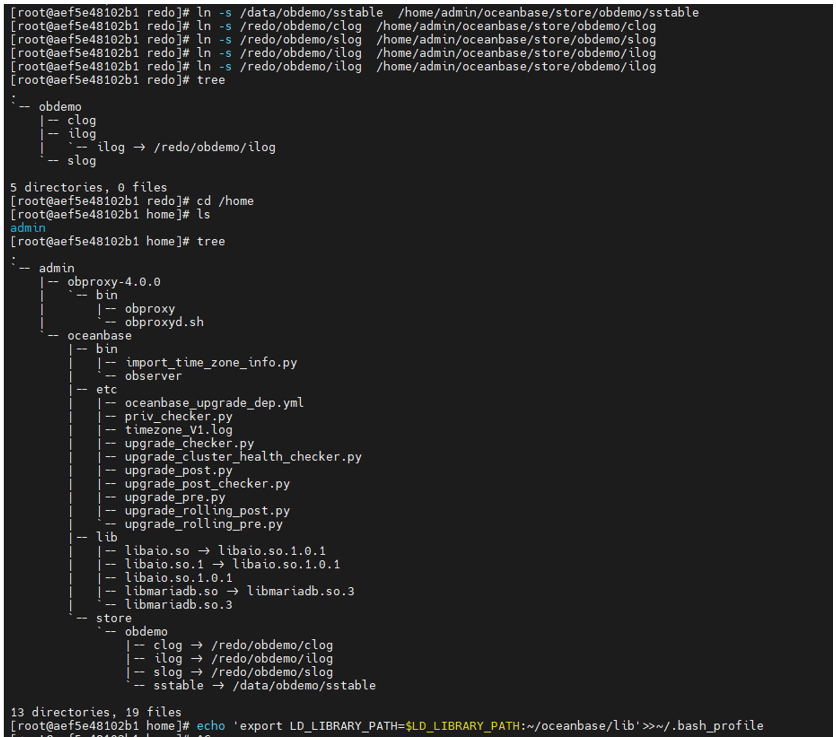
mkdir -p
/home/admin/oceanbase/store/obdemo/
/data/obdemo/sstable
/redo/obdemo/{clog,ilog,slog}
ln -s /data/obdemo/sstable /home/admin/oceanbase/store/obdemo/sstable
ln -s /redo/obdemo/clog /home/admin/oceanbase/store/obdemo/clog
ln -s /redo/obdemo/slog /home/admin/oceanbase/store/obdemo/slog
ln -s /redo/obdemo/ilog /home/admin/oceanbase/store/obdemo/ilog
echo 'export
LD_LIBRARY_PATH=$LD_LIBRARY_PATH:~/oceanbase/lib'>>~/.bash_profile
yum install tree --add tree
3.3 启动observer & obproxy
cd /home/admin/oceanbase &&
bin/observer -i eth0 -p 2881 -P 2882 -z zone1 -d /home/admin/oceanbase/store/obdemo
-r '172.17.0.2:2882:2881' -c 20211207 -n obdemo
-o"memory_limit=8G,cache_wash_threshold=1G,__min_full_resource_pool_memory=268435456,system_memory=3G,memory_chunk_cache_size=128M,cpu_count=16,net_thread_count=4,datafile_size=1G,stack_size=1536K"

netstat -ntlp --检查端口

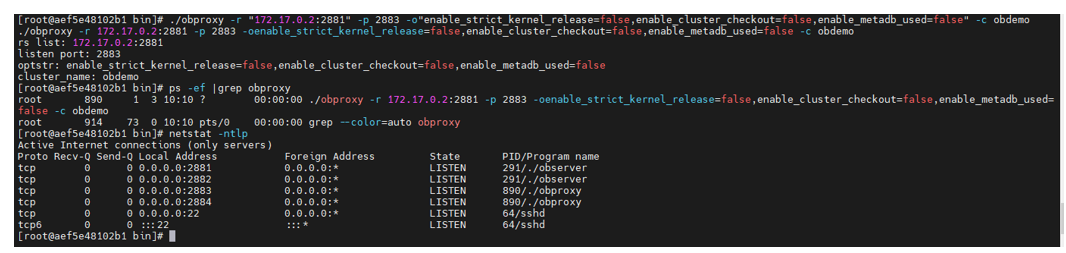
启动obproxy:
cd /home/admin/obproxy-4.0.0/bin
./obproxy -r
"172.17.0.2:2881" -p 2883
-o"enable_strict_kernel_release=false,enable_cluster_checkout=false,enable_metadb_used=false"
-c obdemo
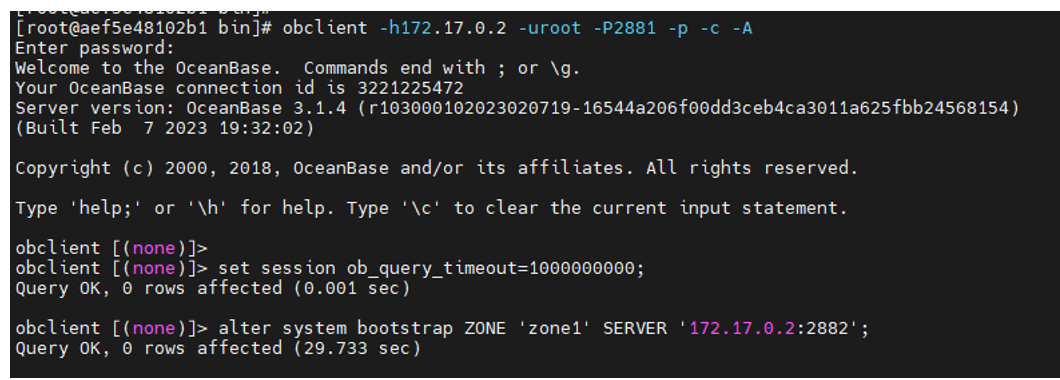
obclient -h172.17.0.2 -uroot -P2881
-p -c -A
set session
ob_query_timeout=1000000000;
alter system bootstrap ZONE 'zone1'
SERVER '172.17.0.2:2882'; --选主
错误1:
./observer: error while loading
shared libraries: libmariadb.so.3: cannot open shared object file: No such file
or directory
Fix step:
配置正确的路径:
echo 'export
LD_LIBRARY_PATH=$LD_LIBRARY_PATH:/home/admin/oceanbase/lib'>>~/.bash_profile
错误2 :
Error 4015 (HY000): System Error

Fix step :
重新初始化,修改CPU 数量从16 到8 ,虚拟机的配置是6
kill -9 `pidof observer`
rm -rf /home/admin/oceanbase/store/obdemo/*/*
/observer
-i eth0 -p 2881 -P 2882 -z zone1 -d /home/admin/oceanbase/s
tore/obdemo -r '172.17.0.2:2882:2881' -c 20211207 -n obdemo -o"memory_limit=8G,cache_wash_thres hold=1G,__min_full_resource_pool_memory=268435456,system_memory=3G,memory_chunk_cache_size=128M
,cpu_count=8,net_thread_count=4,datafile_size=1G,stack_size=1536K"
./observer -i eth0 -p 2881 -P 2882 -z
zone1 -d /home/admin/oceanbase/store/obdemo -r 172.17.0.2
:2882:2881 -c 20211207 -n obdemo
-omemory_limit=8G,cache_wash_threshold=1G,__min_full_resource_
pool_memory=268435456,system_memory=3G,memory_chunk_cache_size=128M,cpu_count=8,net_thread_coun t=4,datafile_size=1G,stack_size=1536K
4. 创建一个业务租户、一个业务数据库,以及一些表
系统租户连接:
obclient -h172.17.0.2 -uroot@sys -P2881 -p -c -A
oceanbase
创建资源单元
CREATE RESOURCE UNIT unit1 max_cpu 4, max_memory '1G',
max_iops 10000,max_disk_size '10G', max_session_num 100000,
MIN_CPU=1,MIN_MEMORY= '1G', MIN_IOPS=128;
创建资源池
CREATE RESOURCE POOL pool1 UNIT = 'unit1',UNIT_NUM =
1,ZONE_LIST = ('zone1');
错误信息:
obclient [oceanbase]> CREATE RESOURCE POOL pool1 UNIT
= 'unit1',UNIT_NUM = 1,ZONE_LIST = ('zone1');
ERROR 4624 (HY000):
machine resource 'zone1' is not enough to hold
a new unit
解决办法:
检查unit 情况:
select * from __all_unit_config;
降低sys租户的资源
alter RESOURCE UNIT sys_unit_config MAX_CPU 3;
[root@aef5e48102b1 bin]# obclient -h172.17.0.2 -uroot@sys
-P2881 -p -c -A oceanbase
Enter
password:
Welcome
to the OceanBase. Commands end with ; or
\g.
Your
OceanBase connection id is 3221487811
Server
version: OceanBase 3.1.4
(r103000102023020719-16544a206f00dd3ceb4ca3011a625fbb24568154) (Built Feb 7 2023 19:32:02)
Copyright
(c) 2000, 2018, OceanBase and/or its affiliates. All rights reserved.
Type
'help;' or '\h' for help. Type '\c' to clear the current input statement.
obclient
[oceanbase]> alter RESOURCE UNIT sys_unit_config MAX_CPU 3;
Query OK,
0 rows affected (0.015 sec)
obclient
[oceanbase]> select * from __all_unit_config;
+----------------------------+----------------------------+----------------+-----------------+---------+---------+------------+------------+----------+----------+---------------+---------------------+
|
gmt_create |
gmt_modified |
unit_config_id | name |
max_cpu | min_cpu | max_memory | min_memory | max_iops | min_iops |
max_disk_size | max_session_num |
+----------------------------+----------------------------+----------------+-----------------+---------+---------+------------+------------+----------+----------+---------------+---------------------+
|
2023-02-25 18:52:50.922507 | 2023-02-25 19:08:16.038871 | 1 | sys_unit_config | 3
| 2.5 | 1610612736 | 1342177280
| 10000 | 5000 |
1073741824 | 9223372036854775807 |
|
2023-02-25 19:06:11.003879 | 2023-02-25 19:06:11.003879 | 1001 | unit1 | 4 |
1 | 1073741824 | 1073741824 |
10000 | 128 | 10737418240 | 100000 |
+----------------------------+----------------------------+----------------+-----------------+---------+---------+------------+------------+----------+----------+---------------+---------------------+
2 rows in
set (0.001 sec)
obclient
[oceanbase]> CREATE RESOURCE POOL pool1 UNIT = 'unit1',UNIT_NUM =
1,ZONE_LIST = ('zone1');
Query OK,
0 rows affected (0.023 sec)
obclient
[oceanbase]> select * from __all_unit_config;
+----------------------------+----------------------------+----------------+-----------------+---------+---------+------------+------------+----------+----------+---------------+---------------------+
|
gmt_create |
gmt_modified |
unit_config_id | name | max_cpu
| min_cpu | max_memory | min_memory | max_iops | min_iops | max_disk_size |
max_session_num |
+----------------------------+----------------------------+----------------+-----------------+---------+---------+------------+------------+----------+----------+---------------+---------------------+
|
2023-02-25 18:52:50.922507 | 2023-02-25 19:08:16.038871 | 1 | sys_unit_config | 3 |
2.5 | 1610612736 | 1342177280 |
10000 | 5000 | 1073741824 | 9223372036854775807 |
| 2023-02-25
19:06:11.003879 | 2023-02-25 19:06:11.003879 | 1001 | unit1 | 4 |
1 | 1073741824 | 1073741824 |
10000 | 128 | 10737418240 | 100000 |
+----------------------------+----------------------------+----------------+-----------------+---------+---------+------------+------------+----------+----------+---------------+---------------------+
2 rows in
set (0.001 sec)
obclient
[oceanbase]> select * from __all_resource_pool;
+----------------------------+----------------------------+------------------+----------+------------+----------------+-----------+-----------+--------------+--------------------+
|
gmt_create |
gmt_modified |
resource_pool_id | name | unit_count
| unit_config_id | zone_list | tenant_id | replica_type | is_tenant_sys_pool |
+----------------------------+----------------------------+------------------+----------+------------+----------------+-----------+-----------+--------------+--------------------+
|
2023-02-25 18:52:50.932536 | 2023-02-25 18:52:50.945251 | 1 | sys_pool | 1 | 1 | zone1 |
1 | 0 | 0 |
|
2023-02-25 19:08:32.095150 | 2023-02-25 19:08:32.095150 | 1002 | pool1 |
1 | 1001 | zone1 |
-1 | 0 | 0 |
+----------------------------+----------------------------+------------------+----------+------------+----------------+-----------+-----------+--------------+--------------------+
2 rows in
set (0.001 sec)
obclient
[oceanbase]> select * from __all_tenant;
+----------------------------+----------------------------+-----------+-------------+-------------+-----------+--------------+--------+----------------+---------------+-----------+-----------------------+---------------+---------------------+-------------------+------------------------+-----------------------------+-----------------------+--------------------+------------------+----------------------+---------------+
|
gmt_create |
gmt_modified | tenant_id |
tenant_name | replica_num | zone_list | primary_zone | locked | collation_type
| info | read_only |
rewrite_merge_version | locality |
logonly_replica_num | previous_locality | storage_format_version |
storage_format_work_version | default_tablegroup_id | compatibility_mode |
drop_tenant_time | status |
in_recyclebin |
+----------------------------+----------------------------+-----------+-------------+-------------+-----------+--------------+--------+----------------+---------------+-----------+-----------------------+---------------+---------------------+-------------------+------------------------+-----------------------------+-----------------------+--------------------+------------------+----------------------+---------------+
|
2023-02-25 18:52:50.964980 | 2023-02-25 18:52:50.964980 | 1 | sys | -1 | zone1 | zone1 |
0 | 0 | system tenant | 0 | 0 | FULL{1}@zone1 | 0 | | 0 | 0 | -1 | 0 | -1 | TENANT_STATUS_NORMAL | 0 |
+----------------------------+----------------------------+-----------+-------------+-------------+-----------+--------------+--------+----------------+---------------+-----------+-----------------------+---------------+---------------------+-------------------+------------------------+-----------------------------+-----------------------+--------------------+------------------+----------------------+---------------+
1 row in
set (0.002 sec)
创建新租户:
obclient
[oceanbase]> create tenant obtenant resource_pool_list=('pool1'),
zone_list=('zone1'), primary_zone='zone1',comment 'mysql tenant/instance',
charset='utf8' set ob_tcp_invited_nodes='%', ob_compatibility_mode='mysql';
Query OK,
0 rows affected (1.270 sec)
obclient
[oceanbase]> exit
Bye
新租户连接:
[root@aef5e48102b1
bin]# obclient -h127.1 -P2881 -uroot@obtenant -P2881
Welcome
to the OceanBase. Commands end with ; or
\g.
Your
OceanBase connection id is 3221487844
Server
version: OceanBase 3.1.4
(r103000102023020719-16544a206f00dd3ceb4ca3011a625fbb24568154) (Built Feb 7 2023 19:32:02)
Copyright
(c) 2000, 2018, OceanBase and/or its affiliates. All rights reserved.
Type
'help;' or '\h' for help. Type '\c' to clear the current input statement.
obclient
[(none)]> show tenant
-> ;
+---------------------+
|
Current_tenant_name |
+---------------------+
|
obtenant |
+---------------------+
1 row in
set (0.023 sec)
obclient
[(none)]> create database testdb;
Query OK,
1 row affected (0.033 sec)
obclient
[(none)]> use testdb;
Database
changed
obclient
[testdb]> create table t1 (id int ,name varchar(10));
Query OK,
0 rows affected (0.139 sec)
obclient
[testdb]> insert into t1 values(1,1);
Query OK,
1 row affected (0.023 sec)
obclient
[testdb]> select * from t1;
+------+------+
| id | name |
+------+------+
| 1 | 1
|
+------+------+
1 row in set (0.002 sec)
最后遇到一个bug :
221版本修复了这个问题,连接root@proxysys用户时,请加上「–proxy-mode」。参考:Release V2.2.1 · oceanbase/obclient · GitHub 9
https://github.com/oceanbase/obclient/releases/tag/2.2.1
错误信息:
[root@aef5e48102b1 bin]# obclient -h172.17.0.2 -uroot@proxysys -P2883 -p –-proxy-mode
Enter password:
ERROR 2027 (HY000): received malformed packet

根据上面的文档,加入一个参数 --proxy-mode
[root@aef5e48102b1 bin]# obclient -h172.17.0.2 -uroot@proxysys -P2883 -p --proxy-mode
Enter password:
Welcome to the OceanBase. Commands end with ; or \g.
Your OceanBase connection id is 17
Server version:
Copyright (c) 2000, 2018, OceanBase and/or its affiliates. All rights reserved.
Type 'help;' or '\h' for help. Type '\c' to clear the current input statement.
修改obproxy 管理员密码:
alter proxyconfig set obproxy_sys_password = '111111';
obproxy 和observer 通信用户密码:
alter proxyconfig set observer_sys_password = '654321';
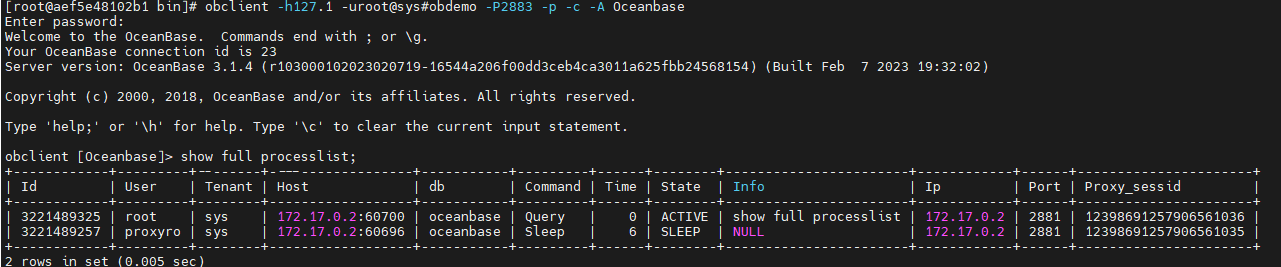
obclient -h127.1 -uroot@sys#obdemo -P2883 -p -c -A Oceanbase
show full processlist;
That is all !
