点击蓝字 关注我们

SeaTunnel是一个开源、易用的超高性能分布式数据集成平台,支持海量数据的实时同步。本文介绍如何通过SeaTunnel集成平台将数据写入OSS-HDFS服务。
背景信息
数据源多样 常用的数据源有数百种,版本不兼容。随着新技术的出现,可能出现更多的数据源。用户很难找到能够全面快速支持这些数据源的工具。 复杂同步场景 数据同步需要支持离线-全量同步、离线-增量同步、CDC、实时同步、全库同步等多种同步场景。 资源需求高 现有的数据集成和数据同步工具往往需要大量的计算资源或JDBC连接资源来完成海量小文件的实时同步,这在一定程度上加重了企业的负担。 缺乏数据监控 数据集成和同步过程经常会丢失或重复数据。同步过程缺乏监控,无法直观了解任务过程中数据的真实情况。 技术栈复杂 企业使用的技术组件各不相同,您需要针对不同的组件开发相应的同步程序来完成数据集成。 管理和维护困难 受限于不同的底层技术组件(Flink或者Spark),通常单独开发和管理离线同步和实时同步,增加了管理和维护的难度。
前提条件
使用限制
步骤一:部署SeaTunnel
1
本地部署
下载SeaTunnel。
在Apache SeaTunnel页面,下载最新版本的seatunnel--bin.tar.gz。 在终端通过以下命令下载最新版本的SeaTunnel。
export version="2.3.0" wget "https://archive.apache.org/dist/incubator/seatunnel/${version}/apache-seatunnel-incubating-${version}-bin.tar.gz" tar -xzvf "apache-seatunnel-incubating-${version}-bin.tar.gz"
sh bin/install_plugin.sh 2.3.0
--connectors-v2--connector-amazondynamodbconnector-assertconnector-cassandraconnector-cdc-mysqlconnector-cdc-sqlserverconnector-clickhouseconnector-datahubconnector-dingtalkconnector-dorisconnector-elasticsearchconnector-emailconnector-file-ftpconnector-file-hadoopconnector-file-localconnector-file-ossconnector-file-oss-jindoconnector-file-s3connector-file-sftpconnector-google-sheetsconnector-hiveconnector-http-baseconnector-http-feishuconnector-http-gitlabconnector-http-githubconnector-http-jiraconnector-http-klaviyoconnector-http-lemlistconnector-http-myhoursconnector-http-notionconnector-http-onesignalconnector-http-wechatconnector-hudiconnector-icebergconnector-influxdbconnector-iotdbconnector-jdbcconnector-kafkaconnector-kuduconnector-maxcomputeconnector-mongodbconnector-neo4jconnector-openmldbconnector-pulsarconnector-rabbitmqconnector-redisconnector-s3-redshiftconnector-sentryconnector-slackconnector-socketconnector-starrocksconnector-tablestoreconnector-selectdb-cloudconnector-hbase--end--
2
Kubernetes(Beta)部署
通过Kubernetes(Beta)部署SeaTunnel目前处于试运行阶段。以下以Flink引擎为例,不推荐在生产环境中使用。 确保已在本地安装Docker,Kubernetes以及Helm。
启动集群。
minikube start --kubernetes-version=v1.23.3
ENV SEATUNNEL_VERSION="2.3.0-beta"ENV SEATUNNEL_HOME = "/opt/seatunnel"RUN mkdir -p $SEATUNNEL_HOMERUN wget https://archive.apache.org/dist/incubator/seatunnel/${SEATUNNEL_VERSION}/apache-seatunnel-incubating-${SEATUNNEL_VERSION}-bin.tar.gzRUN tar -xzvf apache-seatunnel-incubating-${SEATUNNEL_VERSION}-bin.tar.gzRUN cp -r apache-seatunnel-incubating-${SEATUNNEL_VERSION}/* $SEATUNNEL_HOME/RUN rm -rf apache-seatunnel-incubating-${SEATUNNEL_VERSION}*RUN rm -rf $SEATUNNEL_HOME/connectors/seatunnel
docker build -t seatunnel:2.3.0-beta-flink-1.13 -f Dockerfile .
minikube image load seatunnel:2.3.0-beta-flink-1.13
kubectl create -f https://github.com/jetstack/cert-manager/releases/download/v1.7.1/cert-manager.yaml
helm repo add flink-operator-repo https://downloads.apache.org/flink/flink-kubernetes-operator-0.1.0/
helm install flink-kubernetes-operator flink-operator-repo/flink-kubernetes-operator
kubectl get pods
NAME READY STATUS RESTARTS AGEflink-kubernetes-operator-5f466b8549-mgchb 1/1 Running 3 (23h ago) 1
步骤二:设置配置文件
env {# You can set SeaTunnel environment configuration hereexecution.parallelism = 10job.mode = "BATCH"checkpoint.interval = 10000#execution.checkpoint.interval = 10000#execution.checkpoint.data-uri = "hdfs://localhost:9000/checkpoint"}source {LocalFile {path = "/data/seatunnel-2.3.0/testfile/source"type = "csv"delimiter = "#"schema {fields {name = stringage = intgender = string}}}}transform {}# In this case we don't need this function. If you would like to get more information about how to configure Seatunnel and see full list of sink plugins,# please go to https://seatunnel.apache.org/docs/category/sink-v2sink {OssJindoFile {path="/seatunnel/oss03"bucket = "oss://examplebucket.cn-hangzhou.oss-dls.aliyuncs.com"access_key = "LTAI5t7h6SgiLSganP2m****"access_secret = "KZo149BD9GLPNiDIEmdQ7d****"endpoint = "cn-hangzhou.oss-dls.aliyuncs.com"}# If you would like to get more information about how to configure Seatunnel and see full list of sink plugins,# please go to https://seatunnel.apache.org/docs/category/sink-v2}
| 模块 | 是否必选 | 说明 |
| env | 是 | 用于配置引擎的环境变量。 关于env的更多信息,请参见env(https://seatunnel.apache.org/docs/connector-v2/JobEnvConfig)。 |
| source | 是 | 用于定义SeaTunnel需要获取的数据源,并将获取的数据用于下一个模块transform,支持同时定义多个数据源。 关于支持的数据源列表,请参见source(https://seatunnel.apache.org/docs/2.3.0/category/source-v2/)。 |
| transform | 否 | 用于定于数据处理模块。当定义了数据源后,可能还需要对数据做进一步的处理。如果您不需要做数据处理,可以直接忽略transform模块,数据将直接从source写入sink。 关于transform的更多信息,请参见transform(https://seatunnel.apache.org/docs/2.3.0/category/transform)。 |
| sink | 是 | 用于定义SeaTunnel将数据写入的目标端,本教程以写入OSS-HDFS服务为例。
|
步骤三:运行SeaTunnel
cd "apache-seatunnel-incubating-${version}" ./bin/seatunnel.sh --config ./config/seatunnel.streaming.conf.template -e local
***********************************************Job Statistic Information***********************************************Start Time : 2023-02-22 17:12:19End Time : 2023-02-22 17:12:37Total Time(s) : 18Total Read Count : 10000000Total Write Count : 10000000Total Failed Count : 0***********************************************
OSS-HDFS配置说明
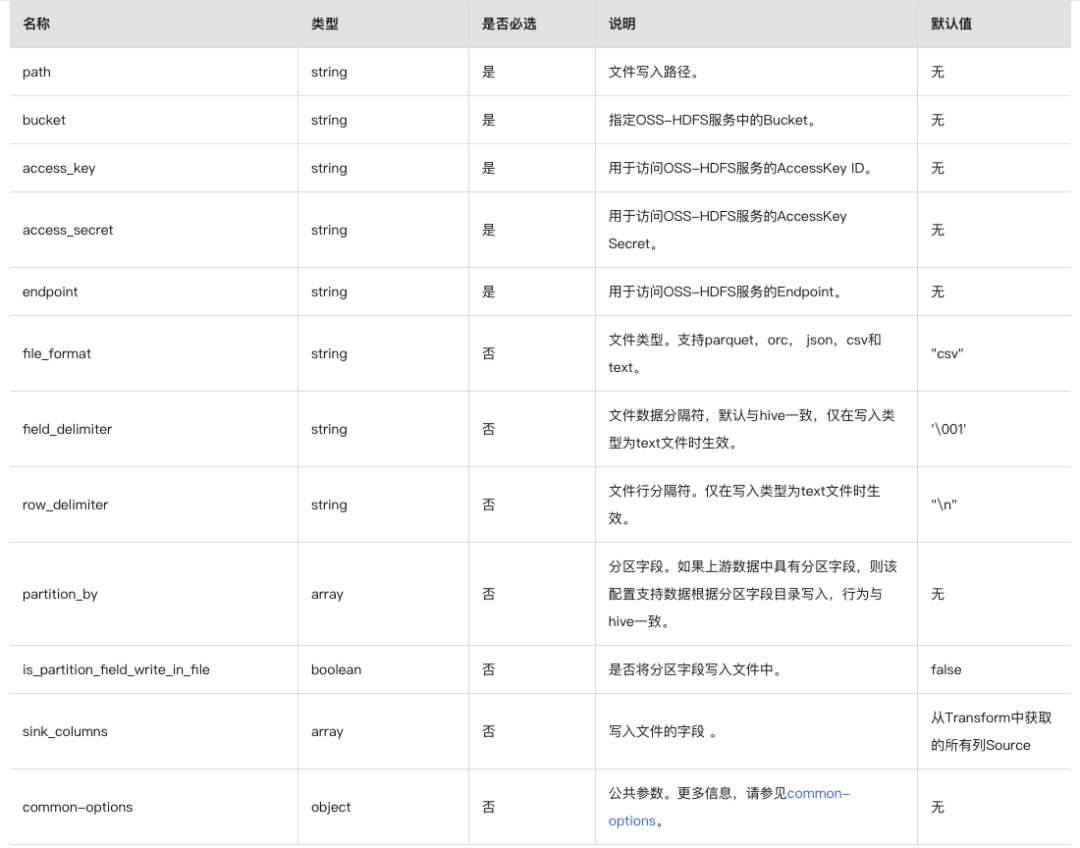
以下是text格式的配置示例。如果您需要配置为其他格式的配置文件,仅需相应替换以下示例中file_format的值,例如file_format = "csv"
。
OssJindoFile {path="/seatunnel/sink"bucket = "oss://examplebucket.cn-hangzhou.oss-dls.aliyuncs.com"access_key = "LTAI5t7h6SgiLSganP2m****"access_secret = "KZo149BD9GLPNiDIEmdQ7d****"endpoint = "cn-hangzhou.oss-dls.aliyuncs.com"file_format = "text"}
相关文档
OSS-HDFS服务概述 https://help.aliyun.com/document_detail/405089.htm?spm=a2c4g.11186623.0.0.66b6935bSzRMW0 OSS-HDFS服务使用前须知 https://help.aliyun.com/document_detail/428212.htm?spm=a2c4g.11186623.0.0.66b6935bSzRMW0 开通并授权访问OSS-HDFS服务 https://help.aliyun.com/document_detail/419505.htm?spm=a2c4g.11186623.0.0.66b6935bSzRMW0
Apache SeaTunnel

往期推荐
分享、点赞、在看,给个3连击呗!