



Ansible 2.1 引入了强大的新模块,即 Docker 服务,并且重写了 Ansible 现有的 Docker模块:
docker_service:   允许Ansible用户使用Docker Compose,并且管理和扩展多容器应用。
docker_container: 管理基础的容器生命周期
docker_image:     构建、推送并标记Docker镜像
docker_login:     用于管理对Docker注册中心的接入
docker_image Facts: 检验镜像的元数据
本文记录 docker_image 的用法。
如何使用
因为 ansible 是基于python 开发,所以 要使用 docker_image 模块需要安装 python3 版本 的dokcer 包 。
pip3 install install docker-py
pip3 install docker
另外可以使用 ansible-doc docker_image 查看非常详细的参数说明 。
常用参数
archive_path: /path/image_file.tar  # 与state present 一起使用时,把镜像归档到.tar文件
build:
  args:       # 格式:key:value,映射到 Dockerfile 中 ARG 的参数
  dockerfile:   # 与state present和source build一起使用时,用于构建 Dockerfile镜像
  etc_hosts:    # 添加到容器中/etc/hosts
  network:
  path:    # 与state present一起使用时,生成镜像
  pull: yes | no # 构建镜像时,将会下载Dockerfile中的所有镜像
buildargs:   # 格式:key:value,映射到Dockerfile中ARG指令的参数
debug: yes | no  # 调试模式
force_tag: yes|no # 与state present一起使用时,可强制标记镜像
load_path:    # 从指定的镜像文件加载docker镜像 ,需要source设置为load
name:    # 镜像的名称,必选参数
path:   # 与state present一起使用时,可生成镜像,要生成镜像,需要把 source 设置为build
pull: yes|no  # 构建镜像时,会下载Dockerfile中的所有镜像
push: yes|no  # 把镜像推送到仓库
repository:
source: build|load|pull|local
 # build:从Dockerfile中构建镜像,使用此值时必须指定 build.path
 # load:从.tar归档文件中加载镜像,使用此值时必须指定 load_path
 # pull:从仓库中拉取镜像
 # local:
state: absent|present
 # absent:删除与名称匹配的镜像
 # present:从仓库中接取与名称匹配的镜像
tag:  # 设置标签,默认 latest
实际案例
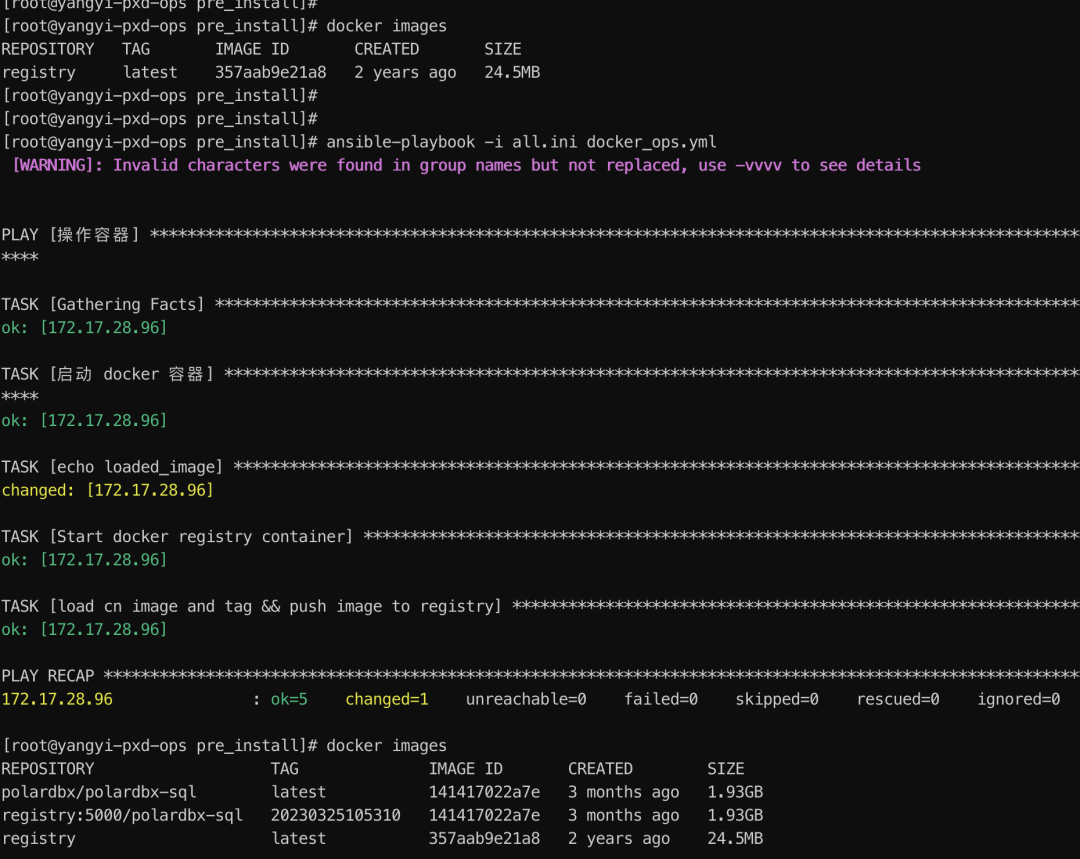
ansible-playbook 脚本,完成 基于 docker 的 PolarDB-X CN 节点镜像的安装。
该脚本完成以下功能 ,导入 仓库镜像,并且使用 docker_container 模块启动 registry 容器,提供镜像仓库的http服务。然后导入 PolarDB-X CN 节点的镜像。
---
- name: 操作容器
  vars:
    ansible_python_interpreter: /root/venv/bin/python3
  hosts: ops-server
  tasks:
    - name: 启动 docker 容器
      docker_image:
        name: registry
        source: load
        load_path: /root/soft/registry-arm64.tar.gz
        state: present
      register: loaded_image

    - name: "echo loaded_image"
      shell: echo "{{ loaded_image.actions }}"

    - name: Start docker registry container
      docker_container:
        name: registry
        image: registry:latest
        state: started
        restart_policy: always
        ports: "5000:5000"

    - name: load cn image and tag && push image to registry
      docker_image:
        name: polardbx/polardbx-sql:latest
        source: load
        state: present
        repository: registry:5000/polardbx-sql:20230325105310
        push: yes
        load_path: /root/soft/polardbx-sql-latest-arm.tar.gz
执行的结果如下:
文章转载自yangyidba,如果涉嫌侵权,请发送邮件至:contact@modb.pro进行举报,并提供相关证据,一经查实,墨天轮将立刻删除相关内容。
