



方法五
测试环境
kylin@kylin-VMware-Virtual-Platform:~$ cat /etc/.kyinfo
[dist]
name=Kylin
milestone=Desktop-V10-SP1-Release-hwe-2107
arch=x86_64
beta=False
time=2021-08-20 17:39:40
dist_id=Kylin-Desktop-V10-SP1-Release-hwe-2107-x86_64-2021-08-20 17:39:40

[servicekey]
key=0111021

[os]
to=
term=2022-12-05

kylin@kylin-VMware-Virtual-Platform:~$
kylin@kylin-VMware-Virtual-Platform:~$ cat /etc/kylin-build
Kylin-Desktop V10-SP1-hwe
Build 20210820
kylin@kylin-VMware-Virtual-Platform:~$
kylin@kylin-VMware-Virtual-Platform:~$ cat /etc/os-release
NAME="Kylin"
VERSION="银河麒麟桌面操作系统V10 (SP1)"
VERSION_US="Kylin Linux Desktop V10 (SP1)"
ID=kylin
ID_LIKE=debian
PRETTY_NAME="Kylin V10 SP1"
VERSION_ID="v10"
HOME_URL="http://www.kylinos.cn/"
SUPPORT_URL="http://www.kylinos.cn/support/technology.html"
BUG_REPORT_URL="http://www.kylinos.cn/"
PRIVACY_POLICY_URL="http://www.kylinos.cn"
VERSION_CODENAME=kylin
UBUNTU_CODENAME=kylin
PROJECT_CODENAME=v10sp1
kylin@kylin-VMware-Virtual-Platform:~$
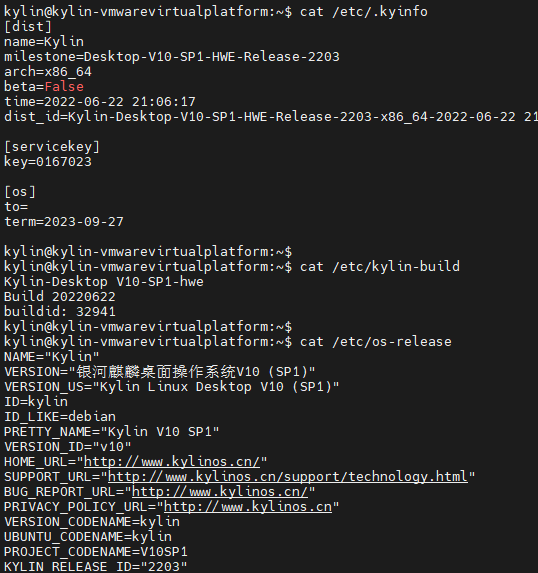
kylin@kylin-vmwarevirtualplatform:~$ cat /etc/.kyinfo
[dist]
name=Kylin
milestone=Desktop-V10-SP1-HWE-Release-2203
arch=x86_64
beta=False
time=2022-06-22 21:06:17
dist_id=Kylin-Desktop-V10-SP1-HWE-Release-2203-x86_64-2022-06-22 21:06:17

[servicekey]
key=0167023

[os]
to=
term=2023-09-27

kylin@kylin-vmwarevirtualplatform:~$
kylin@kylin-vmwarevirtualplatform:~$ cat /etc/kylin-build
Kylin-Desktop V10-SP1-hwe
Build 20220622
buildid: 32941
kylin@kylin-vmwarevirtualplatform:~$
kylin@kylin-vmwarevirtualplatform:~$ cat /etc/os-release
NAME="Kylin"
VERSION="银河麒麟桌面操作系统V10 (SP1)"
VERSION_US="Kylin Linux Desktop V10 (SP1)"
ID=kylin
ID_LIKE=debian
PRETTY_NAME="Kylin V10 SP1"
VERSION_ID="v10"
HOME_URL="http://www.kylinos.cn/"
SUPPORT_URL="http://www.kylinos.cn/support/technology.html"
BUG_REPORT_URL="http://www.kylinos.cn/"
PRIVACY_POLICY_URL="http://www.kylinos.cn"
VERSION_CODENAME=kylin
UBUNTU_CODENAME=kylin
PROJECT_CODENAME=V10SP1
KYLIN_RELEASE_ID="2203"
kylin@kylin-vmwarevirtualplatform:~$
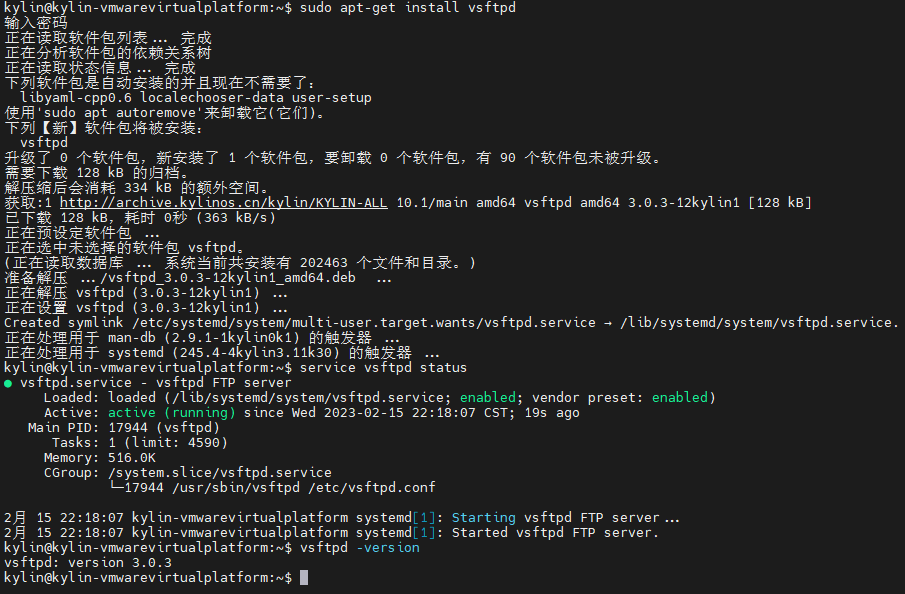
安装vsftpd
kylin@kylin-vmwarevirtualplatform:~$ sudo apt-get install vsftpd
输入密码
正在读取软件包列表... 完成
正在分析软件包的依赖关系树
正在读取状态信息... 完成
下列软件包是自动安装的并且现在不需要了:
  libyaml-cpp0.6 localechooser-data user-setup
使用'sudo apt autoremove'来卸载它(它们)。
下列【新】软件包将被安装:
  vsftpd
升级了 0 个软件包,新安装了 1 个软件包,要卸载 0 个软件包,有 90 个软件包未被升级。
需要下载 128 kB 的归档。
解压缩后会消耗 334 kB 的额外空间。
获取:1 http://archive.kylinos.cn/kylin/KYLIN-ALL 10.1/main amd64 vsftpd amd64 3.0.3-12kylin1 [128 kB]
已下载 128 kB,耗时 0秒 (363 kB/s)
正在预设定软件包 ...
正在选中未选择的软件包 vsftpd。
(正在读取数据库 ... 系统当前共安装有 202463 个文件和目录。)
准备解压 .../vsftpd_3.0.3-12kylin1_amd64.deb  ...
正在解压 vsftpd (3.0.3-12kylin1) ...
正在设置 vsftpd (3.0.3-12kylin1) ...
Created symlink /etc/systemd/system/multi-user.target.wants/vsftpd.service → /lib/systemd/system/vsftpd.service.
正在处理用于 man-db (2.9.1-1kylin0k1) 的触发器 ...
正在处理用于 systemd (245.4-4kylin3.11k30) 的触发器 ...
kylin@kylin-vmwarevirtualplatform:~$ service vsftpd status
● vsftpd.service - vsftpd FTP server
     Loaded: loaded (/lib/systemd/system/vsftpd.service; enabled; vendor preset: enabled)
     Active: active (running) since Wed 2023-02-15 22:18:07 CST; 19s ago
   Main PID: 17944 (vsftpd)
      Tasks: 1 (limit: 4590)
     Memory: 516.0K
     CGroup: /system.slice/vsftpd.service
             └─17944 /usr/sbin/vsftpd /etc/vsftpd.conf

2月 15 22:18:07 kylin-vmwarevirtualplatform systemd[1]: Starting vsftpd FTP server...
2月 15 22:18:07 kylin-vmwarevirtualplatform systemd[1]: Started vsftpd FTP server.
kylin@kylin-vmwarevirtualplatform:~$ vsftpd -version
vsftpd: version 3.0.3
kylin@kylin-vmwarevirtualplatform:~$
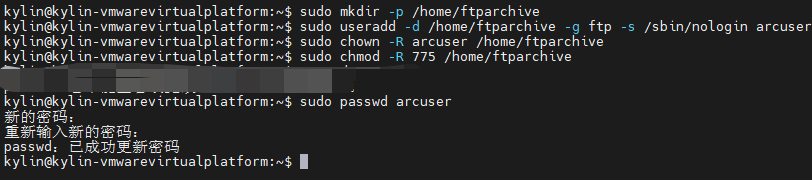
设置用户
创建用户
# 在Linux中,不同用户是有不同目录访问权限的,所以首先创建一个目录,作为这个ftp用户所拥有的目录, 这一步可以省略,但是不建议省略。
# 如果此处不省略,在执行下一条语句时,创建过程给出的警告信息是正常的,不用理会
kylin@kylin-vmwarevirtualplatform:~$ sudo mkdir -p /home/ftparchive

# 创建用户arcuser,并且指定其目录为用户目录中创建的/home/ftparchive
kylin@kylin-vmwarevirtualplatform:~$ sudo useradd -d /home/ftparchive -g ftp -s /sbin/nologin arcuser

# -g ftp 表示该用户属于ftp分组 (ftp分组是内置的,本来就存在,不需要自己创建)
# -s /sbin/nologin 表示这个用户不能用来登录secureCRT这样的客户端,这种不能登陆的用户又叫做虚拟用户
设置目录权限
# 把目录/home/ftparchive的拥有者设置为arcuser
kylin@kylin-vmwarevirtualplatform:~$ sudo chown -R arcuser /home/ftparchive

# 使arcuser用户拥有这个目录的读写权限
kylin@kylin-vmwarevirtualplatform:~$ sudo chmod -R 775 /home/ftparchive
设置密码
# 为arcuser用户设置密码(ftpadmin001.,):
kylin@kylin-vmwarevirtualplatform:~$ sudo passwd arcuser
新的密码:
重新输入新的密码:
passwd:已成功更新密码
编辑vstpd.conf配置文件
编辑vstpd.conf配置文件
kylin@kylin-vmwarevirtualplatform:~$ sudo vim /etc/vsftpd.conf
使用如下配置
# Example config file /etc/vsftpd.conf
#
# The default compiled in settings are fairly paranoid. This sample file
# loosens things up a bit, to make the ftp daemon more usable.
# Please see vsftpd.conf.5 for all compiled in defaults.
#
# READ THIS: This example file is NOT an exhaustive list of vsftpd options.
# Please read the vsftpd.conf.5 manual page to get a full idea of vsftpd's
# capabilities.
#
#
# Run standalone?  vsftpd can run either from an inetd or as a standalone
# daemon started from an initscript.
listen=NO
#
# This directive enables listening on IPv6 sockets. By default, listening
# on the IPv6 "any" address (::) will accept connections from both IPv6
# and IPv4 clients. It is not necessary to listen on *both* IPv4 and IPv6
# sockets. If you want that (perhaps because you want to listen on specific
# addresses) then you must run two copies of vsftpd with two configuration
# files.
listen_ipv6=YES
#
# Allow anonymous FTP? (Disabled by default).
anonymous_enable=NO
#
# Uncomment this to allow local users to log in.
local_enable=YES
#
# Uncomment this to enable any form of FTP write command.
write_enable=YES
#
# Default umask for local users is 077. You may wish to change this to 022,
# if your users expect that (022 is used by most other ftpd's)
local_umask=022
#
# Uncomment this to allow the anonymous FTP user to upload files. This only
# has an effect if the above global write enable is activated. Also, you will
# obviously need to create a directory writable by the FTP user.
#anon_upload_enable=YES
#
# Uncomment this if you want the anonymous FTP user to be able to create
# new directories.
#anon_mkdir_write_enable=YES
#
# Activate directory messages - messages given to remote users when they
# go into a certain directory.
dirmessage_enable=YES
#
# If enabled, vsftpd will display directory listings with the time
# in  your  local  time  zone.  The default is to display GMT. The
# times returned by the MDTM FTP command are also affected by this
# option.
use_localtime=YES
#
# Activate logging of uploads/downloads.
xferlog_enable=YES
#
# Make sure PORT transfer connections originate from port 20 (ftp-data).
connect_from_port_20=YES
#
# If you want, you can arrange for uploaded anonymous files to be owned by
# a different user. Note! Using "root" for uploaded files is not
# recommended!
#chown_uploads=YES
#chown_username=whoever
#
# You may override where the log file goes if you like. The default is shown
# below.
#xferlog_file=/var/log/vsftpd.log
#
# If you want, you can have your log file in standard ftpd xferlog format.
# Note that the default log file location is /var/log/xferlog in this case.
xferlog_std_format=YES
#
# You may change the default value for timing out an idle session.
#idle_session_timeout=600
#
# You may change the default value for timing out a data connection.
#data_connection_timeout=120
#
# It is recommended that you define on your system a unique user which the
# ftp server can use as a totally isolated and unprivileged user.
#nopriv_user=ftpsecure
#
# Enable this and the server will recognise asynchronous ABOR requests. Not
# recommended for security (the code is non-trivial). Not enabling it,
# however, may confuse older FTP clients.
#async_abor_enable=YES
#
# By default the server will pretend to allow ASCII mode but in fact ignore
# the request. Turn on the below options to have the server actually do ASCII
# mangling on files when in ASCII mode.
# Beware that on some FTP servers, ASCII support allows a denial of service
# attack (DoS) via the command "SIZE /big/file" in ASCII mode. vsftpd
# predicted this attack and has always been safe, reporting the size of the
# raw file.
# ASCII mangling is a horrible feature of the protocol.
#ascii_upload_enable=YES
#ascii_download_enable=YES
#
# You may fully customise the login banner string:
#ftpd_banner=Welcome to blah FTP service.
#
# You may specify a file of disallowed anonymous e-mail addresses. Apparently
# useful for combatting certain DoS attacks.
#deny_email_enable=YES
# (default follows)
#banned_email_file=/etc/vsftpd.banned_emails
#
# You may restrict local users to their home directories.  See the FAQ for
# the possible risks in this before using chroot_local_user or
# chroot_list_enable below.
#chroot_local_user=YES
#
#
# You may specify an explicit list of local users to chroot() to their home
# directory. If chroot_local_user is YES, then this list becomes a list of
# users to NOT chroot().
# (Warning! chroot'ing can be very dangerous. If using chroot, make sure that
# the user does not have write access to the top level directory within the
# chroot)
#chroot_local_user=YES
# 创建的arcuser用户所拥有的目录是 /home/ftparchive,如果不做限制,那么使用arcuser登陆之后可以切换到其他敏感目录去,比如切换到/usr目录去,这样就存在巨大的安全隐患。 为了规避这个隐患,需要限制arcuser用户只能通过ftp访问到 /home/ftparchive 目录以及子目录。
chroot_list_enable=YES
# (default follows)
chroot_list_file=/etc/vsftpd.chroot_list
#
# You may activate the "-R" option to the builtin ls. This is disabled by
# default to avoid remote users being able to cause excessive I/O on large
# sites. However, some broken FTP clients such as "ncftp" and "mirror" assume
# the presence of the "-R" option, so there is a strong case for enabling it.
#ls_recurse_enable=YES
#
# Customization
#
# Some of vsftpd's settings don't fit the filesystem layout by
# default.
#
# This option should be the name of a directory which is empty.  Also, the
# directory should not be writable by the ftp user. This directory is used
# as a secure chroot() jail at times vsftpd does not require filesystem
# access.
secure_chroot_dir=/var/run/vsftpd/empty
#
# This string is the name of the PAM service vsftpd will use.
pam_service_name=vsftpd
userlist_enable=YES
#
# This option specifies the location of the RSA certificate to use for SSL
# encrypted connections.
rsa_cert_file=/etc/ssl/certs/ssl-cert-snakeoil.pem
rsa_private_key_file=/etc/ssl/private/ssl-cert-snakeoil.key
ssl_enable=NO

#
# Uncomment this to indicate that vsftpd use a utf8 filesystem.
#utf8_filesystem=YES
#
# vsftpd服务器,一旦某个用户被限制访问了,那么默认情况下,该用户的写权限也被剥夺了。 这就导致ftp客户端连接上服务器之后无法上传文件。这个时候,就需要打开此用户的写权限
# 新加一行:allow_writeable_chroot=YES
allow_writeable_chroot=YES

# 一种是21端口,用来监听客户端连接请求的。 这个一般说来是固定的,就一直使用21端口。
# 一种是,一旦获取到请求之后,再专门用户服务端和客户端传输数据的端口。 (安装用的这种)
# 这表示使用被动模式,用于传输数据的端口分配从30000-30010之间。
pasv_enable=YES
pasv_min_port=30000
pasv_max_port=30010
用户列表
kylin@kylin-vmwarevirtualplatform:~$ sudo vim /etc/vsftpd.chroot_list
# 在chroot_list中添加arcuser用户

用户鉴权
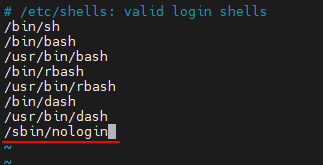
因为用户 arcuser 是 nologin的,所以存在鉴权的问题。 如果鉴权问题不解决,就是永不停息的 530错误。。。
方式一: pam.d/vsftpd 文件
kylin@kylin-vmwarevirtualplatform:~$ sudo vim /etc/pam.d/vsftpd
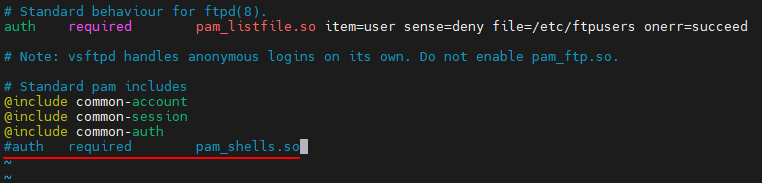
方式二:shells 文件
kylin@kylin-vmwarevirtualplatform:~$ sudo vim /etc/shells
设置selinux 保证上传下载权限
# 开启FTP全权限
kylin@kylin-vmwarevirtualplatform:~$ sudo setsebool -P allow_ftpd_full_access on
# 开启FTP根目录权限
kylin@kylin-vmwarevirtualplatform:~$ sudo setsebool -P ftp_home_dir on

关闭防火墙
kylin@kylin-vmwarevirtualplatform:~$ sudo iptables -F

设置开机启动
kylin@kylin-vmwarevirtualplatform:~$ sudo systemctl enable vsftpd
Synchronizing state of vsftpd.service with SysV service script with /lib/systemd/systemd-sysv-install.
Executing: /lib/systemd/systemd-sysv-install enable vsftpd
kylin@kylin-vmwarevirtualplatform:~$

重启vsftpd
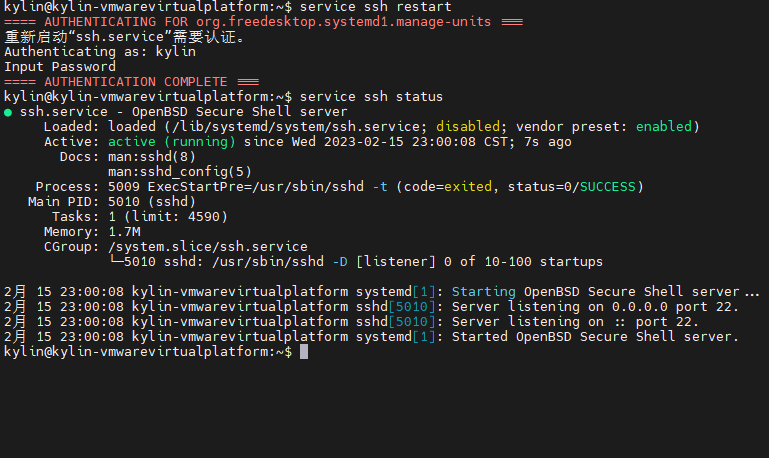
kylin@kylin-vmwarevirtualplatform:~$ service ssh restart
==== AUTHENTICATING FOR org.freedesktop.systemd1.manage-units ===
重新启动“ssh.service”需要认证。
Authenticating as: kylin
Input Password
==== AUTHENTICATION COMPLETE ===
kylin@kylin-vmwarevirtualplatform:~$ service ssh status
● ssh.service - OpenBSD Secure Shell server
     Loaded: loaded (/lib/systemd/system/ssh.service; disabled; vendor preset: enabled)
     Active: active (running) since Wed 2023-02-15 23:00:08 CST; 7s ago
       Docs: man:sshd(8)
             man:sshd_config(5)
    Process: 5009 ExecStartPre=/usr/sbin/sshd -t (code=exited, status=0/SUCCESS)
   Main PID: 5010 (sshd)
      Tasks: 1 (limit: 4590)
     Memory: 1.7M
     CGroup: /system.slice/ssh.service
             └─5010 sshd: /usr/sbin/sshd -D [listener] 0 of 10-100 startups

2月 15 23:00:08 kylin-vmwarevirtualplatform systemd[1]: Starting OpenBSD Secure Shell server...
2月 15 23:00:08 kylin-vmwarevirtualplatform sshd[5010]: Server listening on 0.0.0.0 port 22.
2月 15 23:00:08 kylin-vmwarevirtualplatform sshd[5010]: Server listening on :: port 22.
2月 15 23:00:08 kylin-vmwarevirtualplatform systemd[1]: Started OpenBSD Secure Shell server.
kylin@kylin-vmwarevirtualplatform:~$
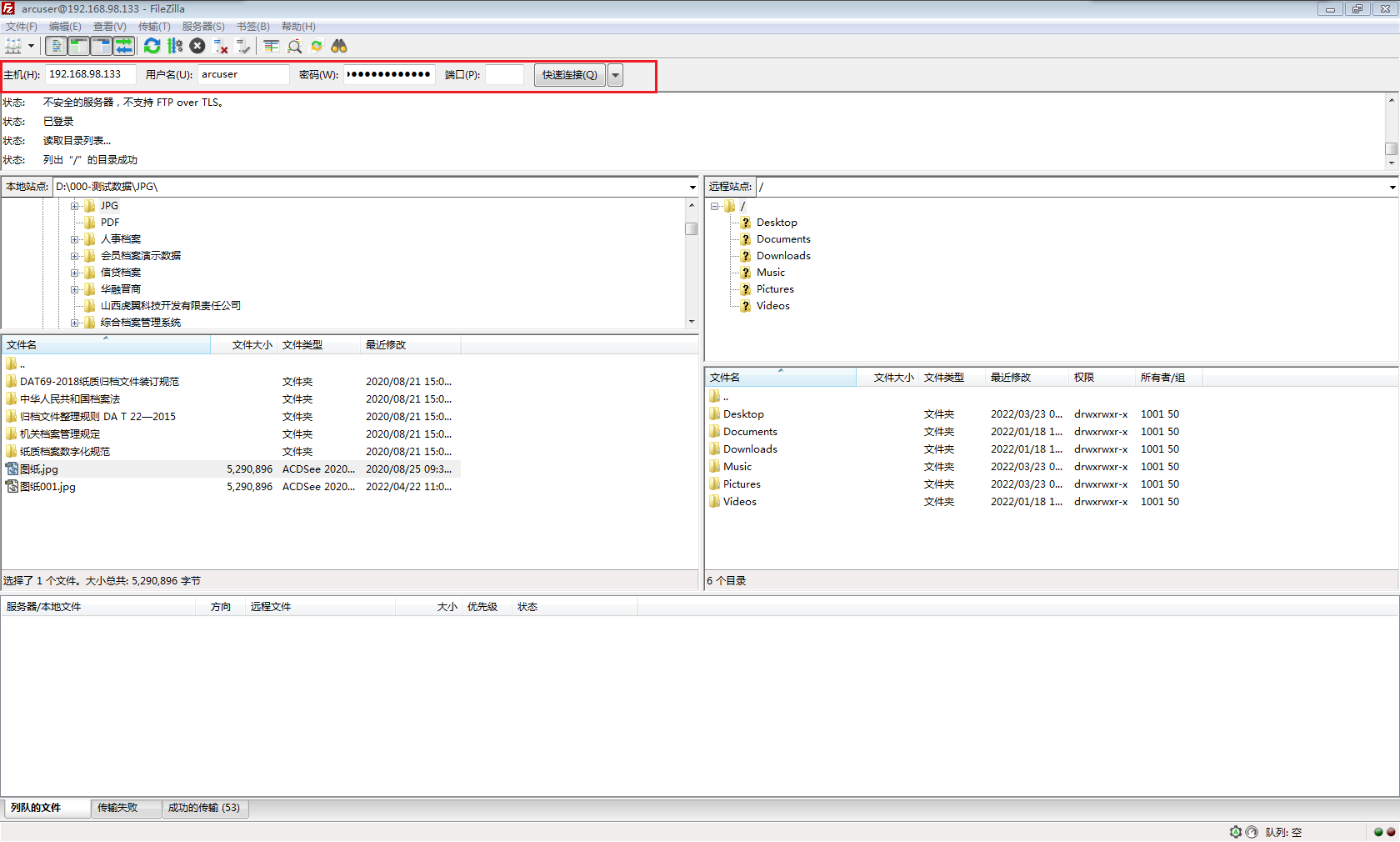
测试是否成功
「喜欢这篇文章,您的关注和赞赏是给作者最好的鼓励」
关注作者
【版权声明】本文为墨天轮用户原创内容,转载时必须标注文章的来源(墨天轮),文章链接,文章作者等基本信息,否则作者和墨天轮有权追究责任。如果您发现墨天轮中有涉嫌抄袭或者侵权的内容,欢迎发送邮件至:contact@modb.pro进行举报,并提供相关证据,一经查实,墨天轮将立刻删除相关内容。
