



Tutorialspoint Java 密码学教程
来源:易百教程
Java密码学教程™
Java密码体系结构(JCA)是一组用于实现现代密码术概念的API,例如数字签名,消息摘要和证书。 此规范可帮助开发人员在其应用程序中集成安全。
面向读者
本教程是为初学者准备的,使他们了解JCA的基础知识。 所有示例都是使用Java编程语言给出的,因此需要有关Java编程语言的基本概念。
前提条件
对于本教程,假设读者具有Java编程语言的知识,知道如何编写Java程序,编译和执行Java示例代码。
问题反馈
我们不能保证您在学习此Java密码学教程的过程中不会遇到任何问题。本教程中的讲解,示例和代码等只是根据作者的理解来概括写出。由于作者水平和能力有限,因此不保正所有编写的文章都准确无误。但是如果有遇到任何错误或问题,请反馈给我们,我们会及时纠正以方便后续读者阅读。
易百教程移动端:请扫描本页面底部(右侧)二维码并关注微信公众号,回复:"教程" 选择相关教程阅读或直接访问:http://m.yiibai.com 。
Java密码学简介 - Java密码学教程™
密码学是制作能够提供信息安全的密码系统的艺术和科学。
密码学处理数字数据的实际保护。 它指的是基于提供基本信息安全服务的数学算法的机制设计。可以将密码学视为在安全应用程序中包含不同技术的大型工具包的建立。
什么是密码分析?
打破密文的艺术和科学被称为密码分析。
密码分析是密码学的姐妹分支,它们共存。 加密过程产生用于传输或存储的密文。 它涉及密码机制的研究,旨在打破它们。 在设计新的加密技术期间还使用密码分析来测试其安全强度。
密码学原语
密码学原语只不过是密码学中可以有选择地,用于提供一组所需安全服务的工具和技术 -
- 加密
- 散列函数
- 消息验证码(MAC)
- 数字签名
Java中的密码学
Java密码体系结构(JCA)是一组API,用于实现现代密码术的概念,如数字签名,消息摘要,证书,加密,密钥生成和管理,以及安全随机数生成等。
使用JCA开发人员可以构建集成安全性的应用程序。
要在应用程序中集成安全性而不是依赖于复杂的安全算法,开发人员可以轻松调用JCA中提供的相应API以获取所需的服务。
易百教程移动端:请扫描本页面底部(右侧)二维码并关注微信公众号,回复:"教程" 选择相关教程阅读或直接访问:http://m.yiibai.com 。
Java密码学检索密钥 - Java密码学教程™
在本章中,将学习如何使用Java加密从密钥库中检索密钥。
要从密钥库中检索密钥,请按照以下步骤操作。
第1步:创建KeyStore对象
java.security包的KeyStore类的getInstance()方法接受表示密钥库类型的字符串值,并返回KeyStore对象。
使用此方法创建KeyStore类的对象,如下所示。
//Creating the KeyStore object
KeyStore keyStore = KeyStore.getInstance("JCEKS");
第2步:加载KeyStore对象
KeyStore类的load()方法接受表示密钥库文件的FileInputStream对象和指定KeyStore密码的String参数。
通常,KeyStore存储在名为cacerts的文件中,位于C:/Program Files/Java/jre1.8.0_101/ lib/security/,其默认密码为changeit,使用load()方法加载它,如下图所示。
//Loading the KeyStore object
char[] password = "changeit".toCharArray();
String path = "C:/Program Files/Java/jre1.8.0_101/lib/security/cacerts";
java.io.FileInputStream fis = new FileInputStream(path);
keyStore.load(fis, password);
第3步:创建KeyStore.ProtectionParameter对象
实例化KeyStore.ProtectionParameter,如下所示。
//Creating the KeyStore.ProtectionParameter object
KeyStore.ProtectionParameter protectionParam = new KeyStore.PasswordProtection(password);
第4步:创建一个SecretKey对象
通过实例化其子类SecretKeySpec来创建SecretKey(接口)对象。 在实例化时,需要将密码和算法作为参数传递给其构造函数,如下所示。
//Creating SecretKey object
SecretKey mySecretKey = new SecretKeySpec(new String(keyPassword).getBytes(), "DSA");
第5步:创建一个SecretKeyEntry对象
通过传递在上面步骤中创建的SecretKey对象来创建SecretKeyEntry类的对象,如下所示。
//Creating SecretKeyEntry object
KeyStore.SecretKeyEntry secretKeyEntry = new KeyStore.SecretKeyEntry(mySecretKey);
第6步:设置KeyStore的条目
KeyStore类的setEntry()方法接受表示密钥库条目别名的String参数,SecretKeyEntry对象,ProtectionParameter对象,并将条目存储在给定别名下。
使用setEntry()方法将条目设置为密钥库,如下所示。
//Set the entry to the keystore
keyStore.setEntry("secretKeyAlias", secretKeyEntry, protectionParam);
第7步:创建KeyStore.SecretKeyEntry对象
KeyStore类的getEntry()方法接受别名(String参数),并将ProtectionParameter类的对象作为参数,并返回KeyStoreEntry对象,然后将其转换为KeyStore.SecretKeyEntry对象。
通过将必需键的别名和前面步骤中创建的保护参数对象传递给getEntry()方法,创建KeyStore.SecretKeyEntry类的对象,如下所示。
//Creating the KeyStore.SecretKeyEntry object
KeyStore.SecretKeyEntry secretKeyEnt = (KeyStore.SecretKeyEntry)keyStore.getEntry("secretKeyAlias", protectionParam);
第8步:创建检索到的条目的密钥对象
SecretKeyEntry类的getSecretKey()方法返回一个SecretKey对象。 使用此方法创建一个SecretKey对象,如下所示。
//Creating SecretKey object
SecretKey mysecretKey = secretKeyEnt.getSecretKey();
System.out.println(mysecretKey);
示例
以下示例显示了如何从密钥库中检索密钥。 在这里,将密钥存储在密钥库中,该密钥库位于cacerts文件(Windows 10操作系统)中,检索它,并显示它的一些属性,例如用于生成密钥的算法,以及格式 检索到的密钥。
import java.io.FileInputStream;
import java.security.KeyStore;
import java.security.KeyStore.ProtectionParameter;
import java.security.KeyStore.SecretKeyEntry;
import javax.crypto.SecretKey;
import javax.crypto.spec.SecretKeySpec;
public class RetrievingFromKeyStore{
public static void main(String args[]) throws Exception{
//Creating the KeyStore object
KeyStore keyStore = KeyStore.getInstance("JCEKS");
//Loading the the KeyStore object
char[] password = "changeit".toCharArray();
java.io.FileInputStream fis = new FileInputStream(
"C:/Program Files/Java/jre1.8.0_101/lib/security/cacerts");
keyStore.load(fis, password);
//Creating the KeyStore.ProtectionParameter object
ProtectionParameter protectionParam = new KeyStore.PasswordProtection(password);
//Creating SecretKey object
SecretKey mySecretKey = new SecretKeySpec("myPassword".getBytes(), "DSA");
//Creating SecretKeyEntry object
SecretKeyEntry secretKeyEntry = new SecretKeyEntry(mySecretKey);
keyStore.setEntry("secretKeyAlias", secretKeyEntry, protectionParam);
//Storing the KeyStore object
java.io.FileOutputStream fos = null;
fos = new java.io.FileOutputStream("newKeyStoreName");
keyStore.store(fos, password);
//Creating the KeyStore.SecretKeyEntry object
SecretKeyEntry secretKeyEnt = (SecretKeyEntry)keyStore.getEntry("secretKeyAlias", protectionParam);
//Creating SecretKey object
SecretKey mysecretKey = secretKeyEnt.getSecretKey();
System.out.println("Algorithm used to generate key : "+mysecretKey.getAlgorithm());
System.out.println("Format used for the key: "+mysecretKey.getFormat());
}
}
执行上面示例代码,得到以下结果:
Algorithm used to generate key: DSA
Format of the key: RAW
易百教程移动端:请扫描本页面底部(右侧)二维码并关注微信公众号,回复:"教程" 选择相关教程阅读或直接访问:http://m.yiibai.com 。
信息摘要和MAC
Java密码学信息摘要 - Java密码学教程™
散列函数非常有用,几乎出现在所有信息安全应用程序中。
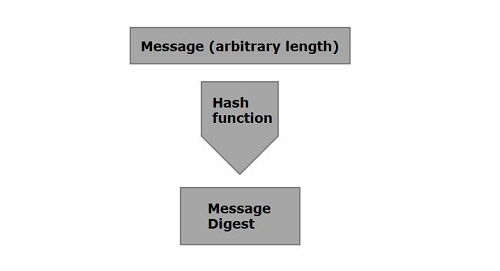
哈希函数是将数字输入值转换为另一个压缩数值的数学函数。 散列函数的输入具有任意长度,但输出始终具有固定长度。
散列函数返回的值称为信息摘要或简称散列值。 下图说明了散列函数。
Java提供了一个名为MessageDigest的类,它属于java.security包。 此类支持诸如SHA-1,SHA 256,MD5算法之类的算法,以将任意长度的消息转换为信息摘要。
要将给定邮件转换为邮件摘要,请按照以下步骤进行操作 -
第1步:创建MessageDigest对象
MessageDigest类提供名为getInstance()的方法。 此方法接受String变量,该变量指定要使用的算法的名称,并返回实现指定算法的MessageDigest对象。
使用getInstance()方法创建MessageDigest对象,如下所示 -
MessageDigest md = MessageDigest.getInstance("SHA-256");
第2步:将数据传递给创建的MessageDigest对象
创建消息摘要对象后,需要将消息/数据传递给它。 可以使用MessageDigest类的update()方法执行此操作,此方法接受表示消息的字节数组,并将其添加/传递给上面创建的MessageDigest对象。
MessageDigest md = MessageDigest.getInstance("SHA-256");
md.update(msg.getBytes());
第3步:生成消息摘要
可以使用digest()方法生成消息摘要,MessageDigest类此方法计算当前对象的散列函数,并以字节数组的形式返回消息摘要。
使用摘要方法生成消息摘要。
MessageDigest md = MessageDigest.getInstance("SHA-256");
md.update(msg.getBytes());
byte[] digest = md.digest();
示例代码
以下是从文件中读取数据并生成消息摘要并打印出来的示例。
import java.security.MessageDigest;
import java.util.Scanner;
public class MessageDigestExample {
public static void main(String args[]) throws Exception{
//Reading data from user
Scanner sc = new Scanner(System.in);
System.out.println("Enter the message");
String message = sc.nextLine();
//Creating the MessageDigest object
MessageDigest md = MessageDigest.getInstance("SHA-256");
//Passing data to the created MessageDigest Object
md.update(message.getBytes());
//Compute the message digest
byte[] digest = md.digest();
System.out.println(digest);
//Converting the byte array in to HexString format
StringBuffer hexString = new StringBuffer();
for (int i = 0;i<digest.length;i++) {
hexString.append(Integer.toHexString(0xFF & digest[i]));
}
System.out.println("Hex format : " + hexString.toString());
}
}
编译并执行上面示例代码,得到以下结果:
Enter the message
Hello how are you
[B@55f96302
Hex format: 2953d33828c395aebe8225236ba4e23fa75e6f13bd881b9056a3295cbd64d3
易百教程移动端:请扫描本页面底部(右侧)二维码并关注微信公众号,回复:"教程" 选择相关教程阅读或直接访问:http://m.yiibai.com 。
Java密码学创建MAC - Java密码学教程™
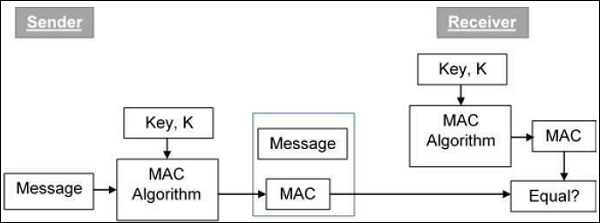
MAC(消息认证码)算法是一种对称密钥加密技术,用于提供消息认证。要建立MAC过程,发送方和接收方共享对称密钥K。
实质上,MAC是在基础消息上生成的加密校验和,它与消息一起发送以确保消息验证。
使用MAC进行身份验证的过程如下图所示 -
在Java中,javax.crypto包的Mac类提供了消息认证代码的功能。按照以下步骤使用此类创建消息身份验证代码。
第1步:创建KeyGenerator对象
KeyGenerator类提供getInstance()方法,该方法接受表示所需密钥生成算法的String变量,并返回生成密钥的KeyGenerator对象。
使用getInstance()方法创建KeyGenerator对象,如下所示。
//Creating a KeyGenerator object
KeyGenerator keyGen = KeyGenerator.getInstance("DES");
第2步:创建SecureRandom对象
java.Security包的SecureRandom类提供了一个强大的随机数生成器,用于在Java中生成随机数。 实例化此类,如下所示。
//Creating a SecureRandom object
SecureRandom secRandom = new SecureRandom();
第3步:初始化KeyGenerator
KeyGenerator类提供了一个名为init()的方法,此方法接受SecureRandom对象并初始化当前的KeyGenerator。
使用此方法初始化在上一步中创建的KeyGenerator对象。
//Initializing the KeyGenerator
keyGen.init(secRandom);
第4步:生成密钥
使用KeyGenerator类的generateKey()方法生成密钥,如下所示。
//Creating/Generating a key
Key key = keyGen.generateKey();
第5步:初始化Mac对象
Mac类的init()方法接受Key对象并使用给定的键初始化当前的Mac对象。
//Initializing the Mac object
mac.init(key);
第6步:完成mac操作
Mac类的doFinal()方法用于完成Mac操作。 将所需的数据以字节数组的形式传递给此方法,并完成操作,如下所示。
//Computing the Mac
String msg = new String("Hi how are you");
byte[] bytes = msg.getBytes();
byte[] macResult = mac.doFinal(bytes);
示例
以下示例演示如何使用JCA生成消息验证代码(MAC)。 在这里,将收到一条简单的消息“Hi how are you”,并为该消息生成一个Mac。
import java.security.Key;
import java.security.SecureRandom;
import javax.crypto.KeyGenerator;
import javax.crypto.Mac;
public class MacSample {
public static void main(String args[]) throws Exception{
//Creating a KeyGenerator object
KeyGenerator keyGen = KeyGenerator.getInstance("DES");
//Creating a SecureRandom object
SecureRandom secRandom = new SecureRandom();
//Initializing the KeyGenerator
keyGen.init(secRandom);
//Creating/Generating a key
Key key = keyGen.generateKey();
//Creating a Mac object
Mac mac = Mac.getInstance("HmacSHA256");
//Initializing the Mac object
mac.init(key);
//Computing the Mac
String msg = new String("Hi how are you");
byte[] bytes = msg.getBytes();
byte[] macResult = mac.doFinal(bytes);
System.out.println("Mac result:");
System.out.println(new String(macResult));
}
}
上述程序将生成以下输出 -
Mac result:
HÖ„^ǃÎ_Utbh…?š_üzØSSÜh_ž_œa0ŽV?
易百教程移动端:请扫描本页面底部(右侧)二维码并关注微信公众号,回复:"教程" 选择相关教程阅读或直接访问:http://m.yiibai.com 。
钥匙存储
Java密码学密钥 - Java密码学教程™
密码系统是加密技术及其附带基础工具的实现,以提供信息安全服务。 密码系统也称为密码系统。
基本密码系统的各种组件是明文,加密算法,密文,解密算法,加密密钥和解密密钥。下面解释两种密钥:
- 加密密钥是发件人已知的值。发送方将加密密钥与明文一起输入加密算法,以便计算密文。
- 解密密钥是接收方已知的值。解密密钥与加密密钥有关,但并不总是与之相同。接收器将解密密钥与密文一起输入到解密算法中以便计算明文。
基本上,基于加密 - 解密算法的类型,存在两种类型的密钥/密码系统。
对称密钥加密
使用相同密钥加密和解密信息的加密过程称为对称密钥加密。
对称密码系统的研究被称为对称密码术。对称密码系统有时也称为秘密密钥密码系统。
以下是对称密钥加密的一些常见示例 -
- 数字加密标准(DES)
- 三重DES(3DES)
- IDEA
- BLOWFISH
非对称密钥加密
使用不同密钥加密和解密信息的加密过程称为非对称密钥加密。 尽管密钥是不同的,但它们在数学上是相关的,因此通过解密密文来检索明文是可行的。
易百教程移动端:请扫描本页面底部(右侧)二维码并关注微信公众号,回复:"教程" 选择相关教程阅读或直接访问:http://m.yiibai.com 。
Java密码学存储密钥 - Java密码学教程™
使用/生成的密钥和证书存储在称为密钥库的数据库中。 默认情况下,此数据库存储在名为.keystore的文件中。
可以使用java.security包的KeyStore类访问此数据库的内容。它管理三个不同的条目,即PrivateKeyEntry,SecretKeyEntry和TrustedCertificateEntry。
- PrivateKeyEntry
- SecretKeyEntry
- TrustedCertificateEntry
1. 在密钥库中存储密钥
在本节中,将学习如何在密钥库中存储密钥。要在密钥库中存储密钥,请按照以下步骤操作。
第1步:创建KeyStore对象
java.security包的KeyStore类的getInstance()方法接受表示密钥库类型的字符串值,并返回KeyStore对象。
使用getInstance()方法创建KeyStore类的对象,如下所示。
// Creating the KeyStore object
KeyStore keyStore = KeyStore.getInstance("JCEKS");
第2步:加载KeyStore对象
KeyStore类的load()方法接受表示密钥库文件的FileInputStream对象和指定KeyStore密码的String参数。
通常,KeyStore存储在名为cacerts的文件中,位于C:/Program Files/Java/jre1.8.0_101 / lib / security /,其默认密码为changeit,使用load()方法加载它,如下面图所示。
//Loading the KeyStore object
char[] password = "changeit".toCharArray();
String path = "C:/Program Files/Java/jre1.8.0_101/lib/security/cacerts";
java.io.FileInputStream fis = new FileInputStream(path);
keyStore.load(fis, password);
第3步:创建KeyStore.ProtectionParameter对象
实例化KeyStore.ProtectionParameter,如下所示。
//Creating the KeyStore.ProtectionParameter object
KeyStore.ProtectionParameter protectionParam = new KeyStore.PasswordProtection(password);
第4步:创建一个SecretKey对象
通过实例化子类SecretKeySpec来创建SecretKey(接口)对象。 在实例化时,需要将密码和算法作为参数传递给其构造函数,如下所示。
//Creating SecretKey object
SecretKey mySecretKey = new SecretKeySpec(new String(keyPassword).getBytes(), "DSA");
第5步:创建一个SecretKeyEntry对象
通过传递在上面步骤中创建的SecretKey对象来创建SecretKeyEntry类的对象,如下所示。
//Creating SecretKeyEntry object
KeyStore.SecretKeyEntry secretKeyEntry = new KeyStore.SecretKeyEntry(mySecretKey);
第5步:设置KeyStore的条目
KeyStore类的setEntry()方法接受表示密钥库条目别名的String参数,SecretKeyEntry对象,ProtectionParameter对象,并将条目存储在给定别名下。
使用setEntry()方法将条目设置为密钥库,如下所示。
//Set the entry to the keystore
keyStore.setEntry("secretKeyAlias", secretKeyEntry, protectionParam);
示例
以下示例将密钥存储到cacerts文件(Windows 10操作系统)中存在的密钥库中。示例代码:
import java.io.FileInputStream;
import java.security.KeyStore;
import javax.crypto.SecretKey;
import javax.crypto.spec.SecretKeySpec;
public class StoringIntoKeyStore{
public static void main(String args[]) throws Exception {
//Creating the KeyStore object
KeyStore keyStore = KeyStore.getInstance("JCEKS");
//Loading the KeyStore object
char[] password = "changeit".toCharArray();
String path = "C:/Program Files/Java/jre1.8.0_101/lib/security/cacerts";
java.io.FileInputStream fis = new FileInputStream(path);
keyStore.load(fis, password);
//Creating the KeyStore.ProtectionParameter object
KeyStore.ProtectionParameter protectionParam = new KeyStore.PasswordProtection(password);
//Creating SecretKey object
SecretKey mySecretKey = new SecretKeySpec("myPassword".getBytes(), "DSA");
//Creating SecretKeyEntry object
KeyStore.SecretKeyEntry secretKeyEntry = new KeyStore.SecretKeyEntry(mySecretKey);
keyStore.setEntry("secretKeyAlias", secretKeyEntry, protectionParam);
//Storing the KeyStore object
java.io.FileOutputStream fos = null;
fos = new java.io.FileOutputStream("newKeyStoreName");
keyStore.store(fos, password);
System.out.println("data stored");
}
}
执行上面示例代码,得到以下结果:
易百教程移动端:请扫描本页面底部(右侧)二维码并关注微信公众号,回复:"教程" 选择相关教程阅读或直接访问:http://m.yiibai.com 。
生成密钥
Java密码学KeyGenerator类 - Java密码学教程™
Java提供了一个名称为KeyGenerator的类,该类用于生成密钥,此类的对象是可重用的。
要使用KeyGenerator类生成密钥,请按照以下步骤操作。
第1步:创建KeyGenerator对象
KeyGenerator类提供getInstance()方法,该方法接受表示所需密钥生成算法的String变量,并返回生成密钥的KeyGenerator对象。
使用getInstance()方法创建KeyGenerator对象,如下所示。
//Creating a KeyGenerator object
KeyGenerator keyGen = KeyGenerator.getInstance("DES");
第2步:创建SecureRandom对象
java.Security包的SecureRandom类提供了一个强大的随机数生成器,用于在Java中生成随机数。 实例化此类,如下所示。
//Creating a SecureRandom object
SecureRandom secRandom = new SecureRandom();
第3步:初始化KeyGenerator
KeyGenerator类提供了一个名为init()的方法,此方法接受SecureRandom对象并初始化当前的KeyGenerator。
使用init()方法初始化在上一步中创建的KeyGenerator对象。
//Creating a SecureRandom object
SecureRandom secRandom = new SecureRandom();
//Initializing the KeyGenerator
keyGen.init(secRandom);
示例
下面的示例演示了使用javax.crypto包的KeyGenerator类生成密钥。
import javax.crypto.Cipher;
import javax.crypto.KeyGenerator;
import java.security.Key;
import java.security.SecureRandom;
public class KeyGeneratorExample {
public static void main(String args[]) throws Exception{
//Creating a KeyGenerator object
KeyGenerator keyGen = KeyGenerator.getInstance("DES");
//Creating a SecureRandom object
SecureRandom secRandom = new SecureRandom();
//Initializing the KeyGenerator
keyGen.init(secRandom);
//Creating/Generating a key
Key key = keyGen.generateKey();
System.out.println(key);
Cipher cipher = Cipher.getInstance("DES/ECB/PKCS5Padding");
cipher.init(cipher.ENCRYPT_MODE, key);
String msg = new String("Hi how are you");
byte[] bytes = cipher.doFinal(msg.getBytes());
System.out.println(bytes);
}
}
执行上面示例代码,得到以下结果:
com.sun.crypto.provider.DESKey@18629
[B@2ac1fdc4
易百教程移动端:请扫描本页面底部(右侧)二维码并关注微信公众号,回复:"教程" 选择相关教程阅读或直接访问:http://m.yiibai.com 。
Java密码学KeyPairGenerator类 - Java密码学教程™
Java提供了KeyPairGenerator类。 此类用于生成公钥和私钥对。 要使用KeyPairGenerator类生成密钥,请按照以下步骤操作。
第1步:创建KeyPairGenerator对象
KeyPairGenerator类提供getInstance()方法,该方法接受表示所需密钥生成算法的String变量,并返回生成密钥的KeyPairGenerator对象。
使用getInstance()方法创建KeyPairGenerator对象,如下所示。
//Creating KeyPair generator object
KeyPairGenerator keyPairGen = KeyPairGenerator.getInstance("DSA");
第2步:初始化KeyPairGenerator对象
KeyPairGenerator类提供了一个名为initialize()的方法,该方法用于初始化密钥对生成器。 此方法接受表示密钥大小的整数值。
使用此方法初始化在上一步中创建的KeyPairGenerator对象,如下所示。
//Creating KeyPair generator object
KeyPairGenerator keyPairGen = KeyPairGenerator.getInstance("DSA");
//Initializing the KeyPairGenerator
keyPairGen.initialize(2048);
第3步:生成KeyPairGenerator
可以使用KeyPairGenerator类的generateKeyPair()方法生成KeyPair。 使用此方法生成密钥对,如下所示。
//Generate the pair of keys
KeyPair pair = keyPairGen.generateKeyPair();
第4步:获取私钥/公钥
可以使用getPrivate()方法从生成的密钥对对象中获取私钥,如下所示。
//Getting the private key from the key pair
PrivateKey privKey = pair.getPrivate();
可以使用getPublic()方法从生成的KeyPair对象获取公钥,如下所示。
//Getting the public key from the key pair
PublicKey publicKey = pair.getPublic();
示例
下面的示例演示了使用javax.crypto包的KeyPairGenerator类生成密钥的密钥。
import java.security.KeyPair;
import java.security.KeyPairGenerator;
import java.security.PrivateKey;
import java.security.PublicKey;
public class KeyPairGenertor {
public static void main(String args[]) throws Exception{
//Creating KeyPair generator object
KeyPairGenerator keyPairGen = KeyPairGenerator.getInstance("DSA");
//Initializing the KeyPairGenerator
keyPairGen.initialize(2048);
//Generating the pair of keys
KeyPair pair = keyPairGen.generateKeyPair();
//Getting the private key from the key pair
PrivateKey privKey = pair.getPrivate();
//Getting the public key from the key pair
PublicKey publicKey = pair.getPublic();
System.out.println("Keys generated");
}
}
执行上面示例代码,得到下结果:
Keys generated
易百教程移动端:请扫描本页面底部(右侧)二维码并关注微信公众号,回复:"教程" 选择相关教程阅读或直接访问:http://m.yiibai.com 。
数字签名
Java密码学创建签名 - Java密码学教程™
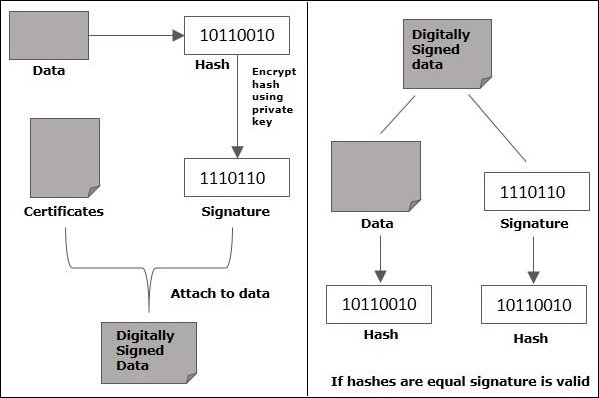
数字签名允许验证签名的作者,日期和时间,验证消息内容。 它还包括用于其他功能的身份验证功能。
数字签名的优点
在本节中,将了解要求使用数字签名的不同原因。数字签名应用到通信有几个原因 -
认证
数字签名有助于验证消息来源。 例如,如果银行的分支机构向中央办公室发送消息,请求更改帐户余额。 如果中央办公室无法验证从授权来源发送的消息,则执行此类请求可能是一个严重的错误。
完整性
邮件签名后,邮件中的任何更改都将使签名无效。
不可否认
通过此属性,任何已签署某些信息的实体都不能在以后拒绝签名。
创建数字签名
现在让学习如何创建数字签名。可以按照以下步骤使用Java创建数字签名。
第1步:创建KeyPairGenerator对象
KeyPairGenerator类提供getInstance()方法,该方法接受表示所需密钥生成算法的String变量,并返回生成密钥的KeyPairGenerator对象。
使用getInstance()方法创建KeyPairGenerator对象,如下所示。
//Creating KeyPair generator object
KeyPairGenerator keyPairGen = KeyPairGenerator.getInstance("DSA");
第2步:初始化KeyPairGenerator对象
KeyPairGenerator类提供了一个名为initialize()的方法,该方法用于初始化密钥对生成器。 此方法接受表示密钥大小的整数值。
使用initialize()方法初始化在上一步中创建的KeyPairGenerator对象,如下所示。
//Initializing the KeyPairGenerator
keyPairGen.initialize(2048);
第3步:生成KeyPairGenerator
可以使用generateKeyPair()方法生成KeyPair。使用generateKeyPair()方法生成密钥对,如下所示。
//Generate the pair of keys
KeyPair pair = keyPairGen.generateKeyPair();
第4步:从对中获取私钥
可以使用getPrivate()方法从生成的KeyPair对象中获取私钥。使用getPrivate()方法获取私钥,如下所示。
//Getting the private key from the key pair
PrivateKey privKey = pair.getPrivate();
第5步:创建签名对象
Signature类的getInstance()方法接受表示所需签名算法的字符串参数,并返回相应的Signature对象。
使用getInstance()方法创建Signature类的对象。
//Creating a Signature object
Signature sign = Signature.getInstance("SHA256withDSA");
第6步:初始化Signature对象
Signature类的initSign()方法接受PrivateKey对象并初始化当前的Signature对象。
使用initSign()方法初始化在上一步中创建的Signature对象,如下所示。
//Initialize the signature
sign.initSign(privKey);
第7步:将数据添加到Signature对象
Signature类的update()方法接受表示要签名或验证的数据的字节数组,并使用给定的数据更新当前对象。
通过以字节数组的形式将要签名的数据传递给update()方法来更新初始化的Signature对象,如下所示。
byte[] bytes = "Hello how are you".getBytes();
//Adding data to the signature
sign.update(bytes);
第8步:计算签名
Signature类的sign()方法返回更新数据的签名字节。使用sign()方法计算签名,如下所示。
//Calculating the signature
byte[] signature = sign.sign();
示例
以下Java程序接受来自用户的消息并为给定消息生成数字签名。
import java.security.KeyPair;
import java.security.KeyPairGenerator;
import java.security.PrivateKey;
import java.security.Signature;
import java.util.Scanner;
public class CreatingDigitalSignature {
public static void main(String args[]) throws Exception {
//Accepting text from user
Scanner sc = new Scanner(System.in);
System.out.println("Enter some text");
String msg = sc.nextLine();
//Creating KeyPair generator object
KeyPairGenerator keyPairGen = KeyPairGenerator.getInstance("DSA");
//Initializing the key pair generator
keyPairGen.initialize(2048);
//Generate the pair of keys
KeyPair pair = keyPairGen.generateKeyPair();
//Getting the private key from the key pair
PrivateKey privKey = pair.getPrivate();
//Creating a Signature object
Signature sign = Signature.getInstance("SHA256withDSA");
//Initialize the signature
sign.initSign(privKey);
byte[] bytes = "msg".getBytes();
//Adding data to the signature
sign.update(bytes);
//Calculating the signature
byte[] signature = sign.sign();
//Printing the signature
System.out.println("Digital signature for given text: "+new String(signature, "UTF8"));
}
}
执行上面示例代码,得到以下结果:
Enter some text
Hi how are you
Digital signature for given text: 0=@gRD???-?.???? /yGL?i??a!?
易百教程移动端:请扫描本页面底部(右侧)二维码并关注微信公众号,回复:"教程" 选择相关教程阅读或直接访问:http://m.yiibai.com 。
Java密码学验证签名 - Java密码学教程™
可以使用Java创建数字签名,并按照以下步骤进行验证。
第1步:创建KeyPairGenerator对象
KeyPairGenerator类提供getInstance()方法,该方法接受表示所需密钥生成算法的String变量,并返回生成密钥的KeyPairGenerator对象。
使用getInstance()方法创建KeyPairGenerator对象,如下所示。
//Creating KeyPair generator object
KeyPairGenerator keyPairGen = KeyPairGenerator.getInstance("DSA");
第2步:初始化KeyPairGenerator对象
KeyPairGenerator类提供了一个名为initialize()方法的方法。 此方法用于初始化密钥对生成器。 此方法接受表示密钥大小的整数值。
使用initialize()方法初始化在上一步中创建的KeyPairGenerator对象,如下所示。
//Initializing the KeyPairGenerator
keyPairGen.initialize(2048);
第3步:生成KeyPairGenerator
可以使用generateKeyPair()方法生成KeyPair。 使用此方法生成密钥对,如下所示。
//Generate the pair of keys
KeyPair pair = keyPairGen.generateKeyPair();
第4步:从对中获取私钥
可以使用getPrivate()方法从生成的KeyPair对象中获取私钥。
使用getPrivate()方法获取私钥,如下所示。
//Getting the private key from the key pair
PrivateKey privKey = pair.getPrivate();
第5步:创建签名对象
Signature类的getInstance()方法接受表示所需签名算法的字符串参数,并返回相应的Signature对象。
使用getInstance()方法创建Signature类的对象。
//Creating a Signature object
Signature sign = Signature.getInstance("SHA256withDSA");
第6步:初始化Signature对象
Signature类的initSign()方法接受PrivateKey对象并初始化当前的Signature对象。
使用initSign()方法初始化在上一步中创建的Signature对象,如下所示。
//Initialize the signature
sign.initSign(privKey);
第7步:将数据添加到Signature对象
Signature类的update()方法接受表示要签名或验证的数据的字节数组,并使用给定的数据更新当前对象。
通过以字节数组的形式将要签名的数据传递给update()方法来更新初始化的Signature对象,如下所示。
byte[] bytes = "Hello how are you".getBytes();
//Adding data to the signature
sign.update(bytes);
第8步:计算签名
Signature类的sign()方法返回更新数据的签名字节。使用sign()方法计算签名,如下所示。
//Calculating the signature
byte[] signature = sign.sign();
第9步:初始化签名对象以进行验证
要验证Signature对象,首先需要使用initVerify()方法对其进行初始化,该方法接受PublicKey对象。
因此,使用initVerify()方法初始化Signature对象以进行验证,如下所示。
//Initializing the signature
sign.initVerify(pair.getPublic());
第10步:更新要验证的数据
使用更新方法使用要验证的数据更新初始化(用于验证)对象,如下所示。
//Update the data to be verified
sign.update(bytes);
第11步:验证签名
Signature类的verify()方法接受另一个签名对象并使用当前签名对象进行验证。 如果有匹配则返回true,否则返回false。
使用此方法验证签名,如下所示。
//Verify the signature
boolean bool = sign.verify(signature);
示例
以下Java程序接受来自用户的消息,为给定消息生成数字签名并进行验证。
import java.security.KeyPair;
import java.security.KeyPairGenerator;
import java.security.PrivateKey;
import java.security.Signature;
import java.util.Scanner;
public class SignatureVerification {
public static void main(String args[]) throws Exception{
//Creating KeyPair generator object
KeyPairGenerator keyPairGen = KeyPairGenerator.getInstance("DSA");
//Initializing the key pair generator
keyPairGen.initialize(2048);
//Generate the pair of keys
KeyPair pair = keyPairGen.generateKeyPair();
//Getting the privatekey from the key pair
PrivateKey privKey = pair.getPrivate();
//Creating a Signature object
Signature sign = Signature.getInstance("SHA256withDSA");
//Initializing the signature
sign.initSign(privKey);
byte[] bytes = "Hello how are you".getBytes();
//Adding data to the signature
sign.update(bytes);
//Calculating the signature
byte[] signature = sign.sign();
//Initializing the signature
sign.initVerify(pair.getPublic());
sign.update(bytes);
//Verifying the signature
boolean bool = sign.verify(signature);
if(bool) {
System.out.println("Signature verified");
} else {
System.out.println("Signature failed");
}
}
}
执行上面示例代码,得到以下结果:
Signature verified
易百教程移动端:请扫描本页面底部(右侧)二维码并关注微信公众号,回复:"教程" 选择相关教程阅读或直接访问:http://m.yiibai.com 。
密文
Java密码学加密数据 - Java密码学教程™
可以使用javax.crypto包的Cipher类加密给定数据。 按照下面给出的步骤使用Java加密给定的数据。
第1步:创建KeyPairGenerator对象
KeyPairGenerator类提供getInstance()方法,该方法接受表示所需密钥生成算法的String变量,并返回生成密钥的KeyPairGenerator对象。
使用getInstance()方法创建KeyPairGenerator对象,如下所示。
//Creating KeyPair generator object
KeyPairGenerator keyPairGen = KeyPairGenerator.getInstance("DSA");
第2步:初始化KeyPairGenerator对象
KeyPairGenerator类提供了一个名为initialize()的方法,该方法用于初始化密钥对生成器。 此方法接受表示密钥大小的整数值。
使用initialize()方法初始化在上一步中创建的KeyPairGenerator对象,如下所示。
//Initializing the KeyPairGenerator
keyPairGen.initialize(2048);
第3步:生成KeyPairGenerator
可以使用KeyPairGenerator类的generateKeyPair()方法生成KeyPair。 使用此方法生成密钥对,如下所示。
//Generate the pair of keys
KeyPair pair = keyPairGen.generateKeyPair();
第4步:获取公钥
使用getPublic()方法从生成的密钥对对象中获取公钥,如下所示。
使用此方法获取公钥,如下所示。
//Getting the public key from the key pair
PublicKey publicKey = pair.getPublic();
第5步:创建一个Cipher对象
Cipher类的getInstance()方法接受表示所需转换的String变量,并返回实现给定转换的Cipher对象。
使用getInstance()方法创建Cipher对象,如下所示。
//Creating a Cipher object
Cipher cipher = Cipher.getInstance("RSA/ECB/PKCS1Padding");
第6步:初始化Cipher对象
Cipher类的init()方法接受两个参数,一个表示操作模式的整数参数(加密/解密)和一个表示公钥的Key对象。
使用init()方法初始化Cypher对象,如下所示。
//Initializing a Cipher object
cipher.init(Cipher.ENCRYPT_MODE, publicKey);
第7步:将数据添加到Cipher对象
Cipher类的update()方法接受表示要加密的数据的字节数组,并使用给定的数据更新当前对象。
通过以字节数组的形式将数据传递给update()方法来更新初始化的Cipher对象,如下所示。
//Adding data to the cipher
byte[] input = "Welcome to yiibai".getBytes();
cipher.update(input);
第7步:第8步:加密数据
Cipher类的doFinal()方法完成加密操作。 因此,使用此方法完成加密,如下所示。
//Encrypting the data
byte[] cipherText = cipher.doFinal();
示例
以下Java程序接受来自用户的文本,使用RSA算法对其进行加密,并打印给定文本的加密格式。
import java.security.KeyPair;
import java.security.KeyPairGenerator;
import java.security.Signature;
import javax.crypto.BadPaddingException;
import javax.crypto.Cipher;
public class CipherSample {
public static void main(String args[]) throws Exception{
//Creating a Signature object
Signature sign = Signature.getInstance("SHA256withRSA");
//Creating KeyPair generator object
KeyPairGenerator keyPairGen = KeyPairGenerator.getInstance("RSA");
//Initializing the key pair generator
keyPairGen.initialize(2048);
//Generating the pair of keys
KeyPair pair = keyPairGen.generateKeyPair();
//Creating a Cipher object
Cipher cipher = Cipher.getInstance("RSA/ECB/PKCS1Padding");
//Initializing a Cipher object
cipher.init(Cipher.ENCRYPT_MODE, pair.getPublic());
//Adding data to the cipher
byte[] input = "Welcome to yiibai".getBytes();
cipher.update(input);
//encrypting the data
byte[] cipherText = cipher.doFinal();
System.out.println(new String(cipherText, "UTF8"));
}
}
上述程序生成以下输出 -
Encrypted Text:
�"???:]J_?]???;Xl??????*@??u???r??=T&???_?_??.??i?????(?$_f?zD??????ZGH??g???
g?E:_??bz^??f?~o???t?}??u=uzp\\UI????Z??l[?G?3??Y?UAEfKT?f?O??N_?d__?????a_?15%?^?
'p?_?$,9"{??^??y??_?t???,?W?PCW??~??[?$??????e????f?Y-Zi__??_??w?_?&QT??`?`~?[?K_??_?�??
易百教程移动端:请扫描本页面底部(右侧)二维码并关注微信公众号,回复:"教程" 选择相关教程阅读或直接访问:http://m.yiibai.com 。
Java密码学解密数据 - Java密码学教程™
可以使用javax.crypto包的Cipher类解密加密数据。 按照下面给出的步骤使用Java解密给定数据。
第1步:创建KeyPairGenerator对象
KeyPairGenerator类提供getInstance()方法,该方法接受表示所需密钥生成算法的String变量,并返回生成密钥的KeyPairGenerator对象。
使用getInstance()方法创建KeyPairGenerator对象,如下所示。
//Creating KeyPair generator object
KeyPairGenerator keyPairGen = KeyPairGenerator.getInstance("DSA");
第2步:初始化KeyPairGenerator对象
KeyPairGenerator类提供了一个名为initialize()的方法,该方法用于初始化密钥对生成器。 此方法接受表示密钥大小的整数值。
使用initialize()方法初始化在上一步中创建的KeyPairGenerator对象,如下所示。
//Initializing the KeyPairGenerator
keyPairGen.initialize(2048);
第3步:生成KeyPairGenerator
使用KeyPairGenerator类的generateKeyPair()方法生成KeyPair。 使用此方法生成密钥对,如下所示。
//Generate the pair of keys
KeyPair pair = keyPairGen.generateKeyPair();
第4步:获取公钥
使用getPublic()方法从生成的密钥对对象中获取公钥,如下所示。
//Getting the public key from the key pair
PublicKey publicKey = pair.getPublic();
第5步:创建一个Cipher对象
Cipher类的getInstance()方法接受表示所需转换的String变量,并返回实现给定转换的Cipher对象。
使用getInstance()方法创建Cipher对象,如下所示。
//Creating a Cipher object
Cipher cipher = Cipher.getInstance("RSA/ECB/PKCS1Padding");
第6步:初始化Cipher对象
Cipher类的init()方法接受两个参数
- 表示操作模式的整数参数(加密/解密)
- 表示公钥的Key对象
使用init()方法初始化Cypher对象,如下所示。
//Initializing a Cipher object
cipher.init(Cipher.ENCRYPT_MODE, publicKey);
第7步:将数据添加到Cipher对象
Cipher类的update()方法接受表示要加密的数据的字节数组,并使用给定的数据更新当前对象。
通过以字节数组的形式将数据传递给update()方法来更新初始化的Cipher对象,如下所示。
//Adding data to the cipher
byte[] input = "Welcome to yiibai".getBytes();
cipher.update(input);
第8步:加密数据
Cipher类的doFinal()方法完成加密操作。 因此,使用此方法完成加密,如下所示。
//Encrypting the data
byte[] cipherText = cipher.doFinal();
第9步:初始化Cipher对象以进行解密
要解密前面步骤中加密的密码,需要初始化它以进行解密。
因此,通过传递参数Cipher.DECRYPT_MODE和PrivateKey对象来初始化密码对象,如下所示。
//Initializing the same cipher for decryption
cipher.init(Cipher.DECRYPT_MODE, pair.getPrivate());
第10步:解密数据
最后,使用doFinal()方法解密加密文本,如下所示。
//Decrypting the text
byte[] decipheredText = cipher.doFinal(cipherText);
示例
以下Java程序接受来自用户的文本,使用RSA算法对其进行加密,打印给定文本的密码,解密密码并再次打印解密文本。
import java.security.KeyPair;
import java.security.KeyPairGenerator;
import java.security.Signature;
import javax.crypto.Cipher;
public class CipherDecrypt {
public static void main(String args[]) throws Exception{
//Creating a Signature object
Signature sign = Signature.getInstance("SHA256withRSA");
//Creating KeyPair generator object
KeyPairGenerator keyPairGen = KeyPairGenerator.getInstance("RSA");
//Initializing the key pair generator
keyPairGen.initialize(2048);
//Generate the pair of keys
KeyPair pair = keyPairGen.generateKeyPair();
//Getting the public key from the key pair
PublicKey publicKey = pair.getPublic();
//Creating a Cipher object
Cipher cipher = Cipher.getInstance("RSA/ECB/PKCS1Padding");
//Initializing a Cipher object
cipher.init(Cipher.ENCRYPT_MODE, publicKey);
//Add data to the cipher
byte[] input = "Welcome to Yiibai".getBytes();
cipher.update(input);
//encrypting the data
byte[] cipherText = cipher.doFinal();
System.out.println( new String(cipherText, "UTF8"));
//Initializing the same cipher for decryption
cipher.init(Cipher.DECRYPT_MODE, pair.getPrivate());
//Decrypting the text
byte[] decipheredText = cipher.doFinal(cipherText);
System.out.println(new String(decipheredText));
}
}
执行上面示例代码,得到以下结果:
Encrypted Text:
]/[?F3?D?p
v?w?!?H???^?A??????P?u??FA?
?
???_?? ???_jMH-??>??OP?'?j?_?n`
?_??'`????o??_GL??g???g_f?????f|???LT?|?Vz_TDu#??\\?<b,,?$C2???Bq?#?lDB`??g,^??K?_?v???`}
?;LX?a?_5e???#???_?6?/B&B_???^?__Ap^#_?q?IEh????_?,??*??]~_?_?D?
_y???lp??a?P_U{
Decrypted Text:
Welcome to Yiibai
易百教程移动端:请扫描本页面底部(右侧)二维码并关注微信公众号,回复:"教程" 选择相关教程阅读或直接访问:http://m.yiibai.com 。
