



docker环境下载
1docker rm -f lhroel87
2docker run -itd --name lhroel87 -h lhroel87 \
3  -p 1521:1521 -p 38389:3389 \
4  -v /sys/fs/cgroup:/sys/fs/cgroup \
5  --privileged=true lhrbest/oracle23cfree:1.0 \
6  /usr/sbin/init
7
8 docker exec -it lhroel87 bash
启动数据库和监听
1/etc/init.d/oracle-free-23c status
2/etc/init.d/oracle-free-23c start
示例:
 1[root@lhroel87 /]# /etc/init.d/oracle-free-23c status
 2Status of the Oracle FREE 23c service:
 3
 4LISTENER status: STOPPED
 5FREE Database status:   STOPPED
 6[root@lhroel87 /]# /etc/init.d/oracle-free-23c start
 7Starting Oracle Net Listener.
 8Oracle Net Listener started.
 9Starting Oracle Database instance FREE.
10Oracle Database instance FREE started.
11
12[root@lhroel87 /]# /etc/init.d/oracle-free-23c status
13Status of the Oracle FREE 23c service:
14
15LISTENER status: RUNNING
16FREE Database status:   RUNNING
17[root@lhroel87 /]# su - oracle
18Last login: Fri Apr  7 03:04:15 UTC 2023 on pts/1
19[oracle@lhroel87 ~]$
测试新特性
 1[oracle@lhroel87 ~]$ sas
 2
 3SQL*Plus: Release 23.0.0.0.0 - Developer-Release on Fri Apr 7 02:45:24 2023
 4Version 23.2.0.0.0
 5
 6Copyright (c) 1982, 2023, Oracle.  All rights reserved.
 7
 8
 9Connected to:
10Oracle Database 23c Free, Release 23.0.0.0.0 - Developer-Release
11Version 23.2.0.0.0
12
13SQL> show pdbs
14
15    CON_ID CON_NAME                       OPEN MODE  RESTRICTED
16---------- ------------------------------ ---------- ----------
17         2 PDB$SEED                       READ ONLY  NO
18         3 FREEPDB1                       READ WRITE NO
(1) 不带FROM子句的SELECT查询
在Oracle 23c中,第一次实现了不带From子句的查询,也不需要dual,就是跟SQL Server,MySQL一样了
 1SQL> select 1;
 2
 3         1
 4----------
 5         1
 6
 7SQL>  ALTER SESSION SET NLS_DATE_FORMAT = 'YYYY-MM-DD HH24:MI:SS';
 8Session altered.
 9
10SQL>  SELECT SYSDATE;
11
12SYSDATE
13-------------------
142023-04-07 03:05:51
15
16SQL>
(2) 单表支持4096列
Oracle 此前版本单表支持1000列。
在23c中,单表支持列数量扩展到4096列,启用这一个特性需要将兼容性参数设置为23.0.0,同时将 Max_columns设置为Extended。
 1SQL> show parameter MAX_COLUMNS;
 2NAME                                 TYPE        VALUE
 3------------------------------------ ----------- ------------------------------
 4max_columns                          string      STANDARD
 5
 6SQL> alter system set MAX_COLUMNS=EXTENDED scope=spfile;
 7
 8-- 注:静态参数修改,需要重启数据库
 9SQL> shu immediate;
10SQL> startup
11SQL> show parameter MAX_COLUMNS;
12NAME                                 TYPE        VALUE
13------------------------------------ ----------- ------------------------------
14max_columns                          string      EXTENDED
(3)SCHEMA级别的权限
在23c之前的版本,如果针对Schema对其他用户进行授权,需要通过系统权限或对象权限分别显式地授予,这对数据库带来了额外的安全风险或复杂性。
在Oracle 23中,可以对Schema进行授权,简化了之前的权限操作,
1grant select any table on SCHMEA GSMUSER to DIP;
(4)Boolean数据类型
在Oracle Database 23c中,布尔数据类型被支持
 1create table test(name varchar2(100),flag BOOLEAN);
 2INSERT INTO test VALUES('dsss',True);
 3INSERT INTO test VALUES('hefei',1);
 4INSERT INTO test VALUES('abc',FALSE);
 5
 6select name from test where flag;
 7
 8SQL> select name from test where flag;
 9NAME
10------------
11dsss
12hefei
(5)GROUP BY可以使用别名了
在Oracle Database 23c中,现在支持基于别名、位置的GROUP BY,这大大简化了SQL文本和编写
1select extract(year FROM hire_date) as hire_year,count(*)
2from employees
3group by hire_year
4having hire_year>1985;
(6)DDL的 IF EXISTS判断
在Oracle Database 23c中,DDL支持通过 IF [NOT] EXISTS 判断,从而规避执行过程中的错误、异常和中断
 1-- 创建表时指定:
 2CREATE TABLE IF NOT EXISTS Customers (ID NUMBER(10), Name VARCHAR2(100));
 3
 4-- 删除表时指定:
 5DROP TABLE IF EXISTS Customers;
 6
 7
 8SQL> create table if not exists t1(id int);
 9
10Table created.
11
12SQL> create table if not exists t1(id int);
13
14Table created.
15
16SQL> create table t1(id int);
17create table t1(id int)
18             *
19ERROR at line 1:
20ORA-00955: name is already used by an existing object
表值函数增强
1SQL> select * from (values (1,'zhang san'),  (2,'lisi'),(3,'wangerma') ) t(id,name);
2
3        ID NAME
4---------- ---------
5         1 zhang san
6         2 lisi
7         3 wangerma
客户端使用
使用sqlplus远程连接:
 1C:\Users\lhr>sqlplus sys/lhr@192.18.0.14:1521/FREE as sysdba
 2
 3SQL*Plus: Release 21.0.0.0.0 - Production on Fri Apr 7 12:16:16 2023
 4Version 21.3.0.0.0
 5
 6Copyright (c) 1982, 2021, Oracle.  All rights reserved.
 7
 8
 9Connected to:
10Oracle Database 23c Free, Release 23.0.0.0.0 - Developer-Release
11Version 23.2.0.0.0
12
13SQL> show pdbs
14
15    CON_ID CON_NAME                       OPEN MODE  RESTRICTED
16---------- ------------------------------ ---------- ----------
17         2 PDB$SEED                       READ ONLY  NO
18         3 FREEPDB1                       READ WRITE NO
19SQL>
20
21C:\Users\lhr>sqlplus sys/lhr@172.18.0.14:1521/freepdb1 as sysdba
22
23SQL*Plus: Release 21.0.0.0.0 - Production on Fri Apr 7 12:16:53 2023
24Version 21.3.0.0.0
25
26Copyright (c) 1982, 2021, Oracle.  All rights reserved.
27
28
29Connected to:
30Oracle Database 23c Free, Release 23.0.0.0.0 - Developer-Release
31Version 23.2.0.0.0
32
33SQL> show pdbs
34
35    CON_ID CON_NAME                       OPEN MODE  RESTRICTED
36---------- ------------------------------ ---------- ----------
37         3 FREEPDB1                       READ WRITE NO
38SQL>
使用PL/SQL Developer连接:
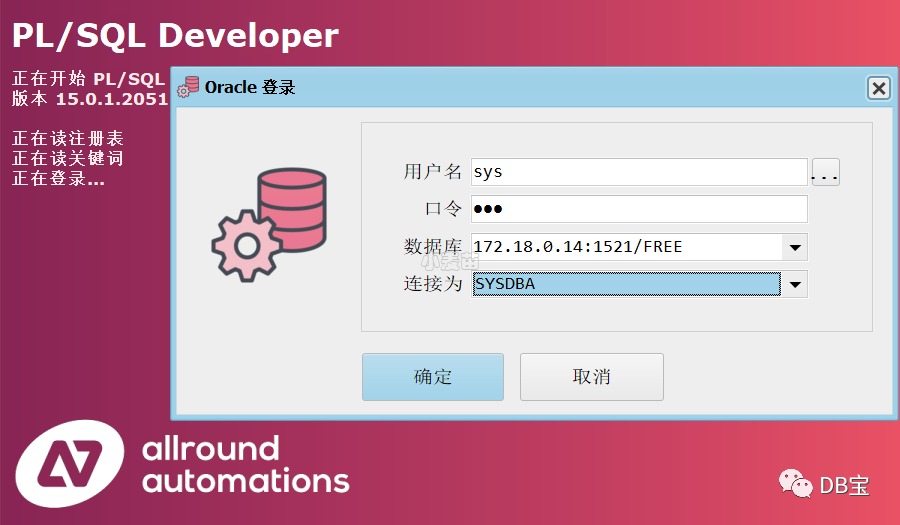
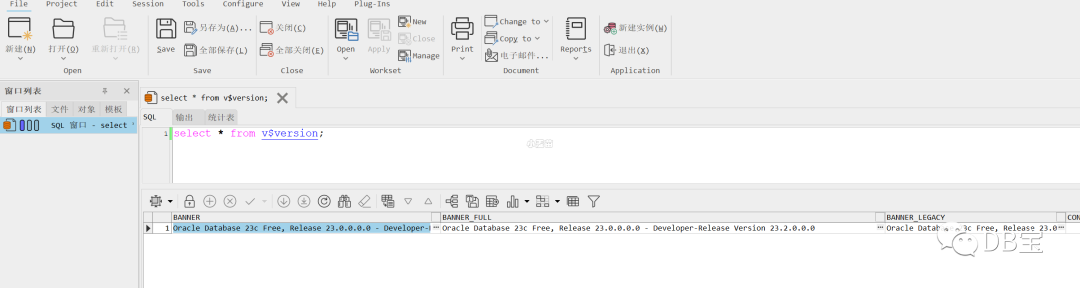
官方docker安装使用
参考:https://container-registry.oracle.com
 1-- 创建
 2docker pull container-registry.oracle.com/database/free:latest
 3
 4docker rm -f oracle23cfree
 5docker run -d --name oracle23cfree -h oracle23cfree \
 6  -p 1621:1521 \
 7container-registry.oracle.com/database/free:latest
 8
 9-- 日志
10docker logs -f oracle23cfree
总结
1、可以使用官方的docker,也可以使用我自己制作的docker镜像。
参考
https://bisal.blog.csdn.net/article/details/127099392
https://blog.csdn.net/qq_23170065/article/details/127094323
https://blog.csdn.net/weixin_41645135/article/details/129968650
文章转载自DB宝,如果涉嫌侵权,请发送邮件至:contact@modb.pro进行举报,并提供相关证据,一经查实,墨天轮将立刻删除相关内容。
