



创建表:create 语句
语法:
-- create table 表名称 (列名称 1 数据类型, 列名称 2 数据类型, 列名称 3 数据类型, ...);

CREATE TABLE database_name.table_name(
   column1 datatype  PRIMARY KEY(one or more columns),
   column2 datatype,
   column3 datatype,
   .....
   columnN datatype,
);

-- CREATE TABLE 是告诉数据库系统创建一个新表的关键字。CREATE TABLE 语句后跟着表的唯一的名称或标识。
-- 创建一表格该表包含 3 列,列名分别是:“id”、“name”、“addr”。

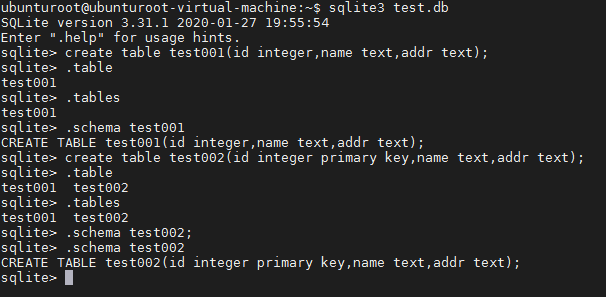
ubunturoot@ubunturoot-virtual-machine:~$ sqlite3 test.db
SQLite version 3.31.1 2020-01-27 19:55:54
Enter ".help" for usage hints.
sqlite> create table test001(id integer,name text,addr text);
sqlite> .table
test001
创建表:create 语句 (设置主键)
在用 sqlite 设计表时,每个表都可以通过 primary key 手动设置主键,每个表只能有一个主键,设置为
主键的列数据不可以重复。
-- create table 表名称 (列名称 1 数据类型 primary key, 列名称 2 数据类型, 列名称 3 数据类型, ...);
sqlite> create table test002(id integer primary key,name text,addr text);
查看表
.tables
验证表是否已成功创建,该命令用于列出附加数据库中的所有表。
.schema[表名]
使用 SQLite .schema 命令得到表的完整信息
「喜欢这篇文章,您的关注和赞赏是给作者最好的鼓励」
关注作者
【版权声明】本文为墨天轮用户原创内容,转载时必须标注文章的来源(墨天轮),文章链接,文章作者等基本信息,否则作者和墨天轮有权追究责任。如果您发现墨天轮中有涉嫌抄袭或者侵权的内容,欢迎发送邮件至:contact@modb.pro进行举报,并提供相关证据,一经查实,墨天轮将立刻删除相关内容。
