



简介
vacuum full本质上是创建了一张新的表,会创建该表的一个新拷贝,并且在操作完成之前都不会释放旧的拷贝。因此在进行vacuum full操作的时候是会加上一个ACCESS EXCLUSIVE级别的锁,所以一般只有当我们需要从表中回收大量磁盘空间的,即膨胀率很高的表才会去做vacuum full的操作。
vacuum full后的空间还是没有释放的原因有哪些?
"vacuum full" 是一种在 PostgreSQL 数据库中执行的命令,它将尝试释放未使用的磁盘空间并优化表的性能。如果执行完 "vacuum full" 后空间没有被释放,则可能有以下原因:
表上有活动的长事务:如果有活动的事务(如未提交的事务)在表中运行,那么 "vacuum full" 命令就无法释放该表使用的空间。因为 PostgreSQL 为了保证事务的隔离性,需要将事务执行的数据保留在数据库中,直到事务结束。
表上有长时间运行的操作:如果在执行 "vacuum full" 命令期间有其他长时间运行的操作(如查询、备份、复制等),则该操作可能会锁定表,并防止 "vacuum full" 命令释放空间。
内存不足:如果服务器的内存不足,则 "vacuum full" 命令可能无法释放空间。因为它需要足够的内存来处理表的索引和数据结构。
版本问题:某些 PostgreSQL 版本可能会存在 bug,导致 "vacuum full" 命令无法释放空间。如果是这种情况,建议升级到最新版本或者寻求帮助。
表上有大量删除的行:如果表上有大量已删除的行,则 "vacuum full" 命令可能需要花费更长的时间来释放空间。这种情况下,可以尝试使用 "vacuum" 命令来替代 "vacuum full" 命令。
请注意,在执行 "vacuum full" 命令前,请务必备份您的数据。
VACUUM和VACUUM FULL的区别
参考:https://www.xmmup.com/greenplumguanlishujukubiaohesuoyindepengzhangjivacuummingling.html#VACUUM_heVACUUM_FULL_de_qu_bie
模拟vacuum full空间不释放问题
长事务
  1db1=# select version();
  2                                                           version
  3-----------------------------------------------------------------------------------------------------------------------------
  4 PostgreSQL 14.5 (Debian 14.5-2.pgdg110+2) on x86_64-pc-linux-gnu, compiled by gcc (Debian 10.2.1-6) 10.2.1 20210110, 64-bit
  5(1 row)
  6
  7
  8db1=#
  9db1=# CREATE TABLE t_hash AS
 10db1-# SELECT id, md5(id::text)
 11db1-# FROM generate_series(1, 2000000) AS id;
 12SELECT 2000000
 13db1=# \dt+ t_hash
 14                                    List of relations
 15 Schema |  Name  | Type  |  Owner   | Persistence | Access method |  Size  | Description
 16--------+--------+-------+----------+-------------+---------------+--------+-------------
 17 public | t_hash | table | postgres | permanent   | heap          | 130 MB |
 18(1 row)
 19
 20
 21db1=# select * from pg_stat_all_tables where relname = 't_hash';
 22 relid | schemaname | relname | seq_scan | seq_tup_read | idx_scan | idx_tup_fetch | n_tup_ins | n_tup_upd | n_tup_del | n_tup_hot_upd | n_live_tup | n_dead_tup | n_mod_since_analyze | n_ins_since_vacuum | last_vacuum | last_autovacuum | last_analyze | last_autoanalyze | vacuum_count | autovacuum_count | analyze_count | autoanalyze_count
 23-------+------------+---------+----------+--------------+----------+---------------+-----------+-----------+-----------+---------------+------------+------------+---------------------+--------------------+-------------+-----------------+--------------+------------------+--------------+------------------+---------------+-------------------
 24 16460 | public     | t_hash  |        0 |            0 |          |               |   2000000 |         0 |         0 |             0 |    2000000 |          0 |             2000000 |            2000000 |             |                 |              |                  |            0 |                0 |             0 |                 0
 25(1 row)
 26
 27
 28db1=# \x
 29Expanded display is on.
 30db1=# select * from pg_stat_all_tables where relname = 't_hash';
 31-[ RECORD 1 ]-------+--------
 32relid               | 16460
 33schemaname          | public
 34relname             | t_hash
 35seq_scan            | 0
 36seq_tup_read        | 0
 37idx_scan            |
 38idx_tup_fetch       |
 39n_tup_ins           | 2000000
 40n_tup_upd           | 0
 41n_tup_del           | 0
 42n_tup_hot_upd       | 0
 43n_live_tup          | 2000000
 44n_dead_tup          | 0
 45n_mod_since_analyze | 2000000
 46n_ins_since_vacuum  | 2000000
 47last_vacuum         |
 48last_autovacuum     |
 49last_analyze        |
 50last_autoanalyze    |
 51vacuum_count        | 0
 52autovacuum_count    | 0
 53analyze_count       | 0
 54autoanalyze_count   | 0
 55
 56
 57db1=#
 58
 59
 60db1=# VACUUM (verbose,analyze,skip_locked,parallel 4) t_hash;
 61INFO:  vacuuming "public.t_hash"
 62INFO:  table "t_hash": found 0 removable, 80 nonremovable row versions in 1 out of 16667 pages
 63DETAIL:  0 dead row versions cannot be removed yet, oldest xmin: 760
 64Skipped 0 pages due to buffer pins, 0 frozen pages.
 65CPU: user: 0.00 s, system: 0.00 s, elapsed: 0.00 s.
 66INFO:  vacuuming "pg_toast.pg_toast_16460"
 67INFO:  table "pg_toast_16460": found 0 removable, 0 nonremovable row versions in 0 out of 0 pages
 68DETAIL:  0 dead row versions cannot be removed yet, oldest xmin: 760
 69Skipped 0 pages due to buffer pins, 0 frozen pages.
 70CPU: user: 0.00 s, system: 0.00 s, elapsed: 0.00 s.
 71INFO:  analyzing "public.t_hash"
 72INFO:  "t_hash": scanned 16667 of 16667 pages, containing 2000000 live rows and 0 dead rows; 30000 rows in sample, 2000000 estimated total rows
 73VACUUM
 74
 75
 76db1=# select * from pg_stat_all_tables where relname = 't_hash';
 77-[ RECORD 1 ]-------+------------------------------
 78relid               | 16460
 79schemaname          | public
 80relname             | t_hash
 81seq_scan            | 0
 82seq_tup_read        | 0
 83idx_scan            |
 84idx_tup_fetch       |
 85n_tup_ins           | 2000000
 86n_tup_upd           | 0
 87n_tup_del           | 0
 88n_tup_hot_upd       | 0
 89n_live_tup          | 2000000
 90n_dead_tup          | 0
 91n_mod_since_analyze | 0
 92n_ins_since_vacuum  | 0
 93last_vacuum         | 2023-04-11 09:12:53.198607+08
 94last_autovacuum     | 2023-04-11 09:10:19.707567+08
 95last_analyze        | 2023-04-11 09:12:53.457643+08
 96last_autoanalyze    | 2023-04-11 09:10:20.352277+08
 97vacuum_count        | 1
 98autovacuum_count    | 1
 99analyze_count       | 1
100autoanalyze_count   | 1
101
102
103db1=# begin ;
104BEGIN
105db1=*# delete from t_hash where id<=1000000;
106DELETE 1000000
再开一个窗口执行:
1db1=# vacuum full t_hash;
此时会卡住。。。。
查询会话:
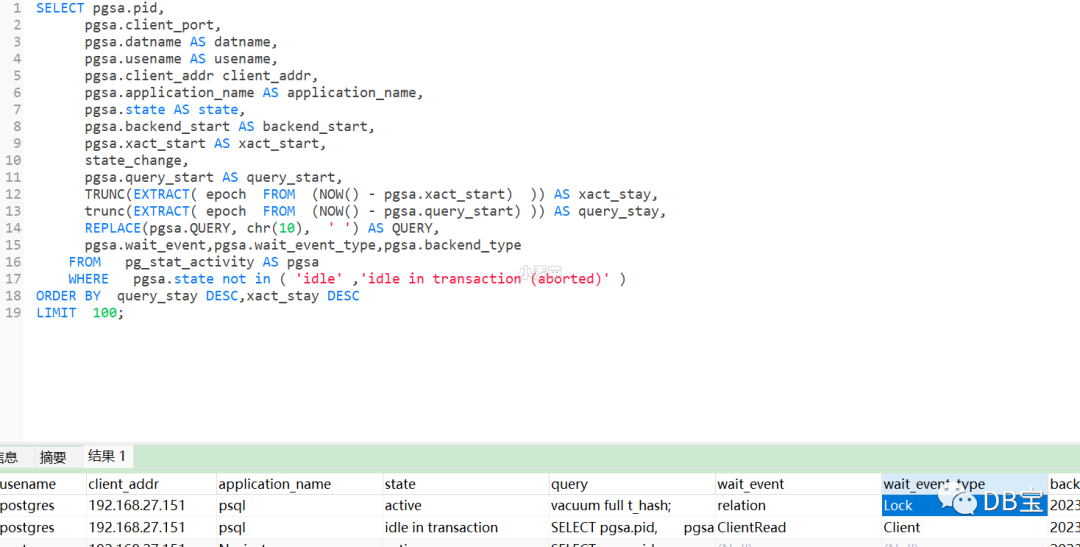
可以看到执行vacuum full
的窗口在等待锁资源,而该锁就是被idle in tracsaction
会话锁住没有释放。
在窗口1做提交后,窗口2立马返回结果。
 1db1=# vacuum full t_hash;
 2VACUUM
 3db1=#  \dtS+ t_hash
 4                                    List of relations
 5 Schema |  Name  | Type  |  Owner   | Persistence | Access method |  Size  | Description
 6--------+--------+-------+----------+-------------+---------------+--------+-------------
 7 public | t_hash | table | postgres | permanent   | heap          | 130 MB |
 8(1 row)
 9
10
11db1=#
12db1=#  select * from pg_stat_all_tables where relname = 't_hash';
13-[ RECORD 1 ]-------+------------------------------
14relid               | 16460
15schemaname          | public
16relname             | t_hash
17seq_scan            | 2
18seq_tup_read        | 4000000
19idx_scan            |
20idx_tup_fetch       |
21n_tup_ins           | 2000000
22n_tup_upd           | 0
23n_tup_del           | 1000000
24n_tup_hot_upd       | 0
25n_live_tup          | 1000000
26n_dead_tup          | 0
27n_mod_since_analyze | 0
28n_ins_since_vacuum  | 0
29last_vacuum         | 2023-04-11 09:12:53.198607+08
30last_autovacuum     | 2023-04-11 09:22:20.742867+08
31last_analyze        | 2023-04-11 09:12:53.457643+08
32last_autoanalyze    | 2023-04-11 09:22:21.396793+08
33vacuum_count        | 1
34autovacuum_count    | 2
35analyze_count       | 1
36autoanalyze_count   | 2
但是,此时空间仍然没有释放,需要我们再做一次vacuum full,空间才能释放。
1db1=# vacuum full t_hash;
2VACUUM
3db1=#  \dtS+ t_hash
4                                   List of relations
5 Schema |  Name  | Type  |  Owner   | Persistence | Access method | Size  | Description
6--------+--------+-------+----------+-------------+---------------+-------+-------------
7 public | t_hash | table | postgres | permanent   | heap          | 65 MB |
8(1 row)
统计信息不更新
这里有个需要注意的地方,vacuum full是不会去更新统计信息的!也就是说如果你执行完vacuum full后去查看pg_stat_all_tables,会发现n_dead_tup仍然没变化,但实际上你的表大小已经降了下来。
 1db1=# select * from pg_stat_all_tables where relname = 't_hash';
 2-[ RECORD 1 ]-------+------------------------------
 3relid               | 16460
 4schemaname          | public
 5relname             | t_hash
 6seq_scan            | 3
 7seq_tup_read        | 5000000
 8idx_scan            |
 9idx_tup_fetch       |
10n_tup_ins           | 2000000
11n_tup_upd           | 0
12n_tup_del           | 1000000
13n_tup_hot_upd       | 0
14n_live_tup          | 1000000
15n_dead_tup          | 0
16n_mod_since_analyze | 0
17n_ins_since_vacuum  | 0
18last_vacuum         | 2023-04-11 09:12:53.198607+08
19last_autovacuum     | 2023-04-11 09:22:20.742867+08
20last_analyze        | 2023-04-11 09:12:53.457643+08
21last_autoanalyze    | 2023-04-11 09:22:21.396793+08
22vacuum_count        | 1
23autovacuum_count    | 2
24analyze_count       | 1
25autoanalyze_count   | 2
26
可以加verbose analyze输出详细信息
 1db1=# begin;
 2BEGIN
 3db1=*# delete from t_hash where id>10000;
 4DELETE 1000000
 5
 6
 7
 8
 9-- 第2个窗口,
10-- 先会卡住,等窗口1提交后,窗口2才会返回信息
11-- 这里可以看到100万行不能被remove(DETAIL行)
12db1=# VACUUM FULL verbose analyze t_hash;
13INFO:  vacuuming "public.t_hash"
14INFO:  "t_hash": found 0 removable, 1000000 nonremovable row versions in 8334 pages
15DETAIL:  1000000 dead row versions cannot be removed yet.
16CPU: user: 0.35 s, system: 0.11 s, elapsed: 0.76 s.
17INFO:  analyzing "public.t_hash"
18INFO:  "t_hash": scanned 8334 of 8334 pages, containing 0 live rows and 1000000 dead rows; 0 rows in sample, 0 estimated total rows
19VACUUM
20db1=#  \dtS+ t_hash
21                                   List of relations
22 Schema |  Name  | Type  |  Owner   | Persistence | Access method | Size  | Description
23--------+--------+-------+----------+-------------+---------------+-------+-------------
24 public | t_hash | table | postgres | permanent   | heap          | 65 MB |
25(1 row)
26
27
28db1=# VACUUM FULL verbose analyze t_hash;
29INFO:  vacuuming "public.t_hash"
30INFO:  "t_hash": found 0 removable, 0 nonremovable row versions in 0 pages
31DETAIL:  0 dead row versions cannot be removed yet.
32CPU: user: 0.00 s, system: 0.00 s, elapsed: 0.00 s.
33INFO:  analyzing "public.t_hash"
34INFO:  "t_hash": scanned 0 of 0 pages, containing 0 live rows and 0 dead rows; 0 rows in sample, 0 estimated total rows
35VACUUM
36db1=#  \dtS+ t_hash
37                                      List of relations
38 Schema |  Name  | Type  |  Owner   | Persistence | Access method |    Size    | Description
39--------+--------+-------+----------+-------------+---------------+------------+-------------
40 public | t_hash | table | postgres | permanent   | heap          | 8192 bytes |
41(1 row)
42
43
44db1=# vacuum t_hash;
45VACUUM
46db1=#
47db1=#  select * from pg_stat_all_tables where relname = 't_hash';
48-[ RECORD 1 ]-------+------------------------------
49relid               | 16460
50schemaname          | public
51relname             | t_hash
52seq_scan            | 8
53seq_tup_read        | 11000000
54idx_scan            |
55idx_tup_fetch       |
56n_tup_ins           | 4000000
57n_tup_upd           | 0
58n_tup_del           | 3990000
59n_tup_hot_upd       | 0
60n_live_tup          | 10000
61n_dead_tup          | 0
62n_mod_since_analyze | 0
63n_ins_since_vacuum  | 0
64last_vacuum         | 2023-04-11 09:33:33.734504+08
65last_autovacuum     | 2023-04-11 09:41:21.978523+08
66last_analyze        | 2023-04-11 09:41:08.403983+08
67last_autoanalyze    | 2023-04-11 09:22:21.396793+08
68vacuum_count        | 2
69autovacuum_count    | 4
70analyze_count       | 4
71autoanalyze_count   | 2
原因
至于为什么vacuum full在有长事务的情况下死元组不一定会被回收掉呢,那是因为为了保证事务的一致性,所以在该长事务的backend_xid或者backend_xmin之前的数据都没法被回收,而是要原封不动的拷贝到新的表中。
而为什么在有长事务存在的情况下,我们执行truncate操作会将表中所有数据包括死元组都回收呢?这是因为truncate并不是一个 MVCC-safe的操作。
TRUNCATE is not MVCC-safe. After truncation, the table will appear empty to concurrent transactions, if they are using a snapshot taken before the truncation occurred
同样的,例如一些alter table之类的操作也不是MVCC-safe的,因此对于生产中时刻都存在事务的情况下,切勿随便乱执行这些“高危”操作,很可能导致应用查询到了错误的数据!
总结
1、执行vacuum full
的时候要确保表上没有锁,若有锁,则需要再执行1次vacuum full
。
2、vacuum full
是不会去更新统计信息的,视图pg_stat_all_tables
的列last_vacuum、vacuum_count是没有变化的,除非不带full才会更新。
3、VACUUM FULL verbose analyze t_hash;
可以看到详细的执行结果,“DETAIL:”行
4、若碰到bug,则可以考虑使用create table as来操作释放空间。
5、若表DML很频繁,不能锁表,则可以考虑使用插件pg_repack或pg_squeeze解决表和索引的膨胀问题解决表和索引的膨胀问题,具体请参考:
https://www.xmmup.com/pgshiyongchajianpg_repackjiejuebiaohesuoyindepengzhangwenti.html
https://www.xmmup.com/pgshiyongchajianpg_squeezejiejuebiaohesuoyindepengzhangwenti.html
6、VACUUM常用命令:
1VACUUM (verbose,analyze,skip_locked,parallel 4) t_hash;
2
3
4VACUUM FULL verbose analyze t_hash;
参考
https://blog.csdn.net/weixin_39540651/article/details/123746465
https://www.cnblogs.com/ctypyb2002/p/9792914.html
