



启动minikube报错
[root@node1 ~]# minikube start --kubernetes-version=v1.23.3
😄  minikube v1.30.1 on Centos 7.6.1810 (amd64)
✨  Using the docker driver based on user configuration

💣  Exiting due to PROVIDER_DOCKER_VERSION_EXIT_1: "docker version --format -:" exit status 1: template: :1:44: executing "" at <.Server.Platform.Nam...>: can't evaluate field Platform in type *types.Version
📘  Documentation: https://minikube.sigs.k8s.io/docs/drivers/docker/
原因是docker太低了
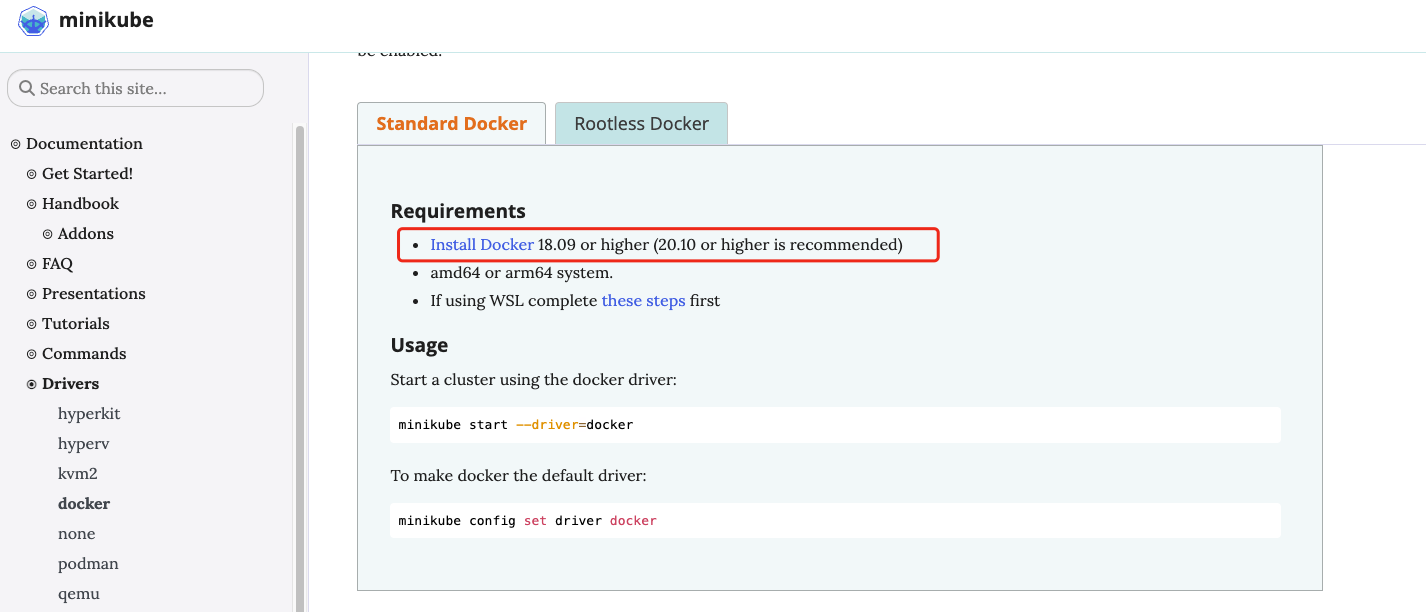
1、系统自带docker版本
[root@node1 ~]# docker version
Client:
 Version:         1.13.1
 API version:     1.26
 Package version: docker-1.13.1-209.git7d71120.el7.centos.x86_64
 Go version:      go1.10.3
 Git commit:      7d71120/1.13.1
 Built:           Wed Mar  2 15:25:43 2022
 OS/Arch:         linux/amd64

Server:
 Version:         1.13.1
 API version:     1.26 (minimum version 1.12)
 Package version: docker-1.13.1-209.git7d71120.el7.centos.x86_64
 Go version:      go1.10.3
 Git commit:      7d71120/1.13.1
 Built:           Wed Mar  2 15:25:43 2022
 OS/Arch:         linux/amd64
 Experimental:    false
这个版本已经很低了
升级docker
1、首先停止掉docker,并使用yum remove卸载旧版本docker
[root@node1 ~]# sudo systemctl stop docker
[root@node1 ~]# sudo yum remove docker \
>                   docker-client \
>                   docker-client-latest \
>                   docker-common \
>                   docker-latest \
>                   docker-latest-logrotate \
>                   docker-logrotate \
>                   docker-engine
Loaded plugins: fastestmirror, langpacks, product-id, search-disabled-repos, subscription-manager

This system is not registered with an entitlement server. You can use subscription-manager to register.

No Match for argument: docker-client-latest
No Match for argument: docker-latest
No Match for argument: docker-latest-logrotate
No Match for argument: docker-logrotate
No Match for argument: docker-engine
Resolving Dependencies
--> Running transaction check
---> Package docker.x86_64 2:1.13.1-209.git7d71120.el7.centos will be erased
---> Package docker-client.x86_64 2:1.13.1-209.git7d71120.el7.centos will be erased
---> Package docker-common.x86_64 2:1.13.1-209.git7d71120.el7.centos will be erased
--> Finished Dependency Resolution

Dependencies Resolved

======================================================================================================================================================
 Package                          Arch                      Version                                                  Repository                  Size
======================================================================================================================================================
Removing:
 docker                           x86_64                    2:1.13.1-209.git7d71120.el7.centos                       @extras                     64 M
 docker-client                    x86_64                    2:1.13.1-209.git7d71120.el7.centos                       @extras                     13 M
 docker-common                    x86_64                    2:1.13.1-209.git7d71120.el7.centos                       @extras                    4.4 k

Transaction Summary
======================================================================================================================================================
Remove  3 Packages

Installed size: 76 M
Is this ok [y/N]: y
Downloading packages:
Running transaction check
Running transaction test
Transaction test succeeded
Running transaction
  Erasing    : 2:docker-1.13.1-209.git7d71120.el7.centos.x86_64                                                                                   1/3
warning: /etc/sysconfig/docker-storage saved as /etc/sysconfig/docker-storage.rpmsave
  Erasing    : 2:docker-client-1.13.1-209.git7d71120.el7.centos.x86_64                                                                            2/3
  Erasing    : 2:docker-common-1.13.1-209.git7d71120.el7.centos.x86_64                                                                            3/3
  Verifying  : 2:docker-common-1.13.1-209.git7d71120.el7.centos.x86_64                                                                            1/3
  Verifying  : 2:docker-1.13.1-209.git7d71120.el7.centos.x86_64                                                                                   2/3
  Verifying  : 2:docker-client-1.13.1-209.git7d71120.el7.centos.x86_64                                                                            3/3

Removed:
  docker.x86_64 2:1.13.1-209.git7d71120.el7.centos                          docker-client.x86_64 2:1.13.1-209.git7d71120.el7.centos
  docker-common.x86_64 2:1.13.1-209.git7d71120.el7.centos

Complete!
2、安装一些必要的软件包,以便使用Docker的存储库:
sudo yum install -y yum-utils
3、添加Docker官方存储库:
sudo yum-config-manager --add-repo https://download.docker.com/linux/centos/docker-ce.repo
4、安装Docker Engine:
[root@node1 ~]# sudo yum install docker-ce docker-ce-cli containerd.io
Loaded plugins: fastestmirror, langpacks, product-id, search-disabled-repos, subscription-manager

This system is not registered with an entitlement server. You can use subscription-manager to register.

Loading mirror speeds from cached hostfile
Resolving Dependencies
--> Running transaction check
---> Package containerd.io.x86_64 0:1.6.20-3.1.el7 will be installed
---> Package docker-ce.x86_64 3:23.0.5-1.el7 will be installed
--> Processing Dependency: docker-ce-rootless-extras for package: 3:docker-ce-23.0.5-1.el7.x86_64
---> Package docker-ce-cli.x86_64 1:23.0.5-1.el7 will be installed
--> Processing Dependency: docker-buildx-plugin for package: 1:docker-ce-cli-23.0.5-1.el7.x86_64
--> Processing Dependency: docker-compose-plugin for package: 1:docker-ce-cli-23.0.5-1.el7.x86_64
--> Running transaction check
---> Package docker-buildx-plugin.x86_64 0:0.10.4-1.el7 will be installed
---> Package docker-ce-rootless-extras.x86_64 0:23.0.5-1.el7 will be installed
---> Package docker-compose-plugin.x86_64 0:2.17.3-1.el7 will be installed
--> Finished Dependency Resolution

Dependencies Resolved

======================================================================================================================================================
 Package                                      Arch                      Version                             Repository                           Size
======================================================================================================================================================
Installing:
 containerd.io                                x86_64                    1.6.20-3.1.el7                      docker-ce-stable                     34 M
 docker-ce                                    x86_64                    3:23.0.5-1.el7                      docker-ce-stable                     23 M
 docker-ce-cli                                x86_64                    1:23.0.5-1.el7                      docker-ce-stable                     13 M
Installing for dependencies:
 docker-buildx-plugin                         x86_64                    0.10.4-1.el7                        docker-ce-stable                     12 M
 docker-ce-rootless-extras                    x86_64                    23.0.5-1.el7                        docker-ce-stable                    8.8 M
 docker-compose-plugin                        x86_64                    2.17.3-1.el7                        docker-ce-stable                     12 M

Transaction Summary
======================================================================================================================================================
Install  3 Packages (+3 Dependent packages)

Total download size: 103 M
Installed size: 366 M
Is this ok [y/d/N]: y
Downloading packages:
warning: /var/cache/yum/x86_64/7/docker-ce-stable/packages/docker-buildx-plugin-0.10.4-1.el7.x86_64.rpm: Header V4 RSA/SHA512 Signature, key ID 621e9f35: NOKEY
Public key for docker-buildx-plugin-0.10.4-1.el7.x86_64.rpm is not installed
(1/6): docker-buildx-plugin-0.10.4-1.el7.x86_64.rpm                                                                            |  12 MB  00:00:04
(2/6): containerd.io-1.6.20-3.1.el7.x86_64.rpm                                                                                 |  34 MB  00:00:05
(3/6): docker-ce-cli-23.0.5-1.el7.x86_64.rpm                                                                                   |  13 MB  00:00:01
(4/6): docker-ce-rootless-extras-23.0.5-1.el7.x86_64.rpm                                                                       | 8.8 MB  00:00:00
(5/6): docker-ce-23.0.5-1.el7.x86_64.rpm                                                                                       |  23 MB  00:00:03
(6/6): docker-compose-plugin-2.17.3-1.el7.x86_64.rpm                                                                           |  12 MB  00:00:01
------------------------------------------------------------------------------------------------------------------------------------------------------
Total                                                                                                                  12 MB/s | 103 MB  00:00:08
Retrieving key from https://download.docker.com/linux/centos/gpg
Importing GPG key 0x621E9F35:
 Userid     : "Docker Release (CE rpm) <docker@docker.com>"
 Fingerprint: 060a 61c5 1b55 8a7f 742b 77aa c52f eb6b 621e 9f35
 From       : https://download.docker.com/linux/centos/gpg
Is this ok [y/N]: y
Running transaction check
Running transaction test
Transaction test succeeded
Running transaction
  Installing : containerd.io-1.6.20-3.1.el7.x86_64                                                                                                1/6
  Installing : docker-compose-plugin-2.17.3-1.el7.x86_64                                                                                          2/6
  Installing : docker-buildx-plugin-0.10.4-1.el7.x86_64                                                                                           3/6
  Installing : 1:docker-ce-cli-23.0.5-1.el7.x86_64                                                                                                4/6
  Installing : docker-ce-rootless-extras-23.0.5-1.el7.x86_64                                                                                      5/6
  Installing : 3:docker-ce-23.0.5-1.el7.x86_64                                                                                                    6/6
  Verifying  : 3:docker-ce-23.0.5-1.el7.x86_64                                                                                                    1/6
  Verifying  : docker-buildx-plugin-0.10.4-1.el7.x86_64                                                                                           2/6
  Verifying  : docker-compose-plugin-2.17.3-1.el7.x86_64                                                                                          3/6
  Verifying  : containerd.io-1.6.20-3.1.el7.x86_64                                                                                                4/6
  Verifying  : 1:docker-ce-cli-23.0.5-1.el7.x86_64                                                                                                5/6
  Verifying  : docker-ce-rootless-extras-23.0.5-1.el7.x86_64                                                                                      6/6

Installed:
  containerd.io.x86_64 0:1.6.20-3.1.el7               docker-ce.x86_64 3:23.0.5-1.el7               docker-ce-cli.x86_64 1:23.0.5-1.el7

Dependency Installed:
  docker-buildx-plugin.x86_64 0:0.10.4-1.el7     docker-ce-rootless-extras.x86_64 0:23.0.5-1.el7     docker-compose-plugin.x86_64 0:2.17.3-1.el7

Complete!
在安装过程中,如果您想安装特定版本的Docker,请使用以下命令列出可用版本:
[root@node1 ~]# sudo yum list docker-ce --showduplicates | sort -r
This system is not registered with an entitlement server. You can use subscription-manager to register.
              : subscription-manager
Loading mirror speeds from cached hostfile
Loaded plugins: fastestmirror, langpacks, product-id, search-disabled-repos,
Installed Packages
docker-ce.x86_64            3:23.0.5-1.el7                     docker-ce-stable
docker-ce.x86_64            3:23.0.5-1.el7                     @docker-ce-stable
docker-ce.x86_64            3:23.0.4-1.el7                     docker-ce-stable
docker-ce.x86_64            3:23.0.3-1.el7                     docker-ce-stable
docker-ce.x86_64            3:23.0.2-1.el7                     docker-ce-stable
docker-ce.x86_64            3:23.0.1-1.el7                     docker-ce-stable
docker-ce.x86_64            3:23.0.0-1.el7                     docker-ce-stable
docker-ce.x86_64            3:20.10.9-3.el7                    docker-ce-stable
docker-ce.x86_64            3:20.10.8-3.el7                    docker-ce-stable
docker-ce.x86_64            3:20.10.7-3.el7                    docker-ce-stable
docker-ce.x86_64            3:20.10.6-3.el7                    docker-ce-stable
docker-ce.x86_64            3:20.10.5-3.el7                    docker-ce-stable
docker-ce.x86_64            3:20.10.4-3.el7                    docker-ce-stable
docker-ce.x86_64            3:20.10.3-3.el7                    docker-ce-stable
然后,您可以通过指定版本号来安装特定版本,例如:
sudo yum install docker-ce-3:23.0.5-1.el7 docker-ce-cli-3:23.0.5-1.el7 containerd.io
2、启动minikube
启动minikube
[root@node1 ~]# minikube start --kubernetes-version=v1.23.3 --force
😄  minikube v1.30.1 on Centos 7.6.1810 (amd64)
❗  minikube skips various validations when --force is supplied; this may lead to unexpected behavior
✨  Using the docker driver based on user configuration
🛑  The "docker" driver should not be used with root privileges. If you wish to continue as root, use --force.
💡  If you are running minikube within a VM, consider using --driver=none:
📘    https://minikube.sigs.k8s.io/docs/reference/drivers/none/

🧯  The requested memory allocation of 1998MiB does not leave room for system overhead (total system memory: 1998MiB). You may face stability issues.
💡  Suggestion: Start minikube with less memory allocated: 'minikube start --memory=1998mb'

📌  Using Docker driver with root privileges
👍  Starting control plane node minikube in cluster minikube
🚜  Pulling base image ...
💾  Downloading Kubernetes v1.23.3 preload ...
    > preloaded-images-k8s-v18-v1...:  400.43 MiB / 400.43 MiB  100.00% 12.22 M
    > index.docker.io/kicbase/sta...:  373.53 MiB / 373.53 MiB  100.00% 7.24 Mi
❗  minikube was unable to download gcr.io/k8s-minikube/kicbase:v0.0.39, but successfully downloaded docker.io/kicbase/stable:v0.0.39 as a fallback image
🔥  Creating docker container (CPUs=2, Memory=1998MB) ...
🐳  Preparing Kubernetes v1.23.3 on Docker 23.0.2 ...
❌  Unable to load cached images: loading cached images: stat /root/.minikube/cache/images/amd64/registry.k8s.io/kube-apiserver_v1.23.3: no such file or directory
    ▪ Generating certificates and keys ...
    ▪ Booting up control plane ...
    ▪ Configuring RBAC rules ...
    ▪ Using image gcr.io/k8s-minikube/storage-provisioner:v5
🔎  Verifying Kubernetes components...
🌟  Enabled addons: storage-provisioner, default-storageclass
💡  kubectl not found. If you need it, try: 'minikube kubectl -- get pods -A'
🏄  Done! kubectl is now configured to use "minikube" cluster and "default" namespace by default
[root@node1 ~]#
参考链接:
https://minikube.sigs.k8s.io/docs/drivers/
https://minikube.sigs.k8s.io/docs/drivers/docker/
「喜欢这篇文章,您的关注和赞赏是给作者最好的鼓励」
关注作者
【版权声明】本文为墨天轮用户原创内容,转载时必须标注文章的来源(墨天轮),文章链接,文章作者等基本信息,否则作者和墨天轮有权追究责任。如果您发现墨天轮中有涉嫌抄袭或者侵权的内容,欢迎发送邮件至:contact@modb.pro进行举报,并提供相关证据,一经查实,墨天轮将立刻删除相关内容。
