



REPMGR 是一套在PostgreSQL服务器集群中用于管理复制和故障转移的开源工具 。它支持并增强了PostgreSQL的 内置流式复制,提供单个读/写主服务器 以及一个或多个只读备用数据库,其中包含主数据库的近实时副本服务器的数据库。
它提供了两个主要工具:
| 工具 | 作用 | 具体用途 |
|---|---|---|
| repmgr | 用于执行管理任务的命令行工具 | 设置备用服务器,将备用服务器提升为主服务器,切换主服务器和备用服务器,显示复制群集中服务器的状态 |
| repmgrd | 主动监视复制群集中的服务器的守护程序 | 监视和记录复制性能,通过检测主数据库和提升最合适的备用服务器,向用户定义的群集中事件提供有关事件的通知 可以执行任务的脚本,例如通过电子邮件发送警报 |
01
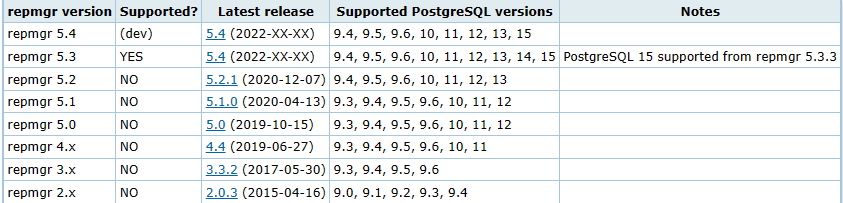
repmgr 版本对应支持的PostgreSQL版本
02
部署环境
操作系统:Scientific Linux release 7.9 (Nitrogen)
PostgreSQL版本:PostgreSQL 15.1
repmgr版本:repmgr-5.3.3
03
安装PostgreSQL
--安装相关依赖:

yum -y install gcc gcc_c++ libyaml  python* readline readline-devel zlib zlib-devel

--关闭防火墙,设置selinux(各节点)

systemctl stop firewalld

systemctl disable firewalld

sed -i 's/^SELINUX=enforcing/SELINUX=disabled/' /etc/selinux/config

--创建目录及用户

mkdir -p /data/pg15

mkdir -p /data/pgarch

mkdir -p /usr/local/pg15

useradd postgres

chown -R postgres:postgres /data

chown -R postgres:postgres /usr/local/pg15

chmod 700 /data/pg15

--源码安装PG15.2(postgres用户,所有节点)

tar -xvf postgresql-15.2.tar.gz

cd postgresql-15.2

./configure --prefix=/usr/local/pg15/

make world && make install-world
04
设置环境变量
cat .bashrc

export PGDATA=/data/pg15

export PGHOME=/usr/local/pg15/

export LD_LIBRARY_PATH=$LD_LIBRARY_PATH:$PGHOME/lib

export PATH=$PATH:$PGHOME/bin/

export PGPORT=5435

source .bashrc
05
初始化数据库(主节点)
initdb -D /data/pg15

--配置pg_hba.conf

host    all        all           192.168.126.0/24   md5

local   replication   repmgr                              trust

host    replication   repmgr      127.0.0.1/32            trust

host    replication   repmgr      192.168.126.0/24          trust

local   repmgr        repmgr                              trust

host    repmgr        repmgr      127.0.0.1/32            trust

host    repmgr        repmgr      192.168.126.0/24          trust

--配置postgresql.conf

listen_addresses = '*'

port = 5435

shared_buffers = 256MB

wal_level = replica

max_wal_size = 1GB

log_destination = 'csvlog'

logging_collector = on

log_directory = 'log'

log_filename = 'postgresql-%Y-%m-%d_%H%M%S.log'

log_file_mode = 0600

archive_mode = on

archive_command = 'cp %p /data/pgarch/%f'

max_wal_senders = 10

max_replication_slots = 10

hot_standby = on

--启动数据库

pg_ctl start -D /data/pg15
06
设置PostgreSQL开机自启(主备相同步骤设置)
[root@pg15_rh7_132 ~]# cd /home/postgres/postgresql-15.1/contrib/start-scripts/

[root@pg15_rh7_132 ~]# cp linux /etc/init.d/postgresql

[root@pg15_rh7_132 ~]# chmod +x /etc/init.d/postgresql

[root@pg15_rh7_132 ~]# vim /etc/init.d/postgresql

# Installation prefix 修改安装目录位置

prefix=/usr/local/pg15

# Data directory 修改数据目录位置

PGDATA="/data/pg15"

[root@pg15_rh7_132 ~]#  chkconfig --add postgresql

[root@pg15_rh7_132 ~]#  chkconfig --list postgresql

重启服务器

[root@pg15_rh7_132 ~]#  reboot
07
主库创建repmgr库存储元数据
postgres=# create user repmgr with superuser password 'qwe' connection limit 10;

CREATE ROLE

postgres=# create database repmgr owner  repmgr;

CREATE DATABASE
08
安装repmgr
--安装依赖

yum check-update

yum groupinstall "Development Tools" -y

yum install -y yum-utils openjade docbook-dtds docbook-style-dsssl docbook-style-xsl

yum -y install yum-builddep flex libselinux-devel libxml2-devel libxslt-devel openssl-devel pam-devel readline-devel

--解压安装repmgr(主备库都安装)

[root@pg15_rh7_132 ~]# tar -xvf repmgr-5.3.3.tar.gz -C /home/postgres/

[root@pg15_rh7_132 ~]#  chown -R postgres:postgres /home/postgres/

[root@pg15_rh7_132 ~]# su - postgres

[postgres@pg15_rh7_132 ~]$ cd repmgr-5.3.3

[postgres@pg15_rh7_132 ~]$  ./configure

[postgres@pg15_rh7_132 ~]$ make install
09
配置免密
[postgres@pg15_rh7_132 ~]$ ssh-keygen -t rsa

[postgres@pg15_rh7_132 ~]$ ssh-copy-id postgres@192.168.126.133

[postgres@pg15_rh7_133 ~]$ ssh-keygen -t rsa

[postgres@pg15_rh7_133 ~]$ ssh-copy-id postgres@192.168.126.132

[postgres@pg15_rh7_132 ~]$ cat .pgpass

192.168.126.132:5435:repmgr:repmgr:qwe

192.168.126.133:5435:repmgr:repmgr:qwe

[postgres@pg15_rh7_133 ~]$ cat .pgpass

192.168.126.132:5435:repmgr:repmgr:qwe

192.168.126.133:5435:repmgr:repmgr:qwe
10
相关的表和视图
| 表名 视图 | 用途 | 备注 |
|---|---|---|
| repmgr.events | 记录集群操作事件 | table |
| repmgr.monitoring_history | 历史备用监控信息 | table |
| repmgr.nodes | 每个服务器的连接和状态信息 | table |
| repmgr.replication_status | 启用 repmgrd 的监控后,会显示 每个备用数据库的当前监视状态 | view |
| repmgr.show_nodes | 基于repmgr.nodes ,显示服务器连接状态信息 | view |
11
主库创建配置文件repmgr.conf
cat repmgr.conf

node_id=1

   node_name='node1'

   conninfo='host=192.168.126.132 port=5435  user=repmgr dbname=repmgr connect_timeout=2'

   data_directory='/data/pg15'

   测试repmgr是否能免密访问主库

   [postgres@pg15_rh7_133 repmgr-5.3.3]$ psql -p5435 -h 192.168.126.132 -Urepmgr
12
使用repmgr命令注册主库
[postgres@pg15_rh7_132 ~]$ chmod 600 .pgpass

[postgres@pg15_rh7_132 ~]$ /usr/local/pg15/bin/repmgr -f /home/postgres/repmgr.conf primary register --force

INFO: connecting to primary database...

NOTICE: attempting to install extension "repmgr"

NOTICE: "repmgr" extension successfully installed

NOTICE: primary node record (ID: 1) registered

--查看注册信息

[postgres@pg15_rh7_132 ~]$ repmgr -f repmgr.conf cluster show

ID | Name  | Role    | Status    | Upstream | Location | Priority | Timeline | Connection string

----+-------+---------+-----------+----------+----------+----------+----------+-----------------------------------------------------------------------------

1  | node1 | primary | * running |          | default  | 100      | 1        | host=192.168.126.132 port=5435  user=repmgr dbname=repmgr connect_timeout=2

repmgr=# select * from repmgr.nodes ;

-[ RECORD 1 ]----+----------------------------------------------------------------------------

node_id          | 1

upstream_node_id |

active           | t

node_name        | node1

type             | primary

location         | default

priority         | 100

conninfo         | host=192.168.126.132 port=5435  user=repmgr dbname=repmgr connect_timeout=2

repluser         | repmgr

slot_name        |

config_file      | /home/postgres/repmgr.conf
13
使用repmgr命令克隆备库
[postgres@pg15_rh7_133 ~]$ cat repmgr.conf

   node_id=2

   node_name='node2'

   conninfo='host=192.168.126.133 port=5435  user=repmgr dbname=repmgr connect_timeout=2'

   data_directory='/data/pg15'

[postgres@pg15_rh7_133 ~]$ /usr/local/pg15/bin/repmgr -h 192.168.126.132 -p5435 -U repmgr -d repmgr -f /home/postgres/repmgr.conf standby clone --dry-run

NOTICE: destination directory "/data/pg15" provided

INFO: connecting to source node

DETAIL: connection string is: host=192.168.126.132 port=5435 user=repmgr dbname=repmgr

DETAIL: current installation size is 29 MB

INFO: "repmgr" extension is installed in database "repmgr"

WARNING: target data directory appears to be a PostgreSQL data directory

DETAIL: target data directory is "/data/pg15"

HINT: use -F/--force to overwrite the existing data directory

INFO: replication slot usage not requested;  no replication slot will be set up for this standby

INFO: parameter "max_wal_senders" set to 10

NOTICE: checking for available walsenders on the source node (2 required)

INFO: sufficient walsenders available on the source node

DETAIL: 2 required, 10 available

NOTICE: checking replication connections can be made to the source server (2 required)

INFO: required number of replication connections could be made to the source server

DETAIL: 2 replication connections required

WARNING: data checksums are not enabled and "wal_log_hints" is "off"

DETAIL: pg_rewind requires "wal_log_hints" to be enabled

NOTICE: standby will attach to upstream node 1

HINT: consider using the -c/--fast-checkpoint option

INFO: would execute:

 pg_basebackup -l "repmgr base backup"  -D /data/pg15 -h 192.168.126.132 -p 5435 -U repmgr -X stream

INFO: all prerequisites for "standby clone" are met

--根据提示查看相对应的参数设置是否没有去掉注释

--注意备库repmgr.conf文件中的目录要为空

[postgres@pg15_rh7_133 ~]$  /usr/local/pg15/bin/repmgr -h 192.168.126.132 -p5435 -U repmgr -d repmgr -f /home/postgres/repmgr.conf standby clone --force

NOTICE: destination directory "/data/pg15" provided

INFO: connecting to source node

DETAIL: connection string is: host=192.168.126.132 port=5435 user=repmgr dbname=repmgr

DETAIL: current installation size is 29 MB

INFO: replication slot usage not requested;  no replication slot will be set up for this standby

NOTICE: checking for available walsenders on the source node (2 required)

NOTICE: checking replication connections can be made to the source server (2 required)

WARNING: data checksums are not enabled and "wal_log_hints" is "off"

DETAIL: pg_rewind requires "wal_log_hints" to be enabled

WARNING: directory "/data/pg15" exists but is not empty

NOTICE: -F/--force provided - deleting existing data directory "/data/pg15"

NOTICE: starting backup (using pg_basebackup)...

HINT: this may take some time; consider using the -c/--fast-checkpoint option

INFO: executing:

 pg_basebackup -l "repmgr base backup"  -D /data/pg15 -h 192.168.126.132 -p 5435 -U repmgr -X stream

NOTICE: standby clone (using pg_basebackup) complete

NOTICE: you can now start your PostgreSQL server

HINT: for example: pg_ctl -D /data/pg15 start

HINT: after starting the server, you need to register this standby with "repmgr standby register"

--启动备库

pg_ctl -D /data/pg15 start
14
验证复制是否正常工作
--连接到主库查看

repmgr=# SELECT * FROM pg_stat_replication;

-[ RECORD 1 ]----+------------------------------

pid              | 17730

usesysid         | 24586

usename          | repmgr

application_name | node2

client_addr      | 192.168.126.133

client_hostname  |

client_port      | 49068

backend_start    | 2023-05-04 14:21:56.605203+08

backend_xmin     |

state            | streaming

sent_lsn         | 0/150001F0

write_lsn        | 0/150001F0

flush_lsn        | 0/150001F0

replay_lsn       | 0/150001F0

write_lag        |

flush_lag        |

replay_lag       |

sync_priority    | 0

sync_state       | async

reply_time       | 2023-05-04 20:51:52.968141+08
15
注册备用数据库
repmgr -f  /home/postgres/repmgr.conf standby register

INFO: connecting to local node "node2" (ID: 2)

INFO: connecting to primary database

WARNING: --upstream-node-id not supplied, assuming upstream node is primary (node ID: 1)

INFO: standby registration complete

NOTICE: standby node "node2" (ID: 2) successfully registered

--查看集群状态

[postgres@pg15_rh7_133 ~]$ repmgr -f  /home/postgres/repmgr.conf cluster show

ID | Name  | Role    | Status    | Upstream | Location | Priority | Timeline | Connection string

----+-------+---------+-----------+----------+----------+----------+----------+-----------------------------------------------------------------------------

1  | node1 | primary | * running |          | default  | 100      | 1        | host=192.168.126.132 port=5435  user=repmgr dbname=repmgr connect_timeout=2

2  | node2 | standby |   running | node1    | default  | 100      | 1        | host=192.168.126.133 port=5435  user=repmgr dbname=repmgr connect_timeout=2
16
主备机切换(切换pg15_rh7_133为主)
[postgres@pg15_rh7_133 ~]$ repmgr -f repmgr.conf  standby switchover -U repmgr --verbose

NOTICE: using provided configuration file "repmgr.conf"

WARNING: following problems with command line parameters detected:

 database connection parameters not required when executing STANDBY SWITCHOVER

NOTICE: executing switchover on node "node2" (ID: 2)

INFO: searching for primary node

INFO: checking if node 1 is primary

INFO: current primary node is 1

INFO: SSH connection to host "192.168.126.132" succeeded

INFO: 0 pending archive files

INFO: replication lag on this standby is 0 seconds

NOTICE: attempting to pause repmgrd on 2 nodes

NOTICE: local node "node2" (ID: 2) will be promoted to primary; current primary "node1" (ID: 1) will be demoted to standby

NOTICE: stopping current primary node "node1" (ID: 1)

NOTICE: issuing CHECKPOINT on node "node1" (ID: 1)

DETAIL: executing server command "pg_ctl  -D '/data/pg15' -W -m fast stop"

INFO: checking for primary shutdown; 1 of 60 attempts ("shutdown_check_timeout")

INFO: checking for primary shutdown; 2 of 60 attempts ("shutdown_check_timeout")

NOTICE: current primary has been cleanly shut down at location 0/16000028

NOTICE: promoting standby to primary

DETAIL: promoting server "node2" (ID: 2) using pg_promote()

NOTICE: waiting up to 60 seconds (parameter "promote_check_timeout") for promotion to complete

INFO: standby promoted to primary after 1 second(s)

NOTICE: STANDBY PROMOTE successful

DETAIL: server "node2" (ID: 2) was successfully promoted to primary

INFO: node "node1" (ID: 1) is pingable

INFO: node "node1" (ID: 1) has attached to its upstream node

NOTICE: node "node2" (ID: 2) promoted to primary, node "node1" (ID: 1) demoted to standby

NOTICE: switchover was successful

DETAIL: node "node2" is now primary and node "node1" is attached as standby

NOTICE: STANDBY SWITCHOVER has completed successfully

查看集群主备状态

[postgres@pg15_rh7_133 ~]$ repmgr -f repmgr.conf  cluster show

ID | Name  | Role    | Status    | Upstream | Location | Priority | Timeline | Connection string

----+-------+---------+-----------+----------+----------+----------+----------+-----------------------------------------------------------------------------

1  | node1 | standby |   running | node2    | default  | 100      | 3        | host=192.168.126.132 port=5435  user=repmgr dbname=repmgr connect_timeout=2

2  | node2 | primary | * running |          | default  | 100      | 4        | host=192.168.126.133 port=5435  user=repmgr dbname=repmgr connect_timeout=2

[postgres@pg15_rh7_133 ~]$ psql repmgr

psql (15.2)

Type "help" for help

repmgr=# \x

Expanded display is on.

repmgr=# select * from pg_stat_replication;

-[ RECORD 1 ]----+------------------------------

pid              | 6593

usesysid         | 24586

usename          | repmgr

application_name | node1

client_addr      | 192.168.126.132

client_hostname  |

client_port      | 44310

backend_start    | 2023-05-04 22:41:31.735749+08

backend_xmin     |

state            | streaming

sent_lsn         | 0/16000910

write_lsn        | 0/16000910

flush_lsn        | 0/16000910

replay_lsn       | 0/16000910

write_lag        |

flush_lag        |

replay_lag       |

sync_priority    | 0

sync_state       | async

reply_time       | 2023-05-04 16:13:36.50688+08


点击此处阅读原文
↓↓↓
文章转载自开源软件联盟PostgreSQL分会,如果涉嫌侵权,请发送邮件至:contact@modb.pro进行举报,并提供相关证据,一经查实,墨天轮将立刻删除相关内容。
