



1、需求描述
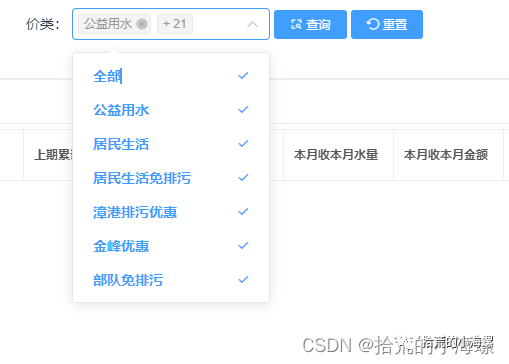
VUE+Element-UI的下拉框选择中缺少全选功能,不方便用户操作。顾封装一个支持全选的el-select的组件
2、组件封装
组件支持全部多选,提供多个参数支持配置,包括全选名称配置。
<template><el-select v-model="selected":collapse-tags="collapseTags":multiple="multiple":popper-append-to-body="false"class="all-select-box"><el-option v-if="multiple && data.length"id="select-all"ref="all":class="{'selected': isSelectedAll,'divide-line': divideAll}":label="allLabel"disabledvalue="@all"@click.stop.native="isSelectedAll = !isSelectedAll"></el-option><el-option v-for="item in data":key="item[key]":label="item[label]":value="item[_value]"></el-option></el-select></template><script>export default {name: 'SelectAll',model: {prop: 'value',event: 'v-model'},props: {// 全选框绑定值value: {type: Array,default: []},// 全选框数据data: {type: Array,default: []},// 全选按钮标题allLabel: {type: String,default: '全部'},// 是否用线将全选与其它选项分割divideAll: {type: Boolean,default: false},// 全选框对应配置option: {type: Object,default: () => ({// 设置label对应字段key: 'key',// 设置label对应字段label: 'label',// 设置value对应字段value: 'value'})},// el-select原生属性multiple: {type: Boolean,default: true},collapseTags: {type: Boolean,default: true}},computed: {// 当前的选中项列表selected: {get() {return this.value},set(v) {this.$emit('v-model', v)}},// 当前是否全选isSelectedAll: {get() {return this.data.every(i => this.selected.includes(i[this._value]))},set(v) {this.$emit('v-model', v ? this.data.map(i => i[this._value]) : [])}},key(){return this.option.key},label() {return this.option.label},_value() {return this.option.value},},}</script><style scoped>#select-all {cursor: pointer;}.divide-line {border-bottom: 1px solid rgba(123, 123, 123, .1);}#select-all:not(.selected) {color: #606266;}deep/ .el-select-dropdown__item.hover {background-color: transparent !important;}#select-all:hover, deep/ .el-select-dropdown__item:hover {background-color: #f5f7fa !important;}</style>
3、使用样例
组件的引用,通过import 在components组件库中添加SelectAll的引用。
import SelectAll from "@/components/SelectAll";export default{components: {SelectAll}}
调用方式:
<SelectAll v-model="queryParam.Nos":data="dataList":option="{key:'no', label: 'name', value: 'no'}"></SelectAll>
参数说明:
| 参数 | 说明 | 值 |
| :data | 要填充下拉框数据列表集 | [] |
| v-model | 选择的数据集 | [] |
| key | 列表中的item key | string |
| label | 列表中的item 显示值 | string |
| value | 列表中的item 选择的值 | string |
| allLabel | 全选名称 | string |
文章转载自拾荒的小海螺,如果涉嫌侵权,请发送邮件至:contact@modb.pro进行举报,并提供相关证据,一经查实,墨天轮将立刻删除相关内容。
