



java中的io流的介绍
I/O是InputStream/OutputStream的缩写,I/O技术是非常实用的技术,用于处理数据传输。比如读写文件,网络通讯
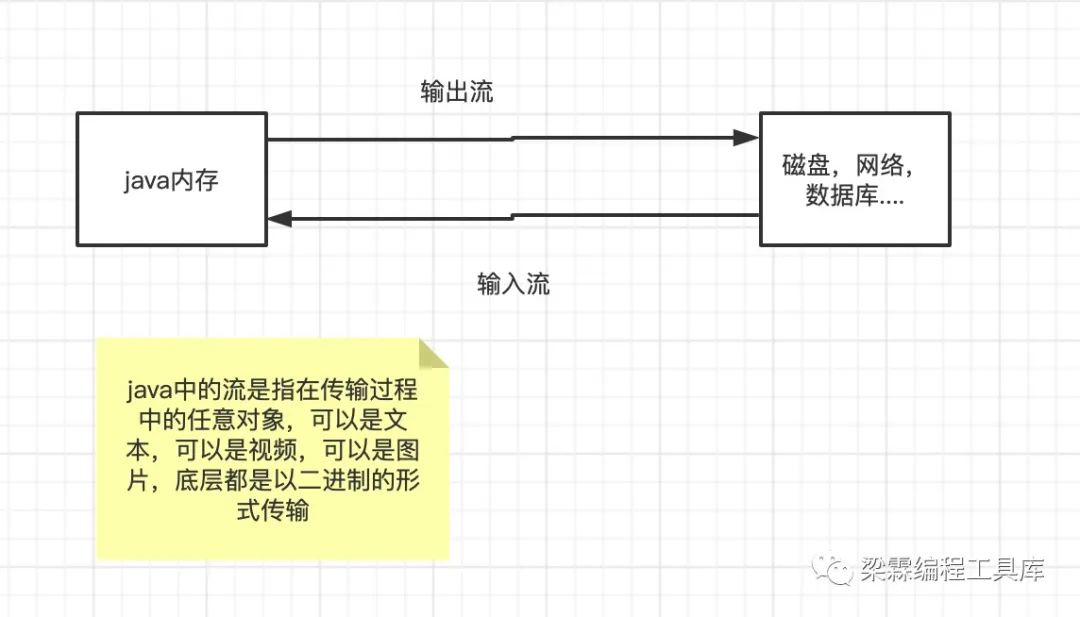
Java中对于数据的输入/输出是以流的形式进行
流可以是任意的内容,比如文本,视频,音频,图片等,因此理论上流可以传输任意的内容
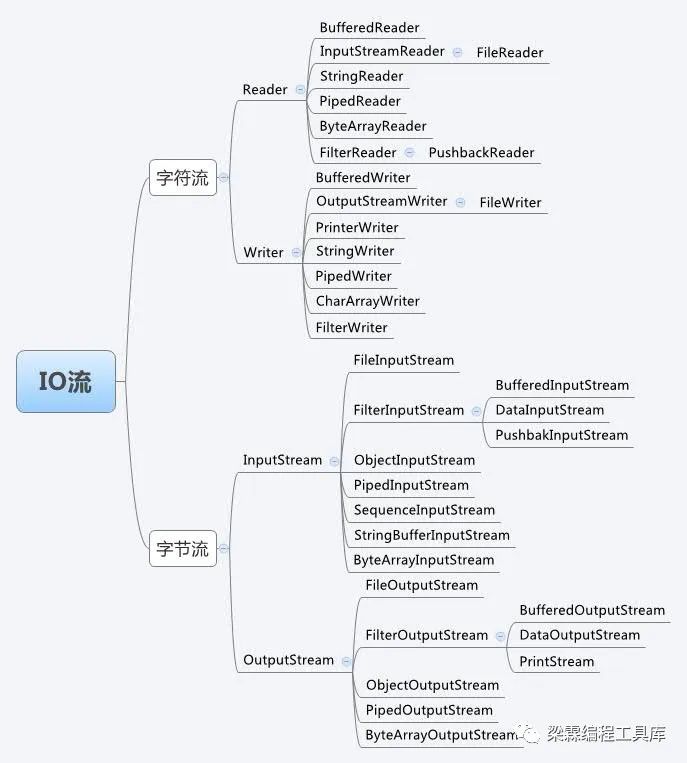
java.io包中提供了各种流的类和接口,可以用于处理不同类型数据的流。
流其实是一种连接java程序和外部文件的一种资源,因此使用完以后需要释放资源。
FileInputStream
针对的是字节文件,比如图片,音乐,视频,音频,英文文本,可以将文件中的数据读取到java程序中
public class FileInputStreamDemo {public static void main(String[] args) {readFile();}public static void readFile(){String filePath = "/Users/lianglin/code/ioStream/test1.txt";//每次读取八个字节byte [] buf = new byte[8];int length = 0;FileInputStream fileInputStream = null;try {fileInputStream = new FileInputStream(filePath);//如果返回-1表示文件已经读取完毕,否则返回读取个数while((length = fileInputStream.read(buf))!=-1){System.out.print(new String(buf,0,length));}} catch (FileNotFoundException e) {e.printStackTrace();} catch (IOException e) {e.printStackTrace();}finally {try {fileInputStream.close();} catch (IOException e) {e.printStackTrace();}}}}
FileOutputStream
将数据从java内存中写出文件中。注意:将数据写出操作的时候需要注意这个写出是覆盖还是追加。
//以覆盖的形式创建文件输出流fileOutputStream = new FileOutputStream(filePath);//以追加的形式创建文件输出流fileOutputStream = new FileOutputStream(filePath,true);
public class FileOutputStreamDemo {public static void main(String[] args) {writeFile();}public static void writeFile(){String filePath = "/Users/lianglin/code/ioStream/test2.txt";String content = "1234abcdet";FileOutputStream fileOutputStream =null;try {//以覆盖的形式创建文件输出流fileOutputStream = new FileOutputStream(filePath);//以追加的形式创建文件输出流//fileOutputStream = new FileOutputStream(filePath,true);fileOutputStream.write(content.getBytes(StandardCharsets.UTF_8));} catch (FileNotFoundException e) {e.printStackTrace();} catch (IOException e) {e.printStackTrace();} finally {try {fileOutputStream.close();} catch (IOException e) {e.printStackTrace();}}}}
图片拷贝实战:图片的拷贝可以结合多线程来处理,即线程1负责将原始图片读入到java内存中,线程2负责将java内存中的图片二进制内存写出到外存中,线程1和线程2通过管道进行同学,这样可以加快访问进度。
这里我们用单线程完成图片拷贝操作。

public class CopyImg {public static void main(String[] args) {//原始图片地址String imgPath = "/Users/lianglin/code/ioStream/img.png";//输出图片地址String outputPath = "/Users/lianglin/code/ioStream/img_copy.png";//每次最大读取1024字节byte[] buf = new byte[1024];int bufLength = 0;FileInputStream fileInputStream = null;FileOutputStream fileOutputStream = null;try{fileInputStream = new FileInputStream(imgPath);fileOutputStream = new FileOutputStream(outputPath);while((bufLength=fileInputStream.read(buf))!=-1){fileOutputStream.write(buf,0,bufLength);}}catch (FileNotFoundException e) {e.printStackTrace();} catch (IOException e) {e.printStackTrace();} finally {try {fileInputStream.close();} catch (IOException e) {e.printStackTrace();}try {fileOutputStream.close();} catch (IOException e) {e.printStackTrace();}}}}
vip算法班双十一优惠价详情
vip算法班详情如下:
奔跑的小梁,公众号:梁霖编程工具库leetcode刷题直播教学,手把手带你刷题,双十一优惠价来啦~~
文章转载自梁霖编程工具库,如果涉嫌侵权,请发送邮件至:contact@modb.pro进行举报,并提供相关证据,一经查实,墨天轮将立刻删除相关内容。
